
Einführung
Thank you for choosing the JOYROOM JR-ZS246 Dashboard Car Mount 15W Wireless Charger. This manual provides detailed instructions for the proper installation, operation, maintenance, and troubleshooting of your device. Please read this manual carefully before use to ensure optimal performance and safety.
Installationsanweisungen
1. Montage des Ladegeräts
The JOYROOM JR-ZS246 offers versatile mounting options for your vehicle's dashboard or windshield.
- Reinigen Sie die Oberfläche: Ensure the chosen mounting surface (dashboard or windshield) is clean, dry, and free of dust or grease.
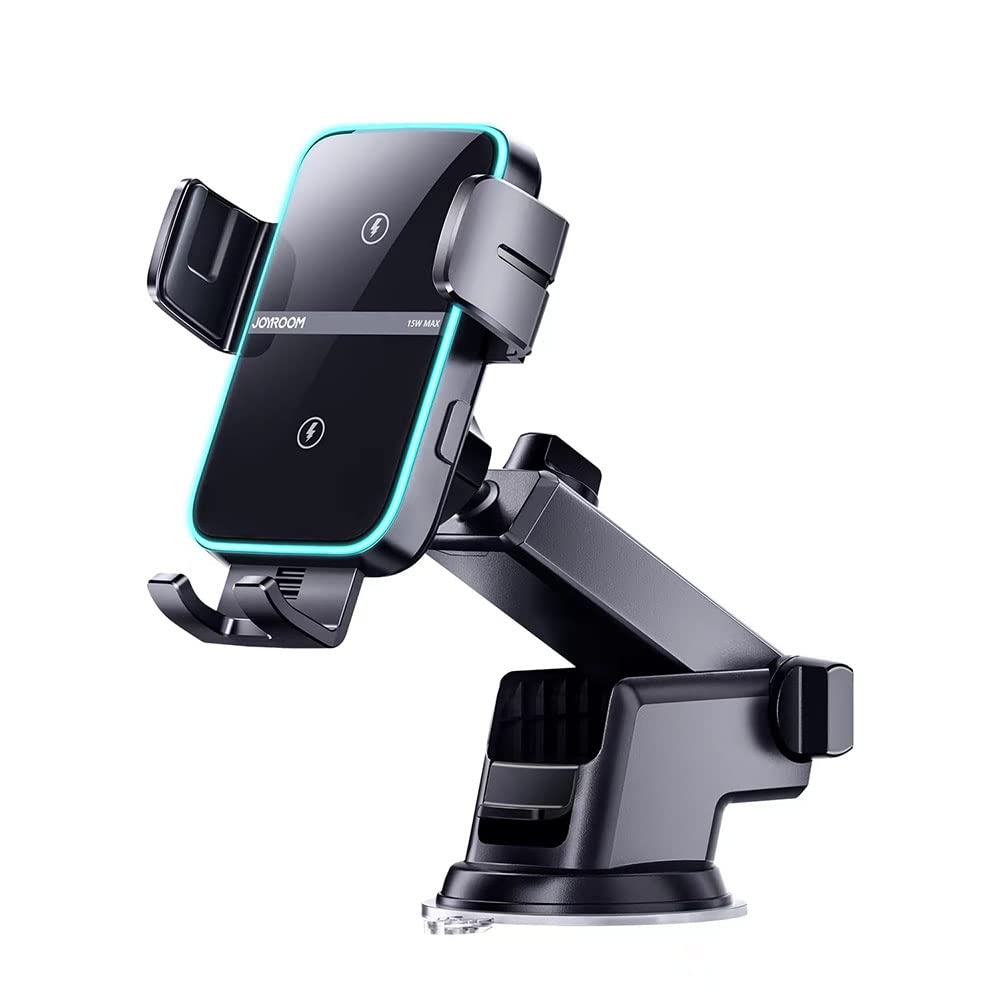
- Befestigen Sie den Saugnapf: Place the suction cup firmly on the desired surface. Press down and then push the locking lever to secure the mount.
- Den Arm einstellen: Loosen the adjustment knobs on the arm to position the charger at an optimal viewing angle. Tighten the knobs once the desired position is achieved.

Dieses Bild liefert eine detaillierte Ansicht. view of the JOYROOM JR-ZS246 car charger, showcasing its adjustable arm for optimal positioning and the strong suction cup base designed for secure dashboard or windshield mounting.
2. Stromversorgung anschließen
To enable the wireless charging function, connect the charger to your vehicle's power source.
- USB-C-Kabel anschließen: Insert the USB Type-C end of the provided charging cable into the port on the bottom of the car mount.
- An das Netzteil anschließen: Plug the other end of the USB cable into a compatible car charger adapter (not included, recommended 15W or higher QC 3.0 adapter) in your vehicle's cigarette lighter socket.
- Einschalten: Once connected, the charger's LED indicator will illuminate, signifying it is ready for use.
Bedienungsanleitung
1. Placing Your Smartphone
The JOYROOM JR-ZS246 features an automatic clamping-Mechanismus.
- Offene Klamps: Das Clamps will automatically open when the charger detects a hand or phone approaching.
- Telefonnummer einfügen: Gently place your Qi-enabled smartphone into the holder. The clamps will automatically close and secure your phone.
- Kabelloses Laden: Once secured, wireless charging will begin automatically. The LED ring will indicate the charging status.
This image illustrates the JOYROOM JR-ZS246 wireless car charger in use, mounted on a vehicle's dashboard. It highlights the automatic locking feature when a phone is placed in the holder and the one-touch button for easy phone retrieval. The LED ring, which indicates charging status, is also visible.
2. Retrieving Your Smartphone
So entfernen Sie Ihr Telefon vom Ladegerät:
- One-Touch Release: Touch the sensor button located on the side or bottom of the charger. The clamps will automatically open.
- Telefon entfernen: Carefully remove your smartphone from the holder. The clamps will close automatically after a few seconds.
3. Wireless Charging Technology
The JR-ZS246 features dual built-in coils for an optimized charging experience.
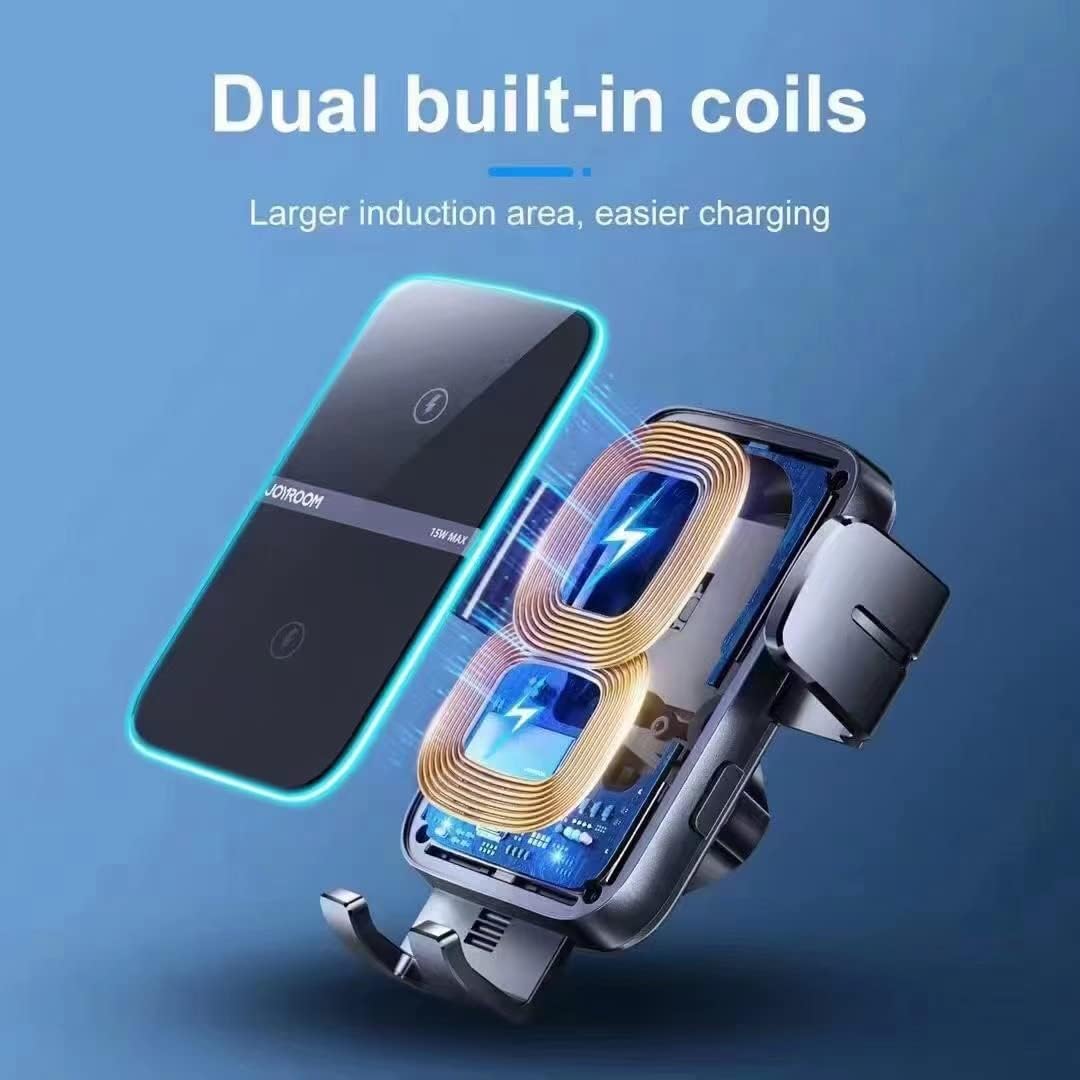
This diagram highlights the dual built-in coils within the JOYROOM JR-ZS246 wireless car charger. These coils provide a larger induction area, making wireless charging more efficient and reliable by reducing the need for precise phone placement.
The dual coil design ensures a larger induction area, allowing for easier phone placement and more consistent charging compared to single-coil chargers. This system automatically identifies the optimal charging location for your device.

This image demonstrates the advantage of the JOYROOM JR-ZS246's dual coil design. It shows how the dual coils automatically detect the phone's charging location for efficient power transfer, contrasting with a single coil system that may fail to recognize the charging position, leading to interrupted or no charging.
4. Ladekompatibilität
The charger supports various fast charging wattages depending on your smartphone model.

This chart details the fast charging capabilities of the JOYROOM JR-ZS246 wireless car charger. It specifies 15W charging for Samsung, 10W for Huawei, and 7.5W for iPhone, along with examples of compatible phone models for each brand.
Wartung
Durch sachgemäße Wartung wird die Langlebigkeit und optimale Leistung Ihres Ladegeräts sichergestellt.
- Reinigung: Use a soft, dry cloth to wipe the surface of the charger. Do not use abrasive cleaners, solvents, or harsh chemicals, as these can damage the device.
- Wasser vermeiden: Keep the charger away from water and excessive moisture. If it comes into contact with liquids, disconnect power immediately and allow it to dry completely before reuse.
- Lagerung: Bei längerer Nichtbenutzung sollte das Ladegerät an einem kühlen, trockenen Ort, geschützt vor direkter Sonneneinstrahlung und extremen Temperaturen, aufbewahrt werden.
- Kabelpflege: Do not bend or pull the charging cable excessively. Ensure the cable is not pinched or damaged.
Fehlerbehebung
If you encounter issues with your JOYROOM JR-ZS246 charger, refer to the following common problems and solutions:
| Problem | Mögliche Ursache | Lösung |
|---|---|---|
| Charger not powering on / LED off | No power connection; faulty cable or adapter. | Check if the USB-C cable is securely connected. Ensure the car charger adapter is working and properly inserted into the cigarette lighter. Try a different cable or adapter. |
| Telefon lädt nicht kabellos | Phone not Qi-enabled; phone case too thick; improper phone placement; foreign object detected. | Ensure your phone supports Qi wireless charging. Remove thick phone cases. Reposition the phone to ensure it's centered on the charging coils. Remove any metal objects or cards between the phone and charger. |
| Clamps not opening/closing automatically | Sensor obstructed; power issue. | Ensure the infrared sensor (usually at the bottom of the holder) is clean and unobstructed. Check power connection. |
| Mount is unstable | Suction cup not properly secured; surface not clean. | Re-clean the mounting surface and re-attach the suction cup, ensuring the locking lever is fully engaged. Avoid mounting on textured or porous surfaces. |
Technische Daten
- Marke: FREUDERAUM
- Modell: JR-ZS246
- Eingang: 5V/2A, 9V/2A, 12V/1.5A (via USB Type-C)
- Ausgangsleistung: 5 W / 7.5 W / 10 W / 15 W (max.)
- Ausgangsstrom: 1.25 Amphier (Max)
- Ausgangsvolumentage: 12 Volt (DC)
- Ladestandard: Kabelloses Qi-Laden
- Montageart: Dashboard / Windshield Suction Cup
- Material: ABS + PC (Plastic)
- USB-Anschlüsse insgesamt: 1 (Type-C for power input)
- Energiequelle: Corded Electric (via car charger adapter)
Garantieinformationen
This JOYROOM JR-ZS246 Wireless Car Charger comes with a 1 Jahr Garantie Die Garantie gilt ab Kaufdatum. Sie deckt Herstellungsfehler und Funktionsstörungen bei normalem Gebrauch ab. Schäden durch Missbrauch, Unfälle, unbefugte Änderungen oder Naturkatastrophen sind nicht abgedeckt.
Bitte bewahren Sie Ihren Kaufbeleg für Garantieansprüche auf.
Kundenservice
For further assistance, technical support, or warranty inquiries, please contact JOYROOM customer service through the retailer where you purchased the product or visit the official JOYROOM webWebsite für Kontaktinformationen.
When contacting support, please provide your product model (JR-ZS246) and a detailed description of the issue.