
1. Einleitung und Sicherheitshinweise
Vielen Dank für Ihren Einkauf.asing the Fenton RP161 Bluetooth Stereo Turntable. This manual provides essential information for the safe and correct operation of your device. Please read it thoroughly before use and retain it for future reference.
Wichtige Sicherheitshinweise:
- Um Brände oder Stromschläge zu vermeiden, setzen Sie das Gerät weder Regen noch Feuchtigkeit aus.
- Sorgen Sie für ausreichende Belüftung; blockieren Sie keine Belüftungsöffnungen.
- Stellen Sie das Gerät auf eine stabile, ebene Fläche.
- Verwenden Sie nur das mit dem Gerät mitgelieferte Netzteil.
- Führen Sie keine Reparaturen am Gerät selbst durch. Überlassen Sie alle Wartungsarbeiten qualifiziertem Fachpersonal.
- Das Gerät sollte nicht direkter Sonneneinstrahlung, Wärmequellen oder starken Magnetfeldern ausgesetzt werden.
2. Produktüberschreitungview
The Fenton RP161 is a versatile stereo turntable featuring integrated speakers and Bluetooth connectivity. It supports three playback speeds for various record types.

Abbildung 2.1: Insgesamt view of the Fenton RP161 Turntable.
Komponenten:
- Staubschutzhülle: Schützt Plattenteller und Tonarm vor Staub.
- Teller: Die drehbare Oberfläche, auf der die Schallplatten platziert werden.
- Spindel: Central pin for placing records.
- 45 RPM-Adapter: Wird zum Abspielen von 7-Zoll-Schallplatten mit großem Mittelloch verwendet.
- Tonarm: Hält die Patrone und den Stift.
- Stift (Nadel): Liest die Rillen der Schallplatte.
- Geschwindigkeitswahlschalter: Ermöglicht die Auswahl von 33, 45 oder 78 U/min.
- Automatischer Stoppschalter: Aktiviert oder deaktiviert die automatische Stoppfunktion.
- Lautstärke-/Ein-/Ausschalter: Steuert die Stromversorgung und den Audioausgangspegel.
- Integrierte Lautsprecher: Eingebauter Audioausgang.
- Cinch-Line-Ausgang: Zum Anschluss an externe Audiosysteme.
- Gleichstromeingang: Zum Anschluss des Netzteils.

Figure 2.2: Tonearm, Speed Selector, and Auto Stop Switch.
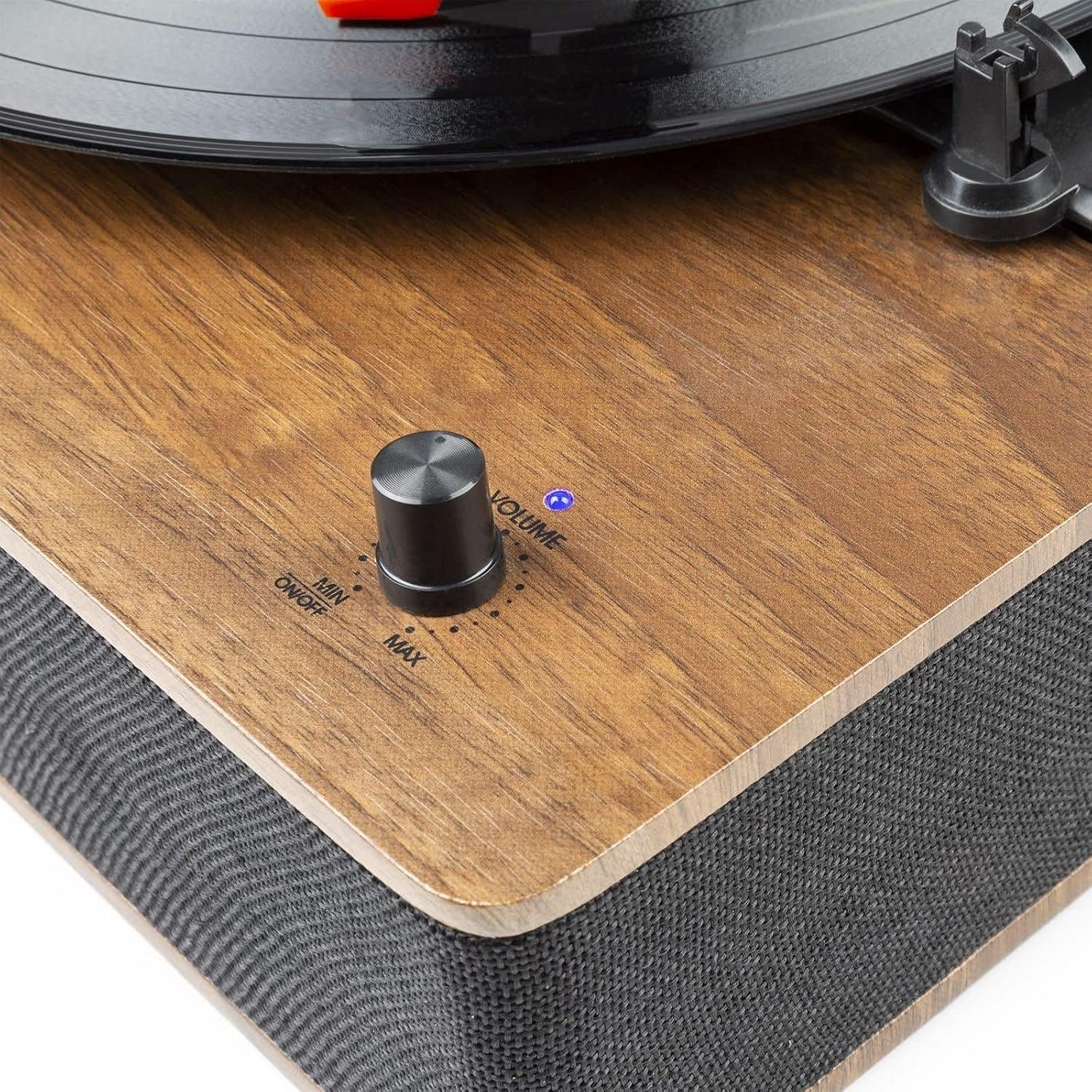
Figure 2.3: Volume and Power Knob.

Figure 2.4: Rear Panel with RCA Output and DC Input.
3. Einrichtung
Auspacken:
- Nehmen Sie den Plattenspieler vorsichtig aus der Verpackung.
- Remove all protective materials, including the stylus protector.
- Ensure all components are present: turntable unit, dust cover, 45 RPM adapter, and power adapter.
Platzierung:
- Place the turntable on a flat, stable, and level surface to prevent vibrations and ensure proper playback.
- Avoid placing it near speakers or other vibration-producing equipment.
Stromanschluss:
- Connect the supplied power adapter to the DC 5V 1A input port on the rear of the turntable.
- Stecken Sie den Adapter in eine geeignete Wandsteckdose.
Externer Audioanschluss (optional):
- Zum Anschluss an ein externes amplifier or powered speakers, use an RCA cable (not included) to connect the RCA Line Output ports on the rear of the turntable to the corresponding input on your audio system.
4. Bedienungsanleitung
4.1 Playing Records:
- Einschalten: Rotate the Volume/Power knob clockwise until it clicks and the indicator light illuminates. Adjust to a low volume setting initially.
- Geschwindigkeit auswählen: Set the speed selector switch to the appropriate speed for your record (33, 45, or 78 RPM). For 7-inch records with a large center hole, place the 45 RPM adapter on the spindle.
- Ortsrekord: Legen Sie Ihre Schallplatte vorsichtig auf den Plattenteller.
- Auto-Stopp: Set the AUTO STOP switch to ON if you want the platter to stop rotating automatically when the record finishes. Set to OFF for continuous rotation.
- Position des Tonarms: Gently lift the tonearm using the tonearm lift lever. Move the tonearm over the desired starting groove of the record.
- Unterer Tonarm: Slowly lower the tonearm onto the record using the tonearm lift lever. The music will begin to play.
- Lautstärke anpassen: Adjust the Volume/Power knob to your desired listening level.
- Ende der Wiedergabe: When the record finishes, if AUTO STOP is ON, the platter will stop. If AUTO STOP is OFF, manually lift the tonearm and return it to its rest.
- Ausschalten: Rotate the Volume/Power knob counter-clockwise until it clicks to turn off the unit.
4.2 Bluetooth-Betrieb:
The RP161 can receive audio wirelessly from a Bluetooth-enabled device.
- Einschalten: Turn on the turntable by rotating the Volume/Power knob. The unit will automatically enter Bluetooth pairing mode, indicated by a flashing blue LED light.
- Bluetooth aktivieren: Aktivieren Sie Bluetooth auf Ihrem Smartphone, Tablet oder einem anderen Bluetooth-fähigen Gerät und suchen Sie nach verfügbaren Geräten.
- Paar: Select 'Fenton RP161' from the list of devices. Once paired, the blue LED light will stop flashing and remain solid.
- Audio abspielen: You can now play music from your Bluetooth device through the turntable's speakers. Adjust the volume using the Volume/Power knob on the turntable and/or your connected device.
- Trennen: To disconnect, turn off Bluetooth on your device or power off the turntable.
5. Wartung
Reinigung des Geräts:
- Trennen Sie das Gerät vor der Reinigung immer vom Stromnetz.
- Verwenden Sie ein weiches, trockenes Tuch, um die Außenflächen abzuwischen.
- Verwenden Sie keine Scheuermittel, Wachse oder Lösungsmittel, da diese die Oberfläche beschädigen können.
Stiftpflege:
- Der Stift ist empfindlich. Gehen Sie äußerst vorsichtig damit um.
- Reinigen Sie den Stift regelmäßig mit einer weichen Bürste, indem Sie vorsichtig von hinten nach vorne bürsten.
- A worn stylus can damage records and degrade sound quality. Replace the stylus approximately every 200-300 hours of playback.
Pflege der Staubschutzhülle:
- Wipe the dust cover gently with a soft, damp Tuch.
- Avoid using harsh chemicals that could scratch or cloud the plastic.
6. Fehlerbehebung
| Problem | Mögliche Ursache | Lösung |
|---|---|---|
| Kein Strom | Netzteil nicht angeschlossen oder defekt. | Stellen Sie sicher, dass das Netzteil fest mit dem Gerät und einer funktionierenden Steckdose verbunden ist. |
| Kein Ton von den Lautsprechern | Volume too low; stylus protector still on; stylus damaged. | Increase volume. Remove stylus protector. Check stylus for damage and replace if necessary. |
| Plattenüberspringen | Record is dirty or scratched; stylus is worn or dirty; turntable not level. | Clean record. Clean or replace stylus. Ensure turntable is on a level surface. |
| Bluetooth stellt keine Verbindung her | Turntable not in pairing mode; device Bluetooth off; too far from unit. | Ensure turntable LED is flashing (pairing mode). Turn on Bluetooth on your device. Move device closer to the turntable. |
| Teller dreht sich nicht | Power off; belt dislodged; AUTO STOP engaged prematurely. | Ensure power is on. Check if the drive belt is correctly positioned around the motor pulley and platter. Try setting AUTO STOP to OFF. |
7. Spezifikationen
| Leistungsabgabe | 50 W |
| Wiedergabegeschwindigkeiten | 33 1/3, 45, 78 U/min |
| Ausgangsverbindung | Cinch-Line-Ausgang |
| Laufwerkstyp | Riemenantrieb |
| Stromversorgung | 230Vac/50Hz (5V DC adapter included) |
| Abmessungen (L x B x H) | 33 x 32 x 13 cm |
| Gewicht | 2.75 kg |
| Merkmale | Integrated Hi-Fi speakers, Bluetooth audio streaming, removable dust cover, ceramic stereo cartridge with needle, shock-absorbing feet. |
8. Garantie und Support
This product is covered by a warranty in accordance with local regulations. Please refer to your purchase documentation for specific terms and conditions.
Ersatzteilverfügbarkeit: Spare parts for the Fenton RP161 are guaranteed to be available for 2 years from the date of purchase.
For technical support or service inquiries, please contact your retailer or the Fenton customer service department.