
TENVIS IP602W
TENVIS IP602W Outdoor-IP-Kamera – Benutzerhandbuch
Model: IP602W
Marke: TENVIS
Einführung
The TENVIS IP602W is a robust outdoor IP camera designed for reliable surveillance. It offers broad compatibility, supporting not only Windows OS but also Mac OS and other platforms accessible via an internet browser. Its design facilitates easy installation, allowing for wall mounting and wireless connectivity.
Equipped with a 1/4 CMOS image sensor and a 6mm lens, the IP602W delivers video at a maximum frame rate of 30 frames per second, with a resolution of up to 640 x 480 pixels. For low-light and nighttime environments, the camera features 30 infrared LEDs, providing high levels of invisible light for clear visibility. Mobile viewing is supported across multiple platforms via 3G networks, including iPhone, Android, Windows Mobile, and Java phones, enabling remote monitoring from any location with internet access.
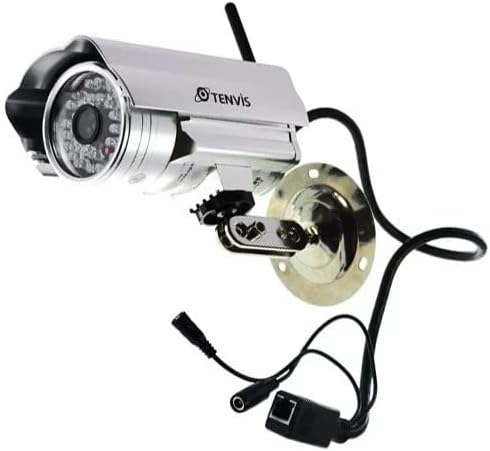
Image: The TENVIS IP602W Outdoor IP Camera, showcasing its durable build, integrated mounting bracket, and connectivity cables.
Lieferumfang
Prüfen Sie nach dem Öffnen der Verpackung, ob alle folgenden Komponenten enthalten sind:
- 1 x IP602W WiFi IP Camera
- 1 x Power Adaptor (AU Plug)
- 1 x WiFi-Antenne
- 1 x Befestigungswinkel
- 1 x CD (containing software/drivers)
- 1 x Schraubensatz zur Montage
- 1 x Benutzerhandbuch

Image: All components included in the TENVIS IP602W package, laid out for verification.
Produkteigenschaften
The TENVIS IP602W camera is equipped with several key features to enhance its performance and usability:
- Night Version: Integrated infrared LEDs provide clear visibility in low-light and complete darkness.
- Wireless-Unterstützung: Connects to your network via Wi-Fi for flexible placement.
- Metal and Waterproof Shell: Designed for outdoor use with a durable, weather-resistant casing.
- Bewegungserkennung: Configurable motion detection alerts for security monitoring.
- Plattformübergreifende Kompatibilität: Unterstützt viewing and control from various operating systems and browsers, including Windows, Mac OS, Firefox, Chrome, and Safari.
- Mobile View: Access live feeds and controls from mobile devices via 3G network, supporting iPhone, Android, Windows Mobile, and Java phones.

Image: Visual representation of the TENVIS IP602W camera, emphasizing its key features such as night vision and wireless capabilities.
Setup und Installation
Komponentenidentifikation
Familiarize yourself with the camera's ports and components before installation:
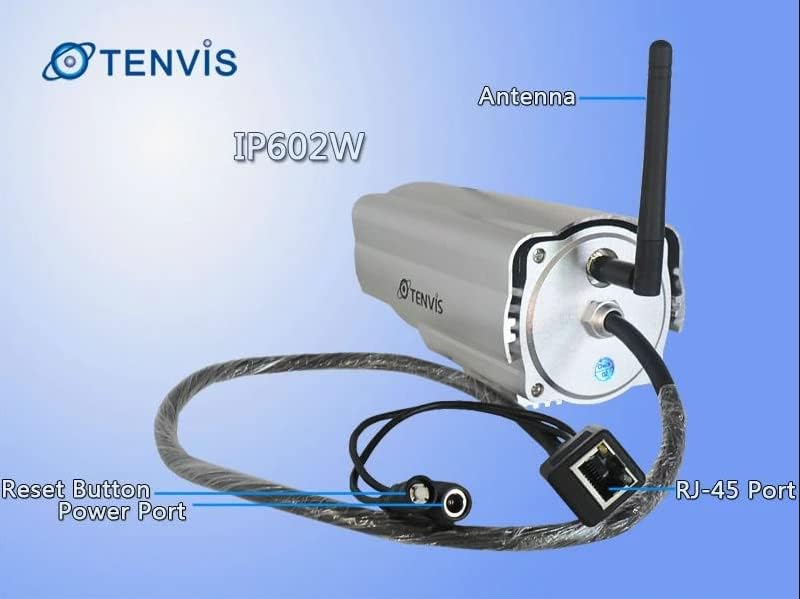
Bild: Detailliert view of the TENVIS IP602W camera's rear, showing the antenna, RJ-45 Ethernet port, power input, and reset button.
- Antenne: Für drahtlose Netzwerkverbindungen.
- RJ-45-Port: For wired Ethernet connection to your router.
- Stromanschluss: Schließen Sie hier das mitgelieferte Netzteil an.
- Reset-Taste: Dient zum Wiederherstellen der Werkseinstellungen.
Netzwerkverbindung
The IP602W can connect to your network wirelessly or via an Ethernet cable. For initial setup, a wired connection is often recommended for stability.

Image: Network diagram showing how the IP602W camera connects to a router, allowing access from a LAN PC, Internet PC, and 3G phone.
- Connect the camera to your router using an Ethernet cable (if using wired setup).
- Schließen Sie das Netzteil an die Kamera an und stecken Sie es in eine Steckdose.
- Allow the camera a few minutes to power on and initialize.
- Refer to the included CD or the TENVIS website for software installation and detailed network configuration instructions, especially for wireless setup.
Montage
The camera comes with a mounting bracket for easy installation on a wall or other suitable surface. Ensure the mounting location provides a clear view and is within range of your Wi-Fi signal or Ethernet cable.
- Wählen Sie einen geeigneten Montageort im Freien.
- Verwenden Sie die Montagehalterung als Schablone, um die Bohrlöcher zu markieren.
- Bohren Sie die erforderlichen Löcher und setzen Sie gegebenenfalls Wandanker ein.
- Befestigen Sie die Montagehalterung mit den mitgelieferten Schrauben an der Oberfläche.
- Befestigen Sie die Kamera an der Halterung und stellen Sie ihren Winkel für optimale Ergebnisse ein. viewing.
Betrieb
Once the camera is set up and connected to your network, you can begin monitoring. The IP602W supports various viewing methods:
- PC/Mac Access: Use the provided software or a compatible web browser (Firefox, Chrome, Safari) to access the camera's live feed and settings from your computer.
- Mobile Device Access: Download the TENVIS mobile application (if available) or use a compatible mobile browser on your iPhone, Android, Windows Mobile, or Java phone to view the camera remotely via a 3G network connection.
- Videoqualität: The camera streams video at up to 640x480 resolution with a frame rate of 30fps, providing clear and smooth surveillance footage.
- Bewegungserkennung: Configure motion detection settings through the camera's interface to receive alerts when movement is detected in the monitored area.
Wartung
Regular maintenance helps ensure the longevity and optimal performance of your TENVIS IP602W camera:
- Reinigung: Reinigen Sie das Kameraobjektiv und das Gehäuse regelmäßig mit einem weichen Tuch.amp Mit einem Tuch abwischen. Vermeiden Sie scheuernde Reiniger oder Lösungsmittel.
- Kabelinspektion: Check all cables (power, Ethernet) for any signs of wear, damage, or loose connections.
- Firmware-Updates: Check the TENVIS official webBesuchen Sie die Website regelmäßig, um nach verfügbaren Firmware-Updates zu suchen. Durch die Aktualisierung der Firmware können Leistung und Sicherheit verbessert werden.
- Umweltprüfungen: Ensure the camera's mounting remains secure and that no obstructions are blocking its field of view.
Fehlerbehebung
If you encounter issues with your IP602W camera, try the following steps:
- Kein Strom: Stellen Sie sicher, dass das Netzteil sowohl mit der Kamera als auch mit einer funktionierenden Steckdose fest verbunden ist.
- Keine Netzwerkverbindung:
- Bei kabelgebundener Verbindung überprüfen Sie bitte den Zustand des Ethernet-Kabels und des Routers.
- For wireless connection, ensure the Wi-Fi antenna is properly attached and the camera is within range of your router. Verify Wi-Fi settings in the camera's configuration.
- Cannot Access Camera: Verify the camera's IP address. Ensure your computer or mobile device is on the same network or has proper internet access for remote viewing. Check firewall settings on your computer.
- Schlechte Videoqualität: Ensure the lens is clean. Check network bandwidth and signal strength.
- Zurücksetzen der Kamera: If issues persist, use the reset button (refer to Component Identification) to restore factory default settings. You will need to reconfigure the camera after a reset.
Technische Daten
| Besonderheit | Detail |
|---|---|
| Modellname | IP602W |
| Marke | TENVIS |
| Verwendung im Innen- und Außenbereich | Im Freien |
| Konnektivitätstechnologie | Kabellos (Wi-Fi) |
| Controllertyp | Android (and other platforms) |
| Montagetyp | Wandhalterung |
| Auflösung der Videoaufnahme | 480p (640x480) |
| Bildfrequenz | 30 fps |
| Fotosensor-Technologie | CMOS (1/4 inch) |
| Linse | 6 mm |
| Low-Light-Technologie | Night Color (Infrared LEDs) |
| Alarmtyp | Nur Bewegung |
| Technische Daten | 10 x 9.5 x 4 Zoll |
| GTIN | 06928446299816 |
Garantie und Support
For warranty information, technical support, or further inquiries regarding your TENVIS IP602W camera, please refer to the official TENVIS website or contact their customer service directly. The included CD may also contain support contact details.
You can visit the official TENVIS store for more information: TENVIS Store on Amazon
Ask a question about this manual
Ask about setup, troubleshooting, compatibility, parts, safety, or missing instructions. Manuals+ will review the question and use this page’s manual context to help answer it.