
Mitzu CSA-5715
Mitzu Professional 15" Speaker with Tripod User Manual
Model: CSA-5715 | Brand: Mitzu
1. Sicherheitshinweise
Bitte lesen Sie vor der Verwendung dieses Produkts alle Sicherheitshinweise sorgfältig durch. Bewahren Sie diese Bedienungsanleitung zum späteren Nachschlagen auf.
- Um Brände oder Stromschläge zu vermeiden, darf der Lautsprecher weder Regen noch Feuchtigkeit ausgesetzt werden.
- Do not open the speaker enclosure. Refer all servicing to qualified personnel.
- Sorgen Sie für ausreichende Belüftung. Blockieren Sie keine Belüftungsöffnungen.
- Verwenden Sie nur vom Hersteller angegebene Anbaugeräte/Zubehör.
- Schützen Sie das Netzkabel vor Beschädigungen durch Treten oder Einklemmen.
- Bei Gewittern oder längerer Nichtbenutzung sollte der Lautsprecher vom Stromnetz getrennt werden.
- Vermeiden Sie es, den Lautsprecher auf instabilen Oberflächen aufzustellen.
- Do not operate the speaker near heat sources such as radiators, heat registers, stoves, or other apparatus (including ampKonverter (Lüfter), die Wärme erzeugen.
2. Produktüberschreitungview
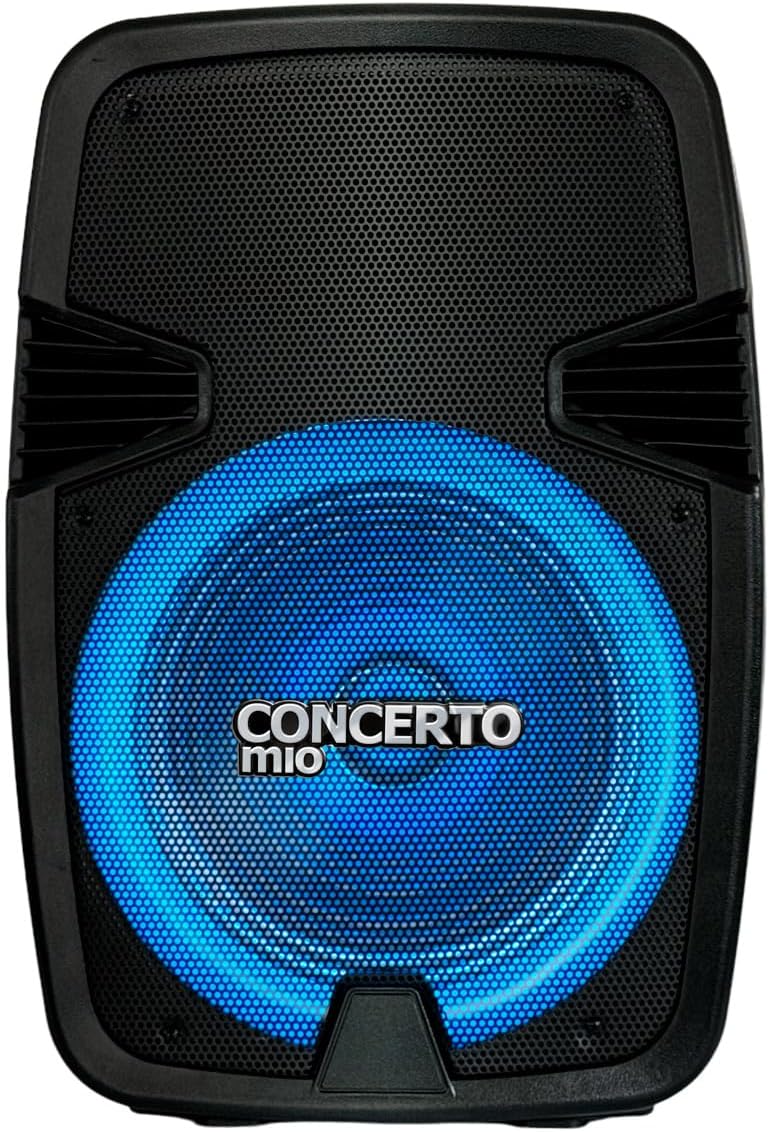
The Mitzu CSA-5715 is a professional 15-inch speaker designed for high-quality audio output, featuring Bluetooth connectivity, USB and auxiliary inputs, and integrated LED lighting. It comes with a tripod for optimal sound projection.


3. Einrichtung
- Auspacken: Carefully remove the speaker and all accessories from the packaging. Verify all components are present: speaker unit, tripod, power cable, and user manual.
- Stativmontage:
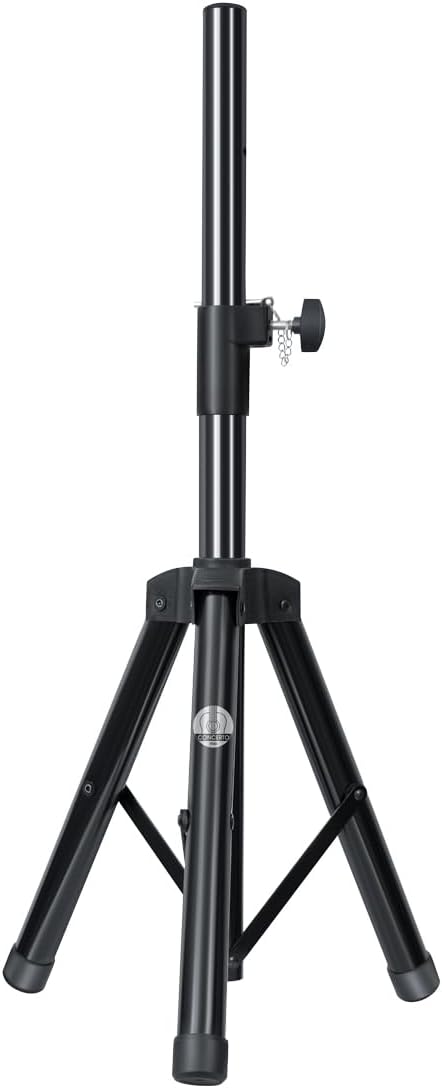
- Extend the tripod legs fully and ensure they are locked securely.
- Adjust the height of the tripod to your desired level, ensuring the locking pin is engaged and the knob is tightened.
- Carefully place the speaker onto the tripod pole, ensuring it is stable and centered.
- Stromanschluss: Connect the power cable to the speaker's power input on the rear panel, then plug the other end into a suitable electrical outlet (AC 120V/60Hz).
- Erstgebühr (falls zutreffend): For first use, it is recommended to fully charge the internal battery. The charging time is approximately 3 hours.
4. Bedienungsanleitung
4.1 Ein-/Ausschalten
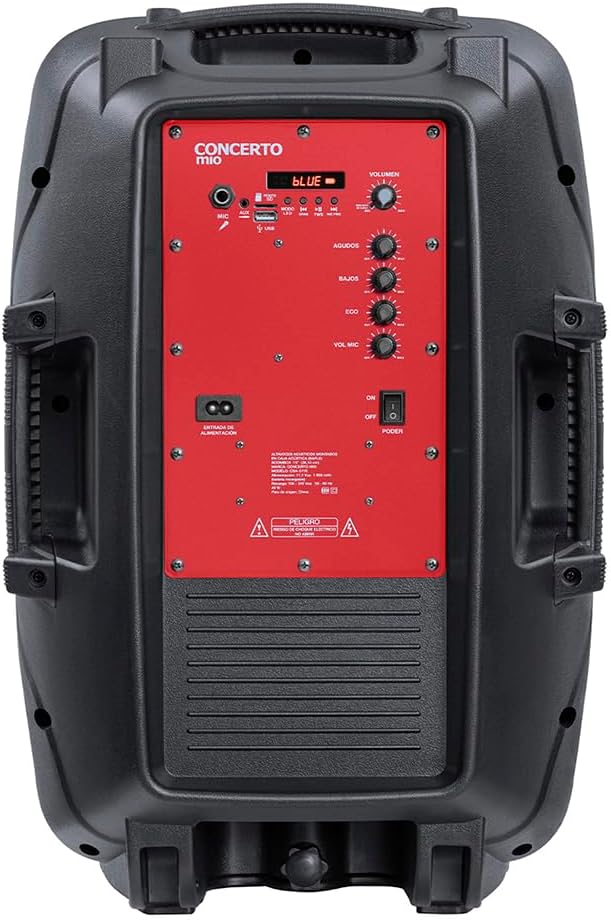
Locate the POWER switch on the rear control panel. Flip it to the "ON" position to power on the speaker. Flip to "OFF" to power off.
4.2 Modusauswahl
Press the "MODE" button on the control panel to cycle through available input modes: Bluetooth, USB, AUX, FM Radio (if applicable).
4.3 Bluetooth-Verbindung
- Ensure the speaker is in Bluetooth mode (indicated by a "BLUE" light or display).
- Aktivieren Sie auf Ihrem Mobilgerät Bluetooth und suchen Sie nach verfügbaren Geräten.
- Select "Mitzu CSA-5715" (or similar name) from the list.
- Once paired, a confirmation sound will be heard, and you can now stream audio wirelessly.
4.4 USB/AUX Playback
- USB: Stecken Sie einen USB-Stick mit kompatiblem Audio fileStecken Sie das Kabel in den USB-Anschluss. Der Lautsprecher schaltet automatisch in den USB-Modus und beginnt mit der Wiedergabe.
- AUX: Connect an external audio device (e.g., MP3 player, smartphone) to the AUX input using a 3.5mm audio cable. Select AUX mode on the speaker.
4.5 Mikrofonnutzung
Connect a microphone to the MIC input on the rear panel. Adjust the "MIC VOL" and "ECHO" knobs to control microphone volume and echo effect, respectively.
4.6 Audio-Bedienelemente
- VOLUMEN: Rotate the main VOLUME knob to adjust the overall sound output.
- AGUDOS (Treble): Adjust for higher frequency sounds.
- BAJOS (Bass): Adjust for lower frequency sounds.
4.7 LED-Lichtmodi
The speaker features integrated LED lights. Use the dedicated light button (if available) or cycle through modes via the control panel to change light patterns or turn them off.
5. Wartung
- Reinigung: Reinigen Sie die Außenseite des Lautsprechers mit einem weichen, trockenen Tuch. Verwenden Sie keine flüssigen Reiniger oder Scheuermittel.
- Lagerung: Bei längerer Nichtbenutzung sollte der Lautsprecher an einem kühlen, trockenen Ort, fern von direkter Sonneneinstrahlung und extremen Temperaturen aufbewahrt werden.
- Batteriepflege: If the speaker has an internal rechargeable battery, avoid fully discharging it frequently. For long-term storage, charge the battery to approximately 50-70% every few months to maintain its lifespan.
6. Fehlerbehebung
| Problem | Mögliche Ursache | Lösung |
|---|---|---|
| Kein Strom | Power cable not connected; Power switch off; Battery depleted. | Ensure power cable is securely connected and outlet is active. Turn power switch to ON. Charge the battery. |
| Kein Ton | Lautstärke zu niedrig; Falscher Eingangsmodus; Gerät nicht richtig angeschlossen. | Increase volume. Select correct input mode (Bluetooth, USB, AUX). Reconnect audio source. |
| Bluetooth nicht gekoppelt | Lautsprecher nicht im Kopplungsmodus; Gerät zu weit entfernt; Störungen. | Ensure speaker is in Bluetooth mode. Move device closer to speaker. Turn off other Bluetooth devices. |
| Verzerrter Ton | Volume too high; Audio source issue; EQ settings. | Lower volume on speaker and/or source device. Check audio source. Adjust BASS/TREBLE knobs. |
7. Spezifikationen
| Besonderheit | Detail |
|---|---|
| Modell | CSA-5715 |
| Lautsprechertyp | Tieftöner |
| Montagetyp | Floor (with included tripod) |
| Material | Plastik |
| Konnektivitätstechnologie | Aux-Anschluss, Bluetooth, USB |
| Besondere Merkmale | High-resolution audio, LED Light, USB Port |
| Maximale Lautsprecherausgangsleistung | 40 Watt |
| Frequenzgang | 20 KHz |
| Akkulaufzeit | 6 Stunden |
| Ladezeit | 3 Stunden |
| Technische Daten | 20cm (D) x 32cm (W) x 60.5cm (H) |
| Gewicht | 10.96 Kilogramm |
8. Garantie und Support
This Mitzu product comes with a limited warranty. Please refer to the warranty card included in your packaging for specific terms and conditions. For technical support, service, or warranty claims, please contact Mitzu customer service.
You can find more information and support on the official Mitzu store page: Mitzu Official Store
Ask a question about this manual
Ask about setup, troubleshooting, compatibility, parts, safety, or missing instructions. Manuals+ will review the question and use this page’s manual context to help answer it.