
Panasonic ES-EY90-A503
Panasonic ES-EY90-A503 Wet & Dry Epilator User Manual
Model: ES-EY90-A503
1. Einleitung
This manual provides detailed instructions for the safe and effective use of your Panasonic ES-EY90-A503 Wet & Dry Epilator. Please read all instructions carefully before use and keep this manual for future reference.
2. Sicherheitshinweise
- Verwenden Sie das Gerät nicht, wenn das Kabel oder der Stecker beschädigt ist.
- Bewahren Sie das Gerät außerhalb der Reichweite von Kindern auf.
- Dieses Gerät ist nur für den persönlichen Gebrauch bestimmt.
- The appliance is waterproof and can be used in the shower or bath. However, ensure the charging port is dry before connecting the charger.
- Do not apply excessive pressure during epilation, as this may cause skin irritation.
- Wenn Sie Hautreizungen oder Beschwerden verspüren, brechen Sie die Anwendung sofort ab.
3. Produktmerkmale
- Extra-Wide 90° Flexible Head: The epilator head pivots 90 degrees to effortlessly glide over skin, adapting to body contours for efficient hair removal, even in hard-to-reach areas. The wide head covers a larger area, allowing for faster and smoother epilation.
- Double Disc with 60 Tweezers: Equipped with a dual-disc system and 60 tweezers, this design captures more hair in a single pass, including short, fine hairs, ensuring thorough and rapid epilation.
- Short Hair Removal: Effectively removes hairs as short as 0.5 mm, providing long-lasting smoothness.
- Wet/Dry Functionality: The waterproof design allows for comfortable use in the bath or shower. Using the epilator with shower gel can create a foam for a gentler experience.
- 3 Speed Settings and LED Light: Choose from three modes (gentle, normal, powerful) to suit your preference and skin sensitivity. The integrated LED light illuminates difficult-to-see areas, ensuring no hair is missed.
- Kabelloser Betrieb: Provides freedom of movement during use with a 30-minute operating time on a full charge.
- Drucksensor: An intelligent sensor detects if too much pressure is applied, indicated by a blinking LED light, helping to prevent skin irritation.

Image: A visual demonstration of the epilator's flexible head pivoting 90 degrees to adapt to body curves.

Image: The epilator head featuring the double disc system with 60 tweezers, designed to provide smooth skin in a single pass, shown alongside a woman with visibly smooth legs.

Image: The epilator being used on a leg, illustrating its capability to effectively remove hairs as short as 0.5 mm.
4. Enthaltene Komponenten
The Panasonic ES-EY90-A503 epilator comes with a comprehensive set of accessories for full body care:
- Epilation Head
- Small Head (for sensitive areas)
- Schutzkappe
- Rasierkopf
- Pop-up-Trimmer
- Bikini-Kamm
- Fußpflegekopf
- Sonic Exfoliation Brush
- Aufbewahrungstasche
- Reinigungsbürste

Image: The Panasonic ES-EY90-A503 epilator shown with its main body and all included attachments: epilation head, small head, protective cap, shaver head, bikini comb, foot care head, sonic exfoliation brush, and cleaning brush, alongside a storage pouch.

Image: An illustration displaying the different heads and accessories provided with the epilator, including the exfoliation brush head, bikini comb attachment, shaver/trimmer head, skin protector attachment, sensitive area head, and pedicure head.
5. Einrichtung
5.1 Charging the Epilator
- Stellen Sie sicher, dass der Epilierer ausgeschaltet ist.
- Connect the charging cord to the epilator and plug it into a power outlet.
- The charging indicator light will illuminate. A full charge takes approximately 1 hour and provides up to 30 minutes of cordless operation.
- Disconnect the charger once fully charged or before use. The epilator cannot be operated while charging.
5.2 Anbringen/Abnehmen von Köpfen
- To attach a head, align it with the epilator body and push until it clicks into place.
- To detach a head, press the release button (if applicable) and pull the head away from the body.
6. Bedienungsanleitung
6.1 Vorbereitung der Haut
- For optimal results, prepare your skin by taking a warm shower or bath to open pores.
- For wet epilation, apply shower gel to the area to be epilated to create a rich foam, enhancing comfort and glide.
6.2 Epilation Process
- Select the appropriate speed setting (gentle, normal, powerful) based on the area and your comfort level.
- Hold your skin taut with one hand to facilitate easier and less painful hair removal.
- Gently glide the epilator over the skin against the direction of hair growth.
- The 90° flexible head will adapt to your body contours.
- If the LED light blinks, you are applying too much pressure. Reduce pressure to avoid irritation.

Image: The epilator in action, with an illustration showing the LED light blinking to indicate excessive pressure, promoting gentle epilation.
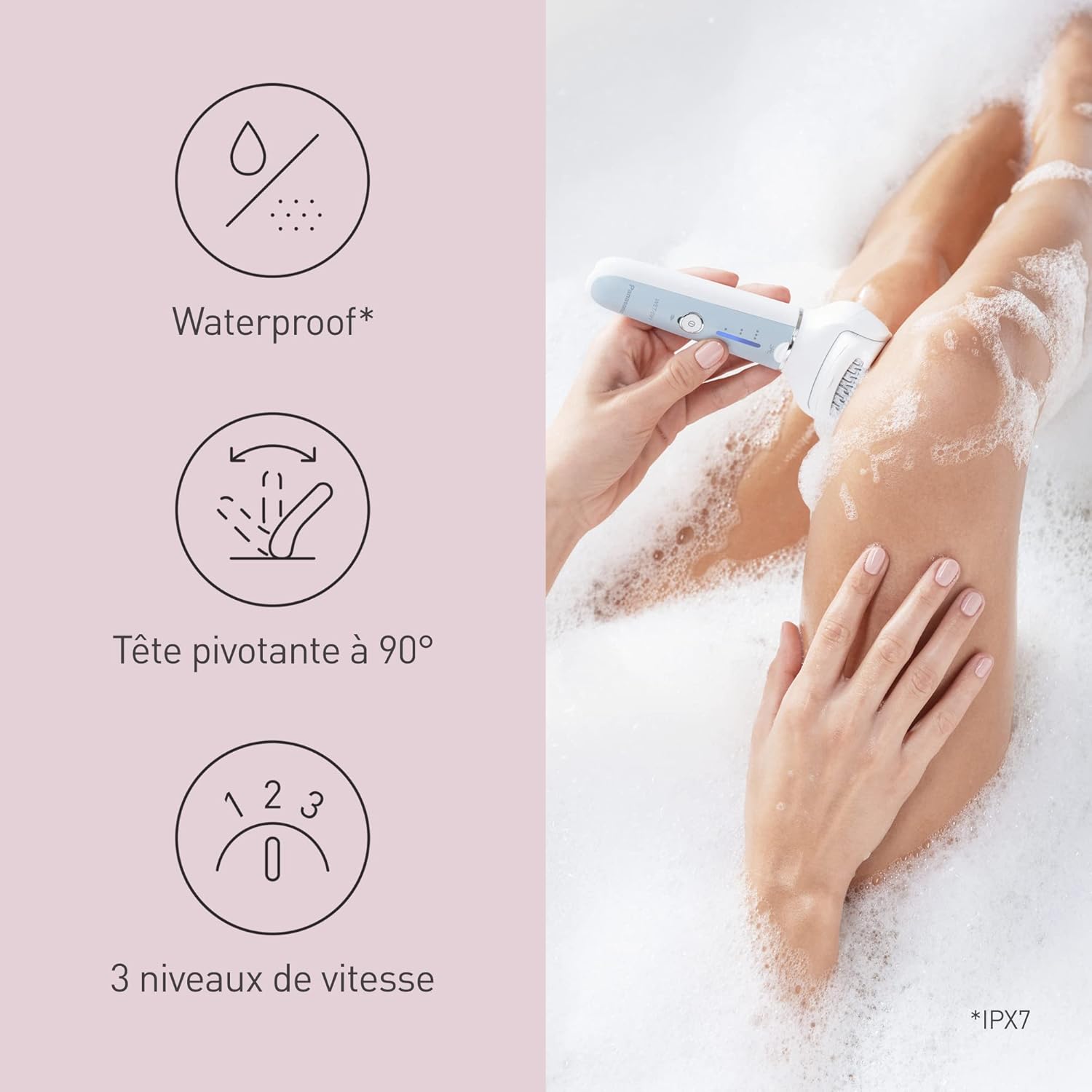
Image: The epilator being used in a bath, demonstrating its waterproof feature, 90° pivoting head for contour adaptation, and the selection of three speed levels.

Image: A woman using the Panasonic ES-EY90-A503 epilator on her leg, demonstrating the proper technique for hair removal.
6.3 Verwendung spezifischer Aufsätze
- Rasierkopf: Attach the shaver head for quick and close shaving. Use the pop-up trimmer for longer hairs before shaving.
- Bikini Comb: Use with the shaver head to trim hair to a uniform length in sensitive areas.
- Foot Care Head: Gently move the foot care head over dry, rough skin on your feet to remove calluses.
- Sonic Exfoliation Brush: Verwenden Sie auf damp skin with your favorite cleanser to gently exfoliate and prepare skin for epilation or to prevent ingrown hairs.

Image: The epilator equipped with the foot care head, being used to smooth the skin on a foot.
7. Wartung
7.1 Cleaning the Epilator
- After each use, turn off the epilator and detach the head.
- Use the provided cleaning brush to remove any trapped hairs from the epilation discs or shaver blades.
- Rinse the epilator head and body under running water. For thorough cleaning, you can use a mild soap.
- Überschüssiges Wasser abschütteln und alle Teile vollständig an der Luft trocknen lassen, bevor sie wieder zusammengebaut oder verstaut werden.

Image: A hand holding the epilator head under running water, demonstrating the ease of cleaning the waterproof device.
7.2 Speicherung
- Store the epilator and its accessories in the provided pouch in a dry place, away from direct sunlight and extreme temperatures.
- Ensure the epilator is fully dry before storing.
8. Fehlerbehebung
| Problem | Mögliche Ursache | Lösung |
|---|---|---|
| Der Epilierer lässt sich nicht einschalten. | Batterie ist leer. | Charge the epilator for at least 1 hour. |
| Mangelhafte Haarentfernungsleistung. | Epilator head is dirty or damaged. Incorrect epilation technique. | Clean the epilator head thoroughly. Ensure you are gliding against hair growth and holding skin taut. |
| Hautreizungen nach der Anwendung. | Es wurde zu viel Druck ausgeübt. Die Haut wurde nicht ausreichend vorbereitet. | Reduce pressure (check LED indicator). Use wet epilation with foam for sensitive skin. Prepare skin with warm water. |
| Epilator stops during use. | Die Batterie ist schwach. | Recharge the epilator. |
9. Spezifikationen
- Modellnummer: ES-EY90-A503
- Energiequelle: Electric (Rechargeable Lithium-ion battery)
- Batterie im Lieferumfang enthalten: 1 Lithium-Ionen
- Ladezeit: Ungefähr 1 Stunde
- Betriebszeit: Ungefähr 30 Minuten
- Bandtage: 3.6 Volt
- Wasserbeständigkeit: Wasserdicht (IPX7)
- Abmessungen (L x B x H): 4.9 x 6.9 x 0.1 cm (Produkt); 850 Gramm (Gewicht)
- Hersteller: Panasonic
- Ursprungsland: China
10. Garantie und Support
Informationen zur Garantie, zur Produktregistrierung oder zum technischen Support finden Sie auf der offiziellen Panasonic-Website. website or contact your local Panasonic customer service center. Keep your proof of purchase for warranty claims.
You can visit the official Panasonic store on Amazon for more information: Panasonic Store
Ask a question about this manual
Ask about setup, troubleshooting, compatibility, parts, safety, or missing instructions. Manuals+ will review the question and use this page’s manual context to help answer it.