
1. Einleitung
This manual provides essential information for the proper use and care of your ZdalaMit AH81-11699A Replacement Remote Control. This remote is designed as a direct replacement for specific Samsung Soundbar models, requiring no programming for immediate use.
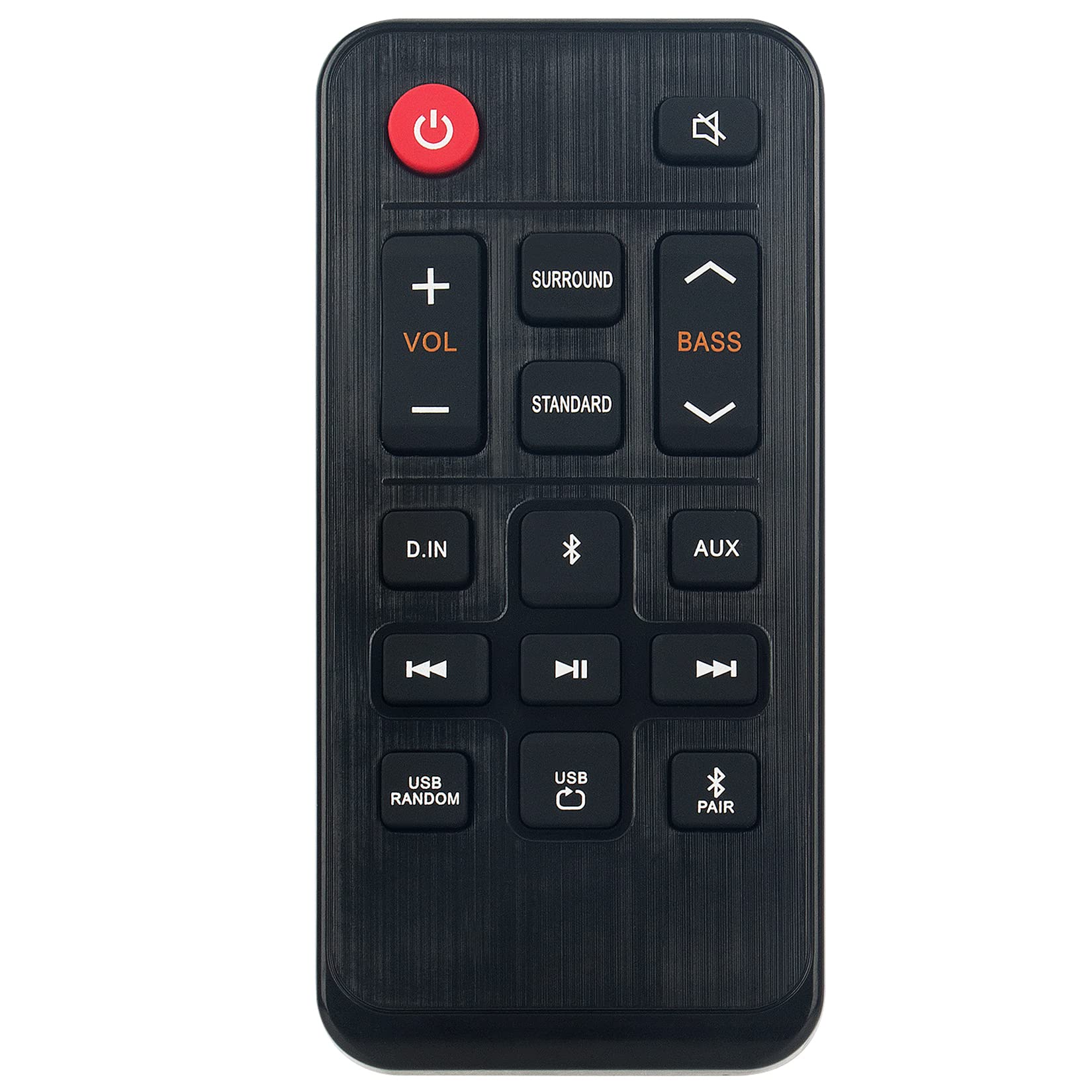
Bild 1.1: The ZdalaMit AH81-11699A Replacement Remote Control. This image displays the front view of the black remote control, featuring various buttons for power, volume, mute, and other soundbar functions.
2. Kompatibilität
The AH81-11699A Replacement Remote Control is compatible with the following Samsung Soundbar models:
- HW-T400
- HW-T400/ZA
- HW-T400/XU
- HWT400
- HWT400/ZA
No programming is required for these models. Simply insert the battery, and the remote is ready for use.
3. Einrichtung
To begin using your replacement remote control, follow these simple steps for battery installation:
- Suchen Sie das Batteriefach: On the back of the remote control, identify the battery compartment cover.
- Öffnen Sie das Fach: Gently slide or press the latch to open the battery compartment cover.
- Batterie einlegen: Insert one CR2032 coin cell battery into the compartment. Ensure the positive (+) side of the battery is facing upwards, as indicated by the diagram inside the compartment.
- Schließen Sie das Fach: Bringen Sie die Abdeckung des Batteriefachs wieder an und achten Sie darauf, dass sie hörbar einrastet.
The remote control is now ready for operation. No additional pairing or programming is necessary for compatible Samsung Soundbar models.
4. Bedienungsanleitung
The AH81-11699A remote control features 18 buttons designed for intuitive control of your Samsung Soundbar. Point the remote directly at your soundbar for optimal performance.
- Netzschalter: Drücken Sie, um die Soundbar ein- oder auszuschalten.
- Lautstärke erhöhen/verringern: Use the '+' and '-' buttons to adjust the soundbar's volume level.
- Stummschaltfläche: Press to temporarily silence the soundbar's audio. Press again to restore sound.
- Quellentaste: Cycle through available input sources (e.g., Bluetooth, Optical, HDMI).
- Tonmodus-Taste: Change the sound effect mode (e.g., Standard, Surround, Game).
- Bass-/Höhenregler: Adjust bass and treble levels (if supported by your soundbar model).
- Weitere Funktionstasten: Additional buttons may control specific soundbar features. Refer to your soundbar's original manual for detailed functionality.
Ensure there are no obstructions between the remote control and the soundbar's infrared receiver for proper signal transmission. The maximum effective range is approximately 33 feet (10 meters).
5. Wartung
Durch sachgemäße Wartung wird die Langlebigkeit und optimale Leistung Ihrer Fernbedienung sichergestellt.
- Reinigung: Reinigen Sie die Fernbedienung mit einem weichen, trockenen Tuch. Verwenden Sie keine flüssigen Reiniger, Lösungsmittel oder Scheuermittel, da diese die Oberfläche oder die internen Bauteile beschädigen können.
- Batteriewechsel: Replace the CR2032 battery when the remote's responsiveness decreases or it stops functioning. Always use a fresh, high-quality CR2032 alkaline battery.
- Lagerung: Bewahren Sie die Fernbedienung an einem kühlen, trockenen Ort fern von direkter Sonneneinstrahlung, extremen Temperaturen und hoher Luftfeuchtigkeit auf.
- Vermeiden Sie Tropfen: Schützen Sie die Fernbedienung vor Stößen, da Stürze die internen Schaltkreise beschädigen können.
6. Fehlerbehebung
Sollten Sie Probleme mit Ihrer Fernbedienung haben, beachten Sie bitte die folgenden gängigen Lösungsansätze:
| Problem | Mögliche Ursache | Lösung |
|---|---|---|
| Die Fernbedienung antwortet nicht. | Batterie defekt oder falsch eingebaut. | Replace the CR2032 battery, ensuring correct polarity (+ side up). |
| Die Fernbedienung hat eine geringe Reichweite oder reagiert nur zeitweise. | Weak battery; Obstruction between remote and soundbar; Remote not pointed correctly. | Replace battery. Remove any objects blocking the signal path. Ensure the remote is pointed directly at the soundbar's IR receiver. |
| Bestimmte Tasten funktionieren nicht. | Button malfunction; Soundbar does not support the function. | Test other buttons. If only specific buttons fail, the remote may be faulty. Verify if your soundbar model supports the intended function. |
| Remote works but soundbar functions incorrectly. | Issue with the soundbar itself. | Refer to your Samsung Soundbar's original user manual for troubleshooting soundbar-specific issues. |
Sollten diese Schritte das Problem nicht beheben, wenden Sie sich bitte an den Kundendienst.
7. Spezifikationen
- Modellname: AH81-11699A
- Marke: ZdalaMit
- Konnektivitätstechnologie: Infrarot
- Kompatible Geräte: Samsung Soundbar (HW-T400 series)
- Akku-Typ: 1 x CR2032 Coin Cell (Alkaline recommended)
- Maximale Reichweite: Approximately 33 Feet (10 meters)
- Button Quantity: 18
- Controller-Typ: Tastensteuerung
- Abmessungen (L x B x H): 4.76" x 2.18" x 0.55" (12.09 cm x 5.54 cm x 1.40 cm)
- Farbe: Schwarz
- Besonderheit: Ergonomisches Design
8. Garantie und Support
This ZdalaMit AH81-11699A Replacement Remote Control comes with a 1 Jahr Garantie ab Kaufdatum, mit Abdeckung von Herstellungsfehlern.
For warranty claims, technical assistance, or any other inquiries, please contact our customer support. We are available to assist you with any questions or concerns you may have regarding your product.
Contact information for support is typically provided at the point of purchase or on the product packaging.