
1. Einleitung
This manual provides detailed instructions for the setup, operation, and maintenance of your Wings Phantom 850 Low Latency Wireless Earbuds. Please read this manual thoroughly before using the product to ensure optimal performance and longevity.

Image: The Wings Phantom 850 Wireless Earbuds shown inside their open charging case, highlighting their design and readiness for use.
2. Packungsinhalt
Prüfen Sie, ob alle Artikel in Ihrer Produktverpackung vorhanden sind:
- Wings Phantom 850 Earbuds
- Kabelloses Ladecase
- USB-Ladekabel
- Ohrpolster (verschiedene Größen)
- Benutzerhandbuch (dieses Dokument)
3. Einrichtung
3.1. Aufladen der Ohrhörer und des Ladecase
Vor dem ersten Gebrauch die Ohrhörer und das Ladecase vollständig aufladen.
- Legen Sie die Ohrhörer in das Ladecase. Achten Sie darauf, dass sie richtig sitzen.
- Verbinden Sie das USB-Ladekabel mit dem Ladeanschluss am Gehäuse und mit einer Stromquelle (z. B. USB-Netzteil, USB-Anschluss am Computer).
- The LED indicators on the case will show the charging status. A full charge typically takes approximately 1-2 hours.

Image: The Wings Phantom 850 Earbuds in their charging case, illustrating the charging process with illuminated LED lights.
3.2. Bluetooth-Kopplung
So verbinden Sie Ihre Ohrhörer mit einem Gerät:
- Stellen Sie sicher, dass die Ohrhörer aufgeladen sind und sich im Ladecase befinden.
- Öffnen Sie das Ladecase. Die Ohrhörer wechseln automatisch in den Kopplungsmodus (erkennbar an blinkenden LED-Leuchten an den Ohrhörern).
- Aktivieren Sie auf Ihrem Gerät (Smartphone, Tablet, Laptop) Bluetooth und suchen Sie nach verfügbaren Geräten.
- Select "Wings Phantom 850" from the list of devices.
- Sobald die Verbindung hergestellt ist, hören die LEDs am Ohrhörer auf zu blinken und Sie hören einen Bestätigungston.
Die Ohrhörer verfügen über Open and On Tech™ for quick connection upon opening the case.
3.3. Wings Sync App Installation
Enhance your experience by installing the Wings Sync App. The app allows for custom controls, EQ modes, and locating misplaced earbuds.
- Download the "Wings Sync" app from your device's app store (App Store for iOS, Google Play Store for Android).
- Open the app and follow the on-screen instructions to connect your Phantom 850 earbuds.

Image: A visual representation of the Wings Sync App dashboard, showing options for touch controls, game mode, EQ modes, and locating earbuds.
Video: A demonstration of the Wings Sync App features, including custom touch controls, EQ modes, and the earbud locator function. This video illustrates how to personalize your earbud settings and find them if misplaced.
4. Bedienungsanleitung
4.1. Tippen Sie auf Steuerung
The Wings Phantom 850 earbuds feature intuitive touch controls. These can be customized via the Wings Sync App.
| Aktion | Funktion (Standard) |
|---|---|
| Einzeltippen (L/R) | Volume Up/Down (Customizable) |
| Doppeltippen (L/R) | Play/Pause (Customizable) |
| Dreifach-Tippen (L) | Previous Track (Customizable) |
| Triple Tap (R) | Next Track (Customizable) |
| Langes Drücken (L) | Voice Assistant (Customizable) |
| Langes Drücken (R) | Game Mode ON/OFF (Customizable) |
| Incoming Call (Single Tap) | Anruf annehmen |
| Eingehender Anruf (langes Drücken) | Anruf ablehnen |
Note: Default functions may vary. Refer to the Wings Sync App for current settings and customization options.
4.2. Gaming-Modus
Activate Gaming Mode for ultra-low latency audio (40ms) during gameplay. This mode is designed to synchronize audio with on-screen action, providing a competitive edge.
- Aktivierung: Long press the right earbud (default setting) or activate via the Wings Sync App.
- Deaktivierung: Repeat the activation step.

Bild: Ein überview of key features including the dedicated Gaming Mode with 40ms ultra-low latency, Bluetooth 5.3, IPX5 water resistance, and ENC Quad Mic technology.
4.3. Umgebungsgeräuschunterdrückung (ENC)
The Quad ENC Mics reduce environmental noise during calls, ensuring clear communication.
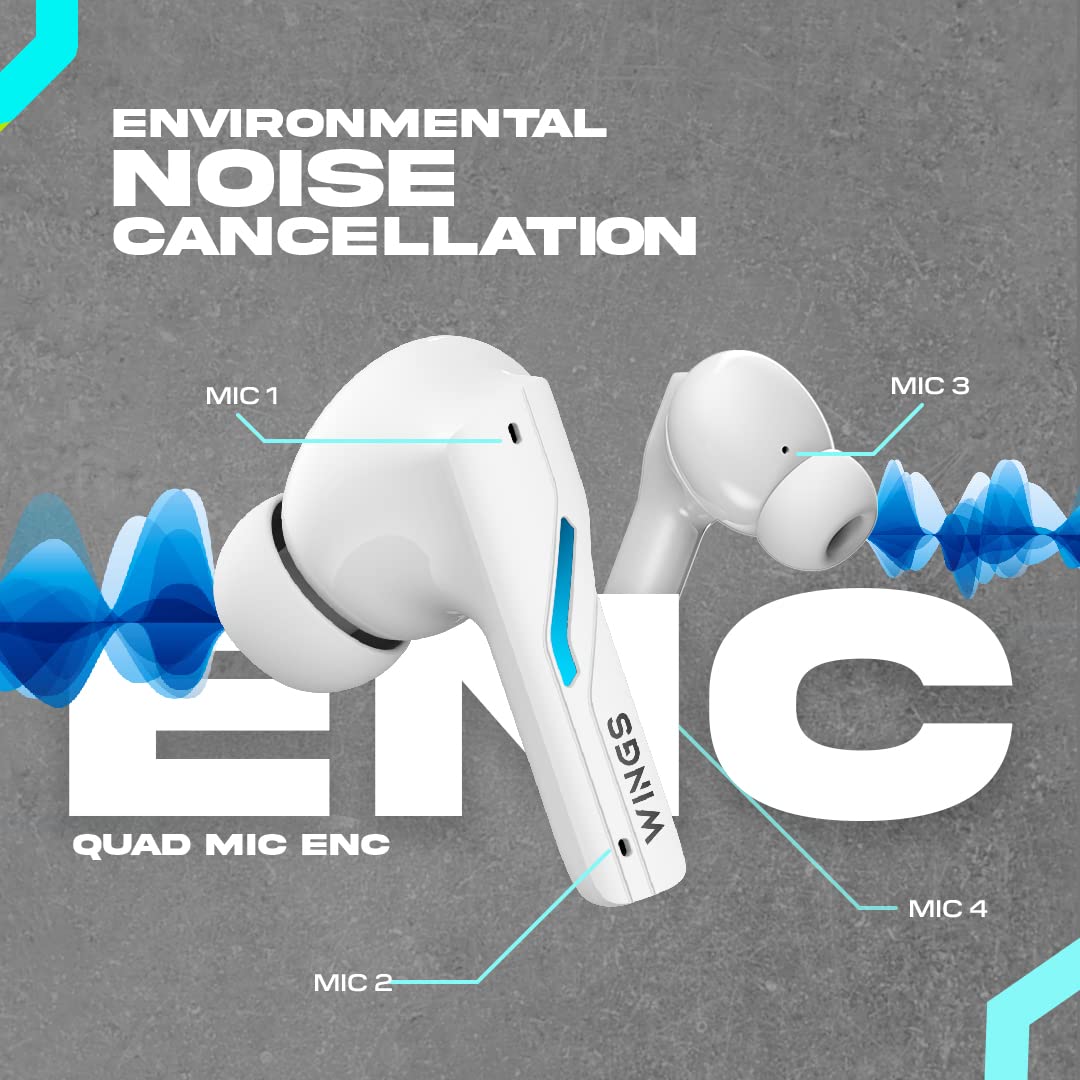
Image: A diagram illustrating the four Environmental Noise Cancellation (ENC) microphones on the Wings Phantom 850 earbuds, designed for clear call quality.
5. Wartung
5.1. Reinigung
Regelmäßige Reinigung trägt zur Erhaltung der Klangqualität und Hygiene bei:
- Wischen Sie die Ohrhörer und das Ladecase vorsichtig mit einem weichen, trockenen, fusselfreien Tuch ab.
- Entfernen Sie die Ohrstöpsel und reinigen Sie sie mit milder Seife und Wasser. Trocknen Sie sie anschließend gründlich ab, bevor Sie sie wieder anbringen.
- Verwenden Sie ein trockenes Wattestäbchen, um die Ladekontakte sowohl an den Ohrhörern als auch am Ladecase zu reinigen.
5.2. Wasserbeständigkeit
The Wings Phantom 850 earbuds are rated IPX5 water resistant, meaning they can withstand splashes and sweat. They are not designed for submersion in water.
- Do not expose the earbuds to running water or wear them while swimming or showering.
- Um Beschädigungen zu vermeiden, stellen Sie sicher, dass die Ohrhörer trocken sind, bevor Sie sie wieder in das Ladecase legen.
6. Fehlerbehebung
If you encounter issues with your Wings Phantom 850 earbuds, refer to the following common solutions:
- Keine Ton-/Verbindungsprobleme:
- Stellen Sie sicher, dass beide Ohrhörer aufgeladen sind.
- Vergewissern Sie sich, dass Bluetooth auf Ihrem Gerät aktiviert ist und die Ohrhörer ausgewählt sind.
- Versuchen Sie, die Ohrhörer von Ihrem Gerät zu entkoppeln und anschließend erneut zu koppeln.
- Starten Sie Ihr Gerät neu.
- Ein Ohrhörer funktioniert nicht:
- Legen Sie beide Ohrhörer zurück in das Ladecase, schließen Sie den Deckel, warten Sie einige Sekunden, öffnen Sie ihn dann und versuchen Sie es erneut.
- Reinigen Sie die Ladekontakte am Ohrhörer und im Ladecase.
- Ladeprobleme:
- Stellen Sie sicher, dass das Ladekabel fest angeschlossen ist.
- Versuchen Sie es mit einem anderen USB-Anschluss oder einem anderen Ladeadapter.
- Reinigen Sie die Ladekontakte.
- Geringe Lautstärke/Schlechte Klangqualität:
- Passen Sie die Lautstärke sowohl an Ihrem Gerät als auch an den Ohrhörern an.
- Achten Sie darauf, dass die Ohrstöpsel richtig im Gehörgang sitzen. Probieren Sie Ohrstöpsel in verschiedenen Größen aus.
- Entfernen Sie jeglichen Schmutz vom Lautsprechergitter des Ohrhörers.
- Check EQ settings in the Wings Sync App.
Für weitere Unterstützung wenden Sie sich bitte an den Kundendienst.
7. Spezifikationen
| Besonderheit | Detail |
|---|---|
| Modellname | Phantom 850 |
| Konnektivitätstechnologie | Kabellos (Bluetooth 5.3) |
| Bluetooth-Reichweite | 15 Meter |
| Audiotreibertyp | Dynamic Driver (13mm Composite Drivers) |
| Akkulaufzeit (Ohrhörer) | Bis zu 10 Stunden |
| Gesamtspielzeit (mit Hülle) | Bis zu 50 Stunden |
| Ladetechnik | Bullet Charge™ (15 mins charge = 100 mins playtime) |
| Besonderheit | ENC Quad Mic, Dedicated Gaming Mode (40ms Low Latency), App Support, Open and On Tech™ |
| Wasserbeständigkeit | IPX5 (schweiß- und wasserbeständig) |
| Kontrollmethode | Berührung, Stimme |
| Kompatible Geräte | Handys, Desktop-Computer, Spielekonsolen, Laptops, Tablets |
| Artikelgewicht | 150 Gramm |
| Technische Daten | 10 x 10 x 4 cm |

Bild: Eine explodierte view diagram illustrating the 13mm composite drivers responsible for high-fidelity audio output in the earbuds.

Image: Information detailing the battery life, showing 50 hours of total playtime with the charging case and 10 hours of playtime on the earbuds alone.
8. Garantie und Support
Your Wings Phantom 850 Wireless Earbuds come with a 1 Jahr Garantie ab Kaufdatum.
For warranty claims, technical support, or any other inquiries, please refer to the contact information provided on the official Wings webWebsite oder Ihre Kaufdokumentation.