
SMALLRIG P108
SmallRig P108 RGB Video Light User Manual
Model: P108 | Brand: SMALLRIG
Einführung
The SmallRig P108 RGB Video Light is a portable and versatile LED camera light designed for various content creation needs, including YouTube, vlogging, and photography. It features 108 high-quality lamp beads, offering 360° full-color adjustment, a wide color temperature range, and multiple special effects. Its compact size and long battery life make it an ideal companion for on-the-go shooting.

Image: The SmallRig P108 RGB Video Light, highlighting its compact design and vibrant RGB capabilities.
Lieferumfang
- RGB-Videoleuchte
- USB-Kabel Typ C.
- Benutzerhandbuch (dieses Dokument)

Image: Contents of the SmallRig P108 RGB Video Light package.
Aufstellen
1. Aufladen des Geräts
Before first use, fully charge the SmallRig P108 RGB Video Light. The device has a built-in 2500mAh lithium battery.
- Connect the included USB Type-C charging cable to the USB-C port on the light.
- Verbinden Sie das andere Ende des Kabels mit einem kompatiblen USB-Netzteil (nicht im Lieferumfang enthalten).
- The indicator lights will show charging progress. Four white lights indicate 100% power when fully charged.
- A full charge provides approximately 130 minutes of usage at maximum power.

Image: Charging the SmallRig P108 RGB Video Light.
2. Montage der Leuchte
The P108 offers multiple mounting options for versatile use.
- Standard 1/4"-20 Screw: Use the integrated 1/4"-20 screw mount at the bottom to attach the light to tripods, camera cages, or other accessories.
- Blitzschuhhalterungen: The light features a built-in standard cold shoe interface at the bottom for direct attachment to cameras or mobile phone expansion frames. Additionally, there are three cold shoe seats on the sides for splicing multiple lights together or expanding with other accessories like microphones.

Image: Various mounting options for the SmallRig P108 RGB Video Light.
Bedienungsanleitung
1. Ein-/Ausschalten
- To turn on the light, press and hold the power button (located on the top left) for 2-3 seconds.
- To turn off the light, press and hold the power button for 2-3 seconds again.
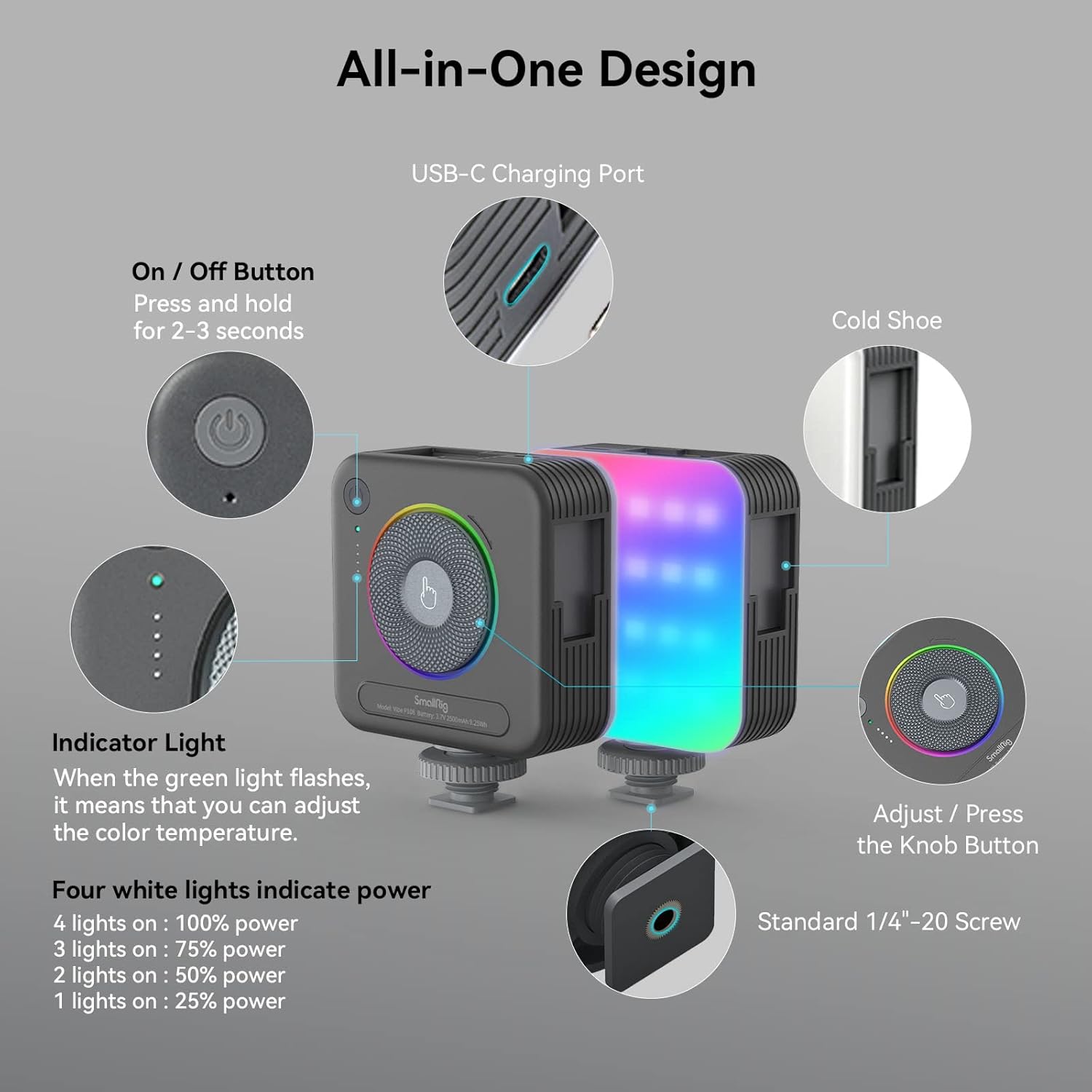
Bild: Überview of the SmallRig P108 controls.
2. Adjusting Color Temperature (CCT Mode)
The P108 offers a color temperature range of 2700K (warm light) to 6500K (cold light).
- Ensure the light is in CCT mode (indicated by the green indicator light).
- Rotate the central knob clockwise to increase the color temperature (cooler light).
- Rotate the central knob counter-clockwise to decrease the color temperature (warmer light).

Image: Color temperature and full color range of the light.
3. Einstellen der Helligkeit
Brightness can be adjusted from 0% to 100% in both CCT and RGB modes.
- In CCT mode, the four white indicator lights show the current power level: 1 light (25%), 2 lights (50%), 3 lights (75%), 4 lights (100%).
- To adjust brightness, rotate the central knob.
- Press the power button briefly to cycle through preset brightness levels (25%, 50%, 75%, 100%).

Image: One-handed control via the step-less knob.
4. Special Effects (FX) Modes
The P108 includes 12 FX light effect modes for various photography needs.
- To enter FX mode, press the central knob. Continue pressing to cycle through the 12 effects.
- Rotate the central knob to adjust the brightness or speed of the selected effect.
- Examples of FX modes include Police Car, Fire Truck, RGB Slow Gradient, Pulsing, Lightning, TV, Candlelight, Firework, Breathing, Disco, Paparazzi, and Faulty Bulb.
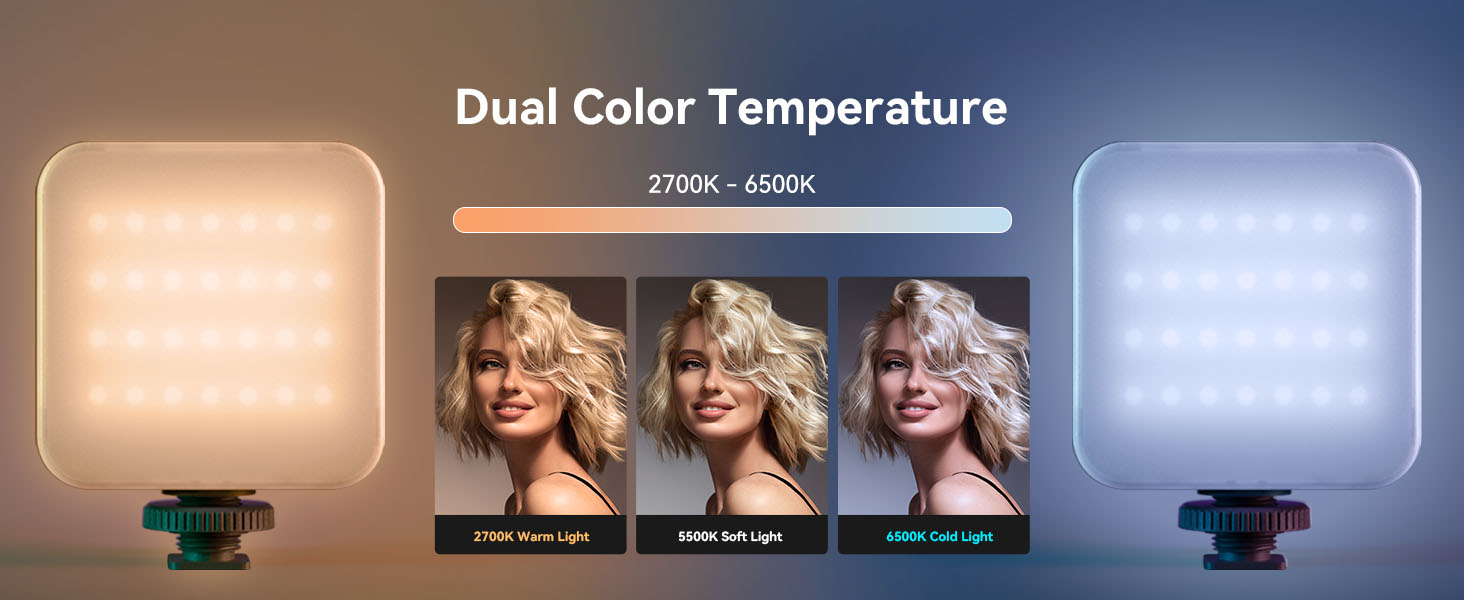
Image: Visual representation of various FX modes.
5. RGB-Modus
The light features a 360° full-color design, allowing adjustment of hue and saturation.
- To enter RGB mode, press the central knob until the RGB indicator light is active.
- Rotate the central knob to cycle through 360° of colors.
- Press the power button briefly to adjust the brightness within the selected color.
Offizielles Produktvideo: So verwenden Sie es
Video: A detailed guide on how to use the SmallRig P108 RGB Video Light, covering its features and modes.
Wartung
- Reinigung: Use a soft, dry cloth to clean the surface of the light. Do not use harsh chemicals or abrasive materials.
- Lagerung: Bewahren Sie das Gerät an einem kühlen, trockenen Ort fern von direkter Sonneneinstrahlung und extremen Temperaturen auf.
- Batteriepflege: Um die Akkulaufzeit zu verlängern, vermeiden Sie häufiges vollständiges Entladen des Akkus. Laden Sie das Gerät regelmäßig auf, auch wenn es nicht verwendet wird, um die Akkuleistung zu erhalten.
- Handhabung: Handle the light with care to prevent drops or impacts, which could damage internal components.
Fehlerbehebung
| Problem | Mögliche Ursache | Lösung |
|---|---|---|
| Licht geht nicht an. | Niedriger Batteriestand; Ein-/Ausschalter nicht lange genug gedrückt. | Laden Sie das Gerät vollständig auf. Halten Sie den Ein-/Ausschalter 2–3 Sekunden lang gedrückt. |
| Die Lichtausbeute ist schwach oder ungleichmäßig. | Niedriger Batteriestand; falsche Helligkeitseinstellung. | Recharge the light. Adjust brightness using the central knob or power button. |
| Modi und Farben können nicht geändert werden. | Incorrect button press; Device malfunction. | Ensure you are pressing the central knob to cycle modes. If issue persists, contact support. |
| Gerät wird nicht geladen. | Faulty cable or adapter; USB-C port issue. | Versuchen Sie es mit einem anderen USB-C-Kabel und Netzteil. Stellen Sie sicher, dass das Kabel vollständig eingesteckt ist. |
Technische Daten
| Besonderheit | Detail |
|---|---|
| Technische Daten | 2.83 x 3.5 x 1.24 Zoll |
| Artikelgewicht | 5.9 Unzen |
| Lichtperlen | 108 (28 RGB, 40+40 cold/warm) |
| CRI | ≥ 95 |
| Farbtemperaturbereich | 2700K - 6500K |
| Farbmodi | 360° Full Color (RGB) |
| FX Light Effects | 12 modes (e.g., Police Car, Fire Truck, Lightning, TV) |
| Batteriekapazität | 2500mAh Lithiumbatterie |
| Akkulaufzeit (Maximale Leistung) | 130 Мinuten |
| Ladeanschluss | USB Typ C |
| Montageoptionen | Standard 1/4"-20 Screw, 3 Cold Shoe Mounts |
Garantie und Support
SmallRig products are designed for durability and performance. For warranty information, technical support, or service inquiries, please refer to the official SmallRig webBesuchen Sie die Website oder kontaktieren Sie direkt den Kundenservice. Bewahren Sie Ihren Kaufbeleg für Garantieansprüche auf.
Online-Ressourcen:
Ask a question about this manual
Ask about setup, troubleshooting, compatibility, parts, safety, or missing instructions. Manuals+ will review the question and use this page’s manual context to help answer it.