
Einführung
The mophie powerstation Go is a versatile portable device designed to provide power in various emergency situations. It functions as a car jump starter, a portable power bank for mobile devices, and a bright LED work light. This manual provides essential instructions for safe and effective use, maintenance, and troubleshooting of your powerstation Go.
Sicherheitshinweise
Lesen Sie vor der Verwendung dieses Produkts alle Sicherheitshinweise und Anweisungen sorgfältig durch. Die Nichtbeachtung dieser Anweisungen kann zu Stromschlag, Brand oder schweren Verletzungen führen.
- Do not expose the powerstation Go to moisture or extreme temperatures.
- Versuchen Sie nicht, das Gerät zu zerlegen oder zu modifizieren.
- Außerhalb der Reichweite von Kindern aufbewahren.
- Ensure proper polarity when connecting jumper cables to a vehicle battery. Incorrect connection can cause damage or injury.
- Use only the provided jumper cables and charging accessories.
- Vermeiden Sie längere direkte Sonneneinstrahlung.
- Sollte das Gerät übermäßig heiß werden, stellen Sie die Benutzung sofort ein.
Packungsinhalt
- mophie powerstation Go
- Mini Jumper Cables
- Ladekabel (USB-C auf USB-A)
- Bedienungsanleitung
Produkt überview
Familiarize yourself with the components of your mophie powerstation Go.


- LED-Taschenlampe: Located at one end, provides bright illumination.
- Arbeitslampe: Integrated into the body, offers broad area lighting.
- Netzschalter: Activates the device and checks battery status.
- LED-Batterieanzeige: Displays the remaining charge level.
- USB-A-Ausgangsanschluss: Zum Aufladen mobiler Geräte.
- Jumperkabelanschluss: Dedicated port for connecting the mini jumper cables.
- USB-C-Eingangsanschluss: For recharging the powerstation Go.
Einrichtung: Erstladung
Before first use, fully charge your mophie powerstation Go.
- Connect the provided USB-C charging cable to the USB-C input port on the powerstation Go.
- Connect the other end of the charging cable to a compatible USB wall adapter (not included) or a powered USB port.
- The LED battery indicator lights will illuminate and flash, indicating the charging status. All four lights will be solid when fully charged.
- Die Ladezeit kann je nach Stromquelle variieren.
Bedienungsanleitung
1. Starthilfe für Ihr Fahrzeug
Ensure the powerstation Go is at least 50% charged before attempting to jump start a vehicle.
- Connect the mini jumper cables to the jumper cable port on the powerstation Go. Ensure a secure connection.
- Verbinden Sie Rot clamp an den Pluspol (+) der leeren Fahrzeugbatterie.
- Verbinden Sie Schwarz clamp to a metal part of the vehicle's chassis (unpainted, non-moving part) or the negative (-) terminal of the battery, if accessible and safe.
- Once connected, the powerstation Go will automatically perform safety checks. Wait for the indicator light on the jumper cable connector to turn solid green.
- Start your vehicle. If it doesn't start immediately, wait 30 seconds and try again. Do not attempt more than three consecutive jump starts.
- Sobald das Fahrzeug startet, sofort die schwarze Klemme abziehen.ampdann der rote Kreisamp, and finally disconnect the jumper cables from the powerstation Go.
2. Aufladen mobiler Geräte
Use the USB-A output port to charge your smartphone, tablet, or other USB-powered devices.

- Connect your device's USB charging cable to the USB-A output port on the powerstation Go.
- The powerstation Go will automatically begin charging your device. The LED battery indicator lights will show the remaining charge.
- Trennen Sie Ihr Gerät vom Stromnetz, sobald der Ladevorgang abgeschlossen ist.
3. Using the LED Flashlight and Work Light
The powerstation Go features both a focused LED flashlight and a broad work light.
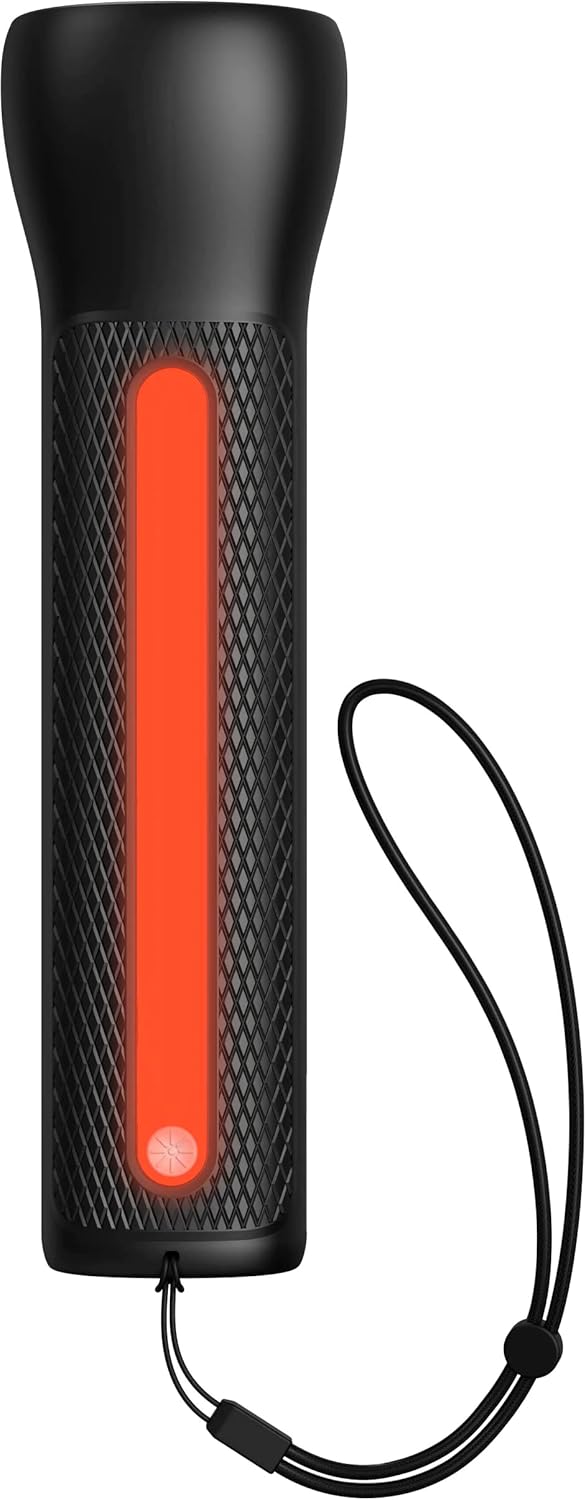

- So aktivieren Sie die LED-Taschenlampe: Press and hold the power button for 2 seconds. Press again to cycle through modes (high, low, strobe, off).
- To activate the Work Light: Double-press the power button. Double-press again to cycle through modes (white, red, flashing red, off).
Wartung
- Reinigung: Reinigen Sie das Gerät mit einem weichen, trockenen Tuch. Verwenden Sie keine scharfen Chemikalien oder Scheuermittel.
- Lagerung: Store the powerstation Go in a cool, dry place away from direct sunlight. For optimal battery life, recharge the device every 3 months if not in regular use.
- Batteriepflege: The internal battery is not user-replaceable. Do not attempt to open the device.
Fehlerbehebung
| Problem | Mögliche Ursache | Lösung |
|---|---|---|
| Gerät lädt nicht | Charging cable or adapter faulty; port obstruction. | Try a different USB-C cable and wall adapter. Ensure ports are clean and free of debris. |
| Vehicle not jump starting | Low powerstation Go charge; incorrect cable connection; severely dead battery. | Ensure powerstation Go is fully charged. Verify correct clamp polarity. Check vehicle battery for severe damage. Consult vehicle manual. |
| Mobilgerät lädt nicht | Powerstation Go battery low; faulty USB cable; device incompatibility. | Recharge powerstation Go. Try a different USB cable. Ensure your device is compatible with standard USB charging. |
| Lichter funktionieren nicht | Powerstation Go battery low; incorrect button press. | Recharge powerstation Go. Refer to "Using the LED Flashlight and Work Light" section for correct operation. |
Technische Daten
- Marke: mophie
- Modellnummer: mpsgrgd-FL36630
- Herstellernummer: 401107454
- Batteriekapazität: 9900 mAh (36.6 Wh)
- Bandtage: 12 Volts (for jump starting)
- Produktgewicht: 1.07 Kilogramm
- Abmessungen: 30.3 x 24.69 x 10.79 cm (Verpackung)
- Besondere Merkmale: LED Indicator Lights, 450-lumen LED Flashlight, Spark-proof Jumper Cables
- Automotive Service Type: LKW, PKW
Garantie und Support
For warranty information and customer support, please visit the official mophie webBesuchen Sie die Website oder kontaktieren Sie den Kundendienst. Bewahren Sie Ihren Kaufbeleg für Garantieansprüche auf.
Online-Hilfe: www.mophie.com/support