
FLEXISPOT EW8Q8
FLEXISPOT Q8 55-Zoll-Stehschreibtisch aus Bambus – Benutzerhandbuch
Model: EW8Q8
1. Einleitung
Thank you for choosing the FLEXISPOT Q8 55-inch Bamboo Standing Desk. This electric height-adjustable desk is designed to enhance your workspace with its durable bamboo tabletop, powerful dual motors, integrated wireless charging, and convenient storage drawer. This manual provides essential information for safe assembly, operation, maintenance, and troubleshooting to ensure optimal performance and longevity of your desk.
2. Wichtige Sicherheitshinweise
- Gewichtskapazität: Do not exceed the maximum weight limit of 220 lbs (100 kg) on the desktop. Overloading can cause damage and pose a safety risk.
- Stabilität: Ensure the desk is placed on a level surface. For taller heights, proper anchoring or counterweighting may be necessary to maintain stability.
- Montage: Follow all assembly instructions carefully. Incorrect assembly can lead to instability and potential injury. It is recommended that two people assemble this desk due to its weight.
- Kinder und Haustiere: Um Unfälle zu vermeiden, sollten Kinder und Haustiere während des Betriebs vom Schreibtisch ferngehalten werden.
- Flüssigkeiten: Avoid spilling liquids on the control panel or electrical components. In case of spillage, immediately unplug the desk and allow it to dry completely before use.
- Netzkabel: Ensure the power cord is not pinched or damaged. Do not operate the desk with a damaged power cord.
- Movement Clearance: Achten Sie beim Verstellen der Höhe des Schreibtisches darauf, dass sich keine Hindernisse oberhalb oder unterhalb des Schreibtisches befinden.
3. Packungsinhalt
Your FLEXISPOT Q8 desk is shipped in two separate boxes. Please verify that all components are present before beginning assembly.
- Bamboo Desktop with Integrated Drawer and Control Panel (Pre-assembled)
- Schreibtischbeine (2)
- Desk Feet (2)
- Kabelführungsschale
- Netzteil und Kabel
- Assembly Hardware and Tools (Screwdriver, Allen wrenches)
- Bedienungsanleitung

This image illustrates the desk's dimensions (55.3 inches wide, 27.7 inches deep) and its robust 220 lbs weight capacity. It also highlights that the product ships in two separate packages.
4. Aufbau und Montage
The FLEXISPOT Q8 desk features a quick-install design, allowing for assembly in approximately 15 minutes. The tabletop and drawer come pre-assembled, simplifying the process.

The desk components are shown ready for assembly, emphasizing the quick 15-minute installation process with included tools and instructions.
Montageschritte:
- Komponenten auspacken: Carefully remove all parts from the packaging. Lay the desktop upside down on a soft, clean surface to prevent scratches.
- Beine anbringen: Securely attach the two desk legs to the pre-drilled holes on the underside of the desktop using the provided hardware.
- Füße anbringen: Connect the desk feet to the bottom of each leg column.
- Kabel anschließen: Connect the motor cables from the legs to the control box, and then connect the control panel cable to the control box. Ensure all connections are firm.
- Kabelmanagement-Tray installieren: Attach the cable management tray to the designated area under the desk to organize wires.
- Flip Desk Upright: With assistance, carefully flip the assembled desk upright and move it to its desired location. Due to the desk's weight (approximately 85 lbs / 38.7 kg), two people are recommended for this step.
- Strom anschließen: Plug the power adapter into the control box, then connect the power cable to a wall outlet.
- Erstkalibrierung (falls erforderlich): Upon first power-on, the desk may perform a brief calibration cycle, moving to its lowest point and then slightly up. This is normal. If the desk does not respond, refer to the troubleshooting section for reset procedures.

A visual representation of the desk's main components, demonstrating the simplified assembly process.
5. Bedienungsanleitung
5.1 Smart Control Panel
The integrated control panel allows for easy height adjustment and includes memory presets for your preferred sitting and standing positions.

The smart control panel is detailed, showing buttons for height adjustment, four programmable memory presets, and integrated USB-A and USB-C charging ports.
- Auf-/Ab-Tasten (▲ / ▼): Durch Drücken und Halten lässt sich die Schreibtischhöhe stufenlos nach oben oder unten verstellen. Lassen Sie die Taste los, um die gewünschte Höhe zu erreichen.
- Speichervoreinstellungen (1, 2, 3, 4): Mithilfe dieser Tasten können Sie bis zu vier verschiedene Höheneinstellungen speichern und wieder aufrufen.
- Stellen Sie den Schreibtisch mithilfe der Auf-/Ab-Tasten auf die gewünschte Höhe ein.
- Drücken Sie die Taste „M“ (oder eine ähnliche Speichertaste, falls vorhanden; andernfalls drücken Sie direkt die entsprechende Zahl).
- Within 3 seconds, press the desired number button (1, 2, 3, or 4) to save the current height. The display will show 'S-' followed by the number to confirm.
- To recall a saved height, simply press the corresponding number button (1, 2, 3, or 4). The desk will automatically move to that preset height.
5.2 Integrated Charging Features
The FLEXISPOT Q8 desk offers multiple charging options for your devices.
- Kabelloses Laden: A 10W wireless charging pad is discreetly integrated under the tabletop. Place your compatible smartphone or other Qi-enabled device directly on the designated area on the desktop (indicated by a subtle marking) to begin charging.
- Wired Charging Ports: The control panel includes a Type-A (18W) and a Type-C (45W) port for fast wired charging of smartphones, tablets, and laptops.
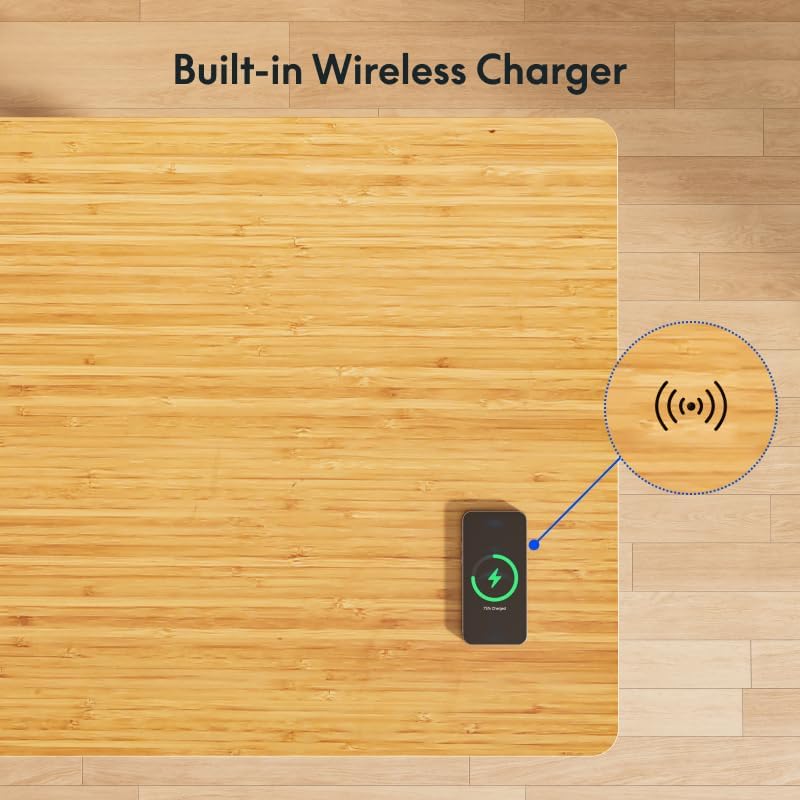
A smartphone is shown charging wirelessly on the desk's surface, illustrating the convenient built-in wireless charging feature.
5.3 Spacious Desk Drawer
The desk features an embedded drawer for convenient storage of your desktop essentials, helping to keep your workspace tidy.

The integrated drawer is displayed open, demonstrating its capacity for storing notebooks, pens, and other small office supplies.
6. Wartung
- Bereinigen des Desktops: Verwenden Sie ein weiches,amp cloth to clean the bamboo surface. Avoid abrasive cleaners or harsh chemicals that could damage the finish. Wipe spills immediately.
- Rahmenreinigung: Wischen Sie den Metallrahmen mit einem weichen, trockenen Tuch ab.
- Kabelmanagement: Periodically check the cable management tray and ensure all cables are neatly organized and not pinched.
- Verbindungsprüfung: Occasionally inspect all electrical connections to ensure they are secure.
7. Fehlerbehebung
| Problem | Mögliche Ursache | Lösung |
|---|---|---|
| Schreibtisch lässt sich nicht bewegen / Kein Strom | Power cable disconnected; Outlet issue; Control box malfunction. | Check power cable connection to wall and control box. Test the outlet with another device. If still no power, contact support. |
| Desk moves unevenly or stops | Overload; Obstruction; Motor cable issue. | Reduce weight on desk. Check for obstructions. Ensure motor cables are securely connected. Perform a reset. |
| Angezeigter Fehlercode | Spezifische Fehlfunktion. | Refer to the full user manual for specific error code meanings and solutions, or perform a reset. |
| Kabelloses Laden funktioniert nicht | Device not Qi-compatible; Incorrect placement; Thick phone case. | Ensure device supports Qi wireless charging. Adjust device placement on the charging area. Remove thick phone cases. |
Vorgehensweise zum Zurücksetzen:
If the desk encounters an issue or displays an error code, a reset may resolve the problem:
- Ziehen Sie den Stecker des Schreibtisches aus der Steckdose.
- Warten Sie mindestens 10-15 Sekunden.
- Schließen Sie den Schreibtisch wieder an die Steckdose an.
- Press and hold the down (▼) button until the desk reaches its lowest position and then slightly rises. This indicates a successful reset.
8. Spezifikationen
| Besonderheit | Detail |
|---|---|
| Marke | FLEXISPOT |
| Modellnummer | EW8Q8 |
| Desktop-Material | Bambus |
| Rahmenmaterial | Bamboo (Base) |
| Produktabmessungen (T x B x H) | 28" x 55" x 49.2" (71.1 cm x 139.7 cm x 125 cm) |
| Höhenbereich | 24" - 49.2" (61 cm - 125 cm) |
| Gewichtskapazität | 220 kg |
| Motortyp | Dual Motor, 3-Stage Beine |
| Liftgeschwindigkeit | 1.5 Zoll/Sekunde (3.8 cm/Sekunde) |
| Geräuschpegel | Ungefähr 45 dB |
| Drahtloser Ladeausgang | 10 W |
| Kabelgebundene Ladeanschlüsse | 1x Type-A (18W), 1x Type-C (45W) |
| Schubladenabmessungen (L x B x H) | 28.3" x 12.8" x 1.97" (71.9 cm x 32.5 cm x 5 cm) |
| Montagezeit | Ca. 15 Minuten |
| Artikelgewicht | 38.7 Kilogramm (ca. 85 Pfund) |

This image highlights the desk's quiet operation, comparing its noise level (45dB) to common sounds like falling leaves (10dB) and normal voice (60dB).

This image focuses on the desk's genuine bamboo tabletop, emphasizing its eco-friendly nature, durability, and unique grain pattern.
9. Garantie und Support
9.1 Eingeschränkte Garantie
The FLEXISPOT Q8 55-inch Bamboo Standing Desk comes with a limited warranty. Please refer to the warranty card included with your product or visit the official FLEXISPOT webAuf der Website finden Sie detaillierte Geschäftsbedingungen hinsichtlich Versicherungsschutz, Laufzeit und Schadensabwicklung.
9.2 Kundendienst
For any questions, technical assistance, or warranty claims, please contact FLEXISPOT customer support. You can find contact information on the official FLEXISPOT webWebsite oder über Ihre Einkaufsplattform.
Visit the official FLEXISPOT Store for more information: FLEXISPOT-Filiale
Ask a question about this manual
Ask about setup, troubleshooting, compatibility, parts, safety, or missing instructions. Manuals+ will review the question and use this page’s manual context to help answer it.