
1. Einleitung
This manual provides detailed instructions for the assembly, operation, and maintenance of your FLEXISPOT Q8 55" Bamboo Standing Desk. Please read this manual thoroughly before installation and use to ensure proper function and safety. Retain this manual for future reference.
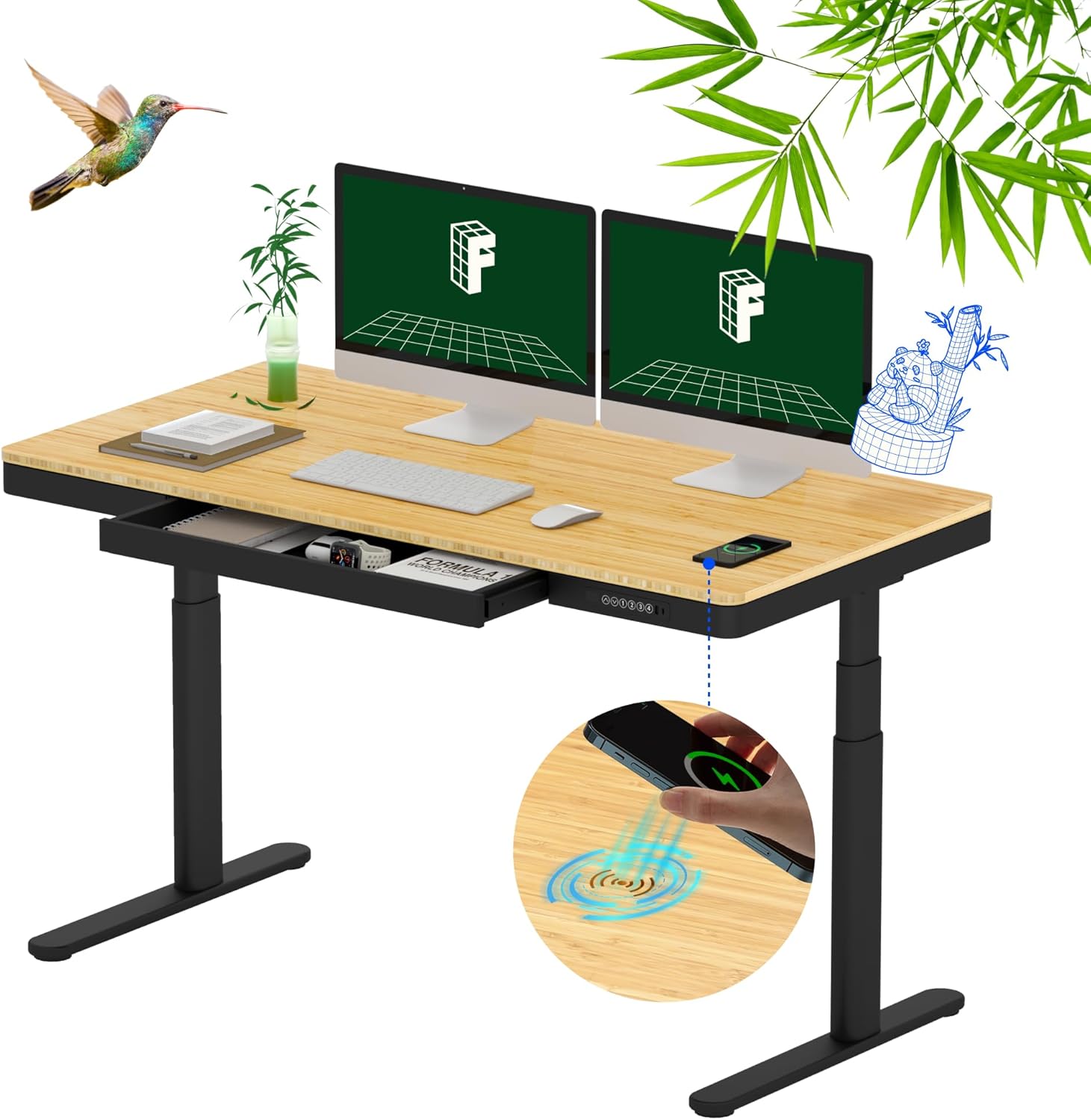
Figure 1.1: FLEXISPOT Q8 55" Bamboo Standing Desk in an office setting.
2. Sicherheitshinweise
Observe the following safety guidelines to prevent injury or damage to the desk:
- The desk has a maximum load capacity of 220 lbs (100 kg). Do not exceed this weight limit.
- The height adjustment range is 24.0 inches to 49.2 inches (with tabletop). Ensure no obstructions are present during height adjustments.
- The desktop is made of bamboo and includes a wireless charger. Avoid exposing the desk to excessive heat or direct sunlight.
- Stellen Sie vor der Verwendung sicher, dass alle Komponenten ordnungsgemäß zusammengebaut und festgezogen sind.
- Halten Sie Kinder und Haustiere während des Betriebs vom Schreibtisch fern.
- Setzen oder stellen Sie sich nicht auf den Schreibtisch.
- Vor der Reinigung oder Wartung die Stromzufuhr unterbrechen.
3. Packungsinhalt
Your FLEXISPOT Q8 desk is shipped in two separate packages. Verify all components are present before beginning assembly.
- Pre-assembled Bamboo Tabletop with integrated drawer and control panel
- Schreibtischbeine (2)
- Desk Feet (2)
- Kabelführungsschale
- Netzteil und Kabel
- Montagezubehör (Schrauben, Werkzeuge)
- Bedienungsanleitung
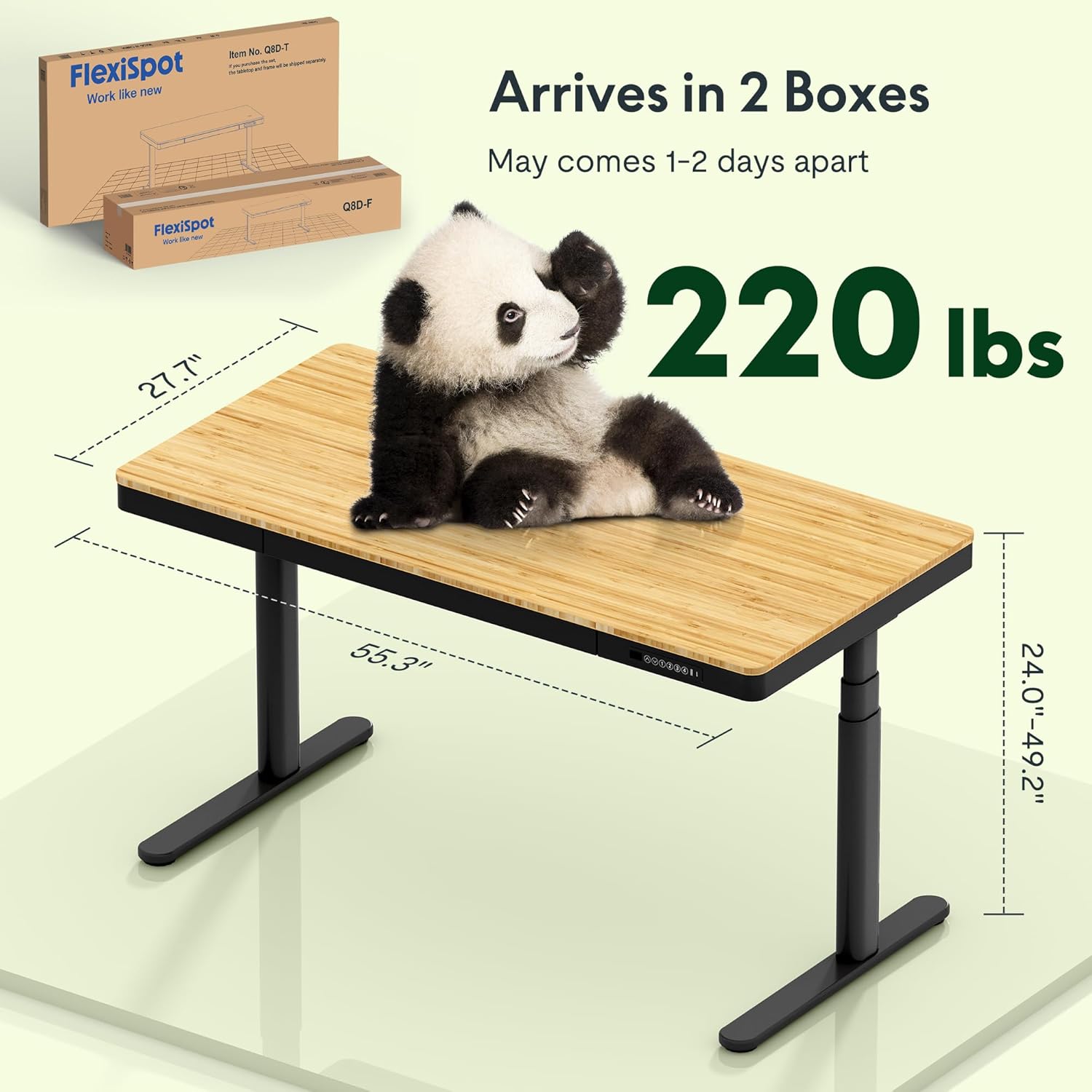
Figure 3.1: Desk dimensions and shipping information.
4. Aufbau und Montage
The FLEXISPOT Q8 desk features a quick-install design, allowing for assembly in approximately 15 minutes. The tabletop and drawer come pre-assembled.
- Komponenten auspacken: Carefully remove all parts from the packaging. Place the pre-assembled tabletop upside down on a soft, clean surface to prevent scratches.
- Beine anbringen: Securely attach the desk legs to the designated mounting points on the underside of the tabletop using the provided hardware.
- Füße anbringen: Fasten the desk feet to the bottom of each leg.
- Kabelmanagement installieren: Attach the cable management tray to the underside of the desk as instructed.
- Strom anschließen: Connect the power adapter to the desk and plug it into a power outlet.
- Flip Desk: With assistance, carefully flip the desk upright.
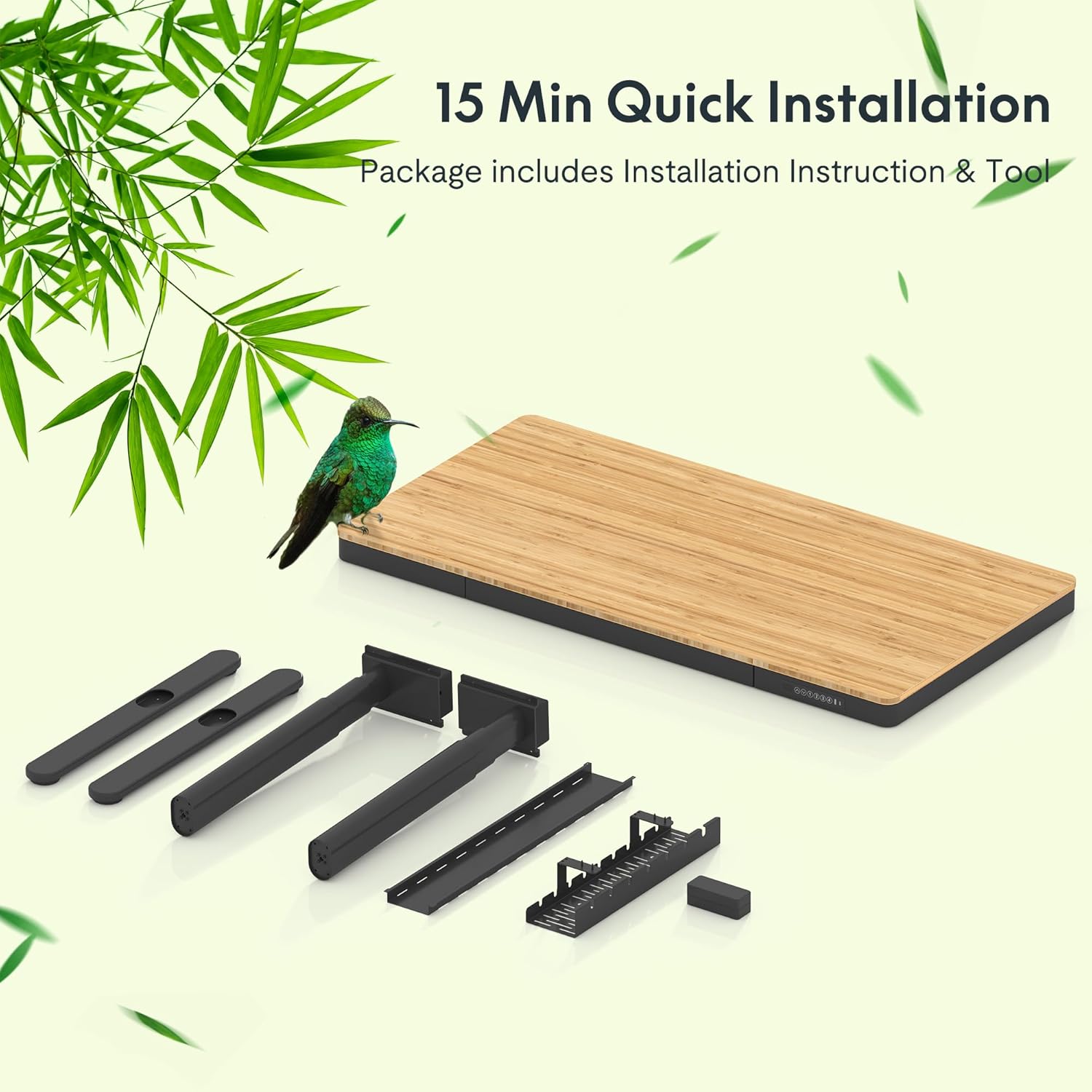
Figure 4.1: Components for quick installation, including the pre-assembled tabletop, legs, feet, and cable management.
5. Bedienungsanleitung
5.1 Höhenverstellung
The desk features a dual-motor system for smooth and quiet height adjustments.
- Auf-/Abwärtsbewegung: Use the up and down arrow buttons on the control panel to adjust the desk height.
- Speichervoreinstellungen: The control panel allows you to save up to four preferred height settings. To set a memory position: adjust the desk to the desired height, then press the 'M' button followed by a number button (1, 2, 3, or 4). The desk will beep to confirm the setting. To recall a saved height, simply press the corresponding number button.
5.2 Integrated Charging Features
The desk includes multiple charging options for your devices.
- Kabelgebundenes Laden: The control panel features a Type-A (18W) port and a Type-C (45W) port for charging smartphones, tablets, and laptops.
- Kabelloses Laden: A 10W wireless charging pad is integrated into the tabletop. Place your compatible device directly on the designated wireless charging area on the desk surface.

Figure 5.1: Smart Control Panel with height adjustment and charging ports.

Figure 5.2: Built-in wireless charging area on the desk surface.
5.3 Integrierte Schublade
The desk includes a spacious embedded drawer for storing desktop essentials.

Figure 5.3: Spacious desk drawer for storage.
6. Wartung
Regelmäßige Wartung gewährleistet die Langlebigkeit und optimale Leistung Ihres Schreibtisches.
- Reinigung: Wischen Sie die Bambusoberfläche mit einem weichen, fusselfreien Tuch ab.amp cloth. Avoid harsh chemicals or abrasive cleaners. For the metal frame, use a mild detergent solution.
- Kabelmanagement: Periodically check and organize cables within the management tray to prevent tangles and damage.
- Überprüfung der Befestigungselemente: Every few months, inspect all screws and fasteners to ensure they are tight. Re-tighten if necessary.
- Motorpflege: The dual motors are designed for durability. Avoid overloading the desk or forcing movement if an obstruction is present.

Figure 6.1: The bamboo desktop is durable and resistant to wear.
7. Fehlerbehebung
If you encounter issues with your FLEXISPOT Q8 desk, refer to the following common solutions:
| Problem | Mögliche Ursache | Lösung |
|---|---|---|
| Der Schreibtisch bewegt sich nicht. | Stromkabel getrennt; Überlastung; Motorfehler | Check power connections; Reduce weight on desk; Unplug and replug power after 30 seconds. |
| Ungleichmäßige Höheneinstellung | Blockierung; ungleichmäßige Belastung | Remove obstructions; Distribute weight evenly. |
| Kabelloses Laden funktioniert nicht | Device not compatible; Misalignment; Thick phone case | Ensure device supports Qi wireless charging; Realign device on charging pad; Remove phone case if too thick. |
| Wired USB charging not working | Cable issue; Device not compatible | Try a different USB cable; Ensure device is compatible with USB charging standards. |
If problems persist after attempting these solutions, please contact FLEXISPOT customer support.
8. Spezifikationen
| Besonderheit | Spezifikation |
|---|---|
| Modellnummer | FLEXISPOT Comhar Pro Desk Q8 |
| Desktop-Material | Bambus |
| Rahmenmaterial | Metall |
| Produktabmessungen (T x B x H) | 12.8 Zoll T x 28.3 Zoll B x 24 Zoll H (Sockel) |
| Tischplattengröße | 55 inches (Working Surface Diagonal Length) |
| Höhenbereich | 24.0 Zoll - 49.2 Zoll |
| Motortyp | Dual Motor, 3 Stages |
| Liftgeschwindigkeit | 1.5 Zoll/Sekunde |
| Gewichtskapazität | 220 kg |
| Bedienfeld | Digital display, Up/Down buttons, 4 Memory Presets |
| Kabelgebundene Ladeanschlüsse | 1x Type-A (18W), 1x Type-C (45W) |
| Kabelloses Laden | 10W integriert |
| Schublade | Integrated Single Drawer |
| Montage erforderlich | Yes (Quick Install) |
9. Garantie und Support
The FLEXISPOT Q8 55" Bamboo Standing Desk comes with a Limited Warranty. Please refer to the warranty documentation included with your product for specific terms and conditions.
9.1 Optionale Schutzpläne
Additional protection plans may be available for purchase to extend coverage beyond the standard warranty period. These plans typically offer:
- 2-Jahres-Schutzplan
- 3-Jahres-Schutzplan
For detailed information on protection plans or to purchase one, please consult your retailer or the FLEXISPOT official webWebsite.
9.2 Kundendienst
For technical assistance, troubleshooting, or warranty claims, please contact FLEXISPOT customer support through their official webWebsite oder die Kontaktinformationen, die auf Ihrer Produktverpackung angegeben sind.