
Einführung
Thank you for choosing the sonoro Primus Internet Radio with Bluetooth. This manual provides essential information for setting up, operating, and maintaining your device to ensure optimal performance and longevity. Please read it thoroughly before use.
Wichtige Sicherheitshinweise
- Energiequelle: Verwenden Sie ausschließlich das angegebene Netzteil. Stellen Sie sicher, dass die Lautstärketage passt zu Ihrer örtlichen Stromversorgung.
- Belüftung: Blockieren Sie keine Lüftungsöffnungen. Sorgen Sie für ausreichend Platz um das Gerät herum, um eine ordnungsgemäße Luftzirkulation zu gewährleisten.
- Wasser und Feuchtigkeit: Do not expose the unit to rain, moisture, dripping, or splashing. Keep liquids away from the device.
- Hitze: Installieren Sie das Gerät nicht in der Nähe von Wärmequellen wie Heizkörpern, Heizregistern, Öfen oder anderen Geräten (einschließlich ampKonverter (Lüfter), die Wärme erzeugen.
- Reinigung: Vor der Reinigung den Netzstecker ziehen. Nur ein trockenes Tuch verwenden.
- Wartung: Versuchen Sie nicht, dieses Produkt selbst zu warten. Überlassen Sie alle Wartungsarbeiten qualifiziertem Servicepersonal.
- Laserprodukt: This product contains a Class 1 laser. Do not open the casing.
Packungsinhalt
Bitte überprüfen Sie, ob alle Artikel vorhanden sind:
- sonoro Primus Internet Radio Unit
- Netzteil
- Fernbedienung (mit Batterien)
- Benutzerhandbuch (dieses Dokument)
Aufstellen
1. Auspacken und Aufstellen
Carefully remove the unit from its packaging. Place the sonoro Primus on a stable, flat surface, ensuring adequate ventilation around the device. Avoid placing it near strong magnetic fields or direct sunlight.
2. Stromversorgung anschließen
Connect the provided power adapter to the AC IN port on the rear of the unit. Plug the other end into a suitable wall outlet. The unit will enter standby mode.
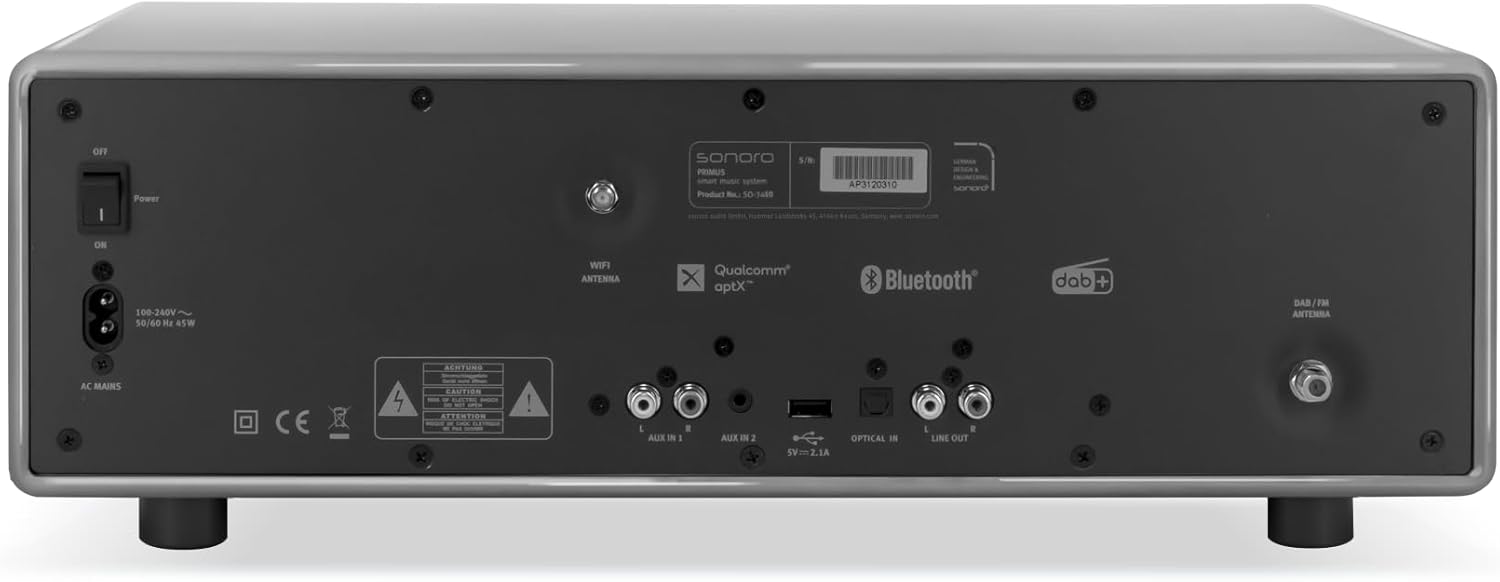
Bild: Rear panel of the sonoro Primus, highlighting the power input and other connectivity options like AUX-in, Optical-in, and antenna connections.
3. Antennenanschluss
For optimal FM and DAB+ reception, connect the included antenna to the appropriate antenna input on the rear panel. Extend the antenna fully for best signal quality.
4. Erstes Einschalten
Press the Power button on the front panel or the remote control to turn on the unit. Follow the on-screen instructions for initial setup, including language selection and network configuration.

Bild: Front view of the sonoro Primus, displaying the central screen, control knobs, and various buttons for media playback and source selection.
Bedienungsanleitung
Grundlegende Bedienelemente
The sonoro Primus features intuitive controls on the front panel and a comprehensive remote control. Key controls include:
- Netzschalter: Schaltet das Gerät ein/aus oder in den Standby-Modus.
- Lautstärkeregler: Regelt den Master-Lautstärkepegel.
- Tune-/Select-Knopf: Navigiert durch Menüs und wählt Optionen aus.
- Quellentasten: Selects input sources (Internet Radio, DAB+, FM, Bluetooth, CD, AUX-in, Optical-in).
- Wiedergabesteuerung: Play/Pause, Skip Forward/Backward for CD and streaming.
Internet Radio and Podcasts
Access over 25,000 internet radio stations and numerous podcasts worldwide. Ensure your device is connected to a stable Wi-Fi network. Navigate through the menu using the Tune/Select knob to find and save your favorite stations.
DAB+ and FM Radio
Switch to DAB+ or FM mode using the source buttons. The unit will automatically scan for available stations. You can manually tune or save presets for quick access to your preferred channels.
Bluetooth-Konnektivität
To connect a Bluetooth device (smartphone, tablet, laptop):
- Select the Bluetooth source on the sonoro Primus.
- Aktivieren Sie Bluetooth auf Ihrem externen Gerät.
- Suchen nach "sonoro Primus" in your device's Bluetooth settings and pair.
- Sobald die Verbindung hergestellt ist, können Sie Audio drahtlos an das Gerät streamen.
CD-Wiedergabe
Insert an audio CD into the CD slot. The unit will automatically detect and begin playback. Use the playback controls to manage your music.
Streaming Services (Spotify Connect, Amazon Music, Deezer)
The sonoro Primus supports various streaming services. To use Spotify Connect, Amazon Music, or Deezer, ensure your device is connected to Wi-Fi and you have an active subscription to the respective service. Follow the instructions within the service's app to connect to your sonoro Primus.
AUX-in and Optical-in
Connect external audio devices using the AUX-in (3.5mm jack) or Optical-in ports on the rear panel. Select the corresponding source on the unit to play audio from these inputs.
Wartung
Reinigen des Geräts
To clean the exterior of the unit, unplug it from the power source. Use a soft, dry, lint-free cloth. Do not use abrasive cleaners, waxes, or solvents as they may damage the finish.
Pflege des CD-Players
Handle CDs by their edges to avoid fingerprints. If a CD is dirty, wipe it gently with a soft, dry cloth from the center outwards. Do not use solvents or abrasive cleaners on CDs.
Software-Updates
Periodically check for software updates via the unit's menu (if available). Updates can improve performance and add new features. Ensure a stable internet connection during updates.
Fehlerbehebung
| Problem | Mögliche Ursache | Lösung |
|---|---|---|
| Kein Strom | Stromkabel nicht angeschlossen; Steckdose defekt. | Überprüfen Sie den Netzanschluss; versuchen Sie es mit einer anderen Steckdose. |
| Kein Ton | Volume too low; wrong input source selected; mute activated. | Increase volume; select correct input source; deactivate mute. |
| Schlechter Radioempfang | Antenna not properly connected or extended; interference. | Antennenposition anpassen; Gerät von anderen elektronischen Geräten fernhalten. |
| Bluetooth-Kopplung fehlgeschlagen | Gerät zu weit entfernt; Bluetooth auf dem externen Gerät nicht aktiviert; Gerät nicht im Kopplungsmodus. | Ensure devices are close; enable Bluetooth; put sonoro Primus in pairing mode. |
| CD wird nicht abgespielt | CD inserted incorrectly; CD is dirty or scratched; unsupported disc format. | CD korrekt wieder einlegen; CD reinigen oder ersetzen; sicherstellen, dass es sich um eine Audio-CD handelt. |
| Probleme mit der Wi-Fi-Verbindung | Falsches Passwort; Router zu weit entfernt; Netzwerkstörungen. | Verify Wi-Fi password; move unit closer to router; restart router. |
Sollte das Problem weiterhin bestehen, wenden Sie sich bitte an den Kundendienst.
Technische Daten
- Marke: sonoro
- Modell: e60a53a9-4d44-4a55-b129-3386e8f3e186
- Tuner-Technologie: UKW, DAB+
- Audioausgabemodus: Stereo
- Unterstützte Audioformate: MP3, AAC, WAV
- Lautsprecherkonfiguration: 2.1 (Two coaxial speakers and a powerful 5.25 inch subwoofer)
- Konnektivität: Optical, Auxiliary, Bluetooth, WLAN
- Kompatible Geräte: Laptop, MP3 player, Smartphone, Tablet
- Energiequelle: Kabelgebundene Elektrik
- Anzeigetyp: LCD oder LED
- Enthaltene Komponenten: Power adapter, Remote control (with Lithium-metal batteries)
- Abmessungen (Paket): 52.6 x 33.2 x 27.4 cm
- Gewicht (Paket): 9.45 kg
- Farbe: Chalk Grey (Note: Other colors may be available for different models)
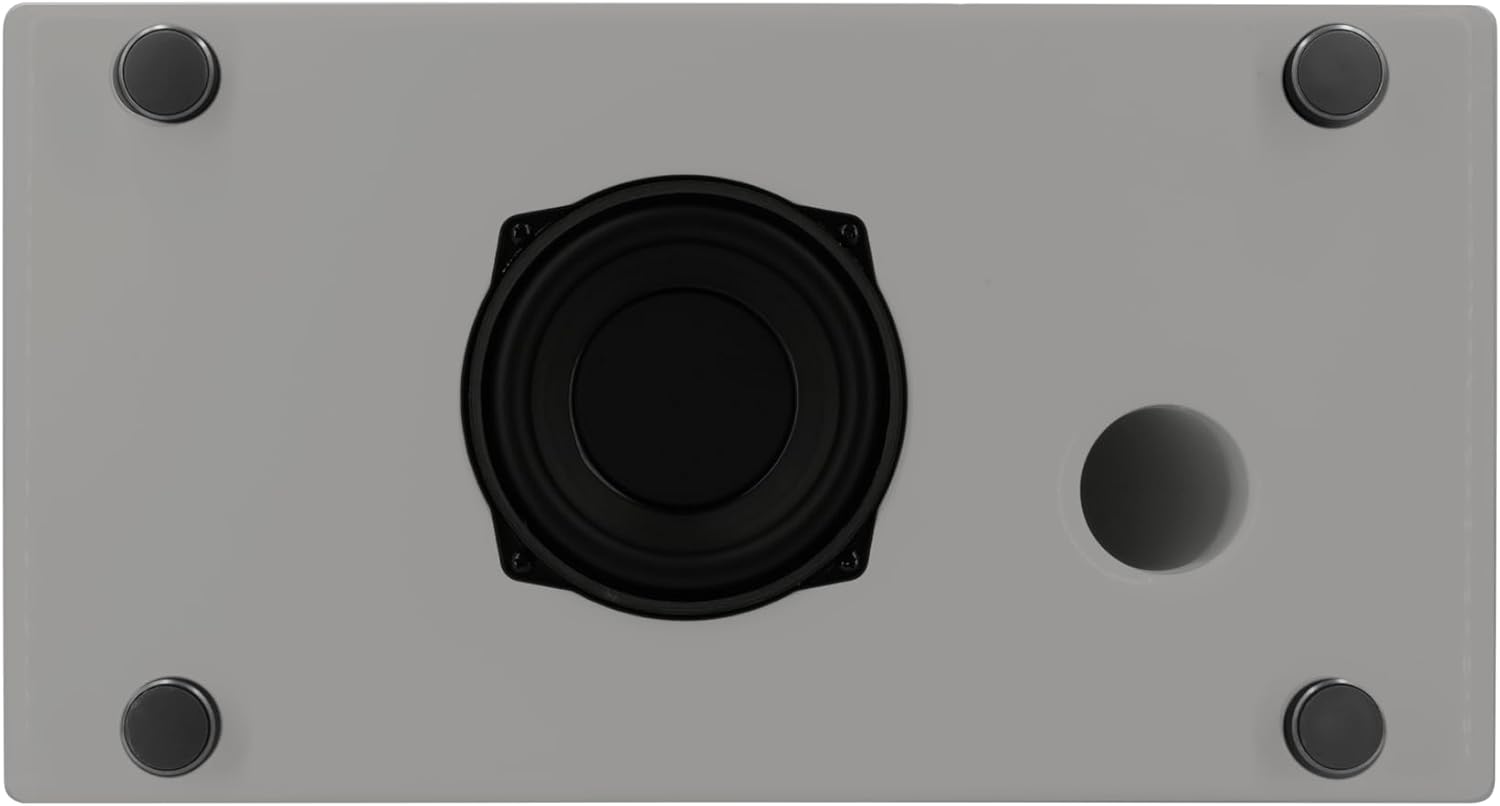
Bild: Underside of the sonoro Primus, revealing the integrated 5.25-inch subwoofer for enhanced bass performance.
Garantie und Support
The sonoro Primus comes with a standard manufacturer's warranty. Please refer to the warranty card included in your package for specific terms and conditions. For technical support, service, or warranty claims, please contact sonoro audio GmbH customer service through their official webWebsite oder die Kontaktinformationen, die Sie bei Ihrem Kauf erhalten haben.
Hersteller: Sonoro Audio GmbH
Frühestmöglicher Termin: 2. Januar 2023