
Luraco Pro 35k
Luraco Pro-35K Nail Drill Instruction Manual
Model: Pro 35k
1. Einleitung
Thank you for choosing the Luraco Pro-35K Nail Drill. This manual provides essential information for the safe and effective operation, maintenance, and care of your device. Please read this manual thoroughly before use and retain it for future reference.
Wichtige Sicherheitsinformationen
Warnung: This nail drill produces high-speed rotation which may generate flying debris or dust, potentially causing eye injury. The device may also become hot during operation, posing a risk of burns. Always use protective eyewear and handle with care. Unplug from power source when not in use.
- Halten Sie das Gerät von Wasser oder anderen Flüssigkeiten fern.
- Do not operate the device if it has a damaged cord or plug.
- Ensure the handpiece is securely attached before operation.
- Avoid dropping the device or handpiece.
- Bei Nichtgebrauch an einem kühlen, trockenen Ort aufbewahren.
2. Produktüberschreitungview
The Luraco Pro-35K Nail Drill is a professional-grade e-file machine designed for precision nail care. It features a true brushless motor for long life and smooth operation.
Hauptmerkmale:
- True Brushless motor for super long life and high torque.
- Up to 35,000 RPM for efficient performance.
- Cordless and rechargeable design for portability.
- Variable speed control for precise adjustments.
- Leichtes und kompaktes Design.
- Up to 10 hours of operation without charging.
- Low vibration and low noise for user comfort.
- Durable Stainless-steel & Aluminum handpiece.
- Forward & Reverse Control.
- Smart overload protection.
- 1-hour auto shutoff timer.
- Built-in cradle for convenience.
- Universalvolumentage (110V/60Hz to 240V/50Hz).
Komponenten:
- Steuereinheit
- Handstück
- Netzteil
- Handstückhalter
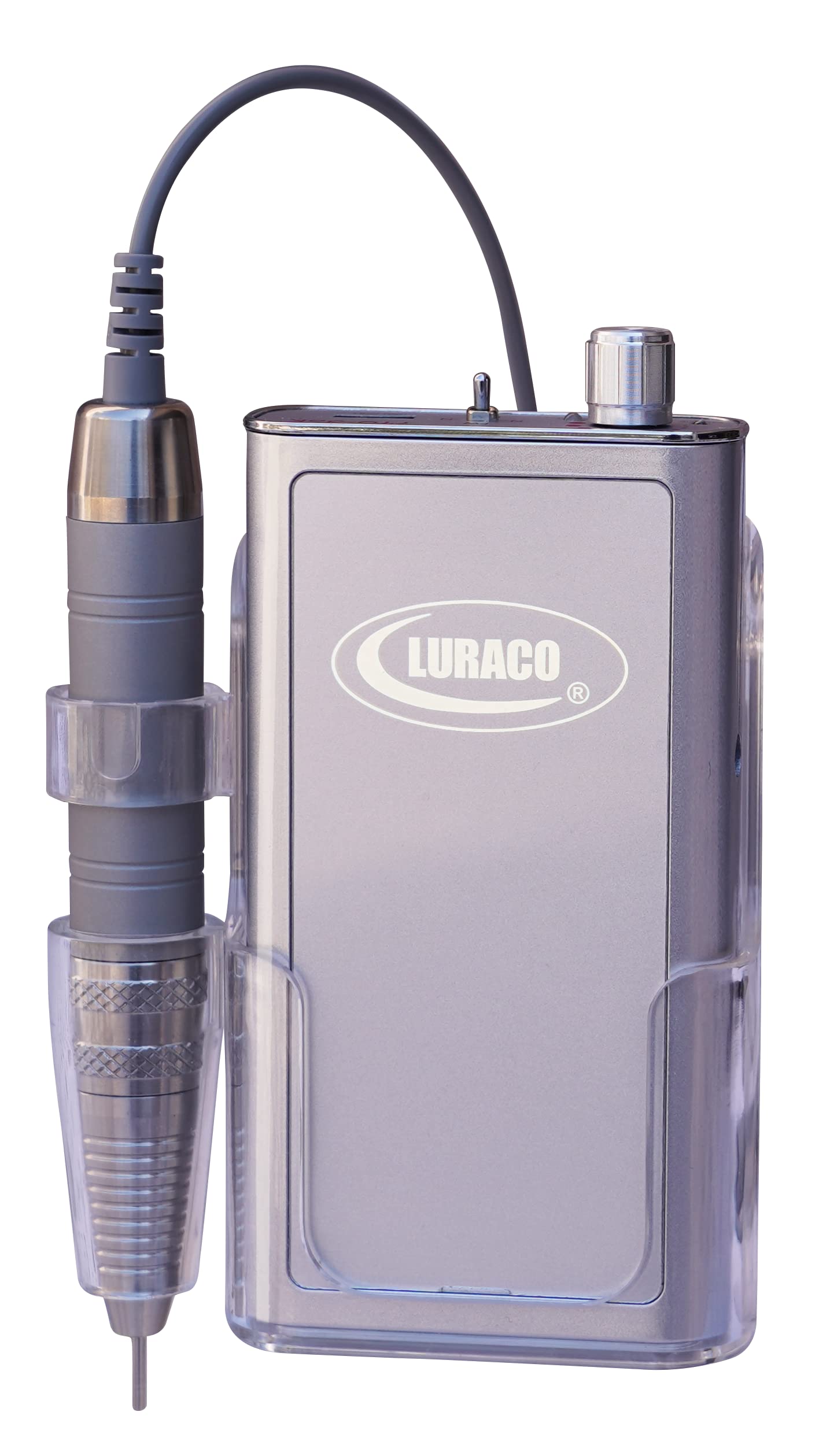
Figure 2.1: The Luraco Pro-35K Nail Drill control unit and handpiece.

Abbildung 2.2: Ausführlich view of the control unit with speed dial, battery indicator, and FWD/REV switch.

Abbildung 2.3: Ausführlich view of the handpiece, highlighting its ergonomic design and bit insertion area.
3. Einrichtung
Follow these steps to set up your Luraco Pro-35K Nail Drill for first use.
- Auspacken: Nehmen Sie alle Komponenten vorsichtig aus der Verpackung. Prüfen Sie sie auf Beschädigungen.
- Laden: Before initial use, fully charge the control unit. Connect the power adapter to the charging port on the control unit and plug it into a suitable power outlet. The battery indicator will show charging status.
- Attaching Handpiece: Schließen Sie das Handstückkabel an den dafür vorgesehenen Anschluss am Steuergerät an. Achten Sie auf eine sichere Verbindung.
- Inserting a Bit: Twist the handpiece collar counter-clockwise to unlock the chuck. Insert your desired nail drill bit fully into the chuck. Twist the collar clockwise to lock the bit securely in place. Always ensure the bit is properly secured before operating to prevent injury or damage.
- Positionierung: Place the control unit on a stable, flat surface. The built-in cradle can be used to hold the handpiece when not in active use.
4. Bedienungsanleitung
This section details how to operate your Luraco Pro-35K Nail Drill.
- Einschalten: Turn the speed control dial clockwise to power on the device. The battery indicator lights will illuminate.
- Geschwindigkeit anpassen: Continue turning the speed control dial clockwise to increase the RPM (Revolutions Per Minute) and counter-clockwise to decrease it. The device supports up to 35,000 RPM.
- Vorwärts-/Rückwärtssteuerung: Use the FWD/REV switch to select the desired rotation direction of the drill bit. 'FW' is for forward rotation, 'REV' is for reverse rotation, and 'N' is for neutral (off). Always ensure the handpiece is stopped before changing direction to prevent damage to the motor.
- Überlastschutz: The device is equipped with smart overload protection. If excessive pressure is applied, the drill may temporarily stop to prevent damage. Reduce pressure and restart if this occurs.
- Timer für automatische Abschaltung: The device features a 1-hour auto shutoff timer to conserve battery life and for safety. If left idle for 1 hour, it will automatically power off.
- Ausschalten: Turn the speed control dial counter-clockwise until it clicks into the 'off' position.
Video 4.1: Ein überview of the Luraco PRO-35K Nail Drill, showcasing its features and operation. This video highlights the product's design and functionality.
Video 4.2: A demonstration of the Luraco Pro-35K Electric Nail Drill, focusing on its performance and ease of use. This video provides a closer look at the drill's capabilities.
5. Wartung
Proper maintenance ensures the longevity and optimal performance of your nail drill.
- Reinigung: Regularly clean the handpiece and control unit with a soft, dry cloth. For the handpiece, remove the drill bit and gently brush away any dust or debris from the chuck area. Do not use harsh chemicals or abrasive cleaners.
- Bit Care: Ensure drill bits are clean and free of debris before insertion. Replace dull or damaged bits to maintain efficiency and prevent strain on the motor.
- Aufladen der Batterie: Charge the device when the battery indicator shows low power. Avoid completely draining the battery frequently to prolong its lifespan. The device can operate for up to 10 hours on a single charge.
- Lagerung: Store the nail drill in its original packaging or a protective case when not in use. Keep it in a dry environment, away from direct sunlight and extreme temperatures.
6. Fehlerbehebung
If you encounter issues with your Luraco Pro-35K Nail Drill, refer to the following common problems and solutions.
| Problem | Mögliche Ursache | Lösung |
|---|---|---|
| Bohrer lässt sich nicht einschalten | Low battery; Power switch off; Loose connection | Charge the battery; Turn the speed dial clockwise to power on; Check handpiece and power adapter connections. |
| Handpiece stops during use | Overload protection activated; Loose bit | Reduce pressure on the handpiece; Ensure the drill bit is securely locked in the chuck. |
| Übermäßige Vibrationen oder Lärm | Damaged or improperly inserted bit; Handpiece issue | Replace the bit or re-insert it correctly; If problem persists, contact customer support. |
| Akku wird nicht geladen | Faulty power adapter; Charging port issue | Ensure power adapter is working; Contact customer support if issue persists. |
7. Spezifikationen
Technical specifications for the Luraco Pro-35K Nail Drill.
- Produktabmessungen: 3 x 1.25 x 6 Zoll
- Gewicht: 4 Pfund
- Artikelmodellnummer: Pro 35k
- Batterien: 1 x 12-V-Batterie (im Lieferumfang enthalten)
- UPC: 893640001700
- Hersteller: Luraco
- Bandtage: Universal (110V/60Hz to 240V/50Hz)
- Energiequelle: Batteriebetrieben
- Eingangsleistung: 200 Watt
- Maximale Drehzahl: 35,000 U/min
- Materialart: Aluminium, Edelstahl
8. Garantie und Support
Luraco stands behind the quality of its products.
Garantieinformationen:
The Luraco Pro-35K Nail Drill comes with a 1-year warranty. For specific warranty terms and conditions, please refer to the warranty card included with your product or visit the official Luraco webWebsite.
Kundendienst:
For technical assistance, troubleshooting beyond this manual, or warranty claims, please contact Luraco customer service. Contact details can typically be found on the product packaging or the official Luraco webWebsite.
Online-Ressourcen: Besuchen www.luraco.com Weitere Produktinformationen, FAQs und Support finden Sie hier.
Ask a question about this manual
Ask about setup, troubleshooting, compatibility, parts, safety, or missing instructions. Manuals+ will review the question and use this page’s manual context to help answer it.