
1. Einleitung
Thank you for choosing the XTRONS TIX125L 10.1-inch Android 12 Car Stereo. This advanced multimedia system features an Octa-core processor, 8GB RAM, 128GB ROM, built-in GPS, Wi-Fi, 4G connectivity, Apple CarPlay, Android Auto, and a Digital Sound Processor (DSP). Its rotatable QLED display offers a versatile and intuitive user experience. This manual provides essential information for installation, operation, maintenance, and troubleshooting to ensure optimal performance and user satisfaction.
2. Sicherheitshinweise
- Professionelle Installation empfohlen: Aufgrund der Komplexität der elektrischen Systeme von Autos wird eine professionelle Installation dringend empfohlen, um Schäden am Gerät oder an Ihrem Fahrzeug zu vermeiden.
- Stromversorgung: Stellen Sie sicher, dass das Gerät an ein 12-V-Gleichstromnetzteil mit negativer Erdung angeschlossen ist. Falsche SpannungtagDies kann zu Schäden führen.
- Verdrahtung: Follow all wiring diagrams carefully. Improper wiring can lead to malfunctions, electrical shorts, or fire.
- Fahrsicherheit: Bedienen Sie das Gerät nicht so, dass Sie vom Fahren abgelenkt werden. Die Verkehrssicherheit hat stets Vorrang.
- Temperatur: Setzen Sie das Gerät nicht über längere Zeit extremen Temperaturen oder direkter Sonneneinstrahlung aus.
- Feuchtigkeit: Das Gerät muss trocken bleiben. Feuchtigkeit kann zu Schäden führen.
- Belüftung: Sorgen Sie für ausreichende Belüftung rund um das Gerät, um eine Überhitzung zu vermeiden.
3. Packungsinhalt
Bitte überprüfen Sie den Inhalt Ihres Pakets anhand der folgenden Liste:
- XTRONS TIX125L Main Head Unit
- Stromkabelbaum
- RCA-Ausgangs-/Eingangskabel
- GPS-Antenne
- USB-Kabel (x2)
- 4G LTE Antenne
- Mounting Brackets (x2 pairs)
- Schrauben
- Externes Mikrofon
- Benutzerhandbuch (dieses Dokument)

Abbildung 3.1: Mitgeliefertes Zubehör und Hauptgerät.
4. Einrichtung und Installation
This section provides general guidelines for installing your XTRONS TIX125L car stereo. For specific vehicle models, additional adapters or professional assistance may be required.
4.1 Schritte vor der Installation
- Batterie abklemmen: Vor dem Starten den Minuspol der Fahrzeugbatterie abklemmen, um Kurzschlüsse zu vermeiden.
- Altes Gerät entfernen: Entfernen Sie Ihr vorhandenes Autoradio vorsichtig vom Armaturenbrett.
- Verkabelung prüfen: Identify the vehicle's wiring harness. You may need a vehicle-specific adapter harness (not included) to connect to the XTRONS unit.
4.2 Kabelverbindungen
- Stromkabelbaum: Connect the provided power wiring harness to the unit and then to your vehicle's wiring. Ensure all connections (power, ground, ACC, illumination) are correct.
- GPS-Antenne: Schließen Sie die GPS-Antenne an und montieren Sie sie an einem Ort mit freiem Blick view des Himmels (z. B. auf dem Armaturenbrett oder unter der Windschutzscheibe).
- 4G LTE-Antenne: Connect the 4G LTE antenna for cellular data connectivity.
- Wi-Fi-Antenne: The unit has a built-in Wi-Fi module. Ensure no obstructions block its signal.
- USB-Kabel: Route the USB cables to an accessible location (e.g., glove compartment) for connecting USB drives or smartphones.
- Externes Mikrofon: Connect the external microphone for improved call quality during Bluetooth hands-free operation. Position it near the driver.
- RCA-Kabel: Schließen Sie RCA-Kabel für externe Verbindungen an ampVerstärker, Subwoofer oder zusätzliche Videoeingänge/-ausgänge nach Bedarf.
- Optionale Verbindungen: Connect optional accessories such as a rear-view camera, DVR camera, DAB+ box, or TPMS kit according to their respective manuals.
4.3 Montage der Einheit
- Secure the Main Unit: Use the provided mounting brackets and screws to secure the main unit into the dashboard opening.
- Anzeige anpassen: The 10.1-inch display is rotatable and adjustable. Position it for optimal viewEinfallswinkel und Zugänglichkeit.
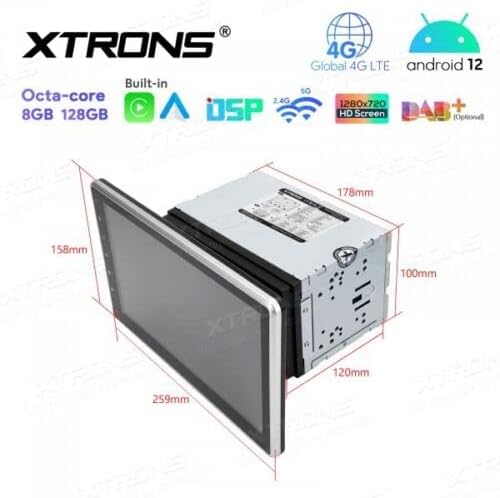
Abbildung 4.1: Abmessungen der Einheit für die Installationsplanung.
4.4 Nach der Installation
- Batterie wieder anschließen: Schließen Sie den Minuspol der Fahrzeugbatterie wieder an.
- Erstes Einschalten: Turn on the vehicle ignition and power on the stereo.
- Testfunktionen: Verify all functions, including audio, radio, GPS, Bluetooth, and touchscreen responsiveness.
5. Bedienungsanleitung
This section details the operation of the XTRONS TIX125L car stereo's various features.
5.1 Grundlegende Bedienung
- Ein-/Ausschalten: Zum Ein- oder Ausschalten des Geräts die Ein-/Aus-Taste (normalerweise an der Vorderseite) gedrückt halten. Ein kurzer Druck schaltet den Ton in der Regel stumm bzw. hebt die Stummschaltung auf.
- Touchscreen-Schnittstelle: Navigate the Android 12 interface by tapping, swiping, and pinching on the capacitive touchscreen.
- Lautstärkeregelung: Die Lautstärke kann über die physischen Tasten oder die Bedienelemente auf dem Bildschirm eingestellt werden.
- Startbildschirm: The main screen provides access to frequently used applications and widgets.

Figure 5.1: Main user interface with navigation and media playback.
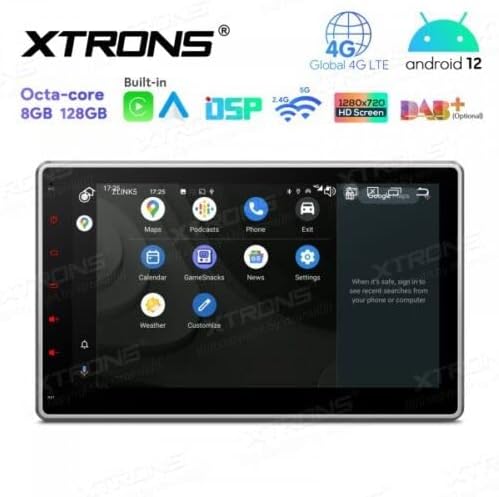
Figure 5.2: Android app drawer with various applications.
5.2 GPS-Navigation
The unit comes with a built-in GPS module. You can use pre-installed navigation apps or download others from the Google Play Store.
- GPS-Antenne: Stellen Sie sicher, dass die GPS-Antenne ordnungsgemäß angeschlossen ist und eine freie Sicht hat. view des Himmels für eine genaue Positionierung.
- Kartenaktualisierungen: Keep your navigation maps updated for the best routing experience.
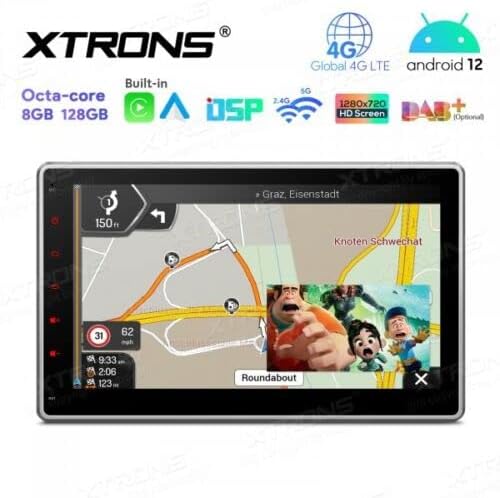
Figure 5.3: Navigation interface with split-screen functionality.
5.3Bluetooth 5.0
Verbinden Sie Ihr Smartphone via Bluetooth für Freisprechanrufe und Audiostreaming.
- Paarung: Öffnen Sie die Bluetooth-Einstellungen sowohl am Gerät als auch an Ihrem Telefon. Suchen nach available devices and select the XTRONS unit to pair.
- Freisprechen: Make and receive calls directly from the unit's screen. Use the external microphone for clear voice transmission.
- Audio-Streaming: Spiele Musik von deinem Handy über die Autolautsprecher ab.
5.4 WLAN- und 4G-Konnektivität
Access the internet and online services using Wi-Fi or a 4G SIM card.
- W-lan: Connect to a Wi-Fi hotspot (e.g., from your phone or home network) via the Wi-Fi settings.
- 4G LTE: Insert a compatible 4G SIM card into the designated slot (if available) and connect the 4G antenna for mobile data access.
5.5 Apple CarPlay / Android Auto
Integrieren Sie Ihr Smartphone für ein sichereres und intelligenteres Fahrerlebnis.
- Verbindung: Connect your iPhone or Android phone via USB or wirelessly (if supported by your phone and the unit's software).
- Merkmale: Access navigation, music, messages, and other compatible apps directly on the stereo display.

Figure 5.4: Apple CarPlay / Android Auto interface.
5.6 Digitaler Soundprozessor (DSP)
Passen Sie Ihr Audioerlebnis mit dem integrierten DSP individuell an.
- Equalizer: Adjust frequency bands to fine-tune the sound output to your preference.
- Soundeffekte: Entdecke verschiedene Sound-Presets und Effekte.
5.7 Bildschirmspiegelung
Display your smartphone's screen directly on the car stereo.
- Verbindung: Follow the instructions within the Screen Mirroring app on the unit to connect your phone (usually via Wi-Fi or USB).
5.8 USB/SD-Wiedergabe
Medien abspielen files von USB-Laufwerken oder SD-Karten.
- USB-Anschlüsse: Connect USB flash drives (up to 128GB) to the provided USB ports.
- SD-Kartensteckplatz: Insert an SD card (up to 64GB) into the designated slot.
- Mediaplayer: Use the built-in media player app to browse and play audio or video files.
5.9 Radio (FM/AM, DAB+)
Hören Sie Ihre Lieblingsradiosender.
- FM/AM: Use the radio app to scan for stations, save presets, and switch between FM and AM bands.
- DAB+ (Digital Audio Broadcasting): This feature requires an optional DAB+ receiver box (not included). Once connected, you can enjoy higher quality digital radio broadcasts.
5.10 Lenkradsteuerung
Control the stereo using your vehicle's steering wheel buttons.
- Konfiguration: This feature typically requires a vehicle-specific CAN-Bus adapter (not included) and configuration within the unit's settings.
5.11 Rear Camera and DVR Input
Enhance driving safety with optional camera systems.
- Rückfahrkamera: Schließen Sie eine optionale Rückfahrkamera an.view camera. The display will automatically switch to the camera view wenn das Fahrzeug im Rückwärtsgang ist.
- DVR-Kamera: Connect an optional DVR (Digital Video Recorder) camera to record your driving.
5.12 TPMS-Unterstützung
Monitor your tire pressure with an optional TPMS (Tire Pressure Monitoring System) kit.
- Verbindung: This feature requires an optional TPMS kit (not included). Once connected, tire pressure data will be displayed on the unit.
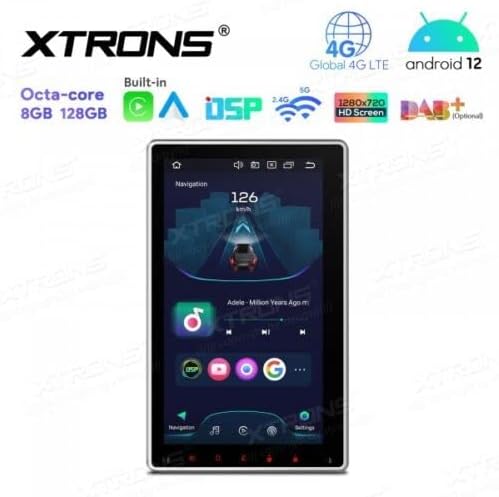
Figure 5.5: Vertical screen orientation for navigation.
6. Wartung
Durch sachgemäße Wartung wird die Langlebigkeit und optimale Leistung Ihres Autoradios sichergestellt.
- Reinigen des Bildschirms: Verwenden Sie ein weiches, fusselfreies Tuch, um den Touchscreen vorsichtig abzuwischen. Bei hartnäckigen Flecken etwas nachhelfen.ampReinigen Sie das Tuch mit Wasser oder einem für Bildschirme geeigneten Reiniger. Vermeiden Sie aggressive Chemikalien.
- Allgemeine Reinigung: Keep the unit and surrounding area free from dust and debris.
- Software-Updates: Überprüfen Sie regelmäßig die offizielle XTRONS-Website. website for available software or firmware updates to improve performance and add new features. Follow update instructions carefully.
7. Fehlerbehebung
If you encounter issues with your XTRONS TIX125L, refer to the following common problems and solutions.
| Problem | Mögliche Ursache | Lösung |
|---|---|---|
| Gerät lässt sich nicht einschalten. | Kein Stromanschluss, Sicherung durchgebrannt, falsche Verkabelung. | Check power wiring, vehicle fuse box, and the unit's fuse. Ensure battery is connected. |
| Kein Ton. | Volume muted, incorrect audio source, speaker wiring issues. | Check volume level, ensure correct audio source is selected. Verify speaker connections. |
| Poor GPS signal or no signal. | GPS antenna not connected, antenna obstructed, faulty antenna. | Ensure GPS antenna is securely connected and mounted in a clear location. Replace antenna if necessary. |
| Probleme mit der Bluetooth-Verbindung. | Gerät nicht im Kopplungsmodus, Störungen, fehlerhafter Kopplungsvorgang. | Stellen Sie sicher, dass sich beide Geräte im Kopplungsmodus befinden. Löschen Sie vorherige Kopplungen und versuchen Sie es erneut. Gehen Sie näher an das Gerät heran. |
| Touchscreen reagiert nicht. | Software glitch, screen dirty, hardware issue. | Starten Sie das Gerät neu. Reinigen Sie den Bildschirm. Sollte das Problem weiterhin bestehen, wenden Sie sich bitte an den Kundendienst. |
| Apps crash or freeze. | Insufficient memory, software bug, incompatible app. | Close background apps. Clear app cache. Update software if available. Uninstall and reinstall problematic apps. |
Sollte das Problem nach dem Ausprobieren dieser Lösungsansätze weiterhin bestehen, wenden Sie sich bitte an den XTRONS-Kundendienst, um weitere Unterstützung zu erhalten.
8. Spezifikationen
Below are the technical specifications for the XTRONS TIX125L car stereo:
- Marke: XTRONS
- Modell: TIX125L
- Bildschirmgröße: 10.1 Zoll
- Anzeigetyp: QLED, Capacitive Touchscreen, LED
- Betriebssystem: Android 12
- Prozessor: Achtkernprozessor
- RAM: 8 GB
- ROM: 128GB (Expandable via USB/SD)
- Konnektivität: Bluetooth 5.0, USB, Wi-Fi, 4G LTE (SIM card reader included)
- Navigation: Built-in GPS (Supports various map types)
- Besondere Merkmale: Apple CarPlay, Android Auto, Digital Sound Processor (DSP), Screen Mirroring, Rotatable Display, Equalizer
- Unterstützter Speicher: USB (bis zu 128 GB), SD (bis zu 64 GB)
- Kontrollmethode: Touch-Screen
- Montageart: Im Armaturenbrett
- Kompatibler Fahrzeugtyp: Motorrad (Note: Product description states 'Motocicletta', but typically these units are for cars. Please verify compatibility with your specific vehicle.)
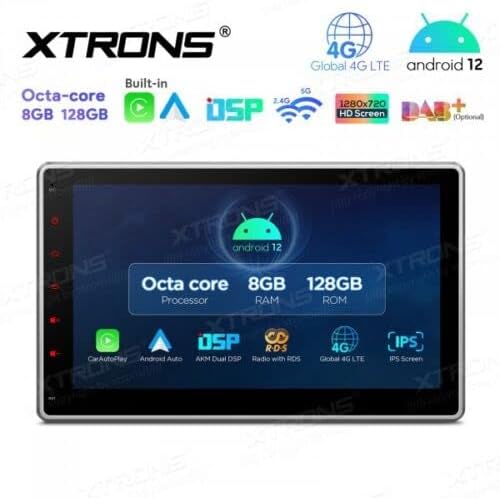
Abbildung 8.1: Wichtigste Merkmale und Spezifikationenview.
9. Garantie und Support
Informationen zur Garantie finden Sie auf der Ihrem Produkt beiliegenden Garantiekarte oder auf der offiziellen XTRONS-Website. website. If you require technical assistance, have questions about installation, or need troubleshooting beyond what is covered in this manual, please contact XTRONS customer support. Have your product model number (TIX125L) and purchase details ready when contacting support.
XTRONS Offiziell WebWebsite: www.xtrons.com (Please verify the exact support contact details on their webSeite? ˅.)