
Walfront WALFRONTnvmfsr1ioe
Upoty 4-in-1 Fiber OTDR & Power Meter User Manual
Model: WALFRONTnvmfsr1ioe
Marke: Walfront
1. Einleitung
This manual provides comprehensive instructions for the Upoty 4-in-1 Fiber OTDR & Power Meter, a portable fiber optic testing device. This versatile instrument integrates an Optical Time Domain Reflectometer (OTDR), Visual Fault Locator (VFL), Optical Power Meter (OPM), and Optical Light Source (OLS) into a single unit, designed for efficient fiber network construction, fault identification, length measurement, and power loss calculation.
Zu den Hauptmerkmalen gehören:
- Wide application for network construction, optical fiber breakpoint identification, optical cable length measurement, and relative optical power loss calculation.
- Durable ABS plastic housing for various environments.
- Optical power meter with 800-1650nm wavelength range, supporting 6 calibration wavelengths and a measurement range of -50~+26dBm.
- Equipped with a USB data interface, built-in 4400mAh lithium battery, and a 3.97-inch 800x480 IPS color touchable screen for easy operation.
- Portable design for practical multiple usages.
2. Einrichtung und Erstgebrauch
2.1 Auspacken und Komponenten
Packen Sie alle Komponenten vorsichtig aus dem Karton aus. Überprüfen Sie, ob alle unten aufgeführten Artikel vorhanden sind:
- Upoty 4-in-1 Fiber OTDR & Power Meter Mainframe
- Ladegerät
- Instrument Bag
- Rückengurt
- OTDR SC-Adapter
- OPM SC Adapter
- Bedienungsanleitung (dieses Dokument)
- CD-ROM
- USB-Datenkabel
- Reinigungswattestäbchen

Abbildung 2.1: Überview of the Upoty 4-in-1 Fiber OTDR & Power Meter and its included accessories.
Eine visuelle Anleitung zum Auspacken und zur ersten Einrichtung finden Sie im folgenden Video:
Video 2.1: Auspacken und überview of the Upoty 4-in-1 Fiber OTDR & Power Meter components. This segment demonstrates the contents of the product packaging, including the main unit, charger, and various accessories.
2.2 Aufladen des Geräts
The device is equipped with a built-in 4400mAh lithium battery. Before first use, ensure the device is fully charged. Connect the provided charger to the device's charging port and plug it into a 100-240V AC power outlet. The charging indicator will illuminate during charging and turn off when fully charged.
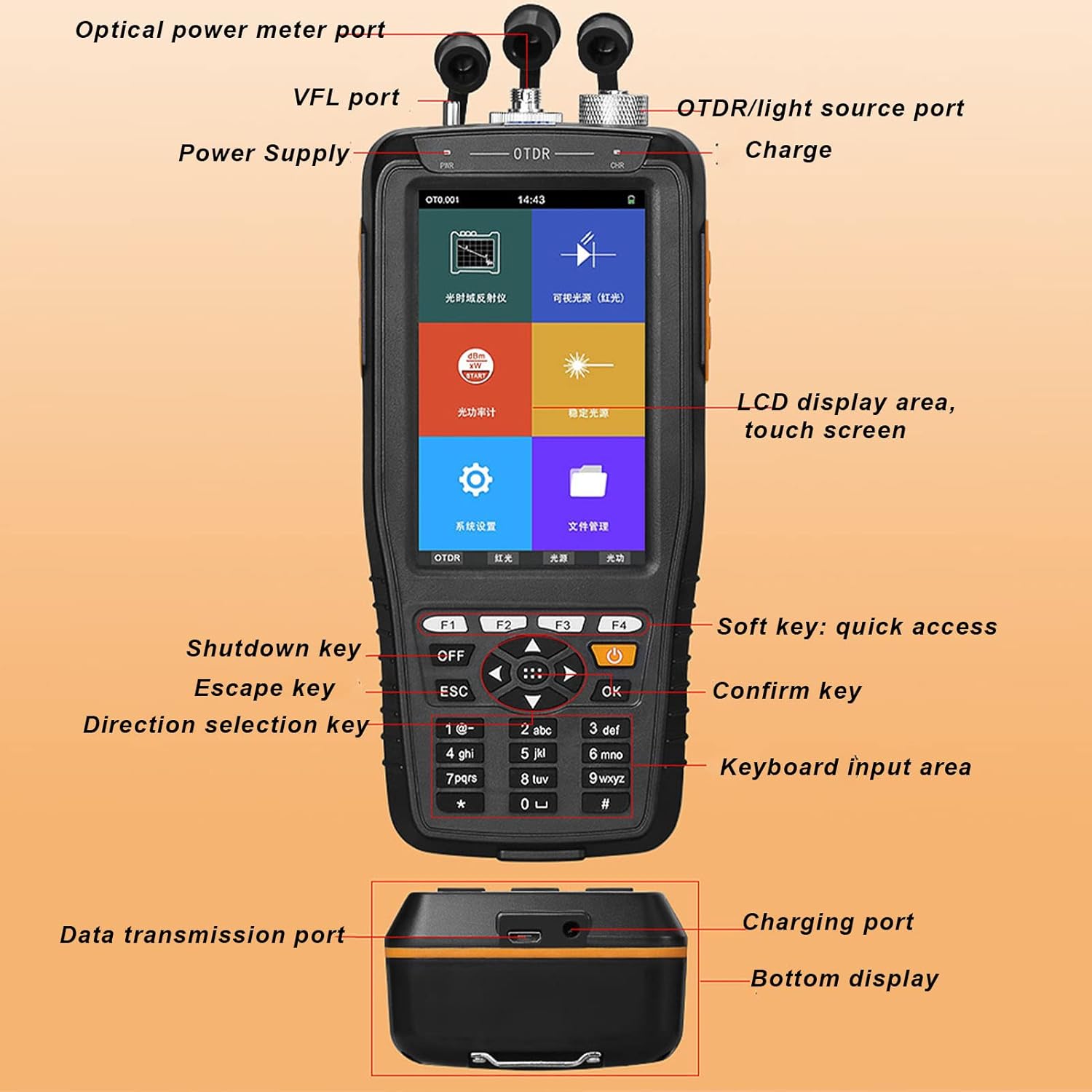
Figure 2.2: The device's battery compartment, highlighting the 4400mAh lithium battery.
2.3 Anschlussadapter
The OTDR and OPM ports support SC/FC adapters. Ensure the correct adapter is securely connected for accurate measurements. The VFL port is compatible with a 2.5mm interface.
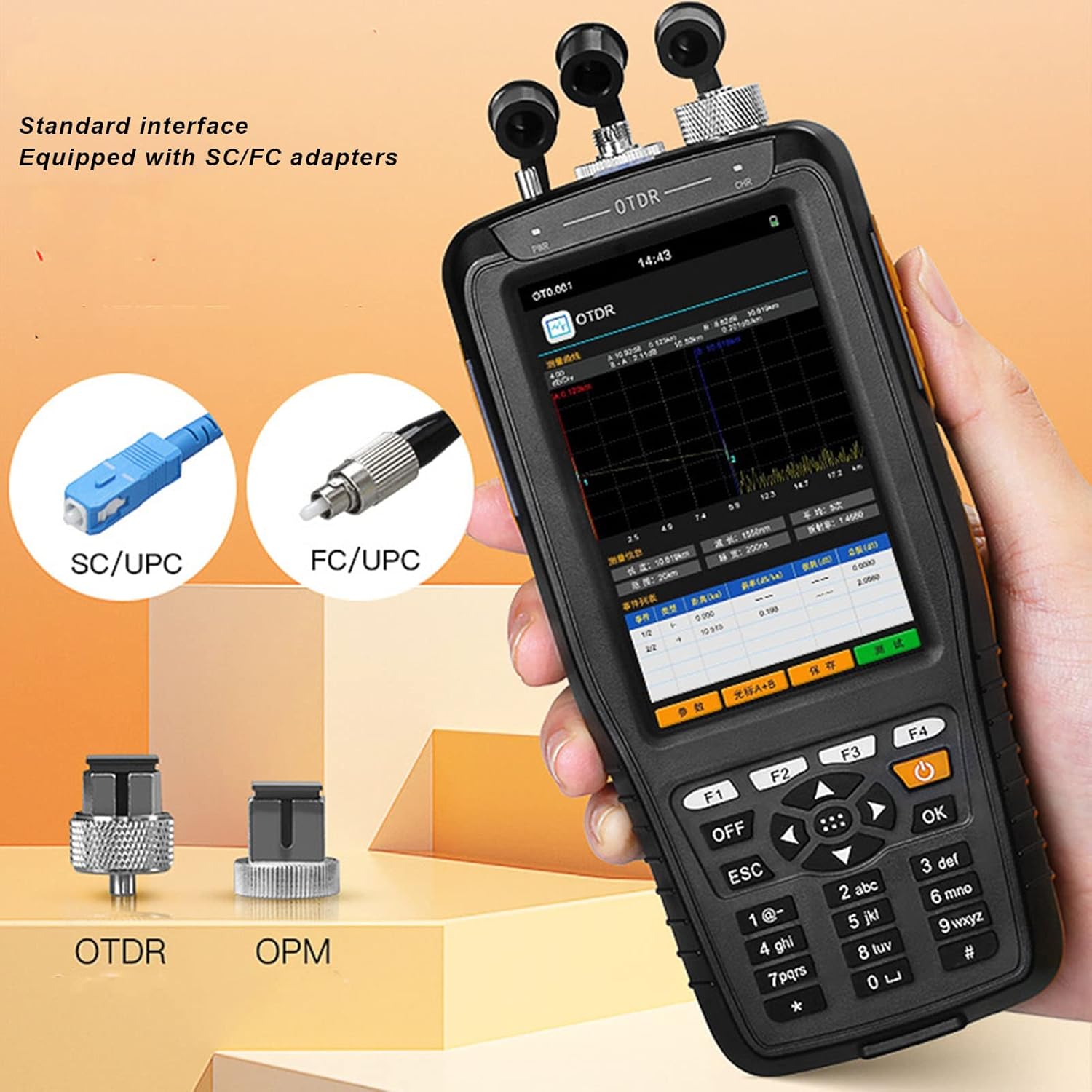
Figure 2.3: Standard interface adapters for the OTDR and OPM ports, showing SC/UPC and FC/UPC types.
3. Bedienungsanleitung
3.1 Gerät überview und Navigation
The device features a 3.97-inch 800x480 IPS color touchable screen and a physical keypad for navigation. You can interact with the device using either the touch screen or the physical buttons.
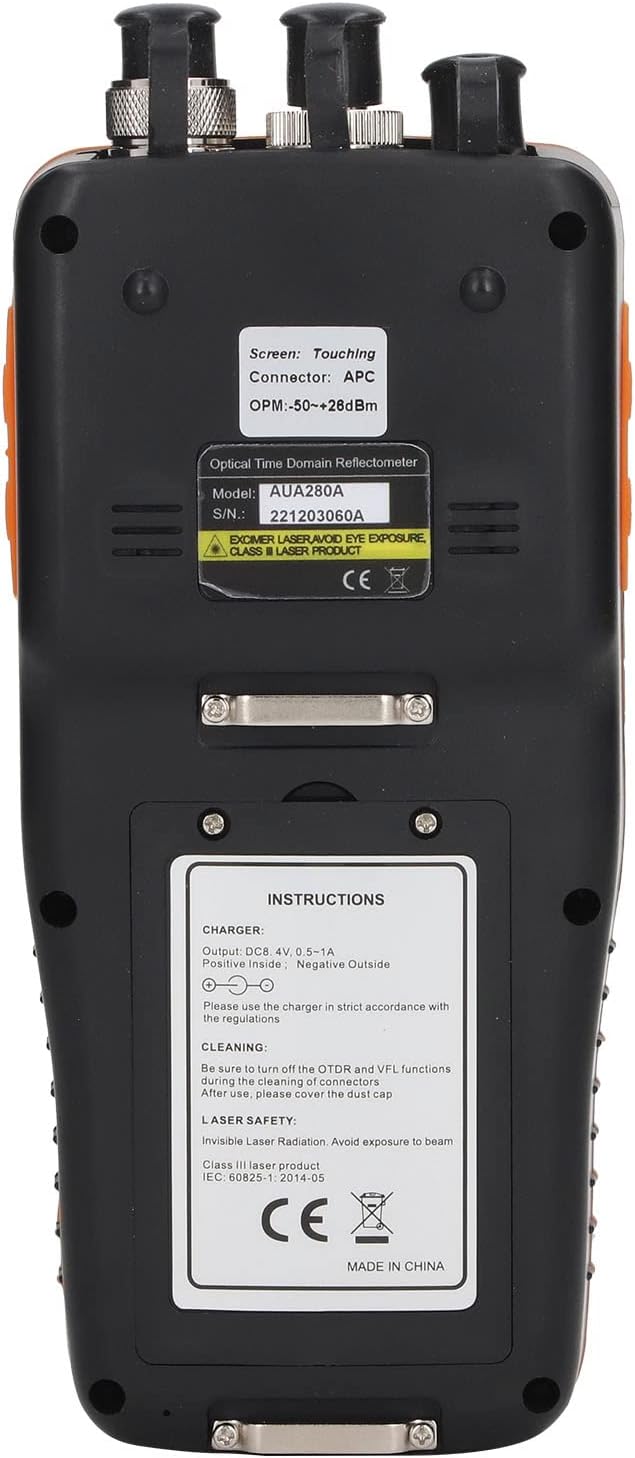
Abbildung 3.1: Ausführlich view of the device's interface and ports.
3.2 OTDR Function
The OTDR (Optical Time Domain Reflectometer) function is used to characterize optical fibers, measure fiber length, and locate faults. To use the OTDR function, select "OTDR" from the main menu. Ensure the fiber is properly connected to the OTDR port. The device will display a trace of the fiber, showing events like splices, connectors, and breaks.

Figure 3.2: Main menu of the device, showing access to various functions.
Watch the video below for a demonstration of the OTDR function:
Video 3.1: Demonstration of the OTDR test function, showing how to initiate a test and interpret the fiber trace.
3.3 Funktion des visuellen Fehlerortungsgeräts (VFL)
The VFL function emits a visible red laser light into the fiber, allowing for quick identification of breaks, bends, or poor connections over short distances. Select "VFL" from the main menu and connect the fiber to the VFL port. The red light will be visible at the fault location.

Figure 3.3: Multi-function display highlighting the VFL (Red Light) capability.
See the VFL function in action:
Video 3.2: Demonstration of the Visual Fault Locator (VFL) function, showing how the red light helps identify fiber faults.
3.4 Funktion des optischen Leistungsmessers (OPM)
The OPM measures the optical power of a fiber optic signal. Select "OPM" from the main menu. The device supports 6 calibration wavelengths (850nm, 1300nm, 1310nm, 1490nm, 1550nm, 1625nm) and has a measurement range of -50~+26dBm. Ensure the correct wavelength is selected for accurate readings.
Observe the OPM function demonstration:
Video 3.3: Demonstration of the Optical Power Meter (OPM) function, showing how to select wavelengths and read power measurements.
3.5 Optical Light Source (OLS) Function
The OLS provides a stable light source for testing fiber optic cables, often used in conjunction with an OPM for attenuation measurements. Select "OLS" from the main menu. The light source offers optional 1550nm wavelength.
See the OLS function in operation:
Video 3.4: Demonstration of the Stable Light Source (OLS) function, showing wavelength selection.
3.6 Datenmanagement
The device supports data saving in SOR format and allows for keyboard input to edit file names and line numbers. You can access saved data through the "File" menu. The USB data interface allows for data transmission to a computer.

Abbildung 3.4: Oben view of the device showing the various ports for fiber connections.
4. Wartung
4.1 Reinigung
Regular cleaning of the optical ports and connectors is crucial for accurate measurements and device longevity. Use the provided cleaning cotton swabs or other approved fiber optic cleaning tools. Always turn off the OTDR and VFL functions before cleaning to prevent eye exposure to laser radiation. After cleaning, ensure to cover the dust caps on all ports.

Figure 4.1: Back panel of the device with important instructions, including cleaning guidelines.
4.2 Batteriepflege
To maximize battery life, avoid fully discharging the battery frequently. Recharge the device when the battery level is low. If the device will not be used for an extended period, charge it to approximately 50% and store it in a cool, dry place.
4.3 Allgemeine Pflege
Store the device in its instrument bag when not in use to protect it from dust and physical damage. Avoid exposing the device to extreme temperatures or humidity.
5. Fehlerbehebung
This section provides solutions to common issues you might encounter with your Upoty 4-in-1 Fiber OTDR & Power Meter.
| Problem | Mögliche Ursache | Lösung |
|---|---|---|
| Gerät lässt sich nicht einschalten. | Schwache Batterie; Einschalttaste nicht richtig gedrückt. | Laden Sie das Gerät vollständig auf. Halten Sie den Ein-/Ausschalter einige Sekunden lang gedrückt. |
| Inaccurate OPM/OTDR readings. | Dirty optical connectors; Incorrect wavelength selected; Damaged fiber. | Clean all optical connectors. Ensure the correct wavelength is selected for OPM. Inspect the fiber for damage. |
| Das VFL-Licht ist schwach oder nicht sichtbar. | Dirty VFL port; Fiber not properly connected; VFL function not activated. | Clean the VFL port. Ensure the fiber is securely connected. Activate the VFL function from the menu. |
| Touchscreen reagiert nicht. | Vorübergehender Softwarefehler; Störung durch Displayschutzfolie. | Restart the device. If a screen protector is installed, ensure it is properly applied or try removing it temporarily. Use physical buttons if touch is completely unresponsive. |
Sollte das Problem nach dem Ausprobieren dieser Lösungsansätze weiterhin bestehen, wenden Sie sich bitte an den Kundendienst, um weitere Unterstützung zu erhalten.
6. Spezifikationen
| Besonderheit | Detail |
|---|---|
| Modellnummer | WALFRONTnvmfsr1ioe |
| Stromquelle | Battery Powered (Built-in 4400mAh Lithium Battery) |
| Mindest. Betriebsvoltage | 100 Volt (Wechselstrom) |
| Obere Temperaturbewertung | 85 Grad Celsius |
| Messtyp | Optical Power Meter, OTDR, VFL, OLS |
| Bildschirm | 3.97-inch 800x480 IPS Color Touchable Screen |
| Wavelength Range (OPM) | 800-1650 nm |
| Measurement Range (OPM) | -50 ~ + 26dBm |
| OTDR Test Distance | Up to 60km (as per product images) |
| VFL-Ausgangsleistung | 10mW (as per product images) |
| Wellenlänge der Lichtquelle | 1550nm (optional) |
| Technische Daten | 8.62 x 7.36 x 3.9 Zoll (Verpackungsmaße) |
| Artikelgewicht | 1.85 Pfund |
| Ursprungsland | China |
Abbildung 6.1: Geräteabmessungen.
7. Garantie und Support
For information regarding warranty coverage, technical support, or service, please refer to the official Walfront webSie können die Website besuchen oder sich direkt an den Kundenservice wenden. Die Kontaktdaten finden Sie in der Regel auf der Produktverpackung oder auf den offiziellen Online-Kanälen des Herstellers.
Ask a question about this manual
Ask about setup, troubleshooting, compatibility, parts, safety, or missing instructions. Manuals+ will review the question and use this page’s manual context to help answer it.