
Produkt überview
The Clarion JM-Carry On is a portable speaker designed for versatile audio playback. It features a wired microphone input, multi-color light effects, and an in-built battery for on-the-go use. Its compact and portable design allows for easy transport and setup in various environments.

Image: Clarion JM-Carry On Portable Bluetooth Speaker shown with its wired microphone.
Video: Ein überview of the Clarion Portable Bluetooth Speaker, highlighting its features and audio performance.
Packungsinhalt
Bitte kreuzen Sie das Kästchen für die folgenden Elemente an:
- Clarion JM-Carry On Portable Bluetooth Speaker
- Kabelgebundenes Mikrofon
- Ladekabel
Ersteinrichtung
- Aufladen des Lautsprechers: Connect the provided charging cable to the speaker's charging port and a suitable power source. The LED indicator will show charging status. Ensure the speaker is fully charged before first use for optimal battery life.
- Ein-/Ausschalten: Locate the power switch on the speaker. Slide it to the 'ON' position to power on the device. Slide it to 'OFF' to power off.
- Bluetooth-Pairing:
- Schalten Sie den Lautsprecher ein. Er wechselt automatisch in den Bluetooth-Kopplungsmodus, was durch eine blinkende LED angezeigt wird.
- Aktivieren Sie auf Ihrem Smartphone oder Tablet Bluetooth und suchen Sie nach verfügbaren Geräten.
- Select "Clarion JM-Carry On" from the list. A confirmation tone will sound upon successful pairing.
- Connecting Wired Microphone: Insert the wired microphone's plug into the designated microphone input jack on the speaker.
Bedienungsanleitung
- Modusauswahl: Use the 'Mode' button to switch between Bluetooth (BT), FM Radio, USB, and AUX input modes.
- Bluetooth-Modus: Once paired, audio from your connected device will play through the speaker. Use your device or the speaker's controls for volume and track navigation.
- UKW-Radiomodus: In FM mode, press and hold the 'Play/Pause' button to auto-scan and save available radio stations. Use the 'Next/Previous' buttons to navigate through saved stations.
- USB/AUX-Modus: Insert a USB drive into the USB port for MP3 playback or connect an external audio device via the AUX input using a 3.5mm audio cable.
- TWS (True Wireless Stereo) Functionality: To connect two JM-Carry On speakers for stereo sound, ensure both speakers are in Bluetooth mode and not connected to any device. Press and hold the TWS button on one speaker until you hear a pairing tone. The two speakers will connect, and then you can pair your device to the primary speaker.
- Klangsteuerung: Adjust the master volume using the main rotary knob. Separate controls may be available for microphone volume and echo effects.
- LED-Lichteffekte: The speaker features multi-color LED light effects. Use the dedicated 'Light' button to cycle through different light modes or turn them off.
Pflege und Wartung
- Reinigung: Reinigen Sie die Außenseite des Lautsprechers mit einem weichen, trockenen Tuch. Verwenden Sie keine Scheuermittel oder Lösungsmittel.
- Lagerung: Bewahren Sie den Lautsprecher an einem kühlen, trockenen Ort fern von direkter Sonneneinstrahlung und extremen Temperaturen auf.
- Batteriepflege: Um die Akkulaufzeit zu verlängern, vermeiden Sie häufiges vollständiges Entladen des Akkus. Laden Sie den Lautsprecher regelmäßig auf, auch wenn er längere Zeit nicht benutzt wird.
- Wasserbeständigkeit: Dieser Lautsprecher ist nicht wasserdicht. Vermeiden Sie den Kontakt mit Wasser und hoher Luftfeuchtigkeit.
Anleitung zur Fehlerbehebung
| Problem | Lösung |
|---|---|
| Der Lautsprecher lässt sich nicht einschalten. | Stellen Sie sicher, dass der Akku geladen ist. Schließen Sie das Ladekabel an und versuchen Sie es erneut. Überprüfen Sie die Position des Netzschalters. |
| Kein Ton aus dem Lautsprecher. | Check the volume level on both the speaker and the connected device. Ensure the correct input mode (BT, AUX, USB) is selected. |
| Die Bluetooth-Kopplung schlägt fehl. | Ensure the speaker is in pairing mode. Turn off and on Bluetooth on your device. Move the device closer to the speaker. Disconnect from other Bluetooth devices. |
| Das Mikrofon funktioniert nicht. | Ensure the microphone is securely plugged into the correct jack. Check the microphone volume control on the speaker. |
| Der FM-Radioempfang ist schlecht. | Adjust the speaker's position. Extend any external antenna if available. |
Technische Spezifikationen
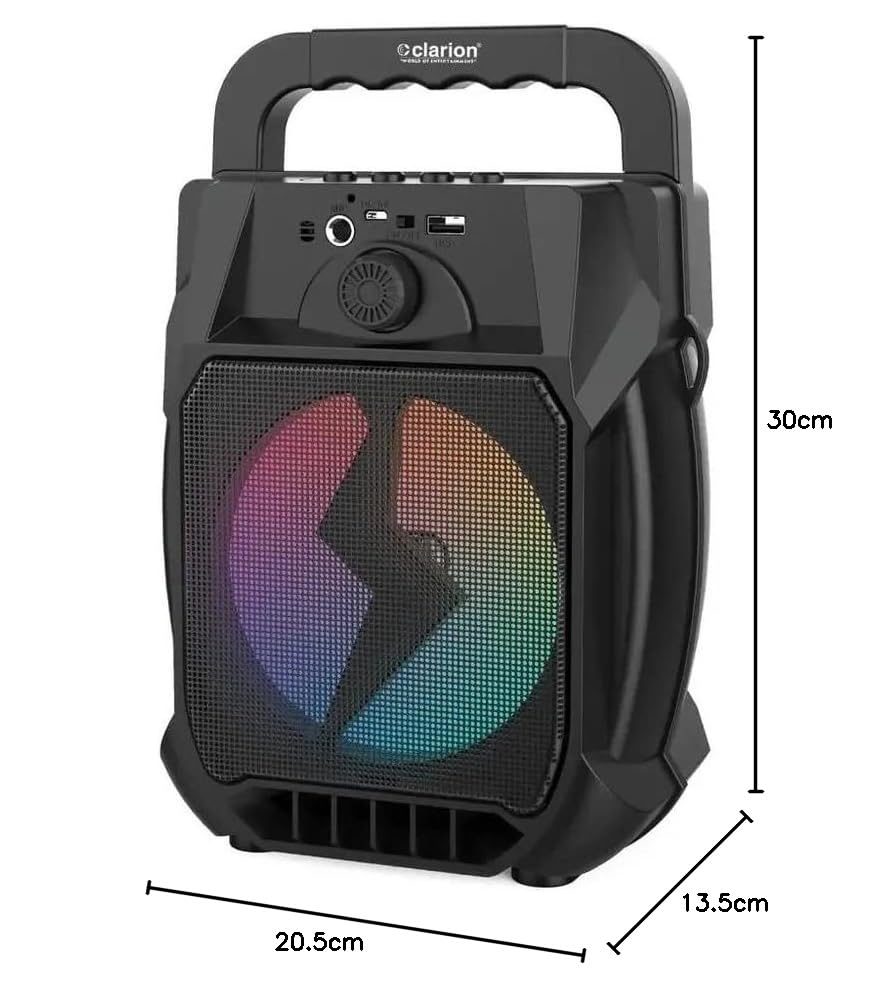
Image: Clarion JM-Carry On Portable Bluetooth Speaker with its dimensions indicated.
- Marke: Clarion (Generic)
- Modellname: JM-Carry On
- Maximale Ausgangsleistung des Lautsprechers: 20 Watt RMS
- Konnektivitätstechnologie: Aux-Anschluss, Bluetooth, USB
- Audioausgabemodus: Stereo
- Montageart: Bodenständig
- Lautsprechertyp: Satellit
- Produkteigenschaften: Built-In Microphone, Radio, Subwoofer, Multi-color Light Effect, Sound Controller
- Kontrollmethode: Berühren
- Woofer Driver Diameter: 6.5 Zoll
- Durchschnittliche Batterielebensdauer: 3-4 Stunden
- Batteriekapazität: 1.2 Amp Stunden (3.7 V)
- Artikelabmessungen (T x B x H): 13.5 x 20.5 x 30 Zentimeter
- Kompatible Geräte: Smartphone, Tablet
- Energiequelle: Batteriebetrieben
Garantie und Kundendienst
This Clarion JM-Carry On Portable Bluetooth Speaker comes with a 1 Jahr Garantie on the speaker unit from the date of purchase. Please retain your purchase receipt as proof of warranty.
For any technical assistance, troubleshooting, or warranty claims, please contact Clarion Computers customer support. Refer to your purchase documentation for specific contact details or visit the official Clarion Computers webWebsite für Supportinformationen.
Note: The warranty typically covers manufacturing defects and does not cover damage caused by misuse, accidents, unauthorized modifications, or normal wear and tear.