
1. Einleitung
This manual provides detailed instructions for the amazon basics Wired Gaming Mouse, Model ABIM03. This mouse is designed to enhance your gaming and computing experience with its adjustable DPI, customizable RGB lighting, and programmable buttons. Please read this manual thoroughly before use to ensure proper operation and longevity of your device.
2. Produktmerkmale
- Einstellbare DPI: Up to 6400 DPI for precise cursor control and quick movements.
- Anpassbare RGB-Beleuchtung: Personalize your mouse with various RGB lighting modes and driver customization options for PC.
- Programmierbare Tasten: Equipped with multiple programmable buttons for assigning custom functions or macros.
- Gaming-Grade Sensor: Ensures accurate tracking and rapid response for gaming.
- Langlebiges Design: Features extra durable switches and enhanced build quality for extended use.
- Honeycomb Grip: Ergonomic honeycomb design provides a comfortable and secure grip.

Image: The amazon basics Wired Gaming Mouse highlighting its adjustable DPI settings, ranging from 1200 to 7200 (though product states up to 6400).
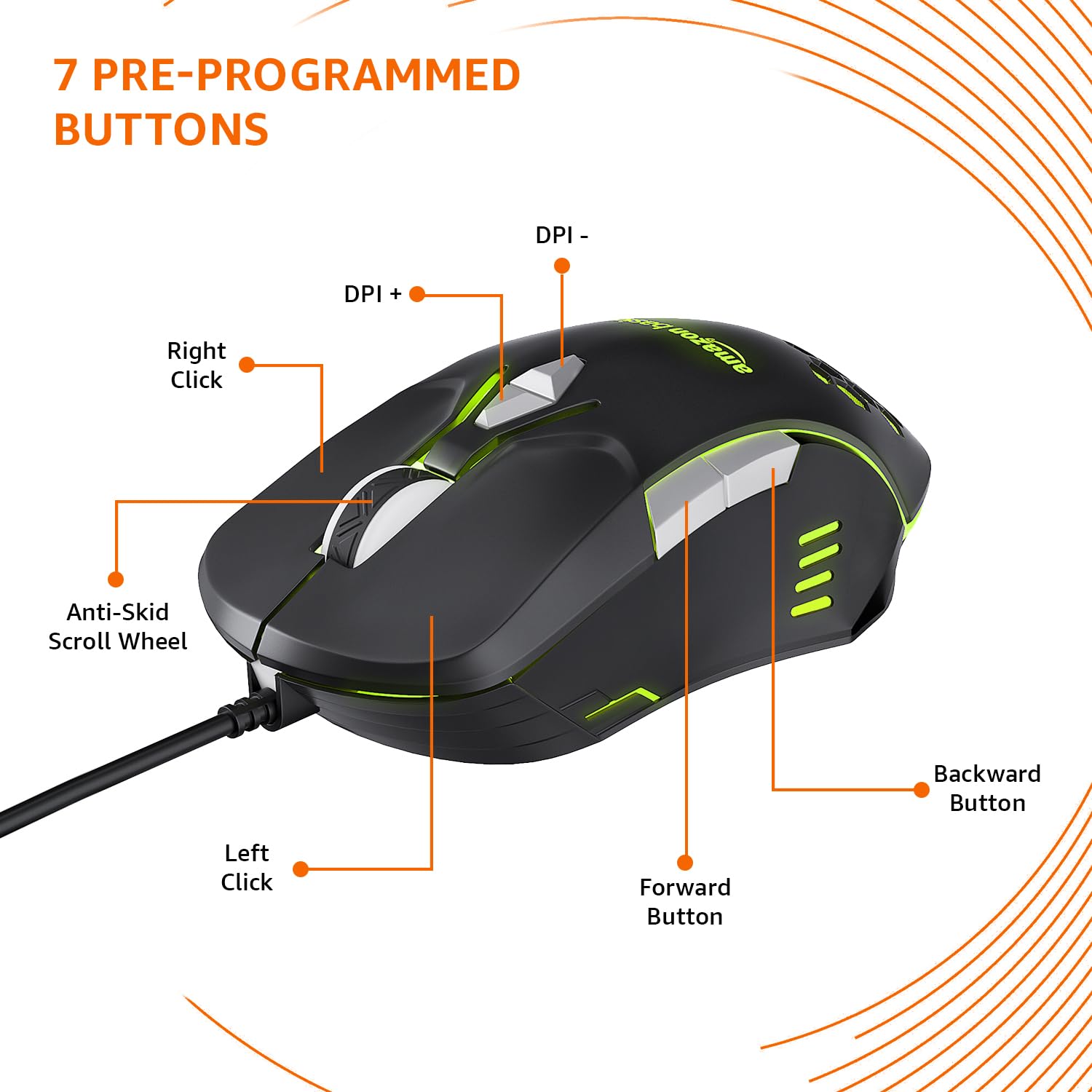
Image: The amazon basics Wired Gaming Mouse showing its 7 pre-programmed buttons, including Left Click, Right Click, Anti-Skid Scroll Wheel, DPI+, DPI-, Forward Button, and Backward Button.

Bild: Eine Draufsicht view of the amazon basics Wired Gaming Mouse, emphasizing its honeycomb-designed surface for improved grip and airflow.

Image: The amazon basics Wired Gaming Mouse illuminated with red RGB lighting, showcasing its light and comfortable design.
3. Einrichtungsanweisungen
- Maus auspacken: Nehmen Sie die Gaming-Maus vorsichtig aus der Verpackung.
- Mit PC verbinden: Stecken Sie den USB-Stecker der Maus in einen freien USB-Port Ihres Computers.
- Treiberinstallation: Your operating system (Windows, Linux) should automatically detect and install the necessary drivers. If prompted, follow the on-screen instructions. For advanced customization of RGB and programmable keys, refer to the manufacturer's website for specific driver software.
- Platzierung: Für eine optimale Leistung platzieren Sie die Maus auf einer flachen, sauberen Oberfläche oder einem Mauspad.
4. Bedienungsanleitung
4.1 Grundlegende Funktionalität
- Links Klick: Primäre Aktion, Auswahl.
- Rechtsklick: Sekundäraktion, Kontextmenüs.
- Scrollrad: Scroll up/down pages. Pressing the scroll wheel often acts as a middle click.
- Vorwärts-/Rückwärtstasten: Wird typischerweise zur Navigation verwendet in web Browser bzw file Entdecker.
4.2 Einstellen der DPI-Zahl (Dots Per Inch)
The mouse features dedicated DPI adjustment buttons (DPI+ and DPI-) to change cursor sensitivity on the fly. Press these buttons to cycle through different DPI levels up to 6400. A higher DPI setting results in faster cursor movement across the screen with less physical mouse movement.
4.3 Customizing RGB Lighting
The mouse includes customizable RGB lighting. Specific lighting modes can often be cycled through using a dedicated button (if present) or through the optional driver software. Refer to the driver software for advanced customization options, including color selection, effects, and brightness.
4.4 Programming Buttons
The mouse is equipped with programmable buttons. To assign custom functions, macros, or key combinations to these buttons, you will need to install and use the specific driver software provided by the manufacturer. This software typically allows you to create profiles für verschiedene Anwendungen oder Spiele.
Video: A short product highlight video demonstrating the key features of the amazon basics Wired Gaming Mouse, including adjustable DPI, RGB lighting, programmable buttons, and durable design.
5. Wartung
- Reinigung: Reinigen Sie die Außenseite der Maus mit einem weichen, trockenen Tuch. Bei hartnäckigem Schmutz kann ein leicht feuchtes Tuch helfen.amp Man kann ein Tuch verwenden, um sicherzustellen, dass keine Flüssigkeit in die Maus eindringt.
- Sensorreinigung: Gelegentlich mit einem Wattestäbchen leicht abtupfen.ampened with isopropyl alcohol to gently clean the optical sensor on the underside of the mouse. Ensure the mouse is disconnected before cleaning.
- Vermeiden Sie Flüssigkeiten: Do not immerse the mouse in water or any cleaning solutions.
- Lagerung: Bewahren Sie die Maus an einem kühlen, trockenen Ort fern von direkter Sonneneinstrahlung und extremen Temperaturen auf.
6. Fehlerbehebung
| Problem | Lösung |
|---|---|
| Maus reagiert nicht. |
|
| Die Cursorbewegung ist unregelmäßig oder sprunghaft. |
|
| Programmable buttons are not working. |
|
| Die RGB-Beleuchtung funktioniert nicht oder ist defekt. |
|
7. Spezifikationen
| Besonderheit | Detail |
|---|---|
| Marke | Amazon-Grundlagen |
| Modellnummer | ABIM03 |
| Konnektivitätstechnologie | Kabelgebunden (USB) |
| Bewegungserkennungstechnologie | Optisch |
| DPI-Bereich | Bis zu 6400 DPI |
| Programmierbare Tasten | 4 (in addition to standard left/right click and scroll) |
| Beleuchtung | RGB |
| Farbe | Schwarz |
| Artikelgewicht | 145 g |
| Produktabmessungen (L x B x H) | 15.8 x 10.4 x 5.4 cm |
| Hardware-Plattform | PC |
| Betriebssystemkompatibilität | Linux, Windows 7 and above |
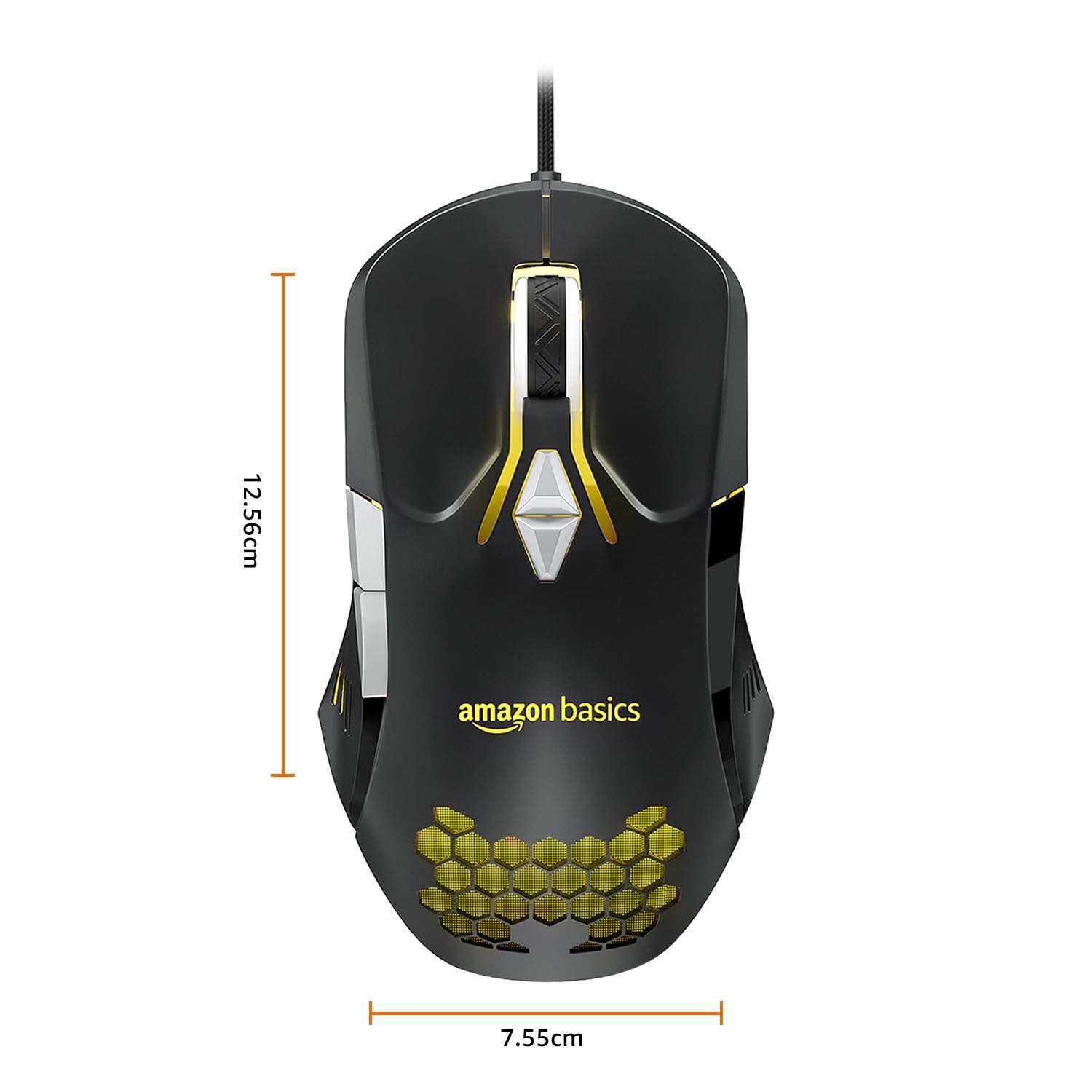
Image: The amazon basics Wired Gaming Mouse with its length (12.56cm) and width (7.55cm) dimensions indicated.
8. Garantieinformationen
This amazon basics Wired Gaming Mouse comes with a 1 Jahr Garantie from the date of purchase. This warranty covers manufacturing defects and issues arising from normal use. It does not cover damage caused by misuse, accidents, unauthorized modifications, or normal wear and tear. Please retain your proof of purchase for warranty claims.
9. Unterstützung
For further assistance, technical support, or warranty claims, please visit the official amazon basics support page or contact customer service through your purchase platform. Ensure you have your product model number (ABIM03) and proof of purchase ready when contacting support.
Online-Ressourcen:
- Produktseite: amazon.in/dp/B0BTD2YN6Y
- amazon basics Store: Amazon Basics Store