
1. Einleitung
Thank you for choosing the Devoko Electric Height Adjustable Desk. This manual provides essential information for the safe and efficient operation of your new desk. Please read it thoroughly before assembly and use, and retain it for future reference.
This desk is designed to promote healthy work habits by allowing you to easily switch between sitting and standing positions, which can help reduce the effects of a sedentary lifestyle and alleviate back pain.
2. Sicherheitshinweise
- Vor der Montage sicherstellen, dass alle Komponenten vorhanden und unbeschädigt sind. Nicht verwenden, wenn Teile fehlen oder beschädigt sind.
- Um Verletzungen zu vermeiden, sollten Kinder und Haustiere während des Betriebs vom Schreibtisch ferngehalten werden.
- Halten Sie Ihre Hände oder andere Körperteile während der Höhenverstellung von beweglichen Teilen des Schreibtisches fern.
- Ensure there are no obstructions above or below the desk when adjusting its height. The anti-collision system is designed to prevent impacts, but caution is always advised.
- Do not overload the desk. The maximum load capacity is approximately 70 kg.
- Use only the power adapter supplied with the desk.
- Vor Reinigungs- oder Wartungsarbeiten die Stromversorgung unterbrechen.
- Dieses Produkt ist nur für den Gebrauch in Innenräumen vorgesehen.

Image: Desk highlighting 70KG load capacity, anti-collision system, 21mm/s lift speed, and quiet operation (under 45dB).
3. Packungsinhalt
Bitte überprüfen Sie das Paket, um sicherzustellen, dass alle Artikel enthalten sind:
- Desktop-Elemente (4 Teile)
- Schreibtischgestell (Beine, Querstange)
- Bedienfeld
- Netzteil und Kabel
- Kabelmanagementfach
- Mounting hardware (screws, Allen keys)
- Optional: Caster wheels (4 pieces)
- Bedienungsanleitung

Bild: Überview of the Devoko Electric Height Adjustable Desk setup, including optional caster wheels.
4. Aufbau und Montage
Assembly typically requires two people. Follow the detailed instructions provided in the separate assembly guide for step-by-step installation.
- Zusammenbau des Schreibtischgestells: Attach the legs to the crossbar using the provided screws.
- Desktop-Abschnitte anhängen: Secure the four desktop sections to the assembled frame. Ensure they are aligned correctly.
- Systemsteuerung installieren: Montieren Sie das Bedienfeld an der Unterseite des Schreibtisches an einer leicht zugänglichen Stelle.
- Kabel anschließen: Connect the motor cables to the control box and the control panel cable to the control box. Plug the power adapter into the control box and then into a power outlet.
- Kabelmanagement-Tray installieren: Attach the cable management tray to the underside of the desk to organize wires.
- Optional Caster Wheels: If desired, replace the standard feet with the provided caster wheels for mobility. The desk supports both fixed and mobile modes.
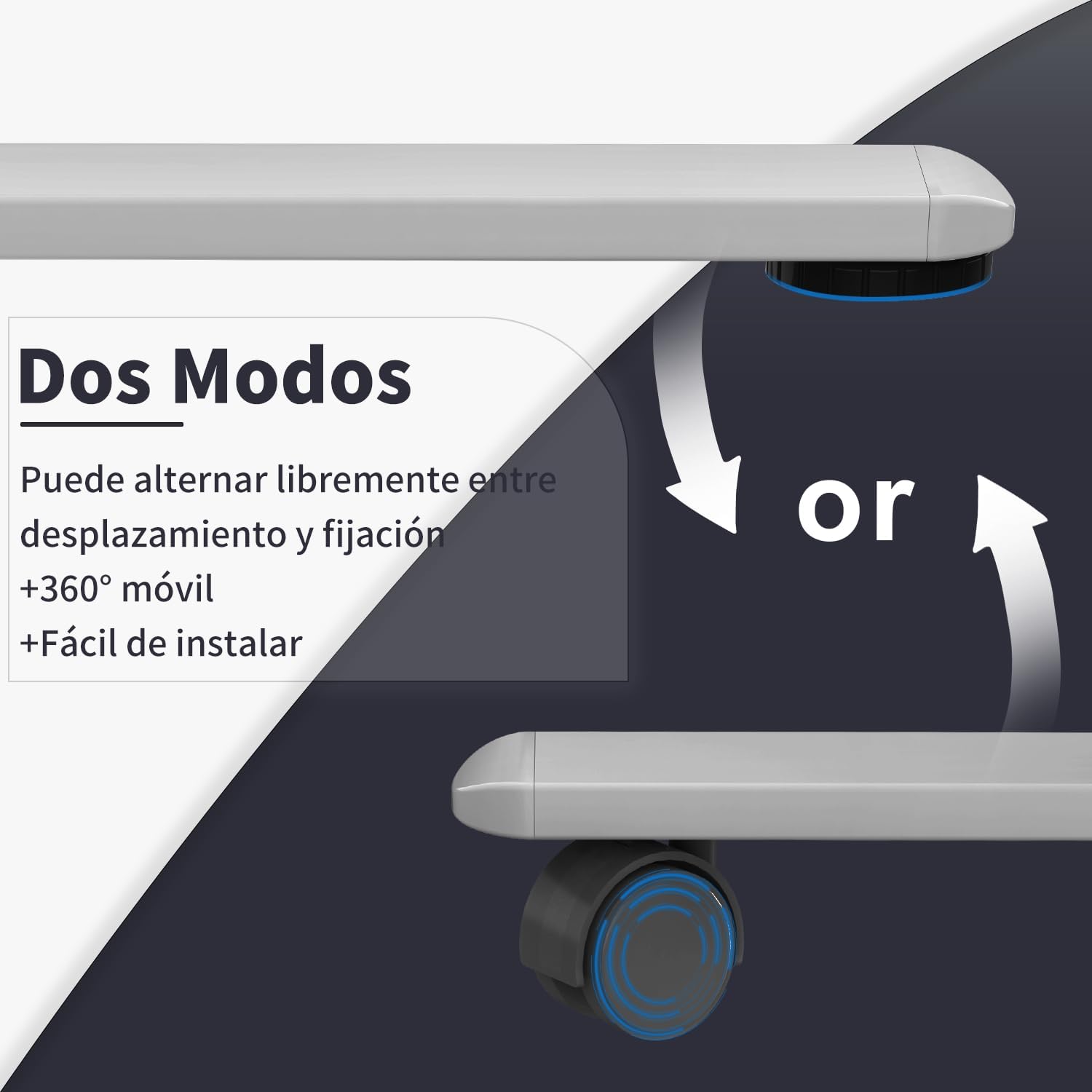
Image: Desk modes, illustrating the option to use fixed feet or 360-degree mobile caster wheels.
5. Bedienungsanleitung
5.1 Bedienfeld vorbeiview

Image: Multifunctional control panel with USB charging ports and height adjustment buttons.
- Auf-/Ab-Tasten (▲ / ▼): Zum manuellen Einstellen der Schreibtischhöhe drücken und halten.
- Speichervoreinstellungen (1, 2, 3): Store and recall preferred sitting and standing heights.
- "S" Button (Set): Used to save a memory preset.
- USB-C / USB-A Charging Ports: For charging compatible electronic devices.
5.2 Höhenverstellung
- Manuelle Einstellung: Halten Sie die Nach oben (▲) or Runter (▼) button until the desk reaches your desired height. Release the button to stop.
- Voreinstellungen im Speicher verwenden:
- Zu Save a Preset: Stellen Sie den Schreibtisch auf die gewünschte Höhe ein. Drücken Sie die Taste "S" button, then press one of the memory buttons (1, 2 oder 3) within 3 seconds. The display will show "S-" followed by the number to confirm.
- Zu Voreinstellung aufrufen: Drücken Sie die entsprechende Speichertaste (1, 2 oder 3Der Schreibtisch fährt automatisch auf die gespeicherte Höhe.
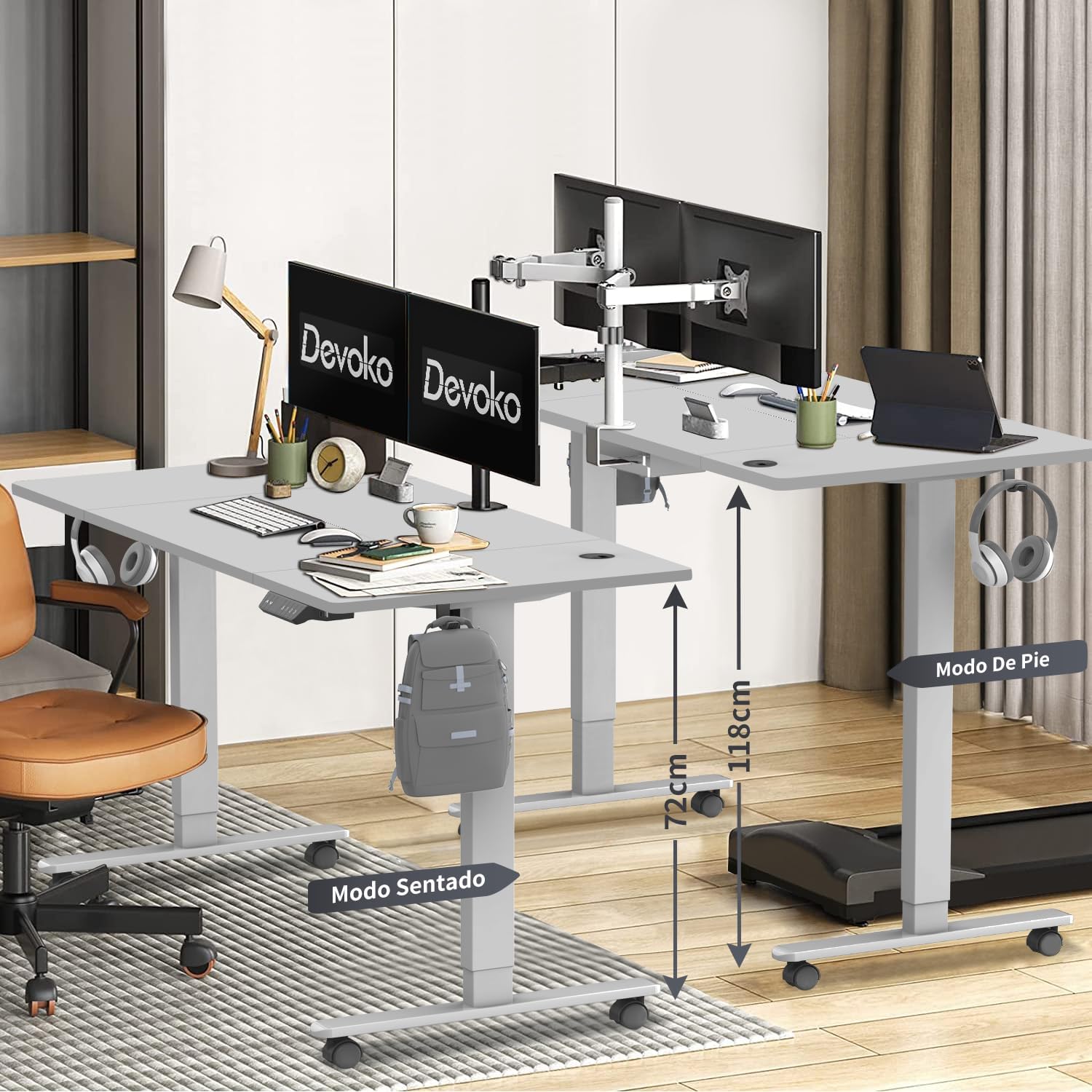
Image: Desk height adjustment range from 72cm (sitting) to 118cm (standing).
5.3 USB-Ladeanschlüsse
The integrated USB-C and USB-A ports allow you to conveniently charge your electronic devices directly from the desk. Simply connect your device's charging cable to the appropriate port.
6. Wartung
- Reinigung: Wischen Sie die Schreibtischoberfläche und den Rahmen mit einem weichen, fusselfreien Tuch ab.amp cloth. Avoid abrasive cleaners or solvents. Ensure the power is disconnected before cleaning.
- Kabelmanagement: Regularly check and organize cables in the cable management tray to prevent tangles and damage.
- Inspektion: Überprüfen Sie regelmäßig alle Schrauben und Verbindungen auf festen Sitz. Ziehen Sie sie gegebenenfalls nach.
7. Fehlerbehebung
| Problem | Mögliche Ursache | Lösung |
|---|---|---|
| Der Schreibtisch bewegt sich nicht. | Stromkabel nicht angeschlossen. Überlast. Motorfehler. |
Stromanschluss prüfen. Reduce weight on desk. Unplug for 10 minutes, then plug back in. If issue persists, contact support. |
| Der Schreibtisch wackelt ungleichmäßig oder macht ungewöhnliche Geräusche. | Lose Verbindungen. Obstruktion. |
Alle Schrauben prüfen und festziehen. Ensure no objects are interfering with the legs. |
| Das Antikollisionssystem löst häufig aus. | Sensitivity too high. Obstruktion. |
Check for obstructions. Refer to the full assembly guide for anti-collision sensitivity adjustment if available. |
| USB-Anschlüsse laden nicht. | Desk not powered. Geräteinkompatibilität. |
Ensure desk is plugged in and powered on. Try a different device or cable. |
8. Spezifikationen
- Marke: Devoko
- Modellnummer: 0428
- Farbe: Grau
- Desktop-Abmessungen: 160 cm (Länge) x 80 cm (Breite)
- Einstellbarer Höhenbereich: 72 cm - 118 cm
- Materialien: Engineered Wood (Desktop), Steel/Metal (Frame)
- Produktgewicht: 25.6 kg
- Max Belastbarkeit: Ca. 70 kg
- Lift Speed: 20 mm/s
- Geräuschpegel: < 45 dB
- Besondere Merkmale: USB-C & USB-A Charging Ports, 3 Memory Presets, Anti-Collision System, Optional Caster Wheels
- Zertifizierungen: TÜV, CE

Image: Desk dimensions (160cm x 80cm) with protective edge detail.
9. Garantie und Support
Garantie: The Devoko Electric Height Adjustable Desk comes with a 5-year warranty on the motor and desk frame, effective from the date of purchase.
Rückgaberecht: A 30-day unconditional return policy is offered.
Kundendienst: For any installation issues, operational questions, or warranty claims, please contact Devoko customer support through the Amazon platform. We aim to respond to all inquiries within 24 hours.