
1. Einleitung
Thank you for choosing the HDWR wagPRO-P500 Platform Scale. This manual provides essential information for the safe and efficient operation, setup, and maintenance of your new scale. Please read this manual thoroughly before use and keep it for future reference.
The HDWR wagPRO-P500 is a robust platform scale designed for precise weighing of larger items in industrial, warehouse, agricultural, and logistics environments. It features a high capacity, accurate measurements, and a user-friendly interface.
2. Produktmerkmale
- Plattform: The scale features a spacious 60 x 45 cm platform for easy placement of goods, equipped with special tabs to prevent accidental slipping.
- Präzise Messung: Offers precise measurement for items weighing from 200 grams up to a maximum capacity of 500 kg, with an accuracy of 0.2 kg.
- Benutzerfreundliche Oberfläche: Features three easy-to-read, green backlit LCD digital displays showing product weight and unit price.
- Zusätzliche Funktionen: Includes useful functions such as Tare, unit price input, and totalization.
- Leistungsbetrieb: An integrated 4 Ah battery provides wireless operation for approximately 150 hours.

Image: Key features of the HDWR wagPRO-P500 scale, including display, hold function, unit conversion, accuracy, tare, and battery power.

Image: Details on measurement accuracy, charging process, the robust platform, and the clear display of the scale.
3. Einrichtungsanweisungen
- Auspacken: Carefully remove all components from the packaging. Verify that all parts are present: platform, display unit, support column, power adapter, and user manual.
- Assemble the Support Column: Attach the display support column to the platform base. Ensure it is securely fastened using the provided hardware.
- Attach the Display Unit: Mount the display unit onto the top of the support column. Connect the cable from the platform to the display unit.
- Platzierung: Place the scale on a firm, level, and stable surface to ensure accurate readings. Avoid areas with excessive vibration, drafts, or extreme temperature changes.
- Erstladung: Connect the scale to a power outlet using the supplied mains adapter. Allow the internal battery to fully charge before the first wireless use. The charging indicator on the display will show the charging status.

Image: An assembled HDWR wagPRO-P500 platform scale, ready for use.
4. Bedienungsanleitung
4.1 Ein-/Ausschalten
- Um die Waage einzuschalten, drücken Sie die Taste [EIN/AUS] Taste.
- To power off the scale, press and hold the [EIN/AUS] gedrückt, bis sich das Display ausschaltet.
4.2 Grundlegendes Wiegen
- Stellen Sie sicher, dass die Waage eingeschaltet ist und die Anzeige „0.00“ anzeigt.
- Carefully place the item to be weighed onto the center of the platform.
- Lesen Sie das auf dem Bildschirm angezeigte Gewicht ab.
4.3 Tara-Funktion
The Tare function allows you to subtract the weight of a container or packaging, so only the net weight of the contents is measured.
- Place the empty container onto the platform. The display will show its weight.
- Drücken Sie die [TARA] Drücken Sie die Taste. Die Anzeige wird auf „0.00“ zurückgesetzt.
- Place the items to be weighed into the container. The display will now show only the weight of the items.
- To clear the tare, remove the container and items, then press [TARA] wieder.
4.4 Einheitenumrechnung
The scale supports measurement in kilograms (kg) and pounds (lb).
- To switch between units, press the [EINHEITEN] button (or similar button as indicated on your display). The active unit will be shown on the display.
4.5 Price Calculation (if applicable)
If your model supports price calculation, follow these steps:
- Platzieren Sie den Artikel auf der Plattform.
- Using the numeric keypad, enter the unit price.
- The total price will be displayed automatically.
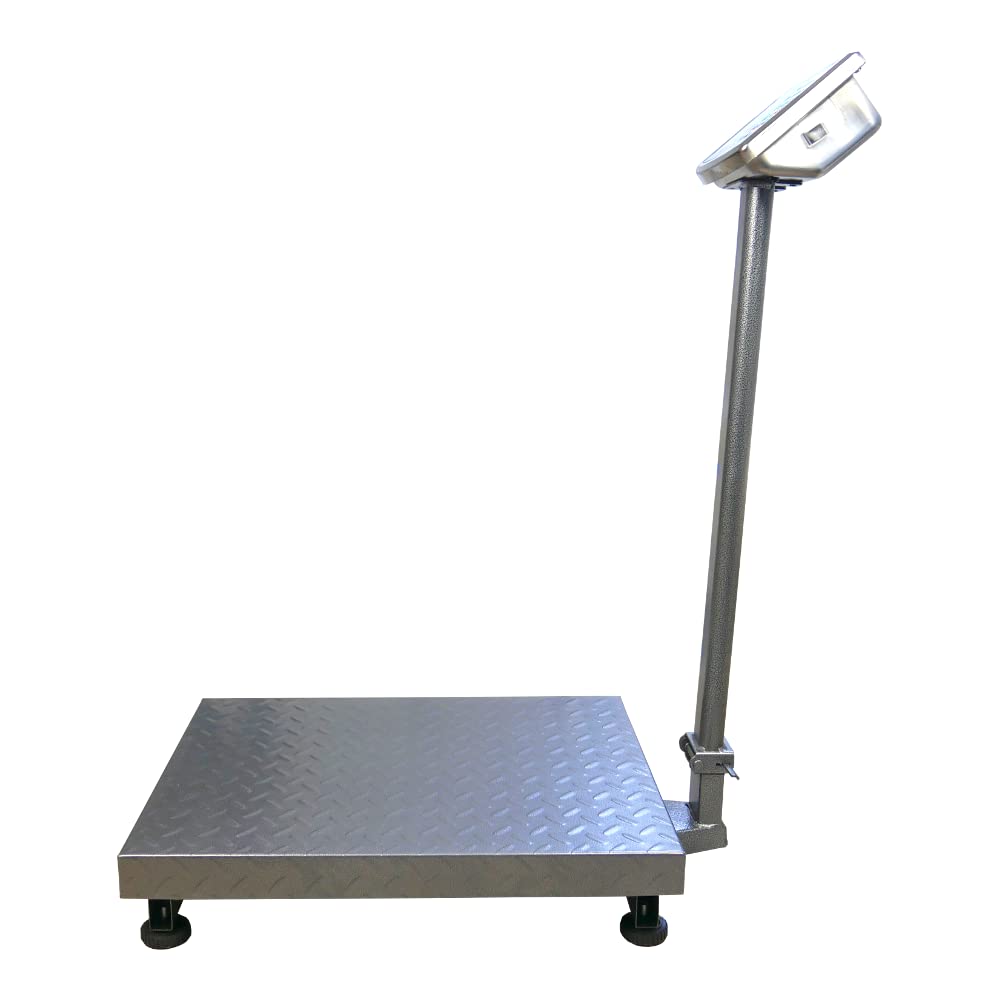
Bild: Eine detaillierte view of the scale's green backlit LCD display and control keypad, showing weight, unit price, and total price fields.
5. Wartung
5.1 Reinigung
- Vor der Reinigung muss die Waage immer vom Stromnetz getrennt werden.
- Wipe the platform and display unit with a soft, damp Stoff. Verwenden Sie bei Bedarf ein mildes Reinigungsmittel.
- Do not use abrasive cleaners, solvents, or immerse any part of the scale in water.
- Ensure no liquid enters the display unit or internal components.
5.2 Batteriepflege
- Laden Sie den Akku auf, sobald die Anzeige für niedrigen Akkustand auf dem Display erscheint.
- Um eine optimale Batterielebensdauer zu gewährleisten, vermeiden Sie es, die Batterie häufig vollständig zu entladen.
- If the scale is not used for an extended period, charge the battery every 3 months to prevent deep discharge.
5.3 Speicherung
- Store the scale in a dry, clean environment, away from direct sunlight and extreme temperatures.
- Avoid placing heavy objects on the platform during storage.

Bild: Eine Nahaufnahme view of the durable, textured metal platform, designed for secure placement of items.
6. Fehlerbehebung
| Problem | Mögliche Ursache | Lösung |
|---|---|---|
| Die Waage lässt sich nicht einschalten. | Der Akku ist leer oder das Netzteil ist nicht angeschlossen. | Connect the power adapter and charge the battery. Ensure the power outlet is functional. |
| Ungenaue Messwerte. | Scale not on a level surface, external vibrations, or overload. | Place the scale on a stable, level surface. Remove any sources of vibration. Do not exceed the maximum weight capacity. |
| Display shows 'Err' or similar error. | Overload, internal error, or unstable reading. | Remove the load from the platform. Power off and restart the scale. If the error persists, contact customer support. |
| Das Display ist dunkel oder flackert. | Schwache Batterie. | Recharge the battery using the provided power adapter. |
7. Spezifikationen
- Modell: wagPRO-P500
- Marke: HDWR
- Abmessungen (L x B x H): 75 x 45 x 88 cm
- Plattformabmessungen: 60 x 45 cm
- Gewicht: 11.6 kg
- Maximale Gewichtskapazität: 500 kg
- Lesegenauigkeit: 200 Gramm (0.2 kg)
- Messgenauigkeit: +/- 0.2 %
- Material: Metall
- Anzeigetyp: LCD mit grüner Hintergrundbeleuchtung
- Batterie: Integrated 4 Ah (approx. 150 hours wireless operation)
- Besondere Merkmale: Backlit display, high load capacity, tare function, large display, portable.
- Empfohlene Verwendung: Industry, agriculture, logistics, wholesale.

Image: Dimensions of the wagPRO-P500 platform scale, illustrating its robust design and size.
8. Garantie und Support
This product is supplied with a user manual. For information regarding warranty coverage, please refer to the documentation provided at the time of purchase or contact your retailer.
For technical support, service, or inquiries about spare parts, please contact HDWR customer service through their official website or the contact information provided with your purchase. Please have your model number (wagPRO-P500) and purchase date ready when contacting support.