
1. Produktüberschreitungview
The Kamon K1 wired earbuds are designed for audio playback and communication across various devices. They feature an in-ear design for sound isolation and include an in-line remote with an integrated microphone for convenient control.

Image 1.1: A user wearing Kamon K1 earbuds, demonstrating the product in use for audio listening.
Hauptmerkmale:
- Eingebautes Mikrofon: Ermöglicht Freisprechanrufe.
- Multi-functional In-line Remote: Steuert Anrufe und Musikwiedergabe.
- Ergonomisches In-Ear-Design: Bietet sicheren Halt und Schallisolierung.
- HiFi-Klang: Delivers clear audio with defined bass, mid-range, and treble.
- Breite Kompatibilität: Connects to devices with a standard 3.5mm headphone jack.
- Verwicklungsfreies Kabel: Designed to resist tangling for ease of use and storage.
2. Einrichtung und Verbindung
The Kamon K1 earbuds utilize a standard 3.5mm audio jack for connection. No additional software or drivers are required for basic functionality.
Anschließen der Ohrhörer:
- Locate the 3.5mm audio port on your device (e.g., smartphone, tablet, laptop, MP3 player).
- Insert the 3.5mm jack of the Kamon K1 earbuds firmly into the device's audio port.
- Ensure the connection is secure. If experiencing sound issues, gently rotate the plug within the port to establish full contact.
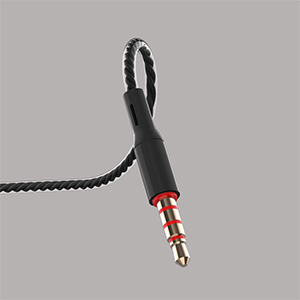
Image 2.1: A close-up of the 3.5mm audio jack, illustrating the connection interface.

Image 2.2: The 3.5mm audio jack of the Kamon K1 earbuds, shown with icons of compatible devices including PCs, Macbooks, iPads, iPhones, Android smartphones, and iPods.
3. Bedienungsanleitung
The in-line remote control allows for easy management of calls and music playback without needing to access your connected device directly.
Funktionen der Inline-Fernbedienung:
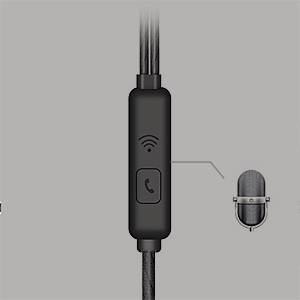
Image 3.1: A detailed image of the in-line remote control for Kamon K1 earbuds, featuring the multi-function button and microphone.
- Anruf annehmen/beenden: Drücken Sie die Taste einmal.
- Anruf ablehnen: Halten Sie die Taste gedrückt.
- Musik abspielen/pausieren: Drücken Sie die Taste einmal.
- Next Music Track: Drücken Sie die Taste zweimal.
- Previous Music Track: Drücken Sie die Taste dreimal.
- Sprachassistent aktivieren (z. B. Siri): Die Taste gedrückt halten (die Funktionalität kann je nach Gerät variieren).
Video 3.1: Official product video demonstrating the features and usage of Kamon K1 wired earbuds, including design, sound quality, and in-line control functions.
4. Wartung und Pflege
Proper care helps extend the lifespan and maintain the performance of your Kamon K1 earbuds.
- Handling the Cord: Avoid pulling the earbud cord directly. Always hold the earphone plug part and the earbud housing when disconnecting from devices or removing from ears.
- Reinigung: Regularly clean the ear tips and earbud housing with a soft, dry cloth. Ensure no moisture enters the speaker components.
- Lagerung: Store earbuds in a clean, dry place. The tangle-free cable design assists in neat storage.
- Schutz: The outer layer of the cable is designed for protection against external shocks. However, avoid excessive force or sharp objects.
5. Fehlerbehebung
If you encounter issues with your Kamon K1 earbuds, refer to the following common solutions:
- No Sound or Sound from One Side:
- Stellen Sie sicher, dass der 3.5-mm-Klinkenstecker vollständig in den Audioanschluss des Geräts eingesteckt ist.
- Gently rotate the plug within the port to ensure proper contact.
- Testen Sie die Ohrhörer mit einem anderen Gerät, um ein gerätespezifisches Problem auszuschließen.
- Überprüfen Sie die Lautstärkeeinstellungen Ihres Geräts.
- Mikrofon funktioniert nicht:
- Stellen Sie sicher, dass die Ohrhörer vollständig eingesteckt sind.
- Verify that your device's microphone input is set to the connected earbuds.
- Testen Sie das Mikrofon mit einer anderen Anwendung oder einem anderen Gerät.
- Fernbedienung reagiert nicht:
- Confirm the earbuds are securely connected.
- Bei einigen älteren Geräten oder bestimmten Betriebssystemen kann die Kompatibilität mit Fernsteuerungsfunktionen eingeschränkt sein.
- Schlechte Tonqualität (Rauschen, Verzerrungen):
- Check the audio source for quality.
- Stellen Sie sicher, dass die 3.5-mm-Klinkenbuchse sauber und frei von Verunreinigungen ist.
- Test with another device to isolate the problem.
6. Spezifikationen
Detailed technical specifications for the Kamon K1 wired earbuds.
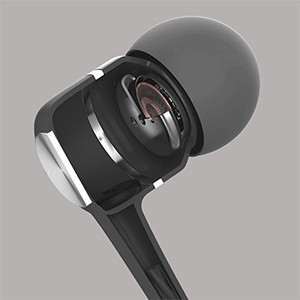
Image 6.1: A cutaway diagram of a Kamon K1 earbud, revealing its internal acoustic components for high-fidelity sound.
| Besonderheit | Spezifikation |
|---|---|
| Modellname | KE |
| Konnektivitätstechnologie | Verdrahtet |
| Kopfhöreranschluss | 3.5 mm Klinke |
| Lärmschutz | Schallisolierung |
| Steuerungstyp | Fernbedienung (Taste) |
| Mikrofon | Integriert |
| Kabelfunktion | Verwicklung frei |
| Impedanz | 32 Ohm ±15 % bei 1 kHz |
| Nennleistung | 3 mW |
| Maximale Eingangsleistung | 5 mW |
| Verzerrung | 3 % maximal (1 kHz/1 mW) |
| Frequenzgang | 20~20,000 Hz |
| Kabellänge | 120 cm |
| Artikelgewicht | 0.07 Kilogramm (ca. 2.39 Unzen) |
| Material | Plastic, Rubber, Silicone, Thermoplastic Elastomer (TPE) |
| Kompatible Geräte | iPhone devices, Android smartphones, iPod, iPad, MP3 players, music speakers |
7. Garantie und Support
For warranty information or technical support regarding your Kamon K1 earbuds, please refer to the product packaging or contact Kamon customer service directly. Details for contacting support are typically provided with your purchase or on the official Kamon webWebsite.