
1. Einleitung
Vielen Dank für Ihren Einkauf.asing the LFF LDR113-EU Kitchen Radio. This manual provides essential information for the safe and efficient operation of your device. Please read it thoroughly before use and retain it for future reference.
The LFF LDR113-EU is a versatile kitchen radio featuring DAB+, FM, and Bluetooth connectivity. It includes dual alarms, a sleep timer, and 60 station presets, designed for both tabletop use and under-cabinet mounting.
2. Sicherheitshinweise
- Energiequelle: Verwenden Sie ausschließlich das mitgelieferte Netzteil. Stellen Sie sicher, dass die Lautstärketage passt zu Ihrer örtlichen Stromversorgung.
- Wasser und Feuchtigkeit: Do not expose the device to water, rain, or excessive moisture. Avoid placing liquids near the radio.
- Belüftung: Ensure adequate ventilation around the device. Do not block ventilation openings.
- Hitze: Halten Sie das Gerät von Wärmequellen wie Heizkörpern, Heizlüftern, Öfen oder anderen wärmeerzeugenden Geräten fern.
- Reinigung: Vor der Reinigung vom Stromnetz trennen. Ein weiches, trockenes Tuch verwenden. Keine flüssigen oder Aerosolreiniger verwenden.
- Wartung: Versuchen Sie nicht, dieses Produkt selbst zu warten. Überlassen Sie alle Wartungsarbeiten qualifiziertem Servicepersonal.
- Platzierung: Place the radio on a stable, level surface or mount it securely according to the instructions.
3. Packungsinhalt
Bitte überprüfen Sie, ob alle Artikel im Paket vorhanden sind:
- LFF LDR113-EU Kitchen Radio
- Netzteil
- Mounting Kit (screws, spacers, mounting template)
- Benutzerhandbuch (dieses Dokument)
4. Produktüberschreitungview
Machen Sie sich mit den Komponenten und Bedienelementen des Radios vertraut.

Abbildung 4.1: Front view of the LFF LDR113-EU Kitchen Radio, showing the LCD display on the left, control buttons in the center, and a large rotary knob on the right. The buttons include power, mode, menu, info, preset, timer/sleep, and navigation arrows. The rotary knob is for volume and selection.

Abbildung 4.2: Diagram illustrating the key features of the LFF Kitchen Radio, including DAB/DAB+ radio, FM radio, two alarms, sleep timer, Bluetooth connectivity, and 60 station presets.
4.1. Bedienelemente und Anzeige
- LCD-Farbdisplay: Shows current mode, station information, time, and settings.
- Netzschalter: Schaltet das Radio ein/aus.
- Modus-Taste: Schaltet zwischen DAB+, FM und Bluetooth-Modus um.
- Menü-/Info-Schaltfläche: Accesses menu options or displays station information.
- Voreingestellte Tasten (1-5): Schneller Zugriff auf gespeicherte Sender.
- Timer-/Schlaftaste: Sets sleep timer or alarm functions.
- Navigationstasten (Auf/Ab/Links/Rechts): Navigates through menus and station lists.
- Rotary Knob (Volume/Enter): Adjusts volume, scrolls through options, and confirms selections.
5. Einrichtung
5.1. Stromanschluss
- Connect the power adapter to the DC IN port on the back of the radio.
- Stecken Sie das Netzteil in eine Wandsteckdose.
- Das Radio schaltet sich ein oder wechselt in den Standby-Modus.
5.2. Initial Scan (DAB+ and FM)
Upon first power-on, the radio will typically perform an automatic scan for DAB+ and FM stations. If not, follow these steps:
- Drücken Sie die Modus Taste zur Auswahl des DAB+- oder FM-Modus.
- For DAB+, the radio will usually initiate a full scan automatically. If not, navigate to the 'Full Scan' option in the DAB+ menu and press the rotary knob to confirm.
- For FM, navigate to the 'Auto Scan' option in the FM menu and press the rotary knob to confirm.
- The radio will search for available stations and store them.

Abbildung 5.1: The LFF Kitchen Radio's LCD color screen displaying the main menu with icons for Digital Radio (DAB+), FM Radio, and Bluetooth, indicating available modes.
6. Bedienungsanleitung
6.1. Ein-/Ausschalten
Drücken Sie die Leistung button to turn the radio on or off (standby mode).
6.2. Modusauswahl
Drücken Sie die Modus button repeatedly to cycle through DAB+, FM, and Bluetooth modes.
6.3. DAB+ Radiobetrieb
- Im DAB+-Modus verwenden Sie die Hoch/Runter navigation buttons or the rotary knob to browse available stations.
- Press the rotary knob to select a station.
- Drücken Menü/Info Zu view Stationsinformationen (z. B. Programmtyp, Signalstärke).
6.4. FM-Radiobetrieb
- Im FM-Modus verwenden Sie die Hoch/Runter navigation buttons to tune to stations manually.
- Halten Sie die Hoch/Runter Tasten für die automatische Sendersuche.
- Drücken Menü/Info Zu view Stationsinformationen.
6.5. Bluetooth-Konnektivität
Connect your smartphone or other Bluetooth-enabled device to the radio.
- Drücken Sie die Modus button to select Bluetooth mode. The display will show 'Bluetooth Pairing'.
- Aktivieren Sie auf Ihrem Mobilgerät Bluetooth und suchen Sie nach verfügbaren Geräten.
- Select 'LFF LDR113-EU' from the list of devices.
- Once connected, the radio display will show 'Bluetooth Connected'. You can now play audio from your device through the radio.
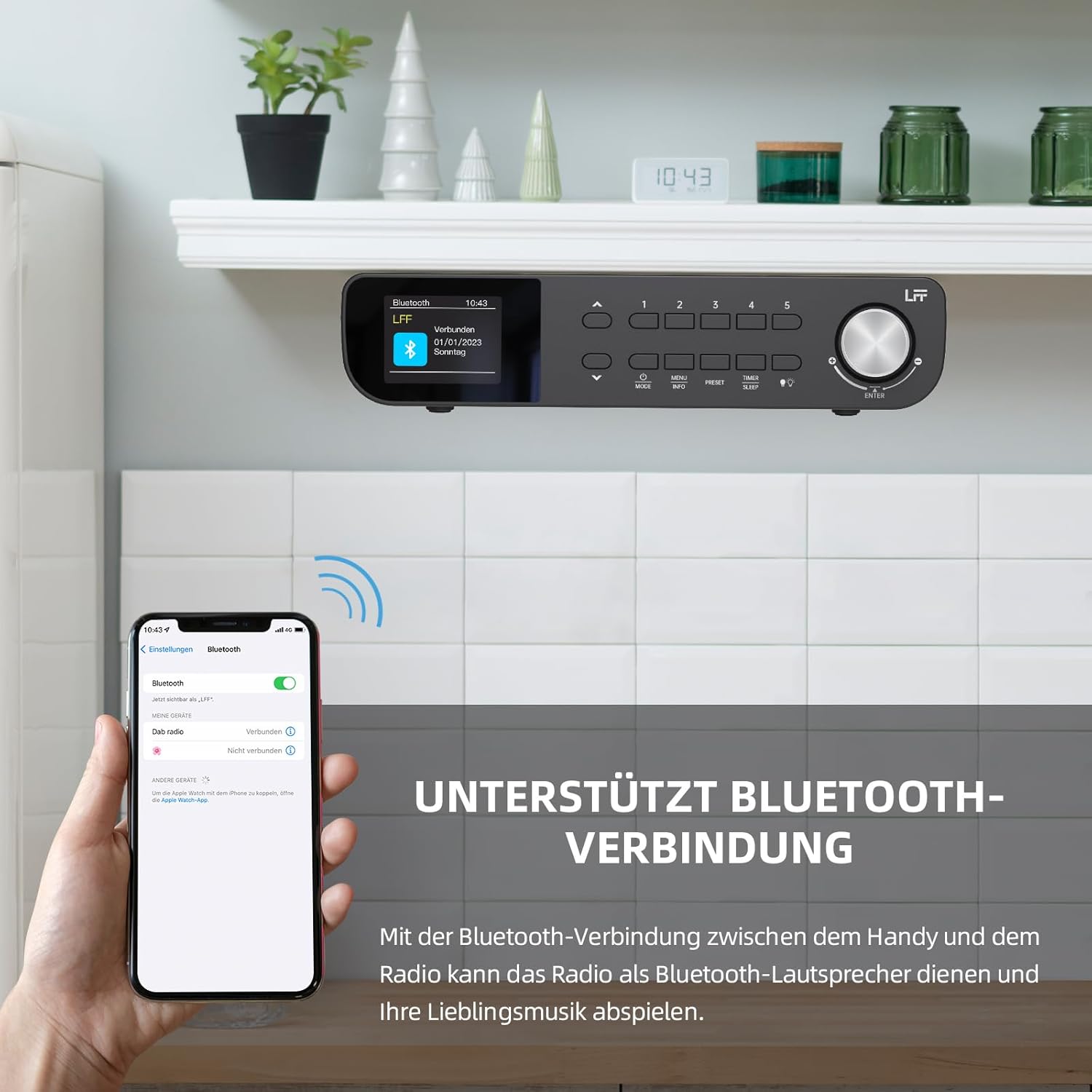
Abbildung 6.1: The LFF Kitchen Radio displaying a successful Bluetooth connection, with a smartphone screen showing the radio as a connected device.

Abbildung 6.2: Nahaufnahme view of the radio's display indicating 'LFF' and 'Connected' under the Bluetooth menu, confirming a successful pairing.
6.6. Alarme einstellen
Das Radio verfügt über zwei unabhängige Wecker.
- Drücken Sie die Timer/Schlaf button repeatedly until 'Alarm 1' or 'Alarm 2' appears.
- Use the navigation buttons and rotary knob to set the alarm time, source (DAB+, FM, or Buzzer), and frequency (daily, weekdays, weekends, once).
- Confirm settings by pressing the rotary knob.

Abbildung 6.3: Close-up of the radio's display showing the current time and options to activate or deactivate Alarm 1 and Alarm 2.
6.7. Sleep-Timer
Der Sleep-Timer sorgt dafür, dass sich das Radio nach einer festgelegten Zeit automatisch ausschaltet.
- Drücken Sie die Timer/Schlaf button repeatedly until 'Sleep Timer' appears.
- Use the navigation buttons or rotary knob to select the desired sleep duration (e.g., 15, 30, 60 minutes).
- Bestätigen Sie durch Drücken des Drehknopfes.

Abbildung 6.4: Close-up of the radio's display showing the 'Sleep Timer' setting, with an option to set the duration, for example, to 30 minutes.
6.8. Voreinstellungen
Speichern Sie bis zu 60 Ihrer Lieblingssender für den Schnellzugriff.
- So speichern Sie eine Voreinstellung: Stellen Sie den gewünschten Sender ein. Drücken und halten Sie eine der Tasten. Voreinstellung (1-5) buttons until 'Preset Saved' appears. For additional presets, use the 'Preset Store' option in the menu.
- So rufen Sie eine Voreinstellung auf: Drücken Sie kurz eine der Tasten Voreinstellung (1-5) buttons. For other presets, navigate to 'Preset Recall' in the menu.
6.9. LED-Licht
The radio includes an integrated LED light, useful for illuminating the area below if mounted under a cabinet.
- Drücken Sie die Licht button (if available, or navigate through menu) to turn the LED light on or off.

Abbildung 6.5: The LFF Kitchen Radio mounted under a kitchen cabinet, with its integrated LED light providing illumination to the countertop below.
6.10. Helligkeit des Displays
Adjust the display backlight brightness to suit your environment.
- Access the 'Display' or 'Settings' menu.
- Select 'Brightness' and choose from High, Medium, or Low settings.

Abbildung 6.6: A visual comparison of the LFF Kitchen Radio's display at three different backlight brightness levels: High, Medium, and Low, demonstrating the adjustable visibility.
7. Montageanleitung
The LFF LDR113-EU Kitchen Radio offers flexible placement options: tabletop or under-cabinet mounting.
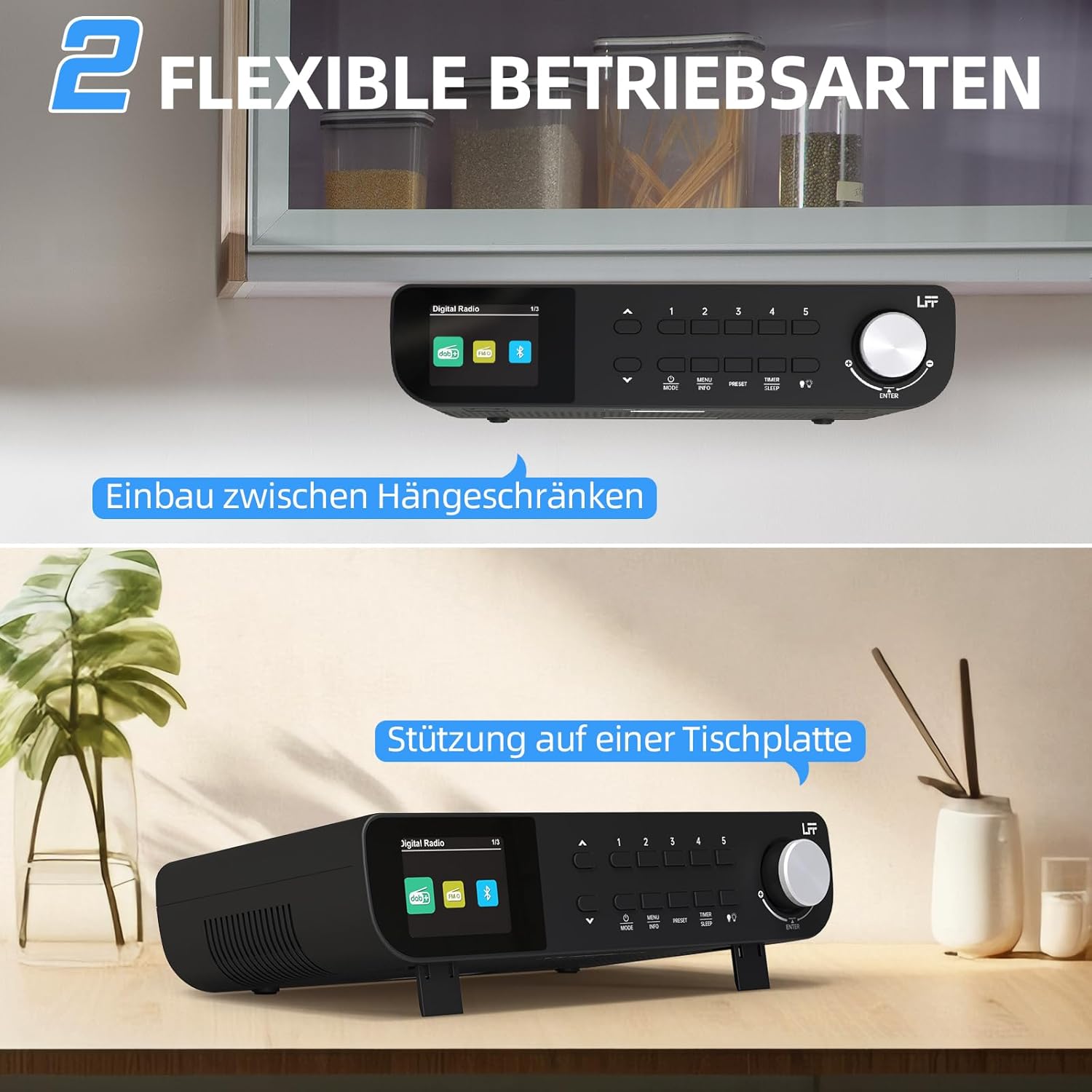
Abbildung 7.1: The LFF Kitchen Radio displayed in two common installation scenarios: mounted underneath a kitchen cabinet and placed freestanding on a tabletop.
7.1. Tabletop Placement
Simply place the radio on a stable, flat surface. Ensure it is not near the edge to prevent accidental falls.
7.2. Under-Cabinet Mounting
For under-cabinet installation, use the provided mounting kit.
- Bereiten Sie den Veranstaltungsort vor: Choose a suitable location under a kitchen cabinet, ensuring there is enough space and access to a power outlet.
- Bohrlöcher markieren: Use the provided mounting template to mark the drill holes on the underside of the cabinet.
- Pilotlöcher bohren: Bohren Sie an den markierten Stellen Führungslöcher.
- Attach Mounting Plate (if applicable): Some models may include a separate mounting plate. Attach this to the cabinet using the screws.
- Secure the Radio: Align the radio with the mounting holes or plate and secure it using the provided screws. Ensure it is firmly attached.
- Strom anschließen: Stecken Sie das Netzteil ein.

Abbildung 7.2: Detailed diagram showing the steps for under-cabinet mounting, including measuring distances (e.g., 58mm) and securing the radio with screws.
8. Wartung
- Reinigung: To clean the radio, disconnect it from the power supply. Use a soft, dry, lint-free cloth. Do not use abrasive cleaners, waxes, or solvents.
- Antenne: Ensure the antenna is extended for optimal reception in DAB+ and FM modes. Handle it gently to avoid damage.
- Lagerung: Wenn Sie das Radio über einen längeren Zeitraum lagern, trennen Sie es vom Stromnetz und bewahren Sie es an einem kühlen, trockenen Ort auf.
9. Fehlerbehebung
| Problem | Mögliche Ursache | Lösung |
|---|---|---|
| Kein Strom | Netzteil nicht angeschlossen oder Steckdose defekt. | Überprüfen Sie den Stromanschluss. Versuchen Sie es mit einer anderen Steckdose. |
| Schlechter DAB+/FM-Empfang | Antenne nicht ausgefahren, schwaches Signal oder Störungen. | Fully extend the antenna. Reposition the radio. Perform a full scan. |
| Bluetooth stellt keine Verbindung her | Radio not in pairing mode, device too far, or already connected to another device. | Stellen Sie sicher, dass das Funkgerät im Bluetooth-Modus ist. Bringen Sie das Gerät näher heran. Trennen Sie die Verbindung zu anderen Geräten. |
| Kein Ton | Volume too low, mute activated, or incorrect mode. | Increase volume. Check if mute is active. Ensure correct mode (DAB+, FM, Bluetooth). |
| Anzeige funktioniert nicht | Brightness too low or device malfunction. | Adjust display brightness. If problem persists, contact support. |
10. Spezifikationen

Abbildung 10.1: Diagram showing the dimensions of the LFF Kitchen Radio: 250mm length, 146mm width, and 55mm height.
| Besonderheit | Detail |
|---|---|
| Marke | LFF-Erweiterung |
| Modellnummer | LDR113-EU |
| Farbe | Schwarz |
| Konnektivität | Bluetooth |
| Tuning-Technologie | DAB Plus, FM |
| Stromquelle | Stromkabel |
| Frequenz | 108 MHz (FM max) |
| Abmessungen (L x B x H) | 250 mm x 146 mm x 55 mm |
| Voreinstellungen | 60 |
| Anzeige | LCD-Farbbildschirm |
| Besondere Merkmale | Dual Alarms, Sleep Timer, Under-cabinet mounting option, LED Light |
11. Garantie und Support
This product comes with a standard manufacturer's warranty. Please refer to the warranty card included in your package for specific terms and conditions. For technical support, troubleshooting assistance, or warranty claims, please contact your retailer or the LFF customer service department.