
Einführung
Thank you for choosing the Baseus Super Energy Pro 1600A Car Jump Starter. This device is designed to provide a reliable and powerful solution for starting vehicles with dead batteries, and also functions as a portable power bank. Please read this manual thoroughly before use to ensure safe and proper operation. Keep this manual for future reference.
Sicherheitshinweise
- Always read the vehicle's owner's manual before attempting to jump start it.
- Versuchen Sie nicht, eine gefrorene Batterie zu überbrücken.
- Sorgen Sie beim Betrieb des Geräts für ausreichende Belüftung.
- Bewahren Sie das Gerät außerhalb der Reichweite von Kindern und Haustieren auf.
- Setzen Sie das Gerät weder Regen noch extremen Temperaturen aus.
- Vermeiden Sie einen Kurzschluss der Jumperklemme.amps. Do not connect the red and black clamps zusammen.
- If the device or cables are damaged, do not use them. Contact support.
- Schließen Sie immer die Klemme an.ampan die richtigen Batteriepole anschließen (rot an Plus, schwarz an Minus).
- Entfernen Sie den Starthilfe-Booster sofort nach dem Starten des Fahrzeugs.
Packungsinhalt
Überprüfen Sie, ob alle Artikel in Ihrem Paket vorhanden sind:
- Baseus Super Energy Pro Starthilfegerät
- Intelligente Starthilfekabel mit Clamps
- USB-C-Ladekabel
- Benutzerhandbuch (dieses Dokument)
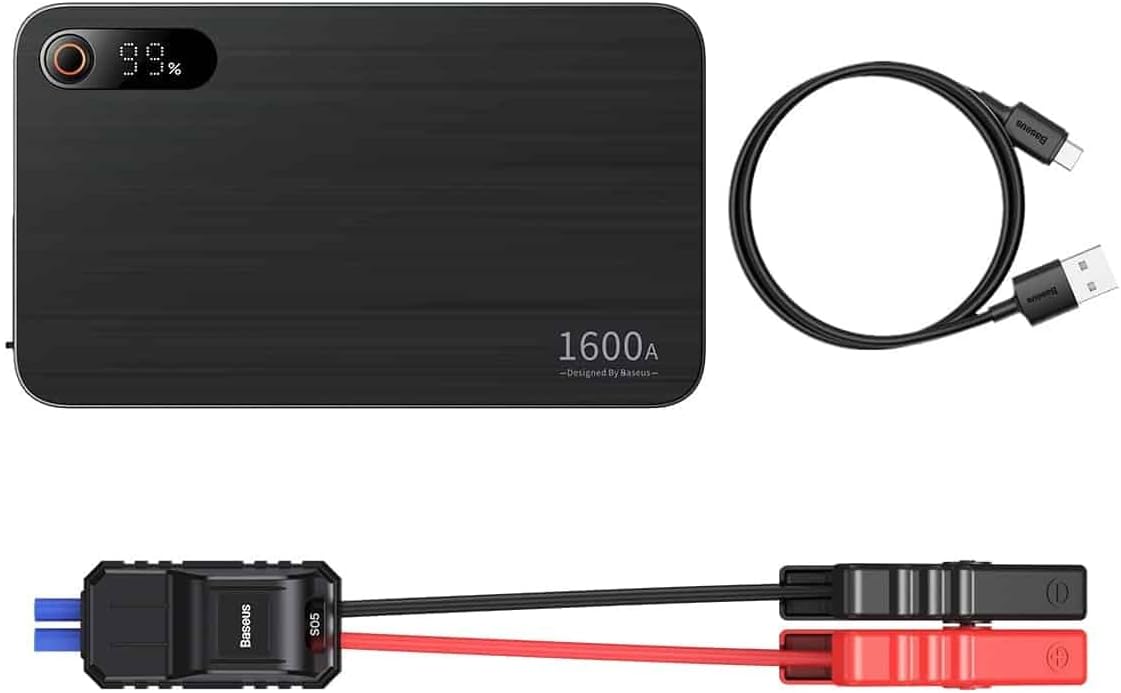
Image: Contents of the Baseus Super Energy Pro Car Jump Starter package, showing the main unit, smart jumper cables, and a USB-C charging cable.
Produkt überview
Familiarize yourself with the components of your Baseus Super Energy Pro Car Jump Starter:
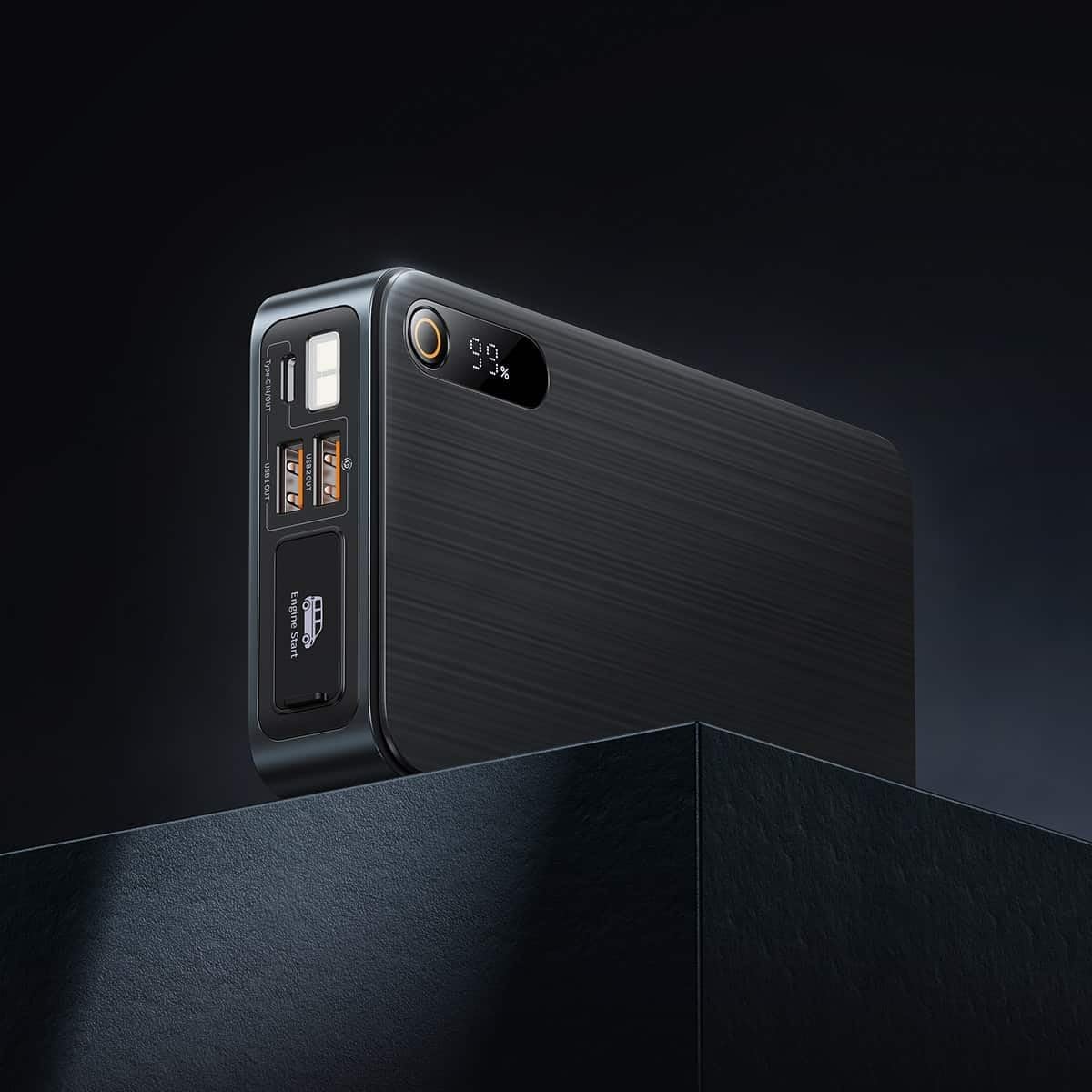
Image: Close-up of the jump starter's side panel, highlighting the various ports and the digital display.
- Digitaler Bildschirm: Zeigt die verbleibende Akkuladung in Prozent antage.
- Netzschalter: Activates the device and turns on the LED light.
- USB-A-Ausgangsanschlüsse: For charging external devices like smartphones or tablets.
- Typ-C-Ein-/Ausgangsanschluss: Used for charging the jump starter itself or charging other devices.
- Engine Start Port: Spezieller Anschluss für die intelligenten Jumperkabel.
- LED-Taschenlampe: Bietet Beleuchtung in dunklen Umgebungen.

Image: The Baseus Super Energy Pro Car Jump Starter unit, displaying its digital battery indicator.
Aufladen des Geräts
Before first use, fully charge the Baseus Super Energy Pro Car Jump Starter. It is recommended to keep the device charged above 50% for optimal performance and longevity.
- Connect the provided USB-C charging cable to the Type-C port on the jump starter.
- Verbinden Sie das andere Ende des USB-C-Kabels mit einem geeigneten USB-Netzteil (nicht im Lieferumfang enthalten).
- The digital display will show the charging progress. The device is fully charged when the display shows 100%.
Setup for Jump Starting
Ensure your vehicle is in Park (P) or Neutral (N) and the parking brake is engaged. Turn off all vehicle accessories (headlights, radio, air conditioning).
- Stellen Sie sicher, dass der Starthilfe-Booster ausreichend geladen ist (mindestens 50%).
- Connect the blue end of the smart jumper cables into the Engine Start port on the jump starter. Ensure it is firmly seated.
Operating Instructions (Jump Starting)
Befolgen Sie diese Schritte sorgfältig, um Ihr Fahrzeug zu überbrücken:
- Verbinden Sie Rot Clamp: Befestigen Sie den roten (+)amp of the jumper cables to the positive (+) terminal of your vehicle's dead battery.
- Connect Schwarz Clamp: Befestigen Sie die schwarze (-)amp of the jumper cables to the negative (-) terminal of your vehicle's dead battery.
- Prüfindikator: Observe the indicator light on the smart jumper cable. A solid green light indicates a correct connection and that the device is ready to start. If it's red or flashing, check connections or refer to troubleshooting.
- Startfahrzeug: Once the indicator is green, start your vehicle's engine.
- Starthilfekabel entfernen: As soon as the engine starts, immediately remove the blue plug of the jumper cables from the jump starter.
- Trennen Clamps: Trennen Sie dann den schwarzen (-) Stecker.amp von der Fahrzeugbatterie, gefolgt von der roten (+)-Tasteamp.
Allow your vehicle's engine to run for at least 20-30 minutes to recharge its battery.
Wartung
- Lagerung: Bewahren Sie den Starthilfe-Booster an einem kühlen, trockenen Ort, fern von direkter Sonneneinstrahlung und Feuchtigkeit auf.
- Laden: Für eine optimale Batterielebensdauer sollte das Gerät alle 3 bis 6 Monate aufgeladen werden, auch wenn es nicht benutzt wird.
- Reinigung: Reinigen Sie das Gerät mit einem weichen, trockenen Tuch. Verwenden Sie keine scharfen Chemikalien oder Scheuermittel.
- Batterieentsorgung: Do not dispose of the device in household waste. Follow local regulations for proper disposal of lithium-ion batteries.
Fehlerbehebung
| Problem | Mögliche Ursache | Lösung |
|---|---|---|
| Fahrzeug springt nicht an | Die Starthilfebatterie ist schwach. Falsche Kabelverbindung. Die Fahrzeugbatterie ist stark beschädigt. | Laden Sie die Starthilfe auf. Überprüfen Sie dieamp connections to battery terminals. Ziehen Sie einen professionellen Mechaniker zu Rate. |
| Starthilfegerät lädt nicht | Ladekabel oder Netzteil defekt. Type-C port damaged. | Versuchen Sie es mit einem anderen USB-C-Kabel und Netzteil. Kontaktieren Sie den Kundendienst. |
| Smart cable indicator is red/flashing | Anschluss mit umgekehrter Polarität. Kurzschluss erkannt. Überstrom/Überspannungtage. | Trennen und erneutes Verbinden clamps korrekt (rot zu +, schwarz zu -). Stellen Sie sicher, dass clampSie berühren sich nicht. Disconnect and try again after a few minutes. If problem persists, contact support. |
Technische Daten
| Besonderheit | Detail |
|---|---|
| Marke | Baseus |
| Modellnummer | CGNL070001 |
| Spitzenstrom | 1600 A |
| Batteriezusammensetzung | Lithium-Ionen |
| Fahrzeug-Servicetyp | Auto |
| Produktabmessungen (L x B x H) | 10 x 5 x 1.27 cm |
| Artikelgewicht | 920 g |
| Eingabe/Ausgabe | USB-A Output, Type-C Input/Output |
Garantie und Support
For warranty information or technical support, please refer to the warranty card included with your product or contact the retailer where you purchased the device. You may also visit the official Baseus webWeitere Hilfe und Kontaktdaten finden Sie auf der Website.