
Roidmi XCQ06RM
Roidmi X20S XCQ06RM Akku-Staubsauger und Wischmopp Benutzerhandbuch
Model: XCQ06RM
1. Einleitung
Thank you for choosing the Roidmi X20S XCQ06RM Cordless 2-in-1 Vacuum and Mop. This appliance is designed to provide efficient and convenient cleaning for various floor types in your home. This manual contains important information regarding the safe use, operation, and maintenance of your device. Please read it thoroughly before first use and keep it for future reference.
2. Sicherheitshinweise
Um das Risiko von Bränden, Stromschlägen oder Verletzungen zu verringern, beachten Sie bitte die folgenden Sicherheitsvorkehrungen:
- Lesen Sie vor der Verwendung des Geräts alle Anweisungen.
- Nicht im Freien oder auf nassen Oberflächen verwenden.
- Nicht als Spielzeug verwenden. Bei Verwendung durch oder in der Nähe von Kindern ist besondere Vorsicht geboten.
- Verwenden Sie das Produkt nur wie in dieser Anleitung beschrieben. Verwenden Sie ausschließlich die vom Hersteller empfohlenen Anbauteile.
- Nicht mit beschädigtem Kabel oder Stecker verwenden. Wenn das Gerät nicht ordnungsgemäß funktioniert, heruntergefallen ist, beschädigt wurde, im Freien liegen gelassen wurde oder ins Wasser gefallen ist, bringen Sie es zu einem Servicecenter.
- Ziehen oder tragen Sie das Gerät nicht am Kabel, verwenden Sie das Kabel nicht als Griff, schließen Sie keine Türen am Kabel und ziehen Sie das Kabel nicht um scharfe Kanten oder Ecken. Fahren Sie nicht mit dem Gerät über das Kabel. Halten Sie das Kabel von heißen Oberflächen fern.
- Ziehen Sie den Stecker nicht am Kabel, sondern fassen Sie ihn am Stecker und nicht am Kabel an.
- Fassen Sie Stecker oder Gerät nicht mit nassen Händen an.
- Stecken Sie keine Gegenstände in die Öffnungen. Verwenden Sie das Gerät nicht, wenn die Öffnungen blockiert sind. Halten Sie das Gerät frei von Staub, Flusen, Haaren und allem, was den Luftstrom beeinträchtigen könnte.
- Halten Sie Haare, lose Kleidung, Finger und alle Körperteile von Öffnungen und beweglichen Teilen fern.
- Schalten Sie alle Bedienelemente aus, bevor Sie den Stecker ziehen.
- Seien Sie beim Reinigen von Treppen besonders vorsichtig.
- Nicht zum Aufsaugen von entzündlichen oder brennbaren Flüssigkeiten (z. B. Benzin) verwenden oder in Bereichen verwenden, wo diese vorhanden sein können.
- Heben Sie keine brennenden oder rauchenden Gegenstände auf, z. B. Zigaretten, Streichhölzer oder heiße Asche.
- Nicht ohne eingesetzten Staubbecher und/oder Filter verwenden.
- Unbeabsichtigtes Anlaufen verhindern. Stellen Sie sicher, dass sich der Schalter in der Aus-Position befindet, bevor Sie den Akku anschließen, das Gerät hochheben oder tragen.
- Laden Sie nur mit dem vom Hersteller angegebenen Ladegerät auf.
3. Packungsinhalt
Bitte überprüfen Sie beim Auspacken den Packungsinhalt, um sicherzustellen, dass alle Artikel vorhanden sind:
- Staubsauger-Haupteinheit
- Multifunktionsbürste
- Mite removal brush
- Washing brush (mop attachment)
- Elektrische Matratzenbürste
- Kabelloses Ladegerät
- Filter
- Fugendüse
- Die Reinigungsstation
- Vakuumröhre
- Mop heads x2
4. Produktüberschreitungview
The Roidmi X20S XCQ06RM is a powerful and versatile cleaning solution, combining vacuuming and mopping capabilities. Its lightweight design and advanced features make home cleaning efficient.

Abbildung 1: The Roidmi X20S XCQ06RM cordless vacuum cleaner in its upright configuration.
Hauptmerkmale:
- 2-in-1 Staubsauger und Wischmopp: Easily switch between vacuuming and mopping functions by attaching the appropriate head. The mop brush rotates at approximately 200 RPM for deep cleaning.
- Starke Saugkraft: Features a new generation Engine-x brushless digital motor (up to 120,000 rpm) delivering 138 watts of suction power and 25,000 Pa air intake pressure. Air-x technology ensures consistent suction by separating dust from air.
- 6-stufiges Filtersystem: A multi-level system effectively separates dust, filtering impurities as small as 0.3 µm with a 99% purification rate. The device includes a safety mechanism that prevents operation if filters are not correctly installed.
- Mobile Application Connectivity: Connects via Bluetooth to your smartphone. The app allows monitoring of remaining operating time, cleaning time, and provides notifications for dustbin full or filter replacement.
- Verlängerte Akkulaufzeit: Optimized by the BMS-X system, the 8 LG/Samsung lithium batteries provide approximately 65 minutes of runtime. The app displays battery status and alerts.
- Magnetisches kabelloses Laden: Bequemes und kabelloses Laden.
- Benutzerfreundliches Design: Operates at a reduced noise level of approximately 72 dB (A). The electric brush includes an LED light for improved visibility in dark areas. Weighing 1.5 kg, it is lightweight for easy handling.

Abbildung 2: The Roidmi X20S main unit shown with both the vacuum brush head and the mop attachment.

Abbildung 3: A user operating the Roidmi X20S to vacuum a rug in a living room setting.

Abbildung 4: The mop attachment of the Roidmi X20S cleaning a wet spill on a tiled kitchen floor.
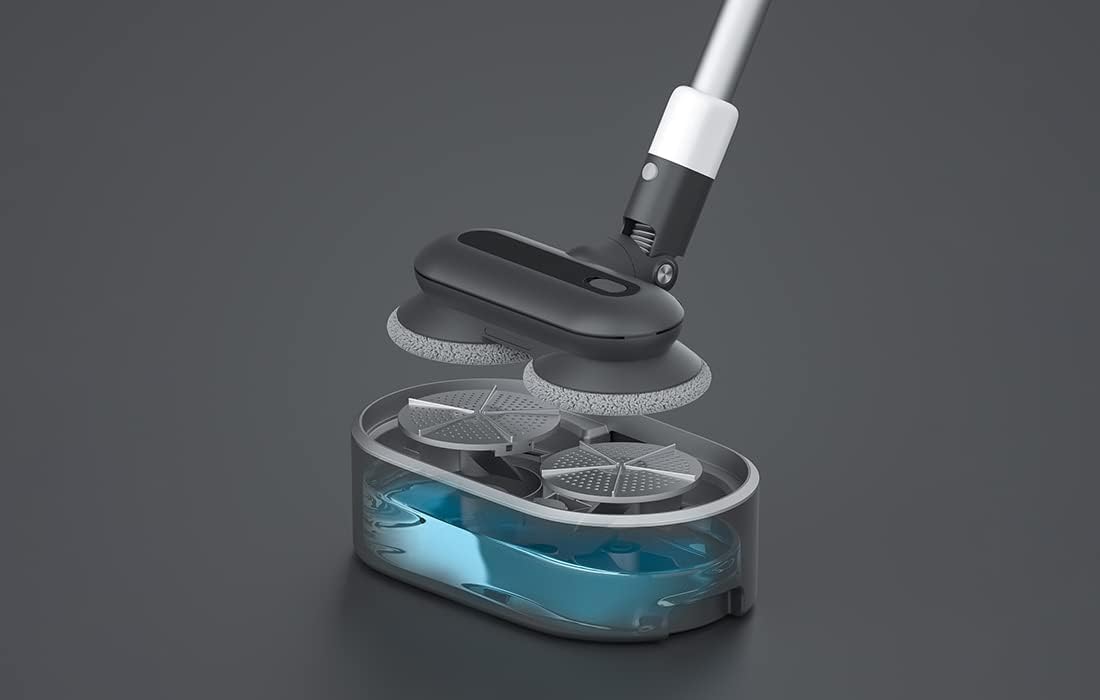
Abbildung 5: Ein explodiert view showing the internal components of the Roidmi X20S mop attachment, including the water tank.
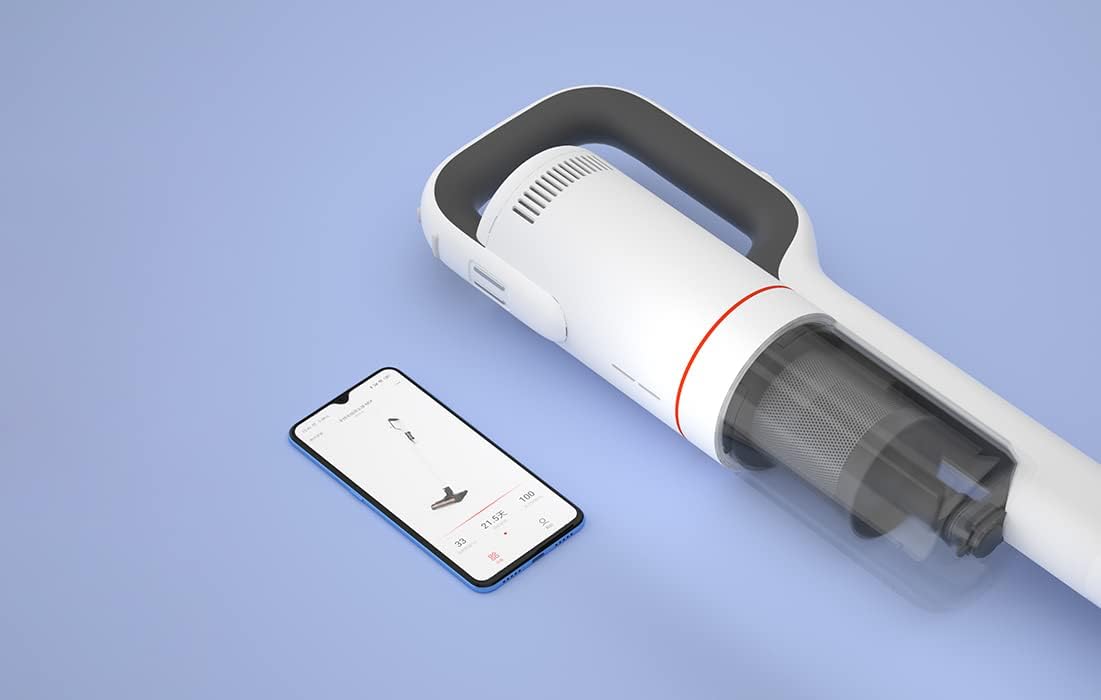
Abbildung 6: The Roidmi X20S main unit positioned next to a smartphone, illustrating its connectivity with the Roidmi mobile application.

Abbildung 7: A user demonstrating the Roidmi X20S in handheld mode, cleaning a sofa with an attachment.
5. Einrichtung
5.1 Montage
- Connect the Vacuum Tube: Insert the vacuum tube into the main unit until it clicks into place.
- Reinigungskopf anbringen: Select the desired cleaning head (multi-function brush for vacuuming, or washing brush for mopping) and attach it to the end of the vacuum tube until it clicks.
- Install Mop Pads (for mopping): If using the washing brush, attach the mop pads to the bottom of the mop attachment.
5.2 Laden
Before first use, fully charge the appliance. The Roidmi X20S uses magnetic wireless charging.
- Mount the cleaning station to a wall in a convenient location, ensuring it is near a power outlet.
- Connect the wireless charger to the cleaning station and plug it into a power outlet (220 Volts).
- Place the Roidmi X20S onto the cleaning station. The magnetic connection will secure it, and charging will begin automatically.
- Monitor the battery status via the indicator lights on the device or through the Roidmi mobile application.
6. Bedienungsanleitung
6.1 Staubsaugen
- Ensure the multi-function brush or appropriate vacuum attachment is securely installed.
- Drücken Sie den Netzschalter, um den Staubsauger einzuschalten.
- Select the desired suction mode (if applicable) using the mode selection button.
- Begin vacuuming the desired surface. The LED light on the brush head will illuminate dark areas.
- After use, press the power button to turn off the vacuum.
6.2 Wischen
- Detach the vacuum brush head and attach the washing brush (mop attachment) with mop pads installed.
- Fill the water tank on the mop attachment with clean water. Do not use corrosive liquids or hot water.
- Press the power button to turn on the device. The mop pads will begin to rotate.
- Gently guide the mop attachment over the floor surface to clean.
- After use, press the power button to turn off the device. Empty any remaining water from the tank and clean the mop pads.
6.3 Nutzung der mobilen Anwendung
- Download the Roidmi app from your smartphone's app store (compatible with Android and iOS).
- Enable Bluetooth on your smartphone and open the Roidmi app.
- Follow the in-app instructions to pair your Roidmi X20S with your smartphone.
- Einmal verbunden, können Sie view battery status, remaining operating time, cleaning history, and receive notifications for dustbin full or filter replacement.
7. Wartung
Regular maintenance ensures optimal performance and extends the lifespan of your Roidmi X20S.
7.1 Den Mülleimer leeren
- When the dustbin full notification appears on the app or when visibly full, detach the dustbin from the main unit.
- Öffnen Sie den Mülleimer und leeren Sie seinen Inhalt in einen Abfalleimer.
- Close the dustbin and reattach it to the main unit.
7.2 Reinigung/Austausch der Filter
- The Roidmi X20S features a washable filter. When the app notifies you to clean or replace the filter, remove the filter from the dustbin.
- Rinse the filter under running water until clean. Ensure it is completely dry before reinserting.
- Tauschen Sie den Filter aus, wenn er beschädigt oder übermäßig abgenutzt ist.
7.3 Cleaning Brushes and Mop Pads
- Regularly remove hair and debris from the multi-function brush and electric mattress brush. Use the crevice tool or scissors if necessary.
- After mopping, detach the mop pads from the washing brush and rinse them thoroughly. Allow them to air dry completely before storing or reusing.
8. Fehlerbehebung
If you encounter issues with your Roidmi X20S, refer to the following common problems and solutions:
| Problem | Mögliche Ursache | Lösung |
|---|---|---|
| Kein Strom/Schaltet sich nicht ein | Batterie ist leer Device not properly assembled | Laden Sie den Akku vollständig auf Ensure all parts are clicked into place |
| Geringe Saugleistung | Mülleimer ist voll Filter ist verstopft Bürstenkopf verstopft | Leeren Sie den Mülleimer Reinigen oder ersetzen Sie den Filter Entfernen Sie alle Verstopfungen vom Bürstenkopf. |
| Mop function not effective | Wassertank ist leer Mop pads are dirty or worn | Füllen Sie den Wassertank auf Clean or replace mop pads |
| Gerät stoppt unerwartet | Batterie schwach Filtration system parts not installed correctly | Laden Sie den Akku auf Check all filter components are securely in place |
| Probleme mit der App-Konnektivität | Bluetooth ist aus Gerät nicht gekoppelt | Ensure Bluetooth is enabled on your phone Follow app instructions to re-pair the device |
If the problem persists after attempting these solutions, please contact Roidmi customer support.
9. Spezifikationen
| Besonderheit | Spezifikation |
|---|---|
| Marke | ROIDMI |
| Modellnummer | XCQ06RM |
| Farbe | Weiß |
| Leistung | 34.2 Watt |
| Bandtage | 220 Volt |
| Geräuschpegel | 72 Dezibel (A) |
| Akkulaufzeit | Ca. 65 Minuten |
| Artikelgewicht | 3.95 Kilogramm |
| Filtertyp | Cartridge (Washable, HEPA) |
| Stromquelle | Batteriebetrieben (1 Lithium-Ionen-Akku im Lieferumfang enthalten) |
| Kompatibilität | Android, iOS (via Roidmi App) |
| Besondere Merkmale | Compact, Lightweight, Portable, Bagless, Wet/Dry (mop function) |
| Hersteller | Wuxi Roidmi Information Technology Co., Ltd. |
10. Garantie und Support
For warranty information, please refer to the warranty card included with your product or contact Roidmi customer service directly. Information regarding the availability of spare parts is not provided in the product details.
For technical support or service inquiries, please visit the official Roidmi webBesuchen Sie die Website oder kontaktieren Sie deren Kundendienstkanäle.
Ask a question about this manual
Ask about setup, troubleshooting, compatibility, parts, safety, or missing instructions. Manuals+ will review the question and use this page’s manual context to help answer it.