
1. Einleitung
Thank you for choosing the LFF DAB/FM Digital Radio YT81107. This manual provides essential information for the safe and efficient use of your new radio. Please read these instructions carefully before operating the device and retain them for future reference.
Sicherheitshinweise
- Um Brände oder Stromschläge zu vermeiden, setzen Sie das Gerät weder Regen noch Feuchtigkeit aus.
- Öffnen Sie nicht das casing. Alle Wartungsarbeiten sind qualifiziertem Personal zu überlassen.
- Verwenden Sie ausschließlich das angegebene Netzteil oder die Batterien.
- Vermeiden Sie extreme Temperaturen, direkte Sonneneinstrahlung und staubige Umgebungen.
2. Produktüberschreitungview
The LFF DAB/FM Digital Radio YT81107 offers versatile listening options with DAB+ and FM radio, Bluetooth connectivity, and convenient features like a dual alarm and sleep timer. Its compact design and dual power options make it suitable for various environments.
Hauptmerkmale
- DAB+ and FM Digital Radio Tuner
- Bluetooth Connectivity for Audio Streaming
- Vollfarb-LCD-Display
- 60 Preset Stations (30 DAB+, 30 FM)
- Doppelte Weckerfunktion
- Einstellbarer Sleep-Timer
- 3.5-mm-Kopfhörerbuchse
- AC Power Adapter or Battery Operated (4x AA batteries, not included)

Abbildung 2.1: Vorderseite view of the LFF DAB/FM Digital Radio highlighting its main features.
Bedienelemente und Komponenten
Familiarize yourself with the buttons and ports on your radio:

Abbildung 2.2: Vorder- und Draufsicht view of the radio with labeled controls.
- Power / Mode-Taste: Turns the radio on/off and switches between modes (DAB, FM, Bluetooth).
- Menü-/Info-Schaltfläche: Accesses menu settings or displays station information.
- Alarmknopf: Stellt Alarme ein und verwaltet sie.
- Voreingestellte Tasten (1-5): Schneller Zugriff auf gespeicherte Lieblingssender.
- Volume Knob/Select: Durch Drehen kann die Lautstärke angepasst oder in Menüs genavigiert werden; zum Bestätigen der Auswahl drücken.
- Tuning/Scroll Buttons: Navigiert durch Stationen oder Menüoptionen.
- Anzeige: Full-color LCD screen.
- Lautsprecher: Integrierter Audioausgang.
- Antenne: Ausziehbare Teleskopantenne für den Radioempfang.
- DC-Eingangsanschluss: Zum Anschließen des Netzteils.
- Kopfhöreranschluss: 3.5-mm-Ausgang für privates Hören.
- Batteriefach: Located on the back for 4x AA batteries.
3. Einrichtung
Einschalten des Radios
Your radio can be powered by the included AC adapter or by batteries for portable use.
- Wechselstromversorgung: Connect the supplied AC adapter to the DC IN port on the back of the radio and plug it into a standard wall outlet.
- Batterieleistung: Open the battery compartment on the back and insert 4x 1.5V AA (LR6) batteries (not included), ensuring correct polarity. Close the compartment securely.

Figure 3.1: Power options and physical dimensions of the radio.
Antenneneinstellung
Für optimalen Radioempfang die Teleskopantenne vollständig ausziehen. Die Position für beste Signalqualität anpassen.
4. Bedienungsanleitung
Ein-/Ausschalten und Modusauswahl
- Drücken Sie die Leistung/Modus Knopf zum Ein- und Ausschalten des Radios.
- While on, press the Leistung/Modus Durch wiederholtes Drücken der Taste können die verfügbaren Modi durchgeschaltet werden: DAB, FM und Bluetooth.
DAB/FM Radio Operation
Ensure the antenna is fully extended for best reception.

Figure 4.1: Radio reception ranges and preset capacity.
- Automatischer Scan: Halten Sie im DAB- oder UKW-Modus die gedrückt Menü/Info button to initiate an automatic scan for available stations. The radio will store them automatically.
- Manuelle Abstimmung: Verwenden Sie die Tuning/Scroll Tasten zur manuellen Frequenzeinstellung.
- Sender auswählen: Drehen Sie den Volume Knob/Select to browse through available stations. Press the knob to select a station.
- Voreinstellungen speichern: To save a station, tune to the desired station, then press and hold one of the Voreingestellte Tasten (1-5) until the display confirms it's saved. You can save up to 30 DAB+ and 30 FM stations.
- Voreinstellungen abrufen: Drücken Sie kurz eine der Tasten Voreingestellte Tasten (1-5) einen gespeicherten Sender aufrufen.
Bluetooth-Modus
Connect your smartphone, tablet, or other Bluetooth-enabled device to stream audio wirelessly.
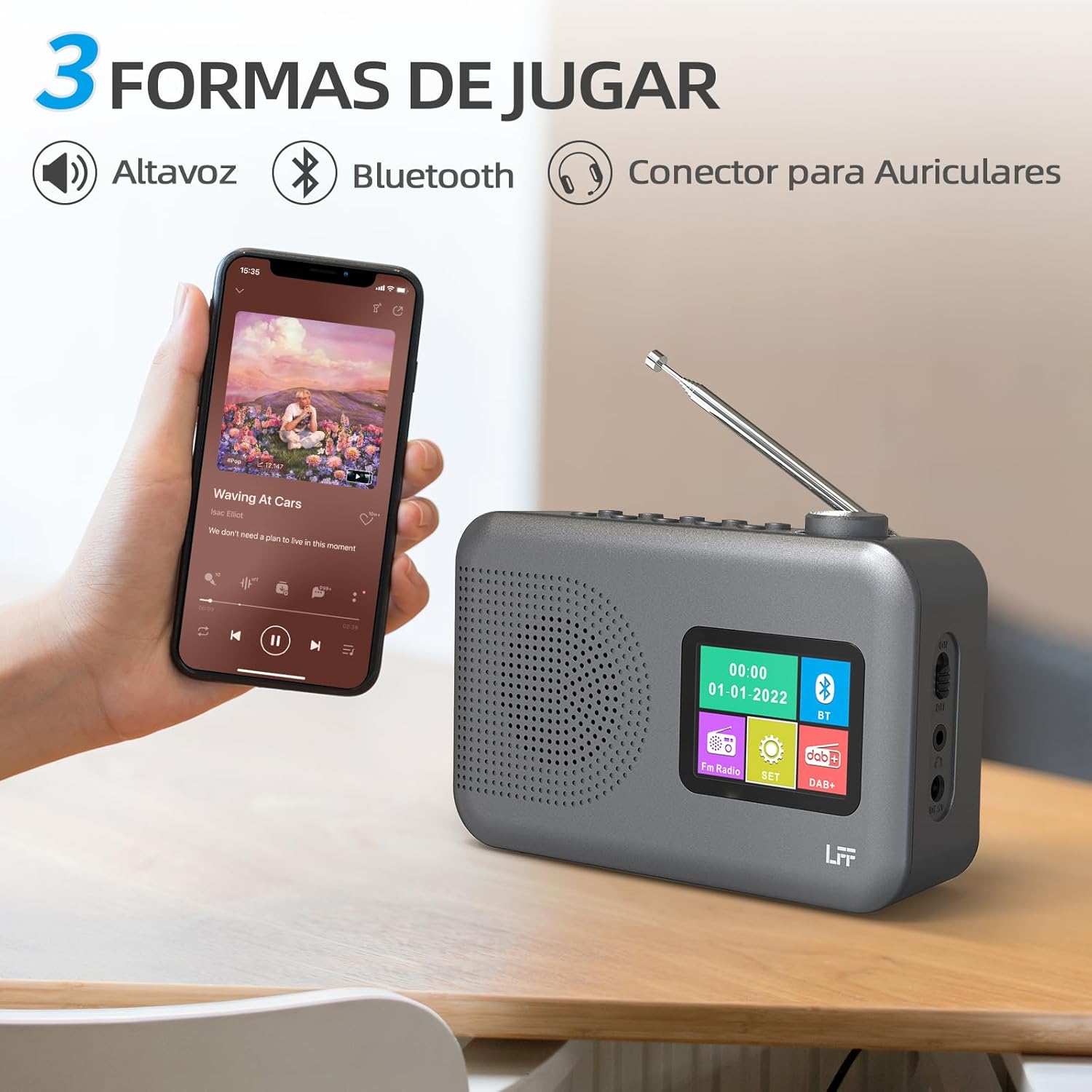
Figure 4.2: Bluetooth connectivity and audio playback options.
- Schalten Sie das Radio mithilfe der folgenden Einstellung in den Bluetooth-Modus: Leistung/Modus Drücken Sie die Taste. Auf dem Display erscheint „Bluetooth-Kopplung“ oder Ähnliches.
- On your device, enable Bluetooth and search for "LFF YT81107" (or similar).
- Select the radio to pair. Once connected, you can play audio from your device through the radio's speaker.
- Adjust volume using the radio's Lautstärkeregler or your connected device.
Weckerfunktion
Richten Sie bis zu zwei unabhängige Alarme ein.
- Drücken Sie die Alarm Taste zum Aufrufen der Alarmeinstellungen.
- Verwenden Sie die Tuning/Scroll Tasten und Volume Knob/Select to set the alarm time, source (DAB, FM, or buzzer), and frequency (daily, weekdays, weekends, once).
- Drücken Sie die Alarm Drücken Sie erneut, um den Alarm zu bestätigen und zu aktivieren.
- When an alarm sounds, press any button (except Power) to snooze, or press the Leistung/Modus Taste, um es auszuschalten.
Einschlaftimer
Der Sleep-Timer sorgt dafür, dass sich das Radio nach einer festgelegten Zeit automatisch ausschaltet.

Figure 4.3: Sleep timer function in use.
- Drücken Sie die Menü/Info Taste, um auf das Hauptmenü zuzugreifen.
- Navigate to the "Sleep Timer" option using the Tuning/Scroll Tasten und drücken Sie die Volume Knob/Select.
- Select your desired duration (15, 30, 45, 60, 90, or 120 minutes) and confirm. The radio will automatically turn off after the selected time.
Verwendung von Kopfhörern
For private listening, connect standard 3.5mm headphones to the headphone jack on the side of the radio. The internal speaker will be muted automatically.
Note: This radio does not support Bluetooth headphones. The 3.5mm headphone jack is for wired headphones only.
5. Wartung
- Reinigung: Wischen Sie das Radio mit einem weichen, trockenen Tuch ab. Verwenden Sie keine Scheuermittel oder Lösungsmittel.
- Batteriewechsel: If using batteries, replace all four AA batteries when the low battery indicator appears on the display or when performance degrades. Ensure proper disposal of old batteries.
- Lagerung: Wenn Sie das Radio über einen längeren Zeitraum lagern, entfernen Sie die Batterien, um ein Auslaufen zu verhindern.
6. Fehlerbehebung
| Problem | Mögliche Ursache | Lösung |
|---|---|---|
| Kein Strom | AC adapter not connected or faulty; batteries depleted or incorrectly inserted. | Check AC adapter connection and power outlet. Replace batteries or ensure correct polarity. |
| Schlechter Radioempfang | Antenne nicht ausgefahren; schwaches Signal; Störungen. | Die Teleskopantenne vollständig ausziehen und einstellen. Versuchen Sie, das Funkgerät an einem anderen Ort aufzustellen. |
| Bluetooth stellt keine Verbindung her | Radio not in Bluetooth mode; device not in pairing mode; radio already connected to another device. | Ensure radio is in Bluetooth mode. Put your device in pairing mode. Disconnect from other Bluetooth devices. |
| Der Alarm ertönt nicht | Alarm not activated; volume too low; incorrect alarm settings. | Check alarm settings and ensure it is enabled. Increase volume. Verify alarm time and source. |
7. Spezifikationen
| Besonderheit | Detail |
|---|---|
| Modellnummer | YT81107 |
| Marke | LFF-Erweiterung |
| Tuning-Technologie | DAB+, UKW |
| Unterstützte Funkbänder | DAB+ (174.928 - 239.2 MHz), FM (87.5 - 108 MHz) |
| Konnektivität | Bluetooth, 3.5mm Headphone Jack |
| Stromquelle | AC Adapter (included), 4x 1.5V AA (LR6) Batteries (not included) |
| Abmessungen (L x B x H) | 16.1 cm x 5.9 cm x 10.9 cm |
| Farbe | Grau |
| Besondere Merkmale | DAB Radio, DAB Plus Radio, DAB+ Radio, FM Radio, Color Display, Bluetooth, Dual Alarm, Sleep Timer |
| Kompatible Geräte | Headphones, MP3 Player, Smartphone, Laptop, Speaker, Tablet |
8. Garantie und Support
LFF is committed to providing high-quality products. If you encounter any quality issues with your LFF DAB/FM Digital Radio YT81107, please contact us directly. Our customer support team is available to assist you and resolve any problems you may experience.
Die genauen Garantiebedingungen und Kontaktinformationen entnehmen Sie bitte Ihrer Kaufdokumentation.