
1. Einleitung
This manual provides detailed instructions for the Loutoc Voice Remote Control, Model 1385a. This remote is designed as a replacement and upgrade for specific Samsung Smart TVs from 2021 and 2022, offering voice control and quick access to popular streaming services. It features a fast response time of 0.5 seconds and durable silicone buttons tested for over 15,000 clicks. Please read this manual carefully to ensure proper use and optimal performance.

Image 1: Loutoc Voice Remote Control, front view.
2. Kompatibilität
The Loutoc Voice Remote Control (Model 1385a) is specifically compatible with 2021/2022 Samsung Neo QLED / Crystal UHD 4K Smart TVs that have Alexa Built-in. It is designed to replace or function similarly to the following Samsung TV remote models with voice function:
- TM2180A (BN68-11642A, BN68-11929A, BN68-11929B, BN68-11929D)
- TM2180E (BN68-11645A, BN68-11645G)
- TM2280E (BN68-13842D, BN68-13842H, BN68-13842J)
- BN68-11645D
Notiz: This remote control may not be fully compatible with Samsung TVs from other years or models that do not support voice control or the listed remote models.

Image 2: The remote is compatible with 2021/2022 Samsung Neo QLED and Crystal UHD 4K Smart TVs with Alexa Built-in.

Image 3: Visual representation of compatible Samsung TV remote models.
3. Einrichtung
3.1. Einlegen der Batterie
The Loutoc Voice Remote Control requires zwei AAA-Batterien zum Betrieb. So legen Sie die Batterien ein:
- Suchen Sie die Batteriefachabdeckung auf der Rückseite der Fernbedienung.
- Schieben Sie den Deckel nach unten oder drücken Sie den Riegel (falls vorhanden), um ihn zu öffnen.
- Legen Sie zwei AAA-Batterien ein und achten Sie darauf, dass die Plus- (+) und Minus- (-) Anschlüsse mit den Markierungen im Inneren des Batteriefachs übereinstimmen.
- Schließen Sie den Batteriefachdeckel fest.
3.2. Anweisungen zum Koppeln
For full functionality, including voice control and advanced features, the remote control must be paired with your Samsung Smart TV. If the remote does not automatically pair upon battery installation, follow these steps:
- Ensure your Samsung Smart TV is powered on.
- Point the Loutoc remote control directly at the front of your TV.
- Halten Sie gleichzeitig die "Zurückkehren" Knopf (gebogener Pfeil) und der "Play/Pause" button (triangle and two vertical lines) for at least 3 to 5 seconds.
- Release the buttons when a pairing message appears on your TV screen, indicating that the pairing process has begun or is complete.
- The TV screen should display a confirmation message once pairing is successful.
If pairing fails, ensure the batteries are correctly inserted and try again. Maintain a clear line of sight to the TV during the pairing process.
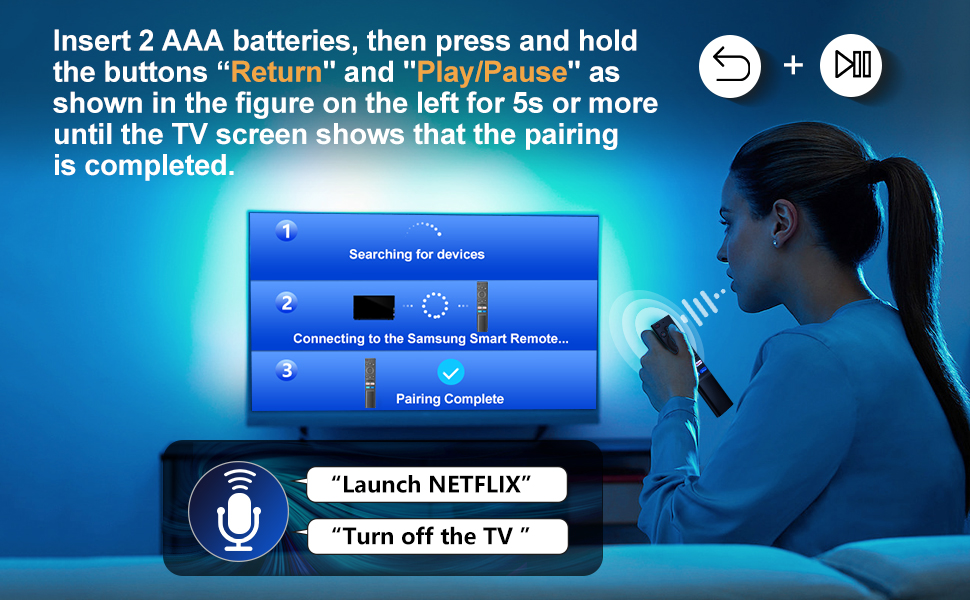
Image 4: Visual guide for pairing the remote control with your Samsung Smart TV by holding the Return and Play/Pause buttons.
4. Bedienungsanleitung
The Loutoc Voice Remote Control offers intuitive navigation and quick access to various TV functions and streaming services.
4.1. Tastenfunktionen (Über)view
Eine detaillierte Übersicht finden Sie im untenstehenden Diagramm.view of each button's function:

Image 5: Labeled diagram of the Loutoc Voice Remote Control buttons and their functions.
| Schaltfläche/Funktion | Beschreibung |
|---|---|
| Leistung | Drücken Sie diese Taste, um das Fernsehgerät ein- oder auszuschalten. |
| Mikrofon / LED | Used as MIC when using voice recognition with the remote control. The LED indicates remote activity. |
| Sprachassistent | Press and hold this button to speak commands to the voice assistant (e.g., Alexa). Supported languages and features may vary by geographical region. |
| Color / Number button (123) | Press once to display the virtual numeric pad and color buttons. Use these to access additional options or enter numbers/text. Press and hold for 1 second or more to access the TTX menu. |
| Mehrfarbig View | Press this button directly to enter the Multi View function. Press and hold for 1 second or more to access the Shortcuts menu screen. |
| Directional buttons (Up, Down, Left, Right) | Moves the focus and changes values on the TV's menu. |
| Wählen | Selects or runs a focused item. When pressed while watching a broadcast program, detailed program information appears. |
| Zurückkehren | Returns to the previous menu. When pressed for 1 second or more, the running function is terminated. When pressed while watching a program, the previous channel appears. |
| Smart Hub (Home) | Kehrt zum Startbildschirm zurück. |
| Abspielen/Pause | Controls media playback. Use to pause/play content. When pressed, the playback controls appear. Using these controls, you can control the media content that is playing. To use Game Bar, press and hold the button in Game Mode. Game Bar may not be supported depending on the model or geographical area. |
| Lautstärke (+/-) | Moves the button up or down to adjust the volume. To mute the sound, press the button. When pressed for 1 second or more, the Accessibility Shortcuts menu appears. |
| Kanal (Auf/Ab) | Moves the button up or down to change the channel. To see the Guide screen, press the button. When pressed for 1 second or more, the Channel List screen appears. |
| Launch App buttons (NFLX, Rakuten TV, Prime Video, Dis) | Press each button to launch its respective application directly. |
4.2. Sprachsteuerungsfunktion
The remote features a dedicated voice control button, allowing you to interact with your Samsung Smart TV using voice commands. This function is particularly useful for searching content, changing settings, or controlling smart home devices connected to your TV's voice assistant.
- Halten Sie die Sprachassistent button (microphone icon).
- Speak your command clearly into the microphone located on the remote.
- Release the button once you have finished speaking.
Examples of commands include: "Launch Netflix", "Turn off the TV", "Suchen nach action movies".

Image 6: The remote control highlighting the voice function button.

Image 7: A user demonstrating the voice control feature to launch applications or control the TV.
4.3. Quick Access Shortcut Buttons
The remote includes four dedicated shortcut buttons for instant access to popular streaming applications:
- NFLX: Launches Netflix.
- Rakuten TV: Launches Rakuten TV.
- Prime Video: Launches Amazon Prime Video.
- Dis: Launches Disney+.

Image 8: Close-up of the dedicated shortcut buttons for streaming services.
5. Wartung
To ensure the longevity and proper functioning of your Loutoc Voice Remote Control, follow these maintenance guidelines:
- Reinigung: Reinigen Sie die Fernbedienung mit einem weichen, trockenen Tuch. Bei hartnäckigem Schmutz leicht andrücken.ampBefeuchten Sie das Tuch mit Wasser oder einem milden, nicht scheuernden Reinigungsmittel. Vermeiden Sie die Verwendung von scharfen Chemikalien oder scheuernden Materialien.
- Batteriewechsel: Tauschen Sie die Batterien aus, wenn die Fernbedienung nur noch langsam reagiert oder gar nicht mehr funktioniert. Ersetzen Sie immer beide Batterien gleichzeitig durch neue Batterien desselben Typs (AAA).
- Lagerung: Bewahren Sie die Fernbedienung an einem kühlen, trockenen Ort fern von direkter Sonneneinstrahlung, extremen Temperaturen und hoher Luftfeuchtigkeit auf.
- Vermeiden Sie Tropfen: Schützen Sie die Fernbedienung vor Stößen, da Stürze interne Bauteile beschädigen können.
6. Fehlerbehebung
If you encounter issues with your Loutoc Voice Remote Control, refer to the following common problems and solutions:
- Fernbedienung reagiert nicht:
- Prüfen Sie, ob die Batterien richtig eingelegt sind und ausreichend geladen sind. Tauschen Sie sie gegebenenfalls aus.
- Stellen Sie sicher, dass sich keine Hindernisse zwischen Fernbedienung und Fernseher befinden.
- Re-pair the remote control with your TV by following the "Pairing Instructions" in Section 3.2.
- Sprachsteuerung funktioniert nicht:
- Ensure the remote is properly paired via Bluetooth/RF (not just infrared).
- Make sure you are pressing and holding the Voice Assistant button while speaking.
- Speak clearly and close to the microphone on the remote.
- Check your TV's settings to ensure the voice assistant feature is enabled and configured correctly.
- Delayed response or intermittent functionality:
- This can sometimes occur if the remote is not fully paired or if there's interference. Try re-pairing the remote.
- Ensure you are within the effective operating range (up to 8 meters / 26 feet).
- Tauschen Sie die Batterien aus, wenn sie schwach sind.
- Specific shortcut buttons not working:
- Ensure your TV has the corresponding application installed and updated.
- Verify that the remote is correctly paired.
Sollte das Problem nach Anwendung dieser Lösungsansätze weiterhin bestehen, wenden Sie sich bitte an den Kundendienst.
7. Spezifikationen
| Besonderheit | Detail |
|---|---|
| Marke | Loutoc |
| Modellnummer | Nr. 1385a |
| Stromquelle | 2 x AAA-Batterien (nicht enthalten) |
| Konnektivitätstechnologie | Bluetooth/RF (for pairing and voice control), Infrared (for basic functions) |
| Maximale Reichweite | Bis zu 8 Meter (26 Fuß) |
| Controllertyp | Sprachsteuerung, Tastensteuerung |
| Anzahl der Tasten | Approx. 20 (including directional pad) |
| Besondere Merkmale | Ergonomic design, No programming required (after pairing), Lightweight, Universal (for compatible Samsung models) |
| Farbe | Schwarz |
| Abmessungen (L x B x H) | Ungefähr 19.7 x 4.8 x 1.5 cm (7.76 x 1.89 x 0.59 Zoll) |
| Gewicht | Ungefähr 40 Gramm (1.41 Unzen) |
| Ursprungsland | China |

Image 9: Dimensions of the Loutoc Voice Remote Control.
8. Garantie und Support
Loutoc is committed to providing quality products and customer satisfaction. If you have any questions regarding your Loutoc Voice Remote Control or encounter any issues, please do not hesitate to contact our customer support team.
- Kundendienst: For inquiries about your order or product, please contact us directly. We aim to respond within 12 hours on business days.
- Garantie: Specific warranty details may vary. Please refer to your purchase documentation or contact customer support for more information.