
1. Einleitung
This manual provides detailed instructions for the setup, operation, maintenance, and troubleshooting of your Cosmic Byte ARES Wired Controller for PC. Designed for an enhanced gaming experience, this controller features Hall Effect joysticks and triggers, dual vibration, and customizable Turbo functions.
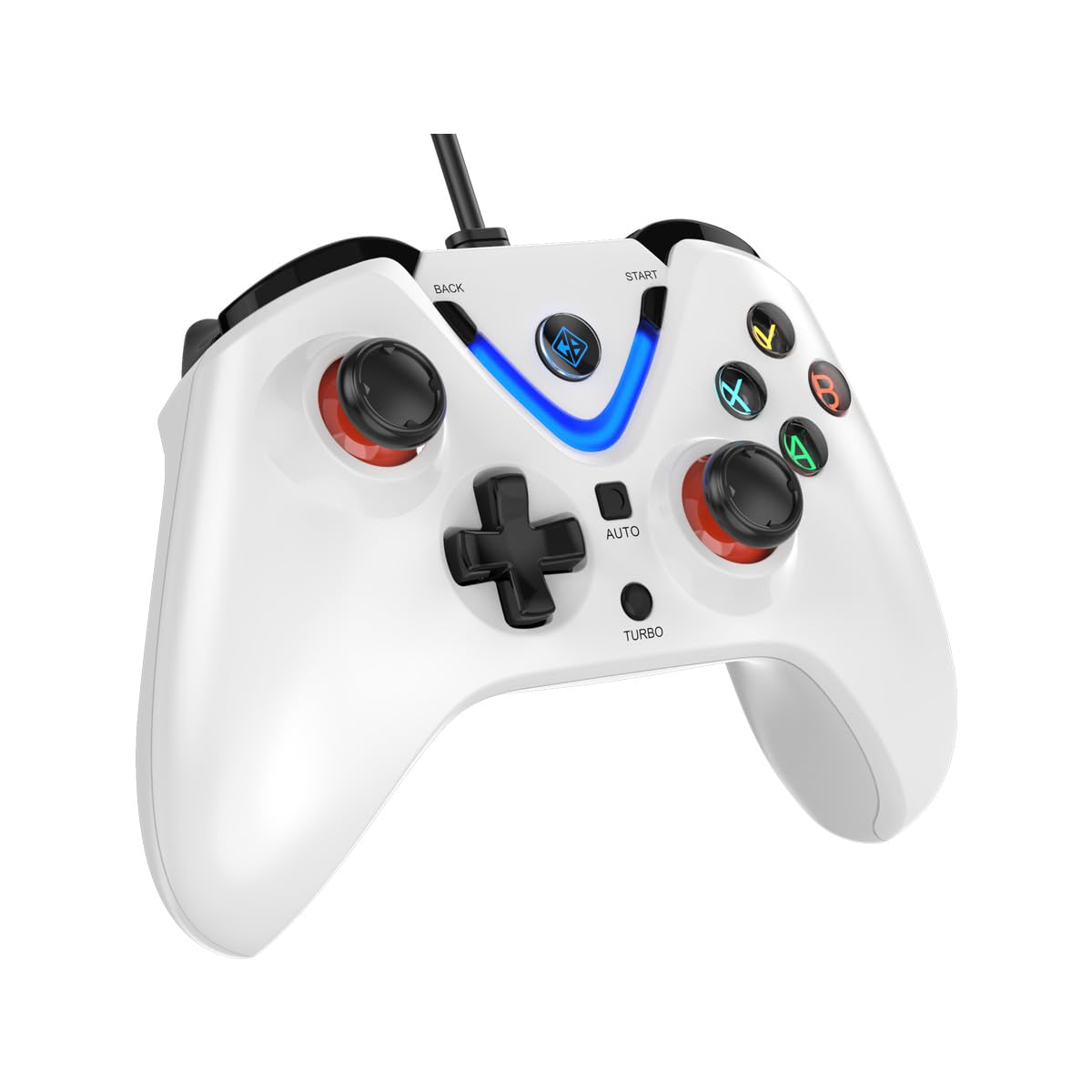
Image 1: The Cosmic Byte ARES Wired Controller in white, showcasing dank seines ergonomischen Designs.
2. Einrichtungsanweisungen
2.1 Verbindung zum PC
- Stellen Sie sicher, dass Ihr PC eingeschaltet ist.
- Suchen Sie einen verfügbaren USB-Anschluss an Ihrem Computer.
- Plug the USB connector of the Cosmic Byte ARES Wired Controller into the USB port.
- Das Betriebssystem erkennt und installiert automatisch die benötigten Treiber. Dieser Vorgang kann einige Augenblicke dauern.
- Once installation is complete, the controller is ready for use.

Image 2: The controller connected via its wired USB connection, ensuring fast response.
3. Bedienungsanleitung
3.1 Grundlegende Bedienelemente
The Cosmic Byte ARES controller features standard gamepad layouts, including:
- Left and Right Analog Joysticks: Für präzise Bewegungs- und Kamerasteuerung.
- Steuerkreuz: Zur Richtungseingabe, die häufig in Menüs oder für bestimmte Spielaktionen verwendet wird.
- Aktionsschaltflächen (A, B, X, Y): For primary game interactions.
- Schultertasten (L1, R1) und Trigger (L2, R2): For various in-game functions like shooting, aiming, or accelerating.
- Start and Back Buttons: For pausing games, accessing menus, or specific in-game commands.
- Turbo-Taste: For activating rapid-fire functions.
- Auto-Taste: For activating automatic rapid-fire functions.
3.2 Joysticks und Trigger mit Hall-Effekt
The controller is equipped with Hall Effect joysticks and triggers, which use magnetic sensors instead of physical contacts. This technology provides:
- Verbesserte Präzision: More accurate and responsive input.
- Erhöhte Haltbarkeit: Reduces wear and tear, preventing stick drift over time.
- Reibungsloser Betrieb: Consistent and linear response for triggers, allowing for nuanced control in games.

Abbildung 3: Eine explodierte view illustrating the Hall Effect joystick mechanism and the Hall Effect triggers.
3.3 Duales Vibrationsfeedback
The controller features dual vibration motors that provide tactile feedback during gameplay, enhancing immersion by simulating in-game events such as impacts, explosions, or engine rumbling.
3.4 Backlit LED Buttons
The action buttons (A, B, X, Y) and the central V-shaped indicator feature LED backlighting, providing visibility in low-light conditions and adding to the controller's aesthetic.

Image 4: The controller with its LED buttons illuminated and visual representation of vibration effects.
3.5 Turbo and Auto Turbo Functions
The Turbo and Auto Turbo functions allow for rapid, repeated input of a button press without continuously pressing the button.
- Turbo aktivieren: Press and hold the desired action button (e.g., A) and then press the Turbo button. The button will now rapidly repeat its input as long as you hold it down.
- Activating Auto Turbo: Press and hold the desired action button (e.g., A) and then press the Auto button. The button will now rapidly repeat its input automatically without needing to be held down.
- Deactivating Turbo/Auto Turbo: To deactivate, repeat the activation steps for the specific button, or press the Klar button (if available) or disconnect and reconnect the controller.

Image 5: Close-up of the controller showing the Turbo and Auto function buttons.
4. Wartung
- Reinigung: Reinigen Sie den Controller mit einem weichen, trockenen Tuch. Bei hartnäckigem Schmutz kann ein leicht feuchtes Tuch hilfreich sein.amp cloth can be used, ensuring no liquid enters the controller. Avoid harsh chemicals or abrasive cleaners.
- Lagerung: Bewahren Sie den Controller an einem kühlen, trockenen Ort ohne direkte Sonneneinstrahlung und extreme Temperaturen auf. Vermeiden Sie es, schwere Gegenstände auf den Controller zu stellen.
- Kabelpflege: Do not sharply bend or pull the USB cable. Always grasp the plug when disconnecting from the PC.
5. Fehlerbehebung
- Controller nicht erkannt:
- Stellen Sie sicher, dass das USB-Kabel sowohl mit dem Controller als auch mit dem PC fest verbunden ist.
- Versuchen Sie, den Controller an einen anderen USB-Anschluss anzuschließen.
- Starten Sie Ihren Computer neu.
- Check Device Manager on Windows to see if the controller is listed and if there are any driver issues.
- Tasten/Joysticks reagieren nicht:
- Verify the controller is recognized by your PC (see above).
- Test the controller in a different game or a controller testing utility to rule out game-specific issues.
- Stellen Sie sicher, dass keine anderen Eingabegeräte Störungen verursachen.
- Vibration funktioniert nicht:
- Überprüfen Sie die Spieleinstellungen, um sicherzustellen, dass die Vibrationsrückmeldung aktiviert ist.
- Bei manchen Spielen wird die Vibration möglicherweise nicht unterstützt oder die Vibrationsfunktion ist eingeschränkt.
6. Spezifikationen
| Besonderheit | Detail |
|---|---|
| Marke | Kosmisches Byte |
| Modellname | Ares |
| Kompatible Geräte | PC |
| Controllertyp | Gamepad |
| Konnektivitätstechnologie | USB |
| Produkteigenschaften | Ergonomisch |
| Anzahl der Tasten | 16 |
| Hardware-Plattform | PC |
| Stromquellentyp | Kabelgebundenes elektrisches USB-Kabel |
| Artikelgewicht | 220 Gramm |
| Artikelabmessungen | 6 x 10 x 4 Zentimeter |
| Farbe | Weiß |
| Ursprungsland | China |

Image 6: A comparison table highlighting features of different ARES controller models.
7. Garantie und Support
7.1 Garantieinformationen
The Cosmic Byte ARES Wired Controller comes with a 1 Jahr Garantie auf Herstellungsfehler ab Kaufdatum. Bitte bewahren Sie Ihren Kaufbeleg für Garantieansprüche auf.
7.2 Kontaktinformationen des Herstellers
For support, service, or warranty inquiries, please contact:
Kosmisches BytePrakash Warehousing, S. No.163, Hissa No 1-2-3-4-5A-5B/2/1,
Phursungi, Pune 412308, Maharashtra, India
For further assistance, please visit the official Cosmic Byte webWebsite oder wenden Sie sich an den Kundendienst.