
1. Einleitung
Thank you for choosing the OQIMAX GH8013 Digital Projection Alarm Clock. This manual provides detailed instructions for the proper setup, operation, and maintenance of your device. Please read this manual thoroughly before use and retain it for future reference.
Sicherheitshinweise
- Setzen Sie das Gerät keinen extremen Temperaturen, direkter Sonneneinstrahlung oder hoher Luftfeuchtigkeit aus.
- Lassen Sie das Gerät nicht fallen und setzen Sie es keinen starken Stößen aus.
- Use only the provided power adapter or a compatible 5V USB power source.
- Außerhalb der Reichweite von Kindern aufbewahren.
- Versuchen Sie nicht, das Gerät selbst zu zerlegen oder zu reparieren. Wenden Sie sich bei Problemen an den Kundendienst.
2. Packungsinhalt
Bitte prüfen Sie das Paket auf folgende Artikel:
- OQIMAX GH8013 Digital Projection Alarm Clock
- USB-Stromkabel
- CR2032 Button Cell Battery (for memory backup)
- Bedienungsanleitung

Image: Contents of the OQIMAX GH8013 package, including the alarm clock, USB cable, CR2032 battery, and user manual.
3. Produktüberschreitungview
Machen Sie sich mit den wichtigsten Komponenten und Bedienelementen Ihres Weckers vertraut.

Abbildung: Oben und unten view of the alarm clock with labels for SNOOZE/LIGHT, PROJECT, ALARM, SET, DOWN, UP buttons, Speaker, Projection lamp, Power port, and CR2032 battery compartment.
Hauptmerkmale:
- Large LED display for time and alarm.
- Adjustable display brightness (4 levels).
- Projection function with 3 brightness levels and 180° flip.
- Schlummerfunktion (1-60 Minuten).
- Three alarm modes (Monday-Friday, Monday-Saturday, Everyday).
- 12/24 hour time format selection.
- Temperaturanzeige.
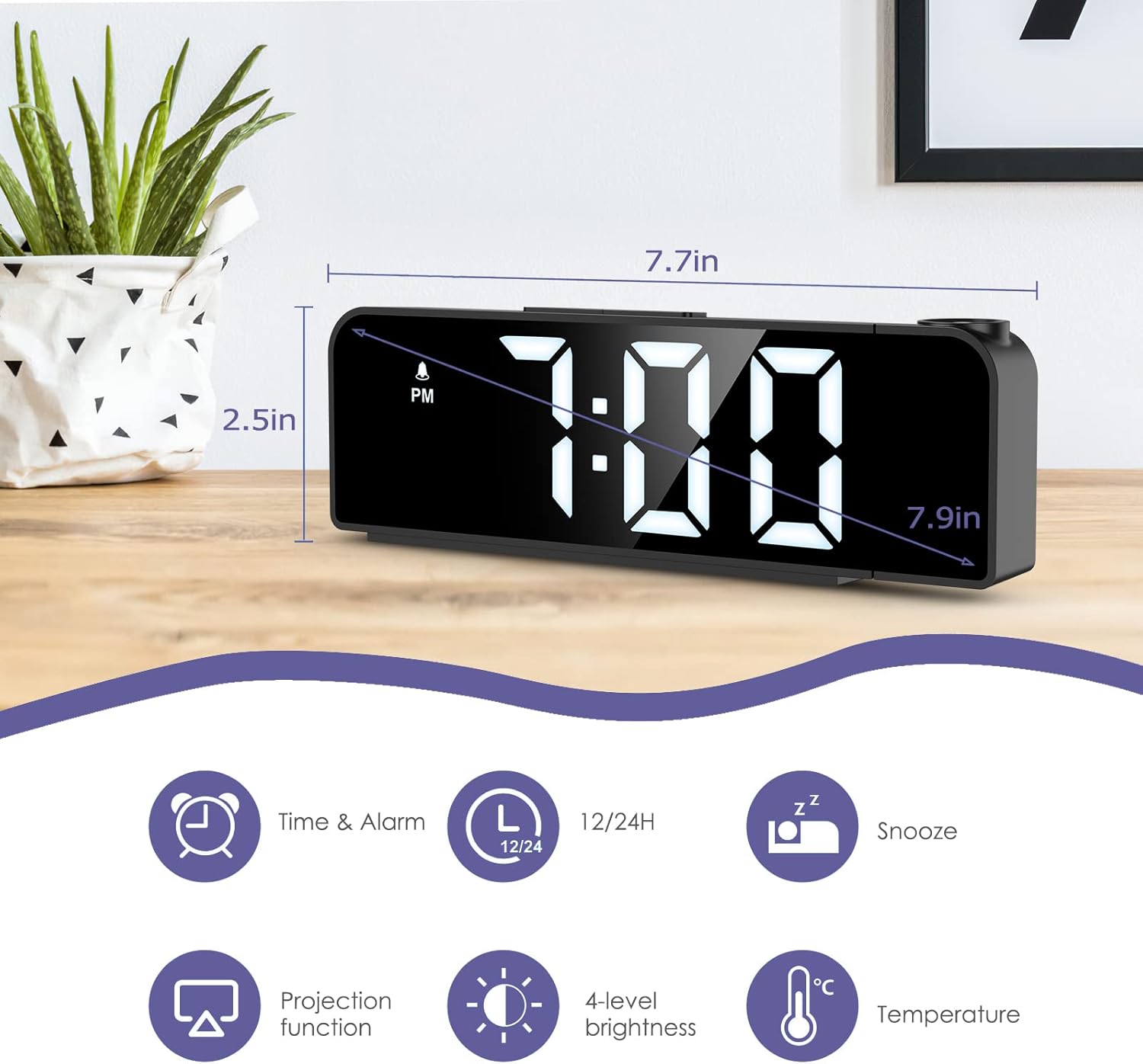
Image: The alarm clock displaying time, with icons indicating Time & Alarm, 12/24H, Snooze, Projection function, 4-level brightness, and Temperature features. Dimensions are shown as 7.7 inches length and 2.5 inches height.
4. Einrichtung
4.1 Einschalten
- Insert the CR2032 button cell battery into the battery compartment on the bottom of the clock. This battery provides memory backup for time and alarm settings during power outages.
- Connect the USB power cable to the power port on the back of the alarm clock.
- Plug the other end of the USB cable into a 5V USB power adapter (not included) or a USB port. The display will light up.
4.2 Anfangszeiteinstellung
- Halten Sie die SATZ Die Taste 3 Sekunden lang gedrückt halten, um in den Zeiteinstellungsmodus zu gelangen. Die Stundenziffern blinken.
- Verwenden Sie die UP or RUNTER Tasten zum Einstellen der Stunde.
- Drücken SATZ Um die Stunde erneut zu bestätigen, wechseln Sie zur Minuteneinstellung. Die Minutenziffern blinken.
- Verwenden Sie die UP or RUNTER Tasten zum Einstellen der Minuten.
- Drücken SATZ again to confirm the minute and exit time setting mode.
4.3 Auswahl des 12-/24-Stunden-Formats
Drücken Sie im normalen Zeitanzeigemodus die Taste UP button to switch between 12-hour and 24-hour time formats. In 12-hour format, "PM" will be displayed for afternoon hours.
5. Bedienungsanleitung
5.1 Wecker stellen
- Halten Sie die ALARM Durch Drücken der Taste für 3 Sekunden gelangen Sie in den Alarm-Einstellmodus. Die Ziffern der Alarmstunde blinken.
- Verwenden Sie die UP or RUNTER Tasten, um die Weckstunde einzustellen.
- Drücken ALARM again to confirm the alarm hour and move to alarm minute setting. The alarm minute digits will flash.
- Verwenden Sie die UP or RUNTER Tasten zum Einstellen der Alarmminuten.
- Drücken ALARM again to confirm the alarm minute and select the alarm mode.
- Verwenden Sie die UP or RUNTER buttons to cycle through the three alarm modes:
- 1-5: Montag bis Freitag
- 1-6: Montag bis Samstag
- 1-7: Täglich
- Drücken ALARM again to confirm the alarm mode and exit alarm setting. The alarm icon will appear on the display, indicating the alarm is active.
To turn the alarm ON/OFF, short press the ALARM button in normal time display mode. The alarm icon will appear or disappear.

Image: The alarm clock display showing the three alarm modes: 1-5 (Monday to Friday), 1-6 (Monday to Saturday), and 1-7 (Everyday).
5.2 Schlummerfunktion
Wenn der Alarm ertönt, drücken Sie die große Taste. SNOOZE / LICHT button on top of the clock to activate the snooze function. The alarm will pause for a set duration (default is 9 minutes, adjustable from 1-60 minutes) and sound again later.
So passen Sie die Schlummerdauer an:
- Während der Alarm ertönt, drücken und halten Sie die Taste SNOOZE / LICHT button for 3 seconds. The snooze time will flash.
- Verwenden Sie die UP or RUNTER buttons to set the desired snooze duration (1-60 minutes).
- Drücken SNOOZE / LICHT erneut, um zu bestätigen und zu beenden.
Um den Alarm vollständig zu stoppen, drücken Sie eine beliebige andere Taste (z. B. ALARM, SATZ, UP, RUNTER) when it is sounding.
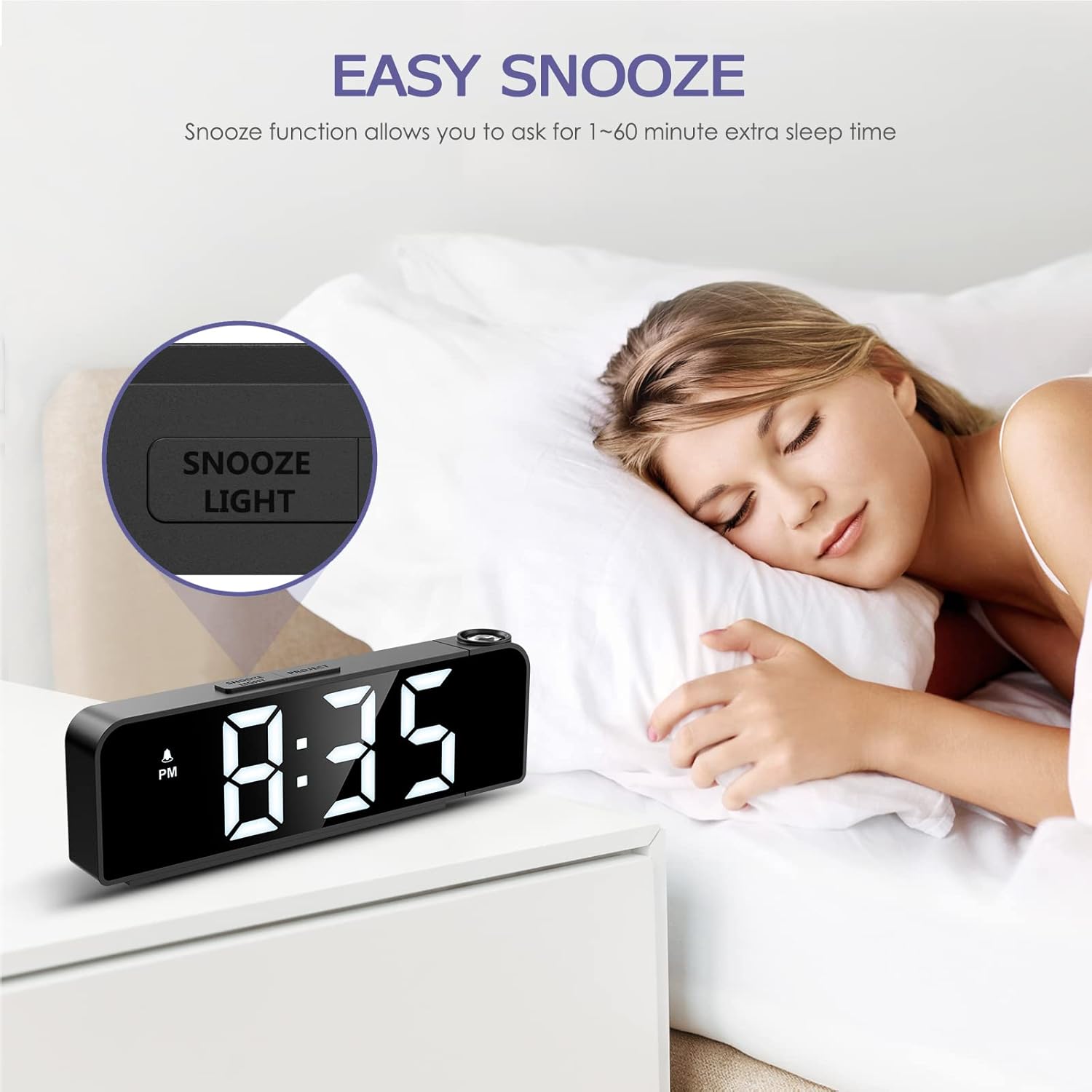
Image: A person sleeping next to the alarm clock, with the "SNOOZE/LIGHT" button highlighted, illustrating the snooze function.
5.3 Anpassung der Anzeigehelligkeit
The main display has 4 adjustable brightness levels (Bright Light, Medium Light, Low Light, OFF).
Im normalen Zeitanzeigemodus kurz drücken SNOOZE / LICHT button to cycle through the brightness levels.

Image: The alarm clock display shown at Bright Light, Medium Light, Low Light, and OFF brightness settings.
5.4 Projektionsfunktion
The alarm clock can project the time onto a wall or ceiling.
- Drücken Sie die PROJEKT button to turn the projection ON/OFF.
- To adjust the projection brightness (3 levels), press the PROJEKT button repeatedly while the projection is active.
- The projection can be rotated 180 degrees for optimal viewing. Manually adjust the projection lens on the side of the clock to change the angle.
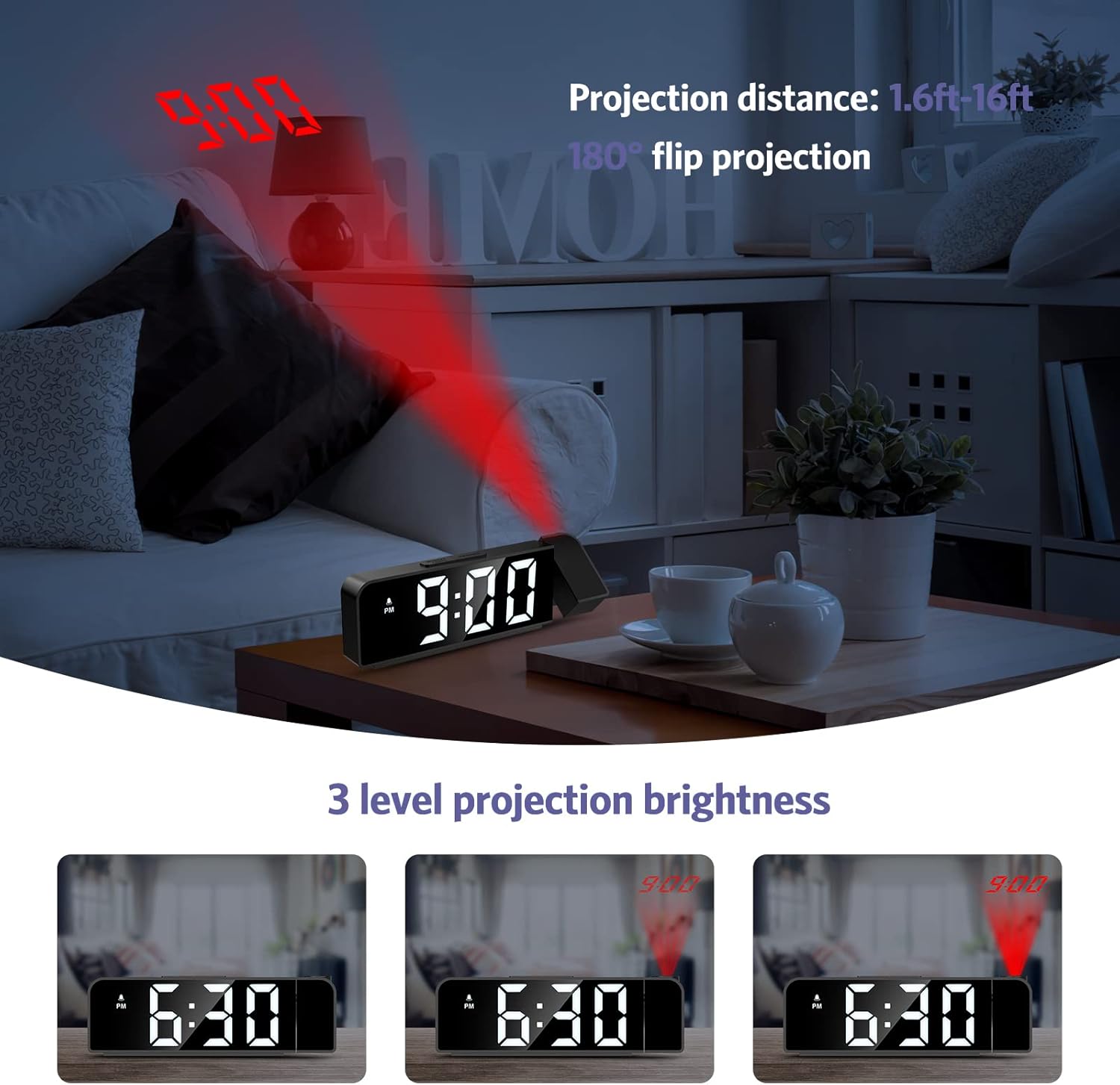
Image: The alarm clock projecting the time "9:00" onto a wall, demonstrating the projection distance (1.6ft-16ft) and 180° flip projection feature. Three levels of projection brightness are also shown.

Image: Four different scenarios showing the alarm clock projecting time onto various surfaces like a wall above a desk, a bedroom wall, and a ceiling while a person is in bed.
5.5 Temperaturanzeige
The alarm clock displays the ambient temperature. This feature is automatic and does not require manual setting.
6. Wartung
- Reinigen Sie das Gerät mit einem weichen, trockenen Tuch. Verwenden Sie keine Scheuermittel oder Lösungsmittel.
- Stellen Sie sicher, dass das Gerät vor der Reinigung vom Stromnetz getrennt ist.
- If the backup battery (CR2032) needs replacement, ensure the clock is powered on via USB to retain settings during the battery change.
7. Fehlerbehebung
| Problem | Mögliche Ursache | Lösung |
|---|---|---|
| Das Display ist ausgeschaltet oder schwach. | No power or display brightness set to OFF. | Ensure the USB power cable is securely connected. Press the SNOOZE / LICHT button to adjust display brightness. |
| Der Alarm ertönt nicht. | Der Alarm ist nicht aktiviert oder falsch eingestellt. | Check if the alarm icon is displayed. If not, short press the ALARM button to activate. Verify alarm time and mode settings. |
| Projection is blurry or upside down. | Projection focus or orientation needs adjustment. | Manually rotate the projection lens to adjust the angle. The device supports 180° flip projection. |
| Time resets after power loss. | Die CR2032-Backup-Batterie ist leer oder fehlt. | Replace the CR2032 button cell battery. Ensure it is inserted correctly. |
8. Spezifikationen
- Modell: GH8013
- Marke: OQIMAX
- Material: Acrylnitril-Butadien-Styrol (ABS)
- Anzeigetyp: Digitale LED
- Energiequelle: USB Cable (DC 5V)
- Backup-Batterie: CR2032 Knopfzelle (im Lieferumfang enthalten)
- Abmessungen: 20.9 x 8.4 x 4.7 cm (ca. 7.7 x 3.3 x 1.85 Zoll)
- Gewicht: 200 Gramm (ca. 0.44 Pfund)
- Besondere Merkmale: Adjustable Brightness, Snooze, Projection Function, 12/24H Format, Temperature Display, Multiple Alarm Modes
9. Garantie und Support
OQIMAX products are designed for reliability and performance. For any questions, technical support, or warranty claims, please contact OQIMAX customer service through the retailer where the product was purchased or visit the official OQIMAX webWebsite für Kontaktinformationen.
Please have your product model (GH8013) and purchase details ready when contacting support.