
1. Produktüberschreitungview
The Spigen OneTap 3 (MagFit) is a magnetic car mount designed for secure phone placement in Tesla vehicles. It features OneTap Technology for easy attachment and a robust magnetic hold.
Kompatibilität
This car mount is compatible with:
- Tesla Model 3, Model Y, Model S (2021+), and Model X (2021+).
- iPhone 16, 15, 14, 13 und 12 Serie.
- MagSafe compatible cases are required for optimal magnetic attachment.

Abbildung 1: Kompatibilität vorbeiview for Tesla models and iPhone series.
The mount's sleek design integrates seamlessly with your Tesla's interior, providing a discreet and functional phone holder.

Abbildung 2: Spigen OneTap 3 mount installed in a Tesla, showcasing its subtle design and integrated cable organizer.
2. Installationsanleitung
Follow these steps for a secure and lasting installation of your Spigen OneTap 3 car mount.
Vorbereitung:
- Identify the desired mounting location behind the corner of your Tesla's display screen.
- Clean the surface thoroughly with isopropyl alcohol and ensure it is completely dry before proceeding. This removes any dust or oils that could compromise adhesion.
- Ensure the car interior is not excessively hot during installation to allow for proper adhesive curing.
Montageschritte:
- Remove the protective film from the pre-applied adhesive on the back of the mount.
- Carefully position the mount behind the corner of your Tesla's screen.
- Press firmly on the mount for at least 30 seconds to ensure strong initial adhesion.
- Wichtig: Allow a curing time of at least 8 hours for optimal adhesion. For full strength, wait 24 hours before attaching your phone or adjusting the mount.
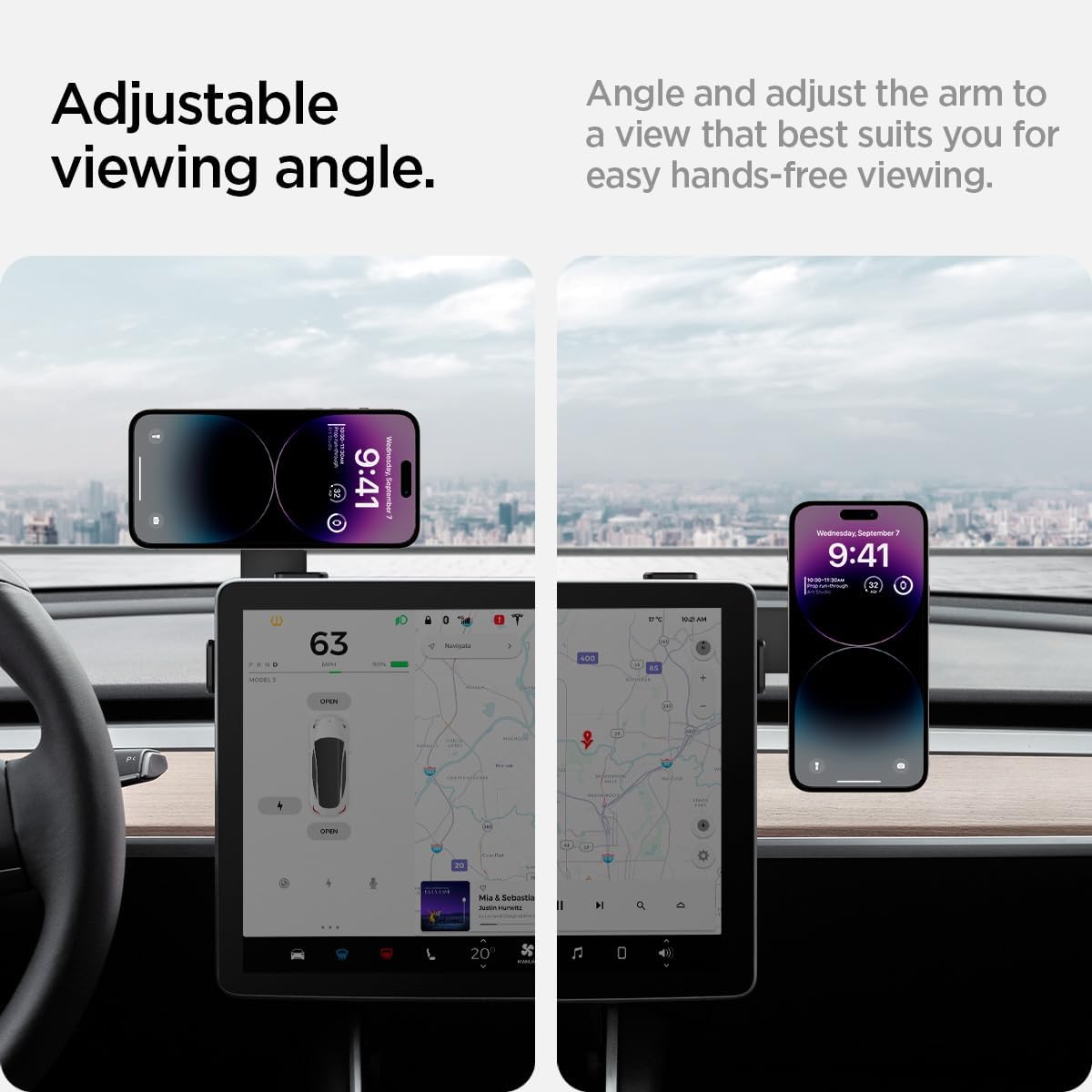
Abbildung 3: Visual guide for secure installation, showing adhesive placement and recommended curing times.

Abbildung 4: Step-by-step installation process for the Spigen OneTap 3 car mount.
An extra adhesive pad is included for future re-installation if needed.
3. Bedienungsanleitung
Anschließen Ihres Telefons:
The Spigen OneTap 3 utilizes MagFit technology for a strong magnetic connection with your iPhone (12 series or newer) or MagSafe compatible case.
- Ensure your iPhone or case is MagSafe compatible.
- Simply bring your iPhone close to the magnetic head of the mount. It will snap securely into place.
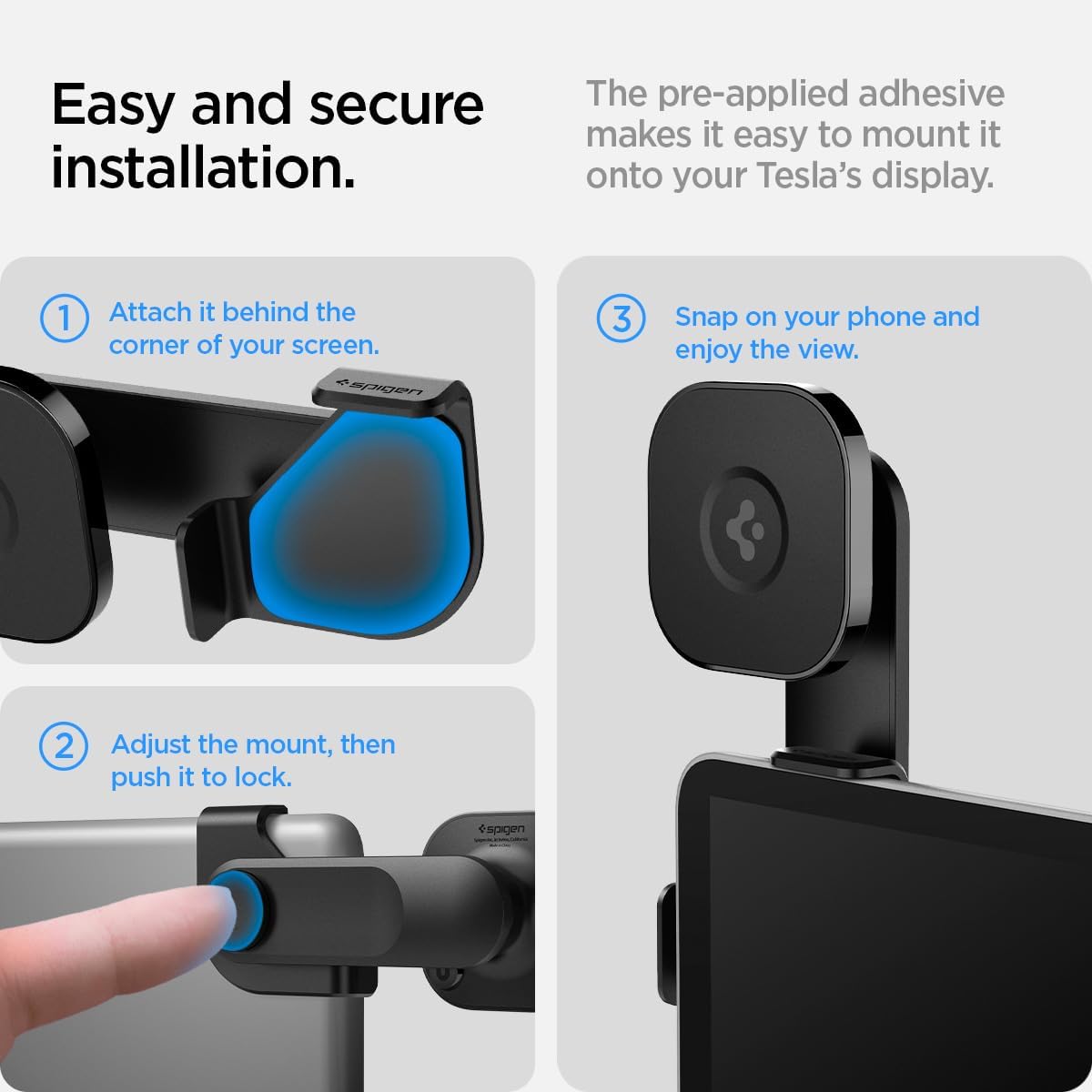
Abbildung 5: Magnetic attachment of an iPhone to the OneTap 3 mount.
Anpassen der Viewing-Winkel:
The mount features an adjustable swing arm and swivel head for optimized viewwinkeln.
- Schwingarm: Press the button on the side of the arm to adjust its position. It locks into 0-degree, 45-degree, and 90-degree angles, allowing for both horizontal and vertical phone orientation.
- Schwenkkopf: The magnetic head can be rotated 360 degrees to fine-tune your phone's orientation.

Abbildung 6: Einstellbar viewing angles, showing horizontal and vertical phone positions.

Abbildung 7: Detail of the adjustable arm mechanism and cable organizer.
Kabelmanagement:
The mount includes two cable head organizing tapes to keep your charging cables tidy and accessible.
4. Videoinstallationsanleitung
For a visual demonstration of the product and installation, please watch the official video below.
Video 1: Spigen OneTap 3 Upgraded Model - Unboxing and Installation Guide by Bazzar Reviews. This video demonstrates the product's features and installation process in a Tesla vehicle.
5. Pflege und Wartung
To ensure the longevity and optimal performance of your Spigen OneTap 3 car mount:
- Clean the mount periodically with a soft, damp Tuch. Vermeiden Sie aggressive Chemikalien oder Scheuermittel.
- Ensure the adhesive area remains clean and free from debris. If re-installation is necessary, use the provided extra adhesive pad.
- Avoid exposing the mount to extreme temperatures for prolonged periods, as this may affect the adhesive.
6. Fehlerbehebung
If you encounter issues with your Spigen OneTap 3 car mount, consider the following:
- Mount not adhering properly: Ensure the installation surface was clean and dry, and that sufficient curing time (at least 8 hours, ideally 24 hours) was allowed after initial application. Re-apply with the extra adhesive pad if necessary.
- Telefon hält nicht magnetisch: Verify that your iPhone is a 12 series or newer, or that your phone case is MagSafe compatible. Ensure no foreign objects are between the phone/case and the mount's magnetic surface.
- Arm not adjusting smoothly: Check for any obstructions in the hinge mechanism. If the issue persists, contact customer support.
7. Produktspezifikationen
| Marke | Spigen |
| Modellname | Spigen OneTap 3 Designed for Tesla Car Mount |
| Modellnummer | ITT90-3 |
| Farbe | Schwarz |
| Montagetyp | Screen Mount (Adhesive) |
| Kompatible Geräte | iPhone 16, 15, 14, 13, 12 Series, MagSafe compatible cases |
| Kompatibler Fahrzeugtyp | Tesla Model 3, Y, S (2021+), X (2021+) |
| Zusätzliche Merkmale | Adjustable swing arm, Powerful Magnetic hold, Cable organizer |
| Artikelabmessungen | 1.47 x 5.44 x 2.53 Zoll |
| Artikelgewicht | 79.65 Gramm |
| Material | Metall |
8. Garantie und Support
Garantieinformationen:
Dieses Produkt wird mit einem 24 Monate sorgenfreie GarantieBitte bewahren Sie Ihren Kaufbeleg für Garantieansprüche auf.
Kundendienst:
For any questions, technical assistance, or warranty claims, please visit the official Spigen webBesuchen Sie die Website oder wenden Sie sich direkt an den Kundendienst. Die genauen Kontaktdaten finden Sie auf der Produktverpackung.