
Produkt überview
The Delton S12 Ergonomic Vertical Wireless Mouse is designed for comfort and efficiency, promoting a natural hand and wrist posture. It features a 2.4GHz wireless connection, six buttons, and three adjustable DPI levels for precise control. This manual provides instructions for setup, operation, maintenance, and troubleshooting.

Image: The Delton S12 Ergonomic Vertical Wireless Mouse, showcasing sein vertikales Design.
Aufstellen
1. Auspacken
Carefully remove the mouse and its accessories from the packaging. Ensure all components are present: the Delton S12 Vertical Wireless Mouse and the USB dongle.
2. Einlegen der Batterie
The Delton S12 mouse requires two (2) AAA batteries (not included). Follow these steps to install them:
- Suchen Sie das Batteriefach auf der Unterseite der Maus.
- Den Deckel des Batteriefachs vorsichtig aufschieben.
- Legen Sie zwei AAA-Batterien ein und achten Sie dabei auf die richtige Polarität (+/-).
- Schließen Sie den Batteriefachdeckel, bis er sicher einrastet.
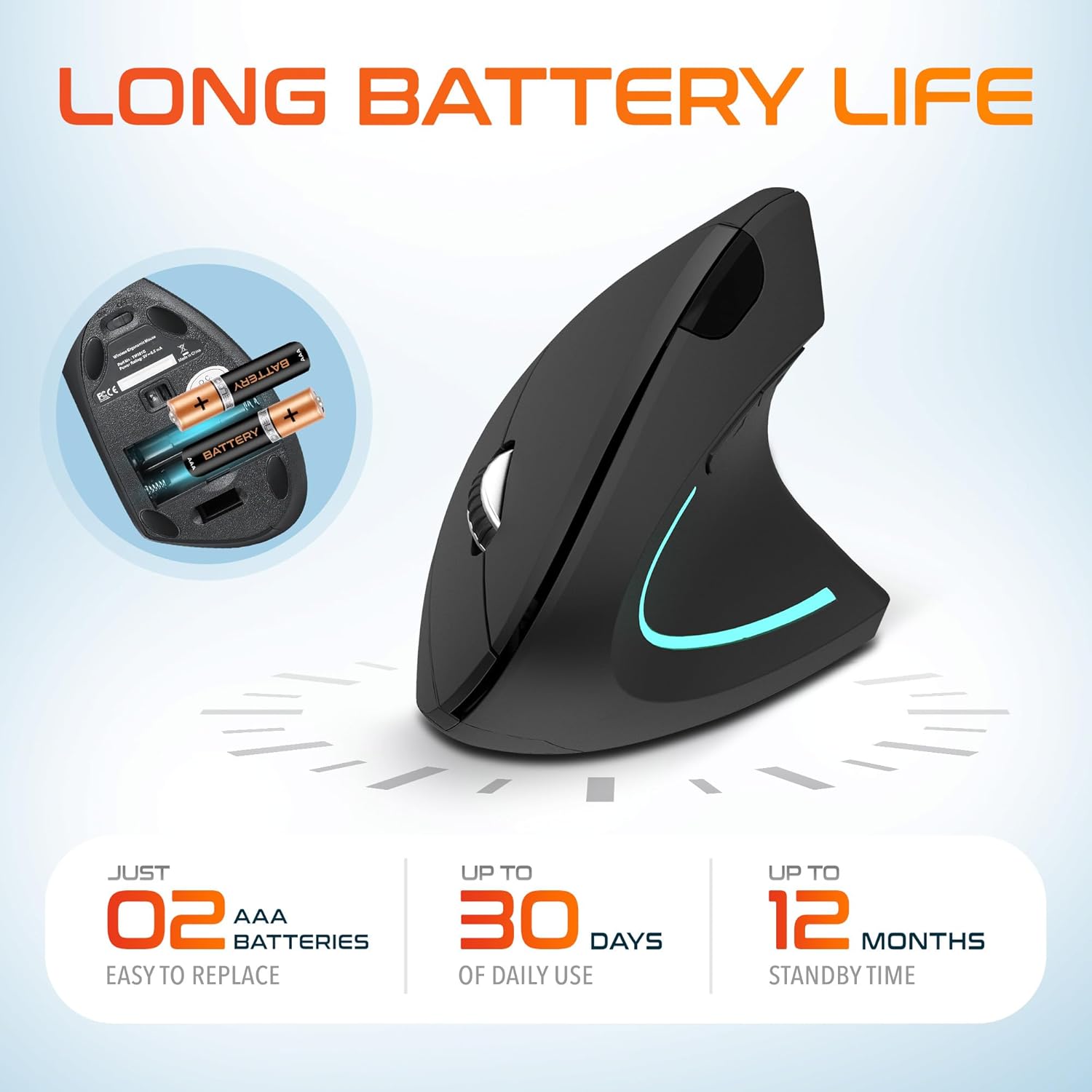
Image: The underside of the Delton S12 mouse with the battery compartment open, showing the correct placement for two AAA batteries.
3. Connecting the USB Dongle
The mouse connects wirelessly via a 2.4GHz USB dongle. No drivers are typically required for most operating systems.
- Remove the USB dongle from its storage slot, usually located near the battery compartment.
- Plug the USB dongle into an available USB port on your computer (PC, Laptop, Mac, Chromebook, etc.).
- The computer should automatically detect and install the necessary drivers. The mouse is ready for use once detected.

Image: The Delton S12 mouse positioned next to its USB dongle, ready for connection to a computer.
Bedienung Ihrer Maus
The Delton S12 mouse features six buttons and a scroll wheel for enhanced functionality.
1. Tastenfunktionen
- Links Klick: Primary selection and activation button.
- Rechtsklick: Greift auf Kontextmenüs zu.
- Scrollrad: Scrollt vertikal durch Dokumente und web Seiten. Kann auch per Mittelklick bedient werden.
- DPI-Umschalttaste: Passt die Cursorempfindlichkeit (DPI) an.
- Vorwärts-Taste: Navigiert vorwärts in web Browser bzw file Entdecker.
- Rückwärts-Taste: Navigiert rückwärts in web Browser bzw file Entdecker.

Image: Diagram illustrating the location and function of the six buttons on the Delton S12 Ergonomic Vertical Wireless Mouse.
2. DPI-Anpassung
The mouse offers three adjustable DPI levels (800, 1200, 2400) to suit different tasks and preferences. Press the DPI Switch Button (located behind the scroll wheel) to cycle through the settings. An indicator LED will change color to show the current DPI level:
- Blaue LED: 800 DPI (Lower sensitivity, suitable for precise work)
- Rote LED: 1200 DPI (Medium sensitivity, standard use)
- Grüne LED: 2400 DPI (Higher sensitivity, suitable for faster cursor movement)

Image: Close-up of the Delton S12 mouse showing the DPI indicator LED changing colors (blue, red, green) for different sensitivity settings.
Wartung
1. Reinigung
Um eine optimale Leistung zu gewährleisten, reinigen Sie Ihre Maus regelmäßig. Verwenden Sie ein weiches, trockenes Tuch, um die Oberfläche abzuwischen. Bei hartnäckigem Schmutz kann ein leicht feuchtes Tuch hilfreich sein.amp Ein Tuch kann verwendet werden, achten Sie jedoch darauf, dass keine Feuchtigkeit in die inneren Bauteile eindringt. Vermeiden Sie aggressive Chemikalien oder Scheuermittel.
2. Batteriewechsel
When the mouse performance degrades or it stops responding, it's time to replace the batteries. Follow the battery installation steps outlined in the Setup section. Dispose of used batteries responsibly according to local regulations.
Fehlerbehebung
Maus reagiert nicht:
- Stellen Sie sicher, dass die Maus eingeschaltet ist.
- Prüfen Sie, ob die Batterien richtig eingesetzt sind und ausreichend geladen sind. Tauschen Sie sie gegebenenfalls aus.
- Verify the USB dongle is securely plugged into a working USB port on your computer. Try a different USB port.
- Move the mouse closer to the USB dongle to ensure it's within the 30-foot operating range.
- Starten Sie Ihren Computer neu.
Unregelmäßige Cursorbewegung:
- Reinigen Sie den optischen Sensor an der Unterseite der Maus mit einem weichen, trockenen Tuch.
- Achten Sie darauf, die Maus auf einer geeigneten Oberfläche zu verwenden. Vermeiden Sie stark reflektierende oder transparente Oberflächen. Ein Mauspad wird empfohlen.
- Überprüfen Sie, ob andere drahtlose Geräte Störungen verursachen.
DPI Indicator Light Not Changing:
- Press the DPI switch button firmly. If the issue persists, ensure batteries are fresh.
Technische Daten
| Marke | Delton |
| Modellnummer | Staffel 12 |
| Konnektivitätstechnologie | 2.4-GHz-Funk (USB-Dongle) |
| Bewegungserkennungstechnologie | Optisch |
| DPI-Stufen | 800, 1200, 2400 |
| Anzahl der Tasten | 6 |
| Handausrichtung | Rechts |
| Stromquelle | Batteriebetrieben (2 x AAA-Batterien erforderlich) |
| Durchschnittliche Batterielebensdauer | Bis zu 30 Tage (bei täglicher Anwendung) |
| Drahtlose Reichweite | Bis zu 30 Fuß |
| Kompatible Geräte | PC, Laptop, Mac, Chromebook, iOS devices |
| Betriebssystem | Windows 11/10/9/8/7/XP, Mac OS 9/8/7, Linux, Chrome OS |
| Material | Plastik |
Garantie und Support
Garantieinformationen:
This Delton S12 Ergonomic Vertical Wireless Mouse comes with a 1-Year Manufacturer Warranty. This warranty covers defects in materials and workmanship under normal use. For warranty claims, please retain your proof of purchase.
Kundendienst:
For technical assistance, troubleshooting, or any questions regarding your Delton S12 mouse, please contact Delton customer support. Refer to the product packaging or the official Delton webDie aktuellsten Kontaktinformationen finden Sie auf dieser Webseite.