
1. Einleitung
This manual provides comprehensive instructions for the setup, operation, maintenance, and troubleshooting of your BIGBIG WON C1S Wired Gaming Controller. Please read this manual carefully before using the product to ensure optimal performance and longevity.
The BIGBIG WON C1S is a versatile wired gaming controller designed for multi-platform compatibility, offering advanced features such as 6-axis gyro, customizable macro and turbo functions, dual vibration, and RGB lighting. Its transparent design allows for a unique visual experience.
2. Installationsanleitung
2.1 Packungsinhalt
- BIGBIG WON C1S Wired Gaming Controller
- 1.8m Ultra-Soft Type-C Cable
- Bedienungsanleitung
2.2 Anschließen des Controllers
The C1S controller connects via a wired USB Type-C cable. Ensure the cable is securely connected to both the controller and your gaming device.
- Connect the USB Type-C end of the provided cable to the controller's port.
- Connect the standard USB-A end of the cable to an available USB port on your PC, Nintendo Switch dock, or PS4 (requires R90 converter, sold separately).
- The controller's RGB lighting will illuminate upon successful connection.
2.3 Plattformkompatibilität
- PC: Compatible with Windows 7/8/10/11. Plug and play functionality.
- Nintendo-Schalter: Connect directly to the Switch dock. Supports one-key wake-up for the console.
- PS4: Requires a BIGBIG WON R90 converter (sold separately) for compatibility.
- Mobile Geräte: Compatible with iOS MFi and Android HID Model devices.

Image: The BIGBIG WON C1S controller connected to various platforms, including a PC and a Nintendo Switch, demonstrating its multi-platform compatibility.
3. Bedienungsanleitung
3.1 Regleraufbau
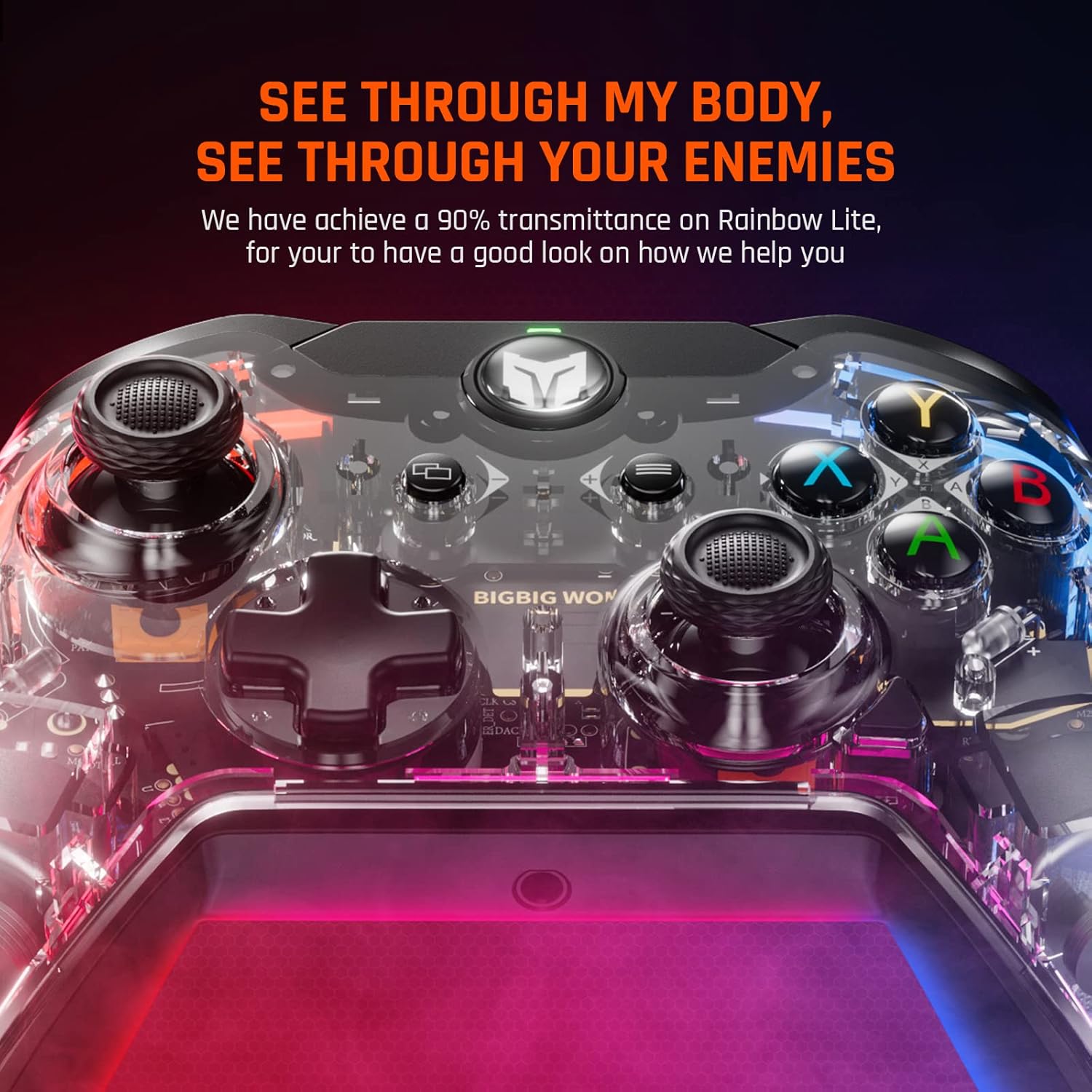
Bild: Vorderseite view of the BIGBIG WON C1S controller, highlighting its transparent casing and illuminated internal components, along with the main buttons and joysticks.
The C1S controller features a standard layout with two analog sticks, a D-pad, A/B/X/Y face buttons, L/R shoulder buttons, ZL/ZR triggers, and additional customizable back buttons (M1/M2).
3.2 Wichtige Merkmale und Funktionen
- 6-Achsen-Gyrosensor: Provides motion control capabilities, enhancing gameplay immersion and allowing for quick, responsive actions in compatible games.
- Customizable M1/M2 Back Buttons: These two remappable buttons on the back of the controller can be programmed for single or multiple key functions (A/B/X/Y/L/ZL/R/ZR/L3/R3/D-pad keys). This allows for advanced game techniques and personalized control schemes.

Bild: Rückseite view of the BIGBIG WON C1S controller, illustrating the placement of the M1 and M2 remappable back buttons for custom configurations.
- Einstellbare Turbofunktion: Supports both Auto TURBO and Manual TURBO modes. You can set TURBO with A/B/X/Y/L/R/ZL/ZR buttons. There are three adjustable speeds: 5 shots/s, 12 shots/s, and 20 shots/s.
- Doppelte Vibrationsmotoren: Built-in motors provide haptic feedback with four adjustable levels: None, Weak, Medium, and Strong. This enhances game immersion by providing tactile responses to in-game events.
- One Key Wake-up: Allows you to quickly wake up your connected console with a single button press.
- RGB-Beleuchtung: The controller features customizable RGB lighting effects, allowing you to personalize its appearance and create a dynamic gaming atmosphere.

Image: Three BIGBIG WON C1S controllers showcasing various RGB lighting effects, demonstrating the customizable illumination feature.
- Linear and Hair Triggers: The triggers can function as linear triggers for precise control in racing games or as hair triggers for rapid fire in FPS games, adapting to different gaming needs.

Image: A visual representation explaining the functionality of linear triggers versus hair triggers, showing how the C1S controller can switch between these modes for different game genres.
- Zero Deadzone Joysticks: Equipped with an optimized joystick algorithm, the controller offers precise accuracy with zero deadzone, ensuring responsive and natural motion control.

Image: A close-up of the controller's joystick, emphasizing its precision and zero deadzone capability with glowing visual effects.
3.3 Mobile Application for Customization
The dedicated mobile application allows users to easily configure mapping settings, adjust turbo speeds, and customize other controller functions for different games or scenarios. A dedicated button on the controller facilitates fast switching between configurations.

Image: A user interacting with the BIGBIG WON mobile application on a smartphone to customize controller settings, with the C1S controller visible.
4. Wartung
4.1 Reinigung
- Verwenden Sie ein weiches, trockenes Tuch, um die Oberfläche des Controllers abzuwischen.
- Bei hartnäckigen Verschmutzungen leicht dampBefeuchten Sie das Tuch mit Wasser oder einer milden Reinigungslösung. Vermeiden Sie scharfe Chemikalien oder scheuernde Materialien.
- Es darf kein Wasser in die Öffnungen des Controllers gelangen.
- Clean the transparent casing gently to maintain its clarity.
4.2 Speicherung
- Bewahren Sie den Controller an einem kühlen, trockenen Ort fern von direkter Sonneneinstrahlung und extremen Temperaturen auf.
- Vermeiden Sie es, schwere Gegenstände auf den Controller zu stellen.
- When not in use, coil the 1.8m Ultra-Soft Type-C cable neatly to prevent kinks or damage.

Bild: Eine Nahaufnahme view of the anti-slip textured grips on the controller, designed for enhanced handling during gameplay.
5. Fehlerbehebung
5.1 Verbindungsprobleme
- Controller nicht erkannt: Ensure the USB Type-C cable is fully inserted into both the controller and the device. Try a different USB port or restart your device.
- No response on PS4: Confirm that you are using the BIGBIG WON R90 converter for PS4 compatibility.
5.2 Button/Joystick Malfunction
- Tasten reagieren nicht: Check if any custom mappings are active via the mobile app that might be interfering. Reset controller settings if necessary.
- Joystick-Drift oder -Ungenauigkeit: The C1S features zero deadzone joysticks. If you experience issues, ensure the controller firmware is up to date via the mobile app.
- Trigger issues (e.g., ZL button): If a trigger button (e.g., ZL/L2) does not maintain a consistent signal when held down, this may indicate a hardware issue. Please contact customer support for assistance.
5.3 Vibrationsprobleme
- Keine Vibration: Check the vibration intensity settings. Ensure it is not set to 'None'.
- Weak/Strong vibration: Adjust the vibration intensity through the controller's settings or the mobile application.
6. Spezifikationen
| Modellnummer | C1S |
| Verbindungstyp | Kabelgebunden (USB Typ-C) |
| Kabellänge | 1.8 meters (Ultra-Soft E-Sport Grade Cable) |
| Unterstützte Plattformen | Windows 7/8/10/11, Nintendo Switch, iOS MFi, Android HID Model, PS4 (with R90 converter) |
| Besondere Merkmale | 6-Axis Gyro, Macro Function (M1/M2), Turbo Function (3 speeds), Dual Vibration (4 levels), One Key Wake-up, RGB Lighting, Linear/Hair Triggers, Zero Deadzone Joysticks, 3.5mm Audio Jack |
| Technische Daten | 0.39 x 0.39 x 1 Zoll |
| Artikelgewicht | 11.7 Unzen |
| Hersteller | BIGBIG GEWONNEN |

Image: Various international certification logos, indicating compliance with quality and safety standards.
7. Garantieinformationen
For detailed warranty information, please refer to the official BIGBIG WON webDie Garantiebedingungen finden Sie auf der Website oder auf der Ihrem Produkt beiliegenden Garantiekarte. Diese Garantiebedingungen decken in der Regel Herstellungsfehler für einen bestimmten Zeitraum ab Kaufdatum ab.
Bewahren Sie Ihren Kaufbeleg als Kaufnachweis für eventuelle Garantieansprüche auf.
8. Kundendienst
If you encounter any issues not covered in this manual or require further assistance, please contact BIGBIG WON customer support through their official website. Provide your product model (C1S) and a detailed description of the issue for efficient service.
Offiziell WebWebsite: https://dwz.cn/fdJI2Z9U