
1. Einleitung
Thank you for choosing the HIKMICRO HEIMDAL H4D Digital Night Vision Monocular. This device is designed for observation in low light and complete darkness, featuring a high-resolution sensor and AMOLED display for clear imaging.
Hauptmerkmale:
- 1.39" AMOLED display with 454 x 454 resolution
- High-resolution 2560 x 1440 sensor
- Integrated 850 nm infrared illuminator with smart IR function
- Day/Night/Auto/Defog modes
- Elektronischer Bildstabilisator (EIS)
- Detection range up to 200 meters
- Replaceable and rechargeable battery with over 4 hours of use
- Compact and portable design, waterproof and dustproof (IP67)
- Integrated 32 GB EMMC for storing recorded videos and photos
- Wireless connection via HIKMICRO Sight app, local album function
Packungsinhalt:
- HIKMICRO HEIMDAL H4D Digital Night Vision Monocular
- Batterie
- Staubtuch
- Schutztasche
- Handschlaufe
- USB-C-Kabel
- Kurzanleitung
2. Produktüberschreitungview
Familiarize yourself with the components and controls of your HIKMICRO HEIMDAL H4D monocular.
Gerätelayout
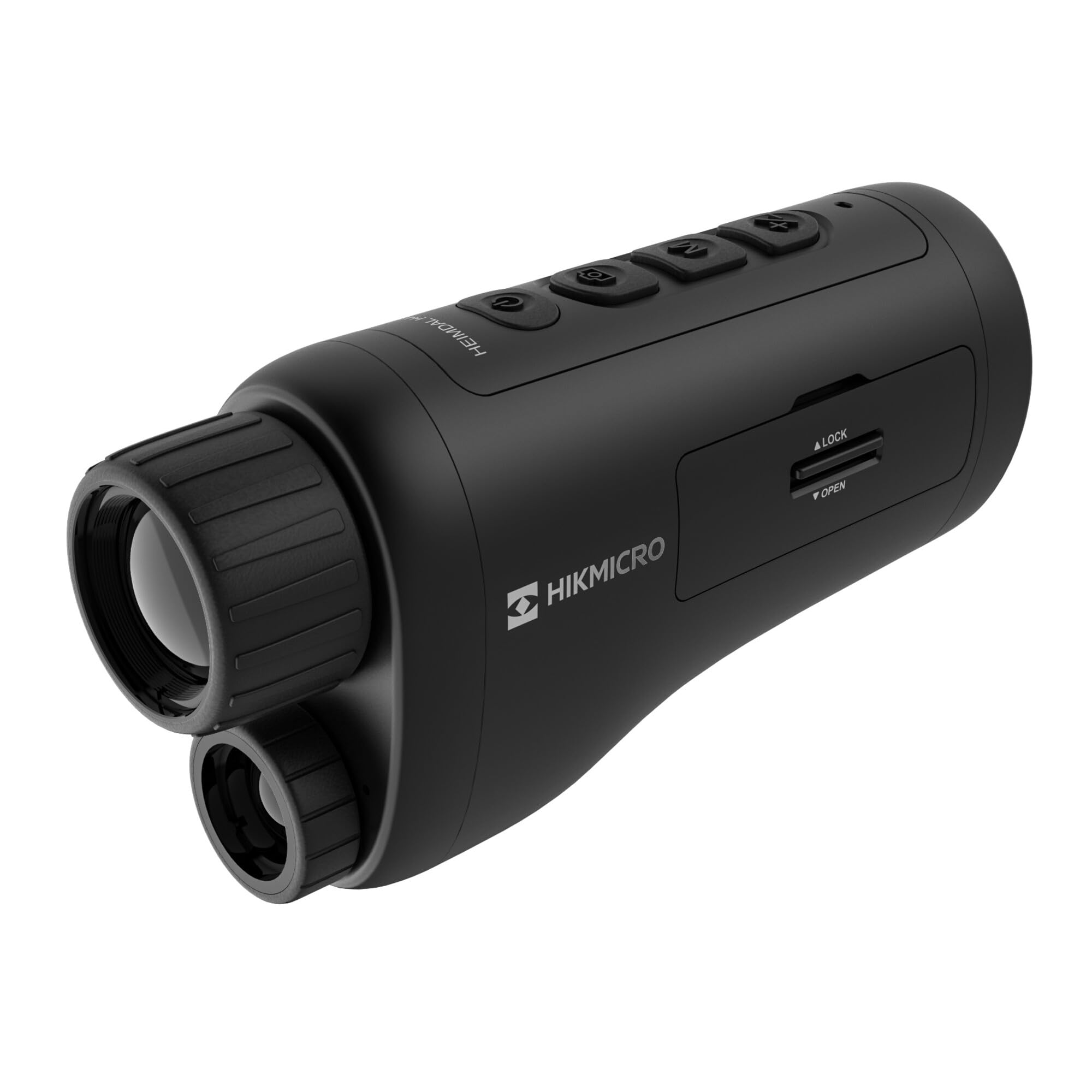
Ein abgewinkelter view of the HIKMICRO HEIMDAL H4D monocular, showing its compact, ergonomic design and the main lens.
Bedienelemente und Schaltflächen

Spitze view of the monocular showing the power button, photo/video record button, mode button, and zoom/IR adjustment buttons.
Lenses and Focus

Front view displaying the objective lens and the integrated infrared illuminator.
Batteriefach

Seite view showing the battery compartment with 'LOCK' and 'OPEN' indicators.
3. Einrichtung
Einlegen der Batterie
- Suchen Sie das Batteriefach an der Seite des Geräts.
- Slide the lock mechanism to the 'OPEN' position.
- Legen Sie den Akku ein und achten Sie dabei auf die richtige Polarität.
- Close the compartment and slide the lock mechanism to the 'LOCK' position.
Laden des Akkus
Connect the device to a power source using the provided USB-C cable. The charging indicator will show the charging status.
Erstes Einschalten
Press and hold the power button (usually marked with Ⓘ) until the HIKMICRO logo appears on the display.
4. Bedienungsanleitung
Ein-/Ausschalten
- Einschalten: Halten Sie den Netzschalter etwa 3 Sekunden lang gedrückt.
- Ausschalten: Press and hold the power button for approximately 3 seconds until the device shuts down.
Fokuseinstellung
Rotate the focus ring on the objective lens to achieve a clear image of your target.
Modusauswahl
Press the 'M' (Mode) button to cycle through observation modes: Day, Night, Auto, and Defog.
Zoom and IR Adjustment
Use the '+' and '-' buttons to adjust the digital zoom level. These buttons also control the intensity of the infrared illuminator in night mode.
Foto- und Videoaufnahmen
- Foto aufnehmen: Press the photo/video button (usually marked with 📷) once to capture an image.
- Video aufnehmen: Press and hold the photo/video button to start recording. Press again to stop.
Connecting to HIKMICRO Sight App
Download the HIKMICRO Sight app from your device's app store. Follow the in-app instructions to connect your monocular for live view, remote control, and media management.
5. Wartung
Reinigung
- Use the provided dust cloth or a soft, lint-free cloth to clean the lenses.
- For stubborn dirt, use a lens cleaning solution specifically designed for optics.
- Wischen Sie das Gerätegehäuse mit einem weichen, fusselfreien Tuch ab.amp Tuch. Keine Scheuer- oder Lösungsmittel verwenden.
Lagerung
- Store the monocular in its protective bag in a cool, dry place when not in use.
- Bei längerem Nichtgebrauch sollte die Batterie aus dem Gerät entnommen werden.
Batteriepflege
- Um die Lebensdauer des Akkus zu erhalten, laden Sie ihn regelmäßig auf, auch wenn er nicht häufig benutzt wird.
- Vermeiden Sie extreme Temperaturen während des Ladevorgangs und der Lagerung.
6. Fehlerbehebung
Häufige Probleme und Lösungen
| Problem | Mögliche Ursache | Lösung |
|---|---|---|
| Gerät lässt sich nicht einschalten. | Die Batterie ist leer oder falsch eingesetzt. | Laden Sie den Akku auf. Achten Sie darauf, dass der Akku mit der richtigen Polarität eingelegt ist. |
| Das Bild ist unscharf. | Der Fokus ist nicht eingestellt. | Rotate the focus ring on the objective lens until the image is clear. |
| Schlechte Bildqualität bei Dunkelheit. | IR illuminator is off or set to low intensity. | Activate the IR illuminator or increase its intensity using the '+' button. Ensure you are in Night mode. |
| Cannot connect to HIKMICRO Sight app. | Bluetooth/Wi-Fi is off on device or phone, or app is not updated. | Ensure Bluetooth/Wi-Fi is enabled on both devices. Restart the app and monocular. Check for app updates. |
| Das Gerät friert ein oder reagiert nicht mehr. | Vorübergehender Softwarefehler. | Perform a soft reset by holding the power button until the device restarts. If issue persists, contact support. |
7. Spezifikationen
| Besonderheit | Detail |
|---|---|
| Sensorauflösung | 2560 x 1440 |
| Anzeigetyp | AMOLED |
| Bildschirmauflösung | 454 x 454 |
| Anzeigegröße | 1.39 Zoll (3.5 cm) |
| Infrarot-Illuminator | Integrated 850 nm |
| Erfassungsbereich | Bis zu 200 Meter |
| Lagerung | 32 GB EMMC (internal) |
| Akkulaufzeit | More than 4 hours (replaceable, rechargeable) |
| Wasserdichtigkeit | IP67 |
| Maße | 153 mm x 50 mm x 80 mm (6.02" x 1.97" x 3.15") |
| Gewicht | 375 Gramm (0.83 Pfund) |
| Material | Plastik |
| Kompatible Geräte | Rifle, Compound Bow |
| Montagetyp | Picatinny-Halterung |
| Sport Use | CampWandern, Wandern |
| Farbe | Weiß |
8. Garantie und Support
HIKMICRO products are covered by a limited warranty. For detailed warranty information, please refer to the official HIKMICRO webWebsite oder wenden Sie sich an Ihren Händler vor Ort.
For technical support, troubleshooting assistance, or service inquiries, please visit the official HIKMICRO support page or contact their customer service department.
Offiziell WebWebsite: www.hikmicrotech.com