
1. Einleitung
Thank you for choosing the Devoko Electric Height Adjustable Desk. This manual provides comprehensive instructions for the assembly, operation, and maintenance of your new desk. Designed for a healthier work-life balance, this desk allows you to seamlessly switch between sitting and standing positions, promoting better posture and productivity.
Key features include a robust steel frame, a spacious 120x80cm desktop, integrated USB-A and USB-C charging ports, and a smart control panel with memory presets and anti-collision functionality.

The Devoko Electric Height Adjustable Desk, showcasing sein klares Design und ample workspace.
2. Sicherheitshinweise
- Lesen Sie alle Anweisungen vor dem Zusammenbau und der Verwendung sorgfältig durch.
- Halten Sie Kinder und Haustiere während des Betriebs vom Schreibtisch fern.
- Stellen Sie sicher, dass alle Kabel ordnungsgemäß verlegt und befestigt sind, um Stolperfallen oder Beschädigungen zu vermeiden.
- Do not overload the desk beyond its maximum weight capacity (70 kg dynamic, 80 kg static).
- Vermeiden Sie es, Flüssigkeiten direkt auf das Bedienfeld oder in die Nähe von elektrischen Bauteilen zu bringen.
- In case of malfunction, unplug the desk immediately and contact customer support.
- The desk is equipped with an anti-collision system. Do not obstruct its movement.
3. Packungsinhalt
Bitte prüfen Sie vor Beginn der Montage, ob alle Komponenten vorhanden sind:
- Desktop-Panels (4 Abschnitte)
- Schreibtischbeine (2)
- Querträger-/Rahmenkomponenten
- Kontrollkästchen
- Control Panel with USB Ports
- Netzteil und Kabel
- Kabelführungsschale
- Montagezubehör (Schrauben, Bolzen usw.)
- Montagewerkzeug (Inbusschlüssel, Schraubendreher)
- Bedienungsanleitung
4. Montageanleitung
Assembly is designed to be straightforward, typically taking around 30 minutes. All necessary tools are included.
Schritt-für-Schritt-Anleitung:
- Auspacken und Organisieren: Packen Sie alle Teile vorsichtig aus und legen Sie sie auf eine saubere, weiche Unterlage, um Kratzer zu vermeiden. Identifizieren Sie jedes Teil anhand der beiliegenden Abbildung.
- Montieren Sie den Rahmen: Attach the crossbar components to the desk legs using the provided hardware. Ensure all connections are secure.
- Desktop-Panels anbringen: Secure the four desktop panels to the assembled frame. The pre-drilled holes will guide you.
- Install Control Box and Panel: Mount the control box and the control panel to the underside of the desktop as indicated in the instructions.
- Kabel anschließen: Connect the motor cables from the legs to the control box, and then connect the control panel cable to the control box. Finally, connect the power adapter to the control box.
- Kabelmanagement-Tray installieren: Attach the cable management tray to the underside of the desk to organize your power strips and cables.
- Letzte Kontrollen: Überprüfen Sie alle Schrauben und Verbindungen nochmals, um sicherzustellen, dass sie fest und sicher sitzen.

The desk is designed for very easy installation, with assembly tools included.

The included cable management tray helps keep your workspace tidy.
5. Bedienungsanleitung
Your Devoko desk features an intelligent control panel for effortless height adjustment and convenient charging.
Funktionen des Bedienfelds:
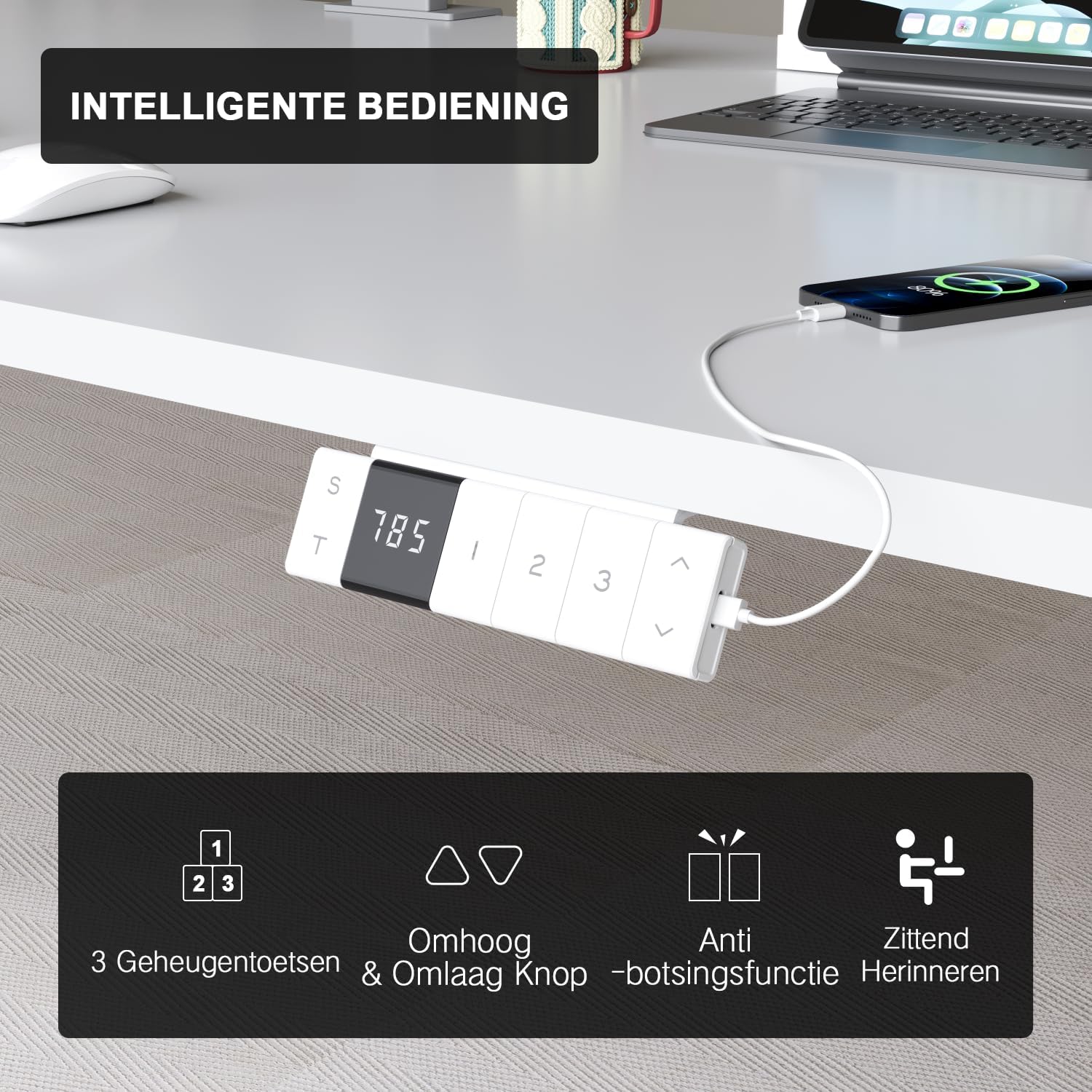
The intelligent control panel features a digital display, height adjustment buttons, memory presets, and USB charging ports.
- Auf-/Ab-Tasten (▲ / ▼): Press and hold to smoothly adjust the desk height. The desk moves at a speed of 20mm/s with operating noise less than 45dB.
- Speichervoreinstellungen (1, 2, 3): Save your preferred sitting and standing heights. To set a preset: adjust the desk to the desired height, then press the 'S' button followed by the desired number (1, 2, or 3). The desk will automatically move to this height with a single press.
- USB-A & USB-C Charging Ports: Conveniently located on the control panel, these ports allow you to charge your devices directly from the desk, eliminating the need for extra wall adapters.
- Antikollisionsfunktion: The desk is equipped with a sensitive anti-collision system that detects obstacles during movement and automatically stops to prevent damage or injury.
- Sitting Reminder (T): The control panel may feature a timer function (indicated by 'T') to remind you to switch between sitting and standing positions for healthier work habits.

Easily switch between sitting mode (72 cm) and standing mode (118 cm) to optimize your comfort and health.
6. Wartung
- Reinigung: Verwenden Sie ein weiches,amp Mit einem Tuch die Tischplatte und den Rahmen abwischen. Scheuermittel oder aggressive Chemikalien vermeiden, die die Oberfläche beschädigen könnten.
- Kabelmanagement: Die Kabel sollten regelmäßig überprüft und neu geordnet werden, um Verwicklungen zu vermeiden und einen reibungslosen Betrieb zu gewährleisten.
- Befestigungsmaterial: Überprüfen Sie gelegentlich alle Schrauben und Bolzen, um sicherzustellen, dass sie fest sitzen. Ziehen Sie sie gegebenenfalls nach.
- Motorpflege: The motor is designed for durability and has been tested over 10,000 cycles. No special maintenance is required for the motor itself.
7. Fehlerbehebung
If you encounter any issues with your Devoko desk, please refer to the following common problems and solutions:
| Problem | Mögliche Ursache | Lösung |
|---|---|---|
| Der Schreibtisch bewegt sich nicht. | Power cable disconnected; Control box error. | Check power connection. Unplug and replug the desk for 10 seconds to reset the control box. |
| Der Schreibtisch wackelt ungleichmäßig oder macht ungewöhnliche Geräusche. | Lose Verbindungen; Verstopfung. | Check all assembly connections. Ensure no objects are obstructing the legs' movement. |
| Das Antikollisionssystem löst zu oft aus. | Sensitivity setting; Obstruction. | Ensure no objects are near the desk's path. Refer to the full manual for anti-collision sensitivity adjustment if available. |
| USB-Anschlüsse laden nicht. | Desk not powered; Device compatibility. | Ensure the desk is plugged in and powered on. Check if the device requires specific charging protocols. |
If the problem persists after trying these solutions, please contact Devoko customer support for further assistance.
8. Spezifikationen
| Besonderheit | Detail |
|---|---|
| Marke | Devoko |
| Modellnummer | 0077B-1222 |
| Farbe | Weiß |
| Abmessungen der Tischplatte (L x B) | 120 cm x 80 cm (47.2 x 31.5 Zoll) |
| Höhenbereich | 72 cm bis 118 cm (28.3 bis 46.5 Zoll) |
| Material | FSC-certified particle board (desktop), Industrial-grade steel (frame) |
| Dynamische Lastkapazität | 70 kg |
| Statische Belastbarkeit | 80 kg |
| Hubgeschwindigkeit | 20 mm/s |
| Geräuschpegel | < 45 dB |
| Besondere Merkmale | Electric height adjustment, Ergonomic design, Integrated USB-A & USB-C charging, 3-Function Memory, Anti-collision system, Mobile with wheels |
| Zertifizierungen | TÜV, CE |
| Produktgewicht | 24.5 kg |

Desktop dimensions: 120cm x 80cm.

Key performance metrics: 70kg load capacity, 20mm/s speed, quiet operation, and anti-collision safety.
9. Garantie und Support
The Devoko Electric Height Adjustable Desk comes with a 5 Jahr Garantie, ensuring peace of mind regarding its durability and performance. This warranty covers manufacturing defects and motor malfunctions under normal use.
For technical support, warranty claims, or any questions not covered in this manual, please contact Devoko customer service through the retailer's platform or the official Devoko website. Please have your model number (0077B-1222) and purchase date ready when contacting support.