
Einführung
This manual provides comprehensive instructions for the SENGBIRCH Keyboard Case, designed to enhance your iPad experience. Please read this manual thoroughly before using the product to ensure proper operation and longevity.
Kompatibilität
The SENGBIRCH Keyboard Case is compatible with the following iPad models:
- iPad Air 13 Zoll (M3 2025, M2 2024)
- iPad Pro 12.9-inch 6th Generation (2022) - Models: A2436, A2437, A2764, A2766
- iPad Pro 12.9-inch 5th Generation (2021) - Models: A2378, A2379, A2461, A2462
- iPad Pro 12.9-inch 4th Generation (2020) - Models: A2229, A2069, A2232, A2233
- iPad Pro 12.9-inch 3rd Generation (2018) - Models: A1876, A2014, A1895, A1983
Besondere Erinnerung: This keyboard case is not compatible with iPad Pro 13-inch tablets. Please verify your iPad model before use.
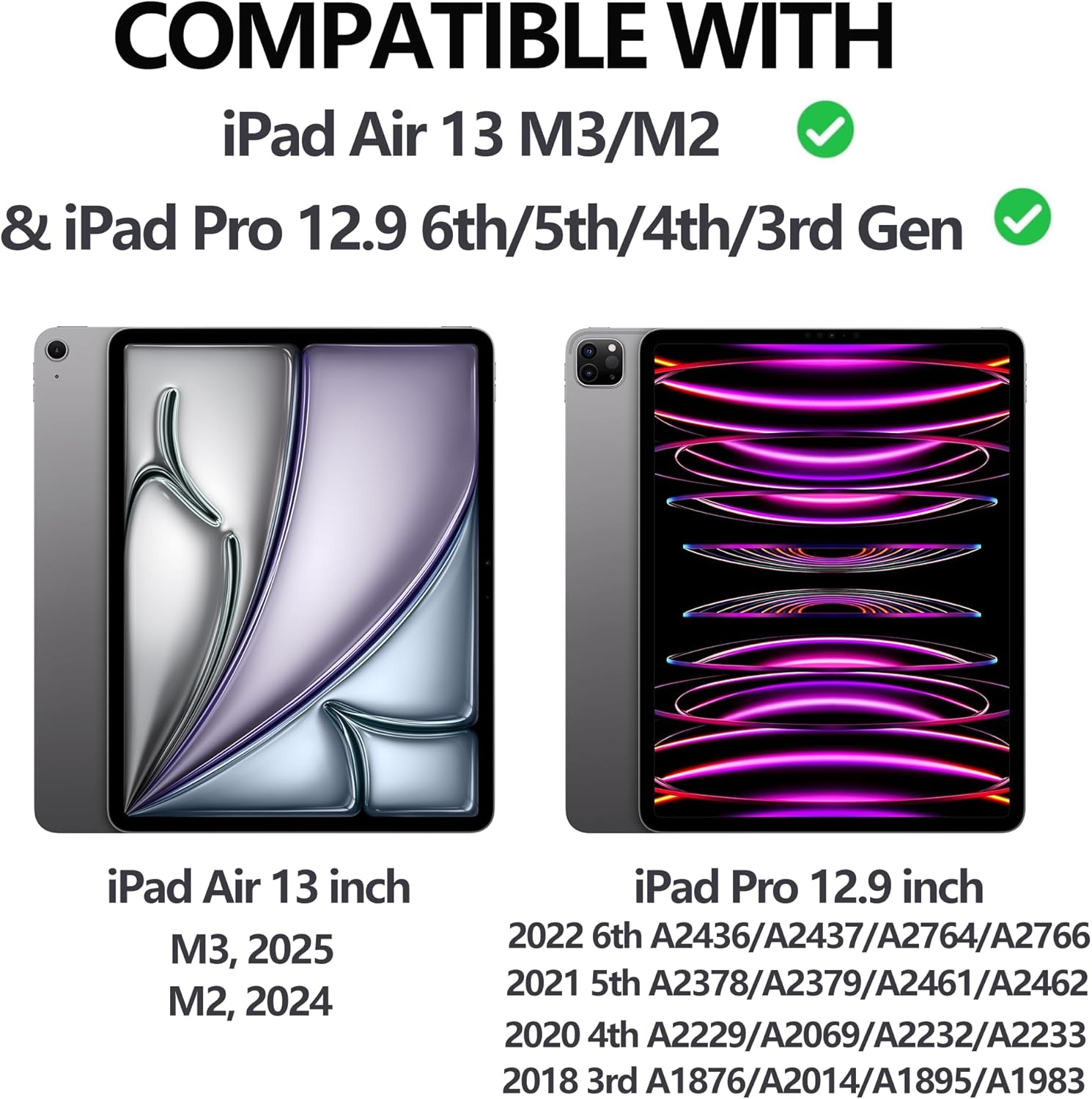
Figure 1: iPad Compatibility Chart
Lieferumfang
Bitte vergewissern Sie sich beim Auspacken, dass alle folgenden Artikel vorhanden sind:
- 1 x Keyboard for iPad Pro 12.9 inch (3rd, 4th, 5th, 6th Generation)
- 1 x Case for iPad Pro 12.9 inch (6th, 5th, 4th, 3rd Generation)
- 1 x USB-C Ladekabel
- 1 x Benutzerhandbuch
Notiz: Tablet and Apple Pencil are not included.
Installationsanweisungen
1. Anbringen Ihres iPads an der Hülle
The case features a magnetic adsorption design for secure attachment of your iPad. Align the camera cutout of the case with your iPad's camera, and the iPad will magnetically snap into place.

Figure 2: Magnetic iPad Attachment and Detachable Keyboard
2. Aufladen der Tastatur
Before first use, fully charge the keyboard using the provided USB-C cable. Connect the USB-C end to the keyboard's charging port and the other end to a compatible USB power adapter (not included).
- Ladezeit: Ungefähr 2.5 Stunden für eine vollständige Ladung.
- Battery Life: Up to 70 hours of continuous work on a single charge.

Figure 3: Keyboard Charging and Battery Information
3. Verbinden der Tastatur über Bluetooth
Folgen Sie diesen Schritten, um Ihre Tastatur mit Ihrem iPad zu koppeln:
- Switch the keyboard's ON/OFF switch to the "ON" position (located on the top right of the keyboard).
- Press the "Connect" button on the keyboard.
- Gehen Sie auf Ihrem iPad zu Einstellungen > Bluetooth.
- Ensure Bluetooth is enabled and select "Bluetooth 3.0 Keyboard" from the list of available devices to pair.

Abbildung 4: Schritte zur Bluetooth-Verbindung
Bedienungsanleitung
Anpassen ViewWinkel
The case allows for adjustable viewing angles (115°, 120°, 130°) to suit your needs for typing, viewing oder Zeichnung.
Abnehmbare Tastatur
The keyboard is magnetically attached to the case and can be easily detached if you prefer to use your iPad without the keyboard, offering flexibility for various tasks.
Hintergrundbeleuchtung
The keyboard features 7 colors of backlight and 3 levels of brightness adjustment. This allows for comfortable typing in low-light conditions.

Figure 5: 7-Color Backlit Keyboard

Abbildung 6: Tastatur-Hintergrundbeleuchtung in Betrieb
Bleistifthalter
The case includes a dedicated pencil holder that supports Apple Pencil charging, ensuring your stylus is always ready and secure.

Figure 7: Pencil Holder and Key Features
Automatische Weck-/Schlaffunktion
The smart cover utilizes a magnetic switch to automatically wake your iPad when opened and put it to sleep when closed, conserving battery life.

Figure 8: Auto Wake/Sleep Smart Cover
Tastaturkürzel
The keyboard supports various iOS shortcuts for efficient operation. Refer to your iPad's settings for a full list of available shortcuts. For example, drückend Befehl + Tab allows you to switch between open applications.
Wartung
Um die Langlebigkeit und optimale Leistung Ihres Tastaturgehäuses zu gewährleisten, beachten Sie bitte folgende Wartungshinweise:
- Reinigung: Verwenden Sie ein weiches,amp Verwenden Sie ein Tuch, um die Außenseite des Gehäuses und die Tastatur abzuwischen. Vermeiden Sie aggressive Chemikalien oder scheuernde Materialien.
- Lagerung: Bewahren Sie die Tastaturhülle bei Nichtgebrauch an einem kühlen, trockenen Ort fern von direkter Sonneneinstrahlung und extremen Temperaturen auf.
- Schutz: The case is made of premium PU leather and a silicone inner shell, providing all-round protection against scratches, bumps, and dents. However, avoid dropping the device from significant heights.
- Wärmeableitung: The honeycomb grid pattern inner padding is designed to improve heat dissipation. Ensure the vents are not obstructed during use.
Fehlerbehebung
If you encounter any issues with your SENGBIRCH Keyboard Case, please refer to the following common solutions:
- Keyboard not connecting to iPad: If the keyboard fails to connect, press Fn + Q simultaneously to switch the keyboard to iOS system mode. Then, attempt to re-pair via Bluetooth.
- Tastatur reagiert nicht: Ensure the keyboard is charged. If the battery is low, connect it to a power source using the USB-C cable.
- Hintergrundbeleuchtung funktioniert nicht: Check if the backlight function is enabled and adjust the brightness levels.
- iPad not waking/sleeping automatically: Stellen Sie sicher, dass das iPad korrekt im Gehäuse sitzt und der Deckel vollständig geschlossen ist.
For further assistance, please contact SENGBIRCH customer support.
Technische Daten
| Marke | SENGBIRCH |
| Modellnummer | Air13 (M3/M2) & Pro 6./5./4./3. Generation |
| Technische Daten | 11.34 x 9.45 x 0.59 Zoll |
| Artikelgewicht | 2.16 Pfund |
| Batterien | 1 Lithium-Polymer-Akku (im Lieferumfang enthalten) |
| Konnektivitätstechnologie | Bluetooth, USB-C |
| Tastaturbeschreibung | Wireless / Rechargeable / Detachable / Backlight |
| Besondere Merkmale | Backlit, Ergonomic, Hotkeys and Media Keys, Lightweight, Rechargeable |
| Farbe | Black (Keyboard backlighting color support: RGB) |
Garantie und Support
Informationen zur Garantie oder technische Unterstützung erhalten Sie beim SENGBIRCH-Kundendienst über den Händler, bei dem Sie das Produkt erworben haben, oder auf der offiziellen SENGBIRCH-Website. webWebsite.
Bewahren Sie Ihren Kaufbeleg als Kaufnachweis für eventuelle Garantieansprüche auf.