
1. Einleitung
The XTUGA SEM100 is a professional wireless in-ear monitor system designed for stage performers, studio musicians, and lecturers. It provides crystal-clear, low-latency audio monitoring through UHF digital transmission, offering freedom of movement and reliable performance. This system features a rechargeable bodypack receiver, multiple frequency options, and versatile connectivity including Bluetooth and USB playback.
2. Packungsinhalt
Bitte überprüfen Sie, ob alle unten aufgeführten Artikel in Ihrem Paket enthalten sind. Sollten Artikel fehlen oder beschädigt sein, kontaktieren Sie bitte unseren Kundenservice.
- Sender × 1
- Bodypack Receiver × 1
- Antenne × 1
- Kopfhörer × 2
- Cable Line × 4
- Netzteil × 1
- Benutzerhandbuch × 1
3. Produktüberschreitungview
Familiarize yourself with the components of your XTUGA SEM100 system.

Figure 3.1: XTUGA SEM100 Wireless In-Ear Monitor System, showing the transmitter, bodypack receiver, and earphones.
3.1 Bodypack-Empfänger

Abbildung 3.2: Ausführlich view of the bodypack receiver, highlighting the power light, charging connector, and earphone jack.
- Power-Licht: Zeigt den Strom- und Verbindungsstatus an.
- Ladeanschluss: Typ-C-Anschluss zum Aufladen des internen Akkus.
- Kopfhörerbuchse: 3.5mm output for connecting in-ear monitors.
- LCD Bildschirm: Displays channel, group, stereo mode, and lock status.
- Bedientasten: For navigation, volume adjustment, and frequency selection.
3.2 Sender

Abbildung 3.3: Vorder- und Rückseite view of the transmitter, showing input/output connectors, volume knobs, USB socket, and control buttons.
- Funktionseinstellungstaste: Used to access and adjust system settings.
- Up/Down Selection Buttons: Zum Navigieren in Menüs und zum Anpassen von Werten.
- LCD Bildschirm: Displays frequency, group, channel, and other operational information.
- Bluetooth-Anzeige: Leuchtet auf, wenn Bluetooth verbunden ist.
- Stromschalter: Schaltet den Sender ein oder aus.
- Last/Next Song Buttons: For controlling media playback via USB or Bluetooth.
- Wiedergabe-/Pause-Taste: Zur Steuerung der Medienwiedergabe.
- USB-Anschluss: Zur Wiedergabe von USB-Laufwerken.
- Lautstärkeregler: Passt die Ausgabelautstärke an.
- Earphone Monitoring Socket: 3.5mm jack for direct monitoring from the transmitter.
- 6.35mm Output Connector: Audio-Ausgang.
- Eingangsanschlüsse: For audio input sources.
- Steckdose: Zum Anschluss des Netzteils.
- Antenne: Zur drahtlosen Signalübertragung.
4. Installationsanleitung
4.1 Erstaufladung
Before first use, ensure the bodypack receiver is fully charged. Connect the Type-C charging cable to the bodypack and a suitable USB power source. A full charge takes approximately 2.5 hours and provides up to 6 hours of operation.
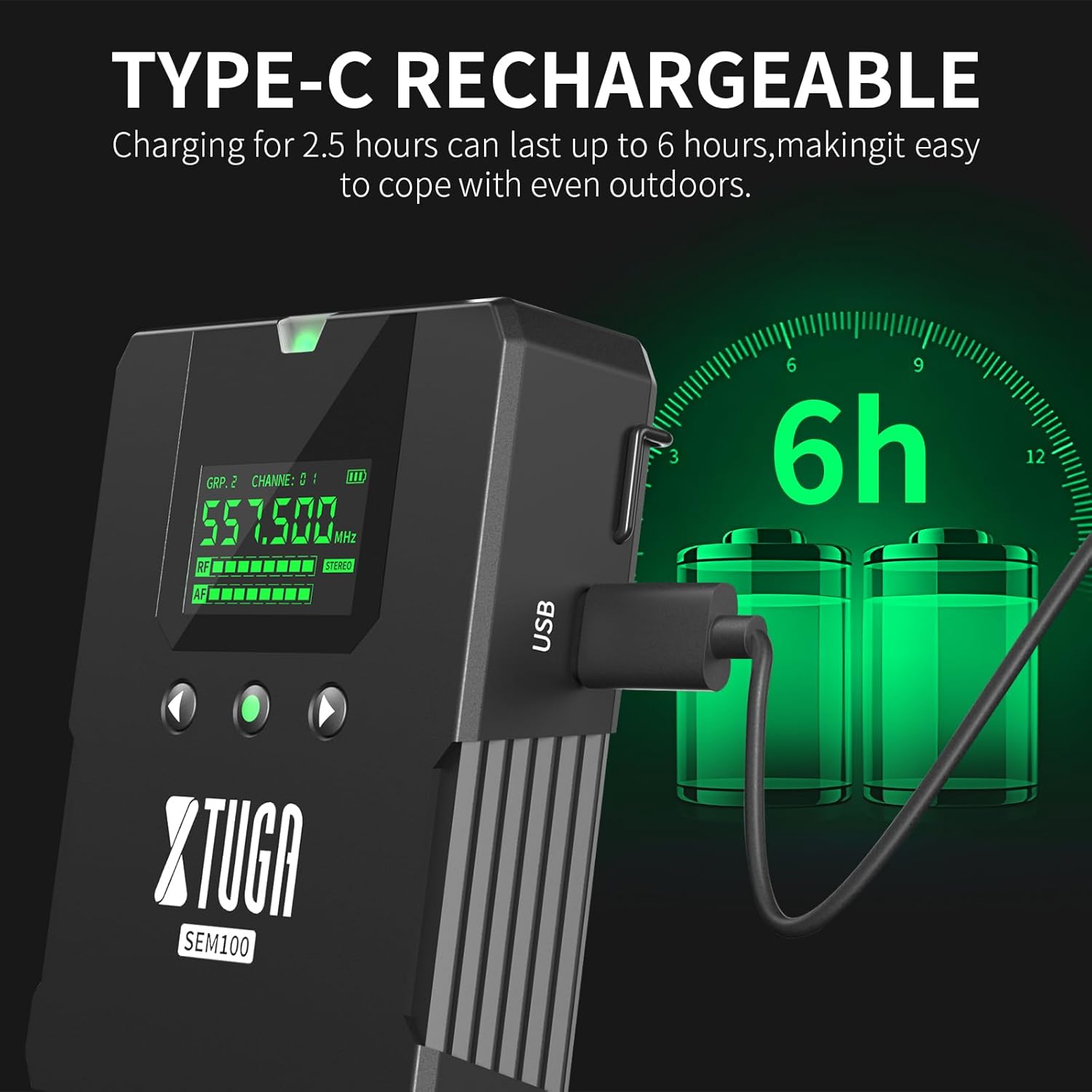
Figure 4.1: The bodypack receiver charging via its Type-C port, indicating a 2.5-hour charge time for 6 hours of use.
4.2 Anschließen des Senders
- Connect the provided antenna to the ANT connector on the rear of the transmitter.
- Connect the power adapter to the Power Socket on the transmitter and plug it into an electrical outlet.
- Connect your audio source (e.g., mixing console, instrument) to the Input Connectors on the transmitter.
4.3 Connecting the Bodypack Receiver
- Connect your in-ear monitors to the 3.5mm Earphone Jack on the bodypack receiver.
4.4 Frequency Synchronization
The system supports 40 frequency options, organized into 4 groups with 10 frequencies each. To ensure proper operation, the bodypack receiver must be synchronized with the transmitter's frequency.

Figure 4.2: The transmitter and two bodypack receivers displaying synchronized frequencies.
- Power on both the transmitter and the bodypack receiver.
- On the transmitter, use the Up/Down selection buttons to choose your desired frequency group and channel.
- On the bodypack receiver, long-press the middle button (often labeled 'SET' or similar) to initiate synchronization. The bodypack will automatically scan and lock onto the transmitter's frequency. The indicator light on the bodypack will remain on after successful connection.
5. Bedienung
Video 5.1: Demonstrates the setup, frequency selection, Bluetooth connection, and monitoring features of the XTUGA SEM100 system.
5.1 Ein-/Ausschalten
- Sender: Press the Power Switch button on the front panel.
- Taschenempfänger: Long-press the power button on the top of the bodypack.
5.2 Lautstärkeregelung
- Taschenempfänger: Use the left and right navigation buttons on the bodypack to adjust the volume. The bodypack offers twelve levels of volume adjustment.
- Sender: Use the Volume Knob on the front panel to adjust the overall output volume.
5.3 Mono/Stereo-Schalter
The bodypack receiver allows switching between mono and stereo monitoring modes.

Figure 5.1: The bodypack receiver's screen showing the option to switch between mono and stereo modes.
- On the bodypack receiver, press the appropriate button (refer to the bodypack's screen for indication) to toggle between mono and stereo modes.
5.4 Bluetooth/USB Playback
The transmitter supports playing accompaniment directly via Bluetooth or a USB drive.
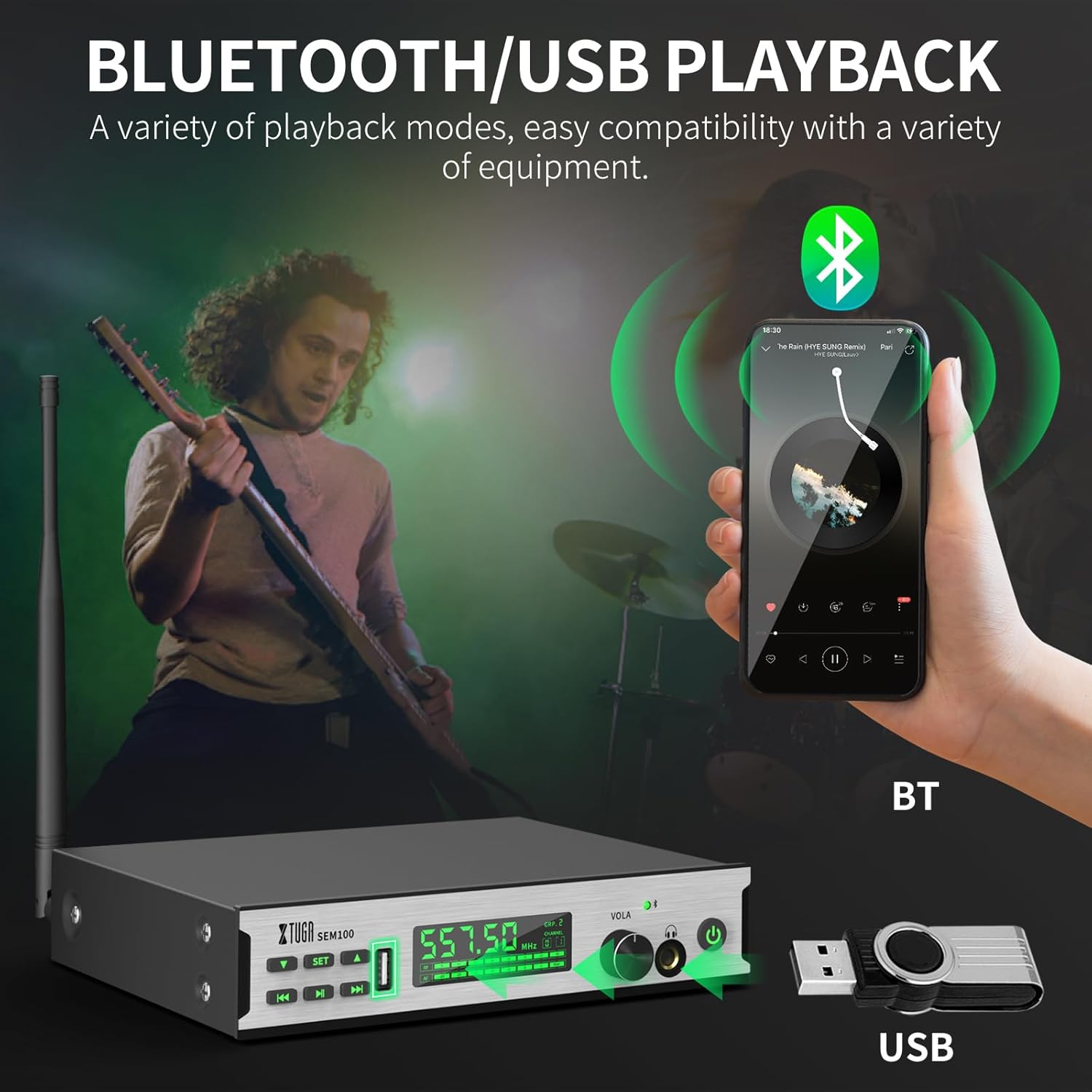
Figure 5.2: The transmitter connected to a smartphone via Bluetooth and a USB drive for accompaniment playback.
- Bluetooth: Enable Bluetooth on your smartphone or other device and pair with "XTUGA-SEM". The Bluetooth indicator on the transmitter will light up upon successful connection. Use the Play/Pause and Last/Next Song buttons on the transmitter to control playback.
- USB-Wiedergabe: Schließen Sie einen USB-Stick mit Audiodateien an. files into the USB Socket on the transmitter. Use the Play/Pause and Last/Next Song buttons to control playback.
5.5 Sperrbildschirmfunktion
To prevent accidental changes during performance, the bodypack receiver features a lock screen function.

Figure 5.3: The bodypack receiver displaying a lock icon on its screen, indicating the lock function is active.
- Long-press the middle button on the bodypack receiver to activate or deactivate the lock screen function. When locked, a locking pattern or icon will appear on the screen, and controls will be unresponsive to prevent unintended adjustments.
6. Wartung
Proper maintenance ensures the longevity and optimal performance of your XTUGA SEM100 system.
- Reinigung: Use a soft, dry cloth to clean the surfaces of the transmitter and bodypack receiver. Avoid using liquid cleaners or solvents.
- Lagerung: Store the system in a cool, dry place away from direct sunlight and extreme temperatures. When not in use for extended periods, ensure the bodypack receiver is charged periodically to maintain battery health.
- Batteriepflege: Avoid fully discharging the bodypack's battery frequently. Recharge it regularly to prolong its lifespan.
7. Fehlerbehebung
If you encounter issues with your XTUGA SEM100 system, refer to the following common troubleshooting steps:
- Kein Ton:
- Stellen Sie sicher, dass sowohl der Sender als auch der Taschenempfänger eingeschaltet sind.
- Verify that the frequencies of the transmitter and bodypack are synchronized.
- Check all cable connections (audio input to transmitter, earphones to bodypack).
- Adjust volume levels on both the transmitter and bodypack.
- Ensure the bodypack is not in lock screen mode.
- Störungen/Statische Aufladung:
- Change the frequency channel on the transmitter and re-synchronize the bodypack. The system offers 40 frequency options to avoid clashes.
- Ensure the transmitter and receiver are within the operating range (up to 213ft/65m).
- Minimieren Sie Hindernisse zwischen Sender und Empfänger.
- Check for other wireless devices operating on similar frequencies nearby.
- Kurze Akkulaufzeit:
- Ensure the bodypack is fully charged (2.5 hours for 6 hours of use).
- Die Leistungsfähigkeit des Akkus kann sich bei intensiver Nutzung mit der Zeit verschlechtern.
8. Spezifikationen
Key technical specifications for the XTUGA SEM100 Wireless In-Ear Monitor System:
| Besonderheit | Spezifikation |
|---|---|
| Marke | XTUGA |
| Modellnummer | SEM100 |
| Farbe | Schwarz |
| Platzierung des Ohrs | Im Ohr |
| Formfaktor | Im Ohr |
| Impedanz | 4 Ohm |
| Kopfhöreranschluss | 3.5 mm Klinke |
| Konnektivitätstechnologie | Kabellos |
| Wireless-Technologie | Bluetooth |
| Bluetooth-Reichweite | 65 Meter |
| Bluetooth-Version | 4.0 |
| Steuerungstyp | Lautstärkeregler, Druckknopf |
| Lärmschutz | Keiner |
| Frequenzbereich | 550 MHz – 580 MHz |
| Audiotreibertyp | Balanced Armature Treiber |
| Gehäusematerial | Metall |
| Artikelgewicht | 3.25 Kilogramm (Gesamtgewicht des Pakets) |
9. Garantie und Support
XTUGA products are designed for reliability and performance. For warranty information, technical support, or service inquiries, please refer to the contact details provided in your product packaging or visit the official XTUGA webBewahren Sie Ihren Kaufbeleg als Kaufnachweis für Garantieansprüche auf.
For additional support, you may visit the XTUGA Store on Amazon: XTUGA Store