
1. Installationsanleitung
This section provides instructions for setting up your WEILAILIFE Wireless Security Camera System.
1.1. Lieferumfang
Überprüfen Sie, ob alle Komponenten in Ihrem Paket vorhanden sind:
- 10CH 5.0MP NVR Pre-install 4TB Hard Drive x 1
- 5MP 2-Way Audio Wireless Security Camera x 8
- 10FT Cable Power Supply for Camera x 8
- 3FT Cable Power Supply for NVR x 1
- Antenna for Camera x 16
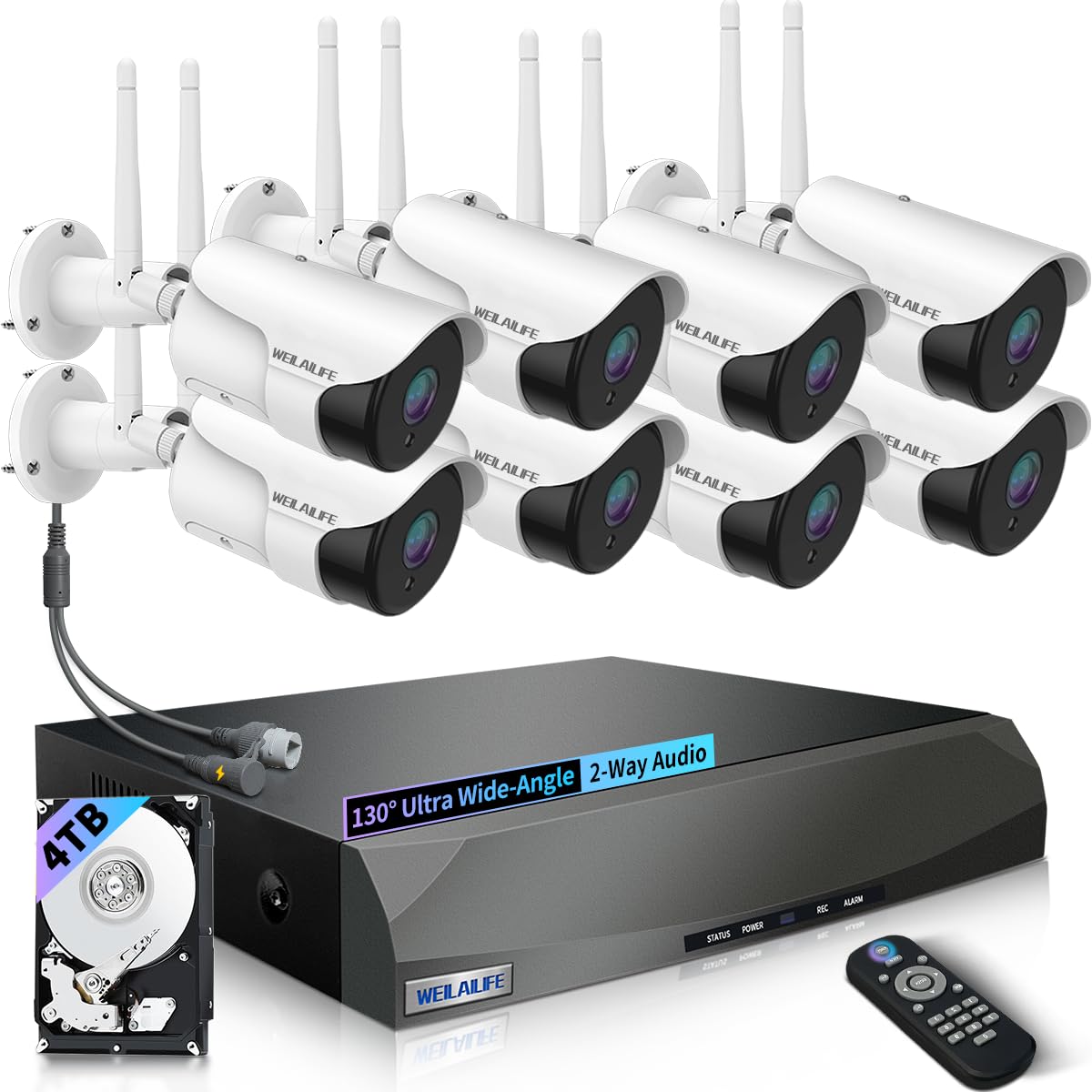
Bild: Überview of the WEILAILIFE 5MP 8-Camera 4TB Wireless Security Camera System, showing the NVR and multiple cameras.
1.2. Camera Antenna Installation
Before mounting, ensure the antennas are correctly attached to each camera for optimal wireless signal.
- Remove the red protective cap from the antenna port on the camera.
- Firmly screw in the antenna to the designated port.
- Adjust the angle of the antenna for best signal reception.
Video: Demonstrates the installation process for the wireless camera antennas and mounting.
1.3. Systemverbindung
Follow these steps to connect your wireless security camera system:
- Connect the power adapter to the NVR and plug it into an electrical outlet.
- Connect the power adapters to each camera and plug them into electrical outlets.
- Connect the NVR to a monitor (VGA or HDMI) and a mouse for local control.
- For remote access, connect the NVR to your router using the provided LAN cable.
Video: Illustrates the connection settings for the wireless security camera system, including NVR and camera power, and network connections.
1.4. App Setup and Camera Pairing
Use the "HonestView" app for remote viewing und Verwaltung.
- Download the "HonestView" app from your smartphone's app store (iOS/Android).
- Open the app and follow the on-screen instructions to add your NVR by scanning the QR code on the device.
- The app will guide you through pairing the cameras to the NVR. Ensure cameras are powered on and within range.
Video: Shows how to add a WiFi camera to the wireless security system using the mobile application.
2. Bedienungsanleitung
Learn how to utilize the key features of your security system.
2.1. 90ft Super Night Vision
Each camera is equipped with 18 hidden infrared LEDs, providing clear surveillance up to 90 feet in complete darkness. The LEDs activate automatically at night.

Image: Illustrates the camera's 90ft Super Night Vision capability, showing clear visibility in low-light conditions.
2.2. Dual Antenna Enhanced Wireless Signal
The dual-antenna design enhances wireless signal transmission up to 150 feet, ensuring stable and reliable connectivity for your 5-megapixel cameras, delivering stunning 1944P resolution.

Image: Diagram showing enhanced wireless signal transmission with dual antennas, improving range and stability.
2.3. 2-Way Audio Communication
Equipped with advanced noise-canceling microphones and speakers, the cameras allow for clear two-way communication. This feature enables you to speak with visitors or deter intruders remotely via the app.

Image: Depicts a user communicating through the camera's two-way audio feature with a person at the door.
2.4. 130° Wide-angle Lens
The cameras feature a 130° wide-angle lens, providing extensive coverage and minimizing blind spots in the monitored area. This is ideal for thorough inspections and capturing a broader view.

Image: Visual representation of the 130-degree wide-angle lens coverage from a security camera.
2.5. Bewegungserkennung und Benachrichtigungen
The system detects movement and sends real-time notifications to your smartphone (via app push, email, or buzzer), ensuring you are immediately aware of any activity.

Image: Shows motion detection in action, highlighting a person entering the monitored area and the various alert options.
2.6. Fernbedienung Viewing with "HonestView" App
Greifen Sie auf Live-Video-Feeds und aufgezeichnete Inhalte zu.tage from your smartphone, PC, or tablet using the free "HonestView" app, with no monthly fees.

Bild: Eine Person viewing live camera footage on a smartphone, demonstrating remote monitoring capabilities.
Video: Ein einführendes Video zeigtasing the features and benefits of the WEILAILIFE Wireless Security System.
Video: Highlights the 5MP resolution and wireless capabilities of the security camera system.
3. Wartung
Durch sachgemäße Wartung wird die Langlebigkeit und optimale Leistung Ihres Sicherheitssystems gewährleistet.
3.1. Reinigung
- Reinigen Sie die Kameralinsen regelmäßig mit einem weichen, fusselfreien Tuch.amp Mit einem Tuch Staub und Flecken entfernen. Scheuermittel vermeiden.
- Keep the NVR unit free from dust by gently wiping its exterior. Ensure ventilation openings are not blocked.
3.2. Umweltaspekte
The cameras are IP66 waterproof, designed to withstand various weather conditions. However, extreme temperatures can affect performance.

Image: Demonstrates the IP66 waterproof rating of the camera, showing its resilience to rain and varying temperatures.
3.3. Firmware-Updates
Check the "HonestView" app or the WEILAILIFE webBesuchen Sie die Website regelmäßig, um Firmware-Updates zu erhalten und sicherzustellen, dass Ihr System über die neuesten Funktionen und Sicherheitsverbesserungen verfügt.
4. Fehlerbehebung
Häufige Probleme und ihre Lösungen.
4.1. Kein Videofeed
- Überprüfen Sie die Leistung: Ensure both the camera and NVR are powered on and connected to a working power source.
- Verbindungen prüfen: Verify all cables (HDMI/VGA, LAN) are securely connected.
- Drahtloses Signal: If using wireless, check the signal strength in the NVR settings or app. Relocate cameras closer to the NVR if the signal is weak.
- Kamera neu koppeln: If a specific camera is offline, try re-pairing it through the NVR's menu or the app.
4.2. Bewegungserkennung funktioniert nicht
- Bewegungserkennung aktivieren: Ensure motion detection is enabled in the NVR settings or app for the specific camera.
- Empfindlichkeit anpassen: The sensitivity level might be too low. Increase it in the settings.
- Erkennungszonen festlegen: Verify that detection zones are correctly configured and cover the desired areas.
4.3. Probleme beim Fernzugriff
- Internetverbindung: Ensure both your NVR and smartphone have a stable internet connection.
- App Version: Make sure your "HonestView" app is updated to the latest version.
- Router-Einstellungen: Check your router's firewall or port forwarding settings if you experience persistent connectivity issues. Consult your router's manual or ISP for assistance.
5. Produktspezifikationen
| Besonderheit | Detail |
|---|---|
| Marke | WEILAILEBEN |
| Modellname | CSWL-08SW5MP18-8ch+3.5"4TB-BW |
| Empfohlene Verwendung | Innensicherheit, Außensicherheit |
| Konnektivitätstechnologie | IEEE802.11 1/n/f, WiFi, Wireless |
| Besondere Merkmale | 130° Wide-angle Lens, 2-Antennas Enhancement, 2-Way Audio, 90ft Night Vision, Motion Sensor |
| Verwendung im Innen- und Außenbereich | Innenbereich, Außenbereich |
| Kompatible Geräte | Cameras, Personal Computers, Smartphone, Tablet, Television |
| Controllertyp | APP Control, Remote Control, USB Mouse |
| Montagetyp | Eingebettet |
| Farbe | Weiß |
| Formfaktor | Kugel |
| Installationstyp | Wandhalterung |
| Gehäusematerial | Aluminium |
| Wasserbeständigkeit | Wasserdicht (IP66) |
| Alarmtyp | Audio und Bewegung |
| Effektive Standbildauflösung | 5 Megapixel |
| Auflösung des Fotosensors | 5 Megapixel |
| Stromquelle | Wechselstrom/Gleichstrom |
| Bandtage | 110 Volt (Wechselstrom) |
| Wastage | 50 Watt |
| Anzahl der Kanäle | 10 |
| Videokodierung | MPEG-4 |
| Nachtsichtbereich | 90 Fuß |
| Auflösung der Videoaufnahme | 2536 x 1944p, 5.0 Megapixel |
| Bildfrequenz | 15 Fps |
| Viewing-Winkel | 130 Grad |
| Zoomtyp | Digital Zoom |
| Artikelabmessungen | 13 x 11 x 9 Zoll |
6. Garantie und Support
6.1. Herstellergarantie
The WEILAILIFE 5MP 8-Camera 4TB Wireless Security Camera System comes with a US Location Service Manufacturer Warranty for 1 Year from Date of Purchase.
6.2. Kundendienst
For further assistance, technical support, or to explore other WEILAILIFE products, please visit the official WEILAILIFE Store: