
1. Einleitung
Thank you for choosing the DIGISHUO 14.6V 10A LiFePO4 Battery Charger. This charger is specifically designed for charging and maintaining 12V (12.8V) LiFePO4 lithium-ion batteries. It features a 2-stage Konstantstrom/Konstantvoltage (CC/CV) charge algorithm to optimize charging efficiency and battery lifespan. Please read this manual thoroughly before use to ensure safe and effective operation.
2. Sicherheitshinweise
WARNING: Risk of Electric Shock. Do not open the charger casing.
- This charger is designed exclusively for 12V (12.8V) LiFePO4 batteries. Do not use it with other battery types (e.g., lead-acid, Ni-Cd, Ni-MH) as this may cause damage to the battery or charger, or result in injury.
- Stellen Sie sicher, dass das Ladegerät an eine Steckdose mit der richtigen Spannung angeschlossen ist.tage (100-220 V Wechselstrom).
- Always connect the charger to the battery terminals correctly: red clip to positive (+), black clip to negative (-). Reverse connection can cause damage.
- Operate the charger in a well-ventilated area. Do not cover the charger during operation.
- Halten Sie das Ladegerät von Wasser, Feuchtigkeit und brennbaren Materialien fern.
- Do not use the charger if the cables, clips, or casing sind beschädigt.
- Unplug the charger from the power outlet before making or breaking connections to the battery.
- Außerhalb der Reichweite von Kindern aufbewahren.

Image: The DIGISHUO LiFePO4 Battery Charger features built-in protections against over-temperature, reverse polarity, over-voltage und Kurzschluss.
3. Produktüberschreitungview
The DIGISHUO 14.6V 10A LiFePO4 Battery Charger includes the main charging unit, power supply cable, and alligator clips for battery connection.
Packungsinhalt:
- 1 x 14.6V Lithium Battery Charger with Crocodile Clip
- 1 x US Plug Power Supply Cable
- 1 x englische Bedienungsanleitung (dieses Dokument)
- 1 x Ersatzsicherung

Image: The package includes the charger unit, power cable, and alligator clips.
Charger Components:
- Ladegerät: Langlebige Aluminiumlegierung casing with built-in cooling fan.
- LED-Anzeige: Zeigt den Ladestatus an (Rot für Ladevorgang, Grün für vollständig geladen).
- Krokodilklemmen: Rot steht für positiv (+), Schwarz für negativ (-).
- Stromeingangsanschluss: Zum Anschließen des Netzkabels.
- Sicherungshalter: Contains a replaceable fuse for protection.

Bild: Vorderseite view of the charger showing the main unit, alligator clips, and power cord.
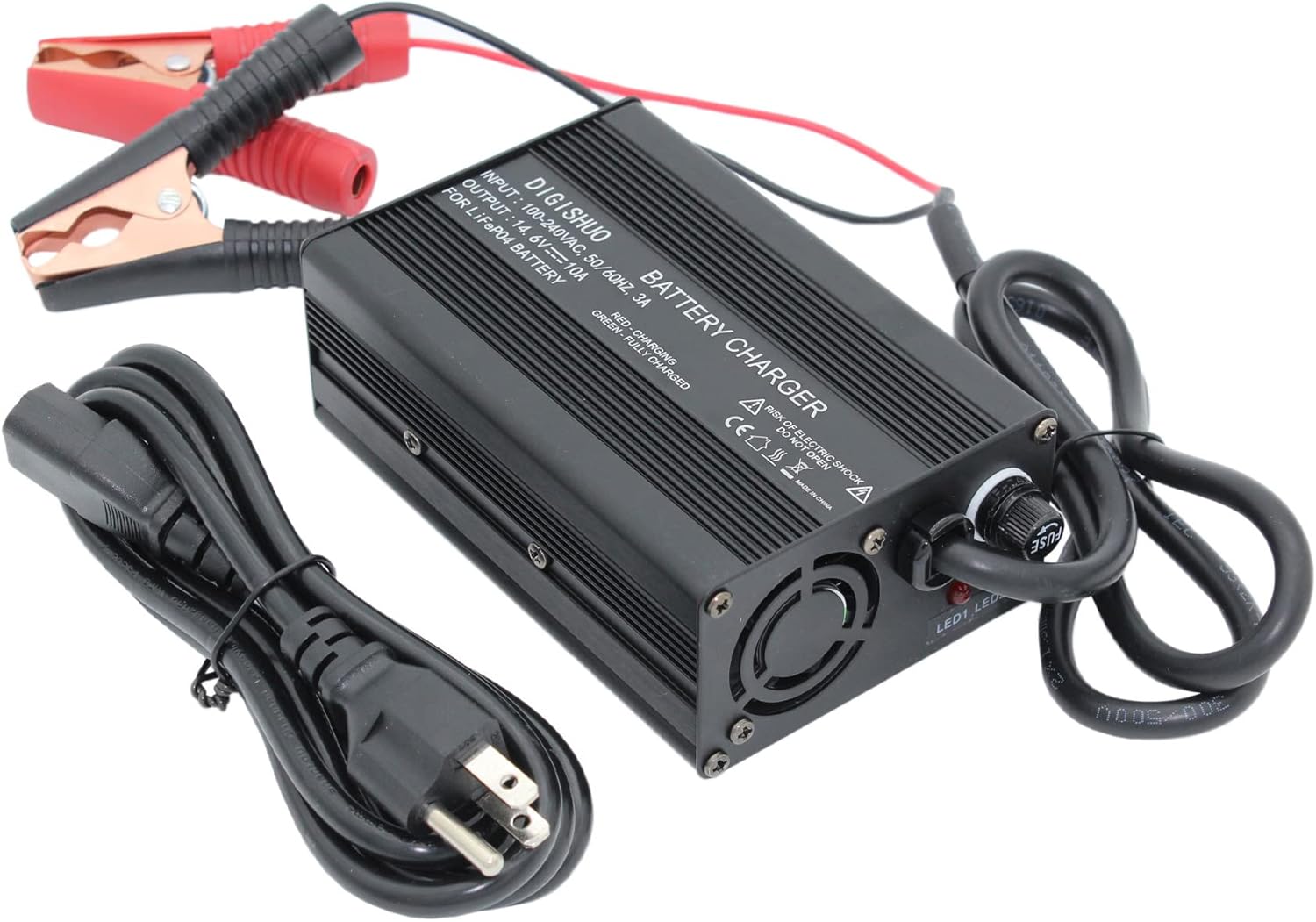
Bild: Abgewinkelt view highlighting the cooling fan and fuse holder on the charger unit.
4. Spezifikationen
| Marke | DIGISHUO |
| Modell | B0C3GYRHS4 |
| Eingangslautstärketage | 100-220V AC |
| Ausgangsvolumentage | 14.6 V |
| Ladestrom | 10 Amps |
| Empfohlene Batteriekapazität | 30 bis 50 Amp Hours and above (12V LiFePO4) |
| Technische Daten | 8"T x 4"B x 2"H |
| Gehäusematerial | Langlebige Aluminiumlegierung |
| Kühlung | Eingebauter Lüfter |
5. Einrichtung
- Bereiten Sie die Batterie vor: Ensure the 12V LiFePO4 battery is clean and its terminals are free from corrosion.
- An die Batterie anschließen:
- Verbinden Sie ROT Krokodilklemme zum positiv (+) Pol der Batterie.
- Verbinden Sie SCHWARZ Krokodilklemme zum negativ (-) Pol der Batterie.
- An die Stromversorgung anschließen: Insert the AC power cable into the charger's power input port, then plug the other end into a standard 100-220V AC wall outlet.
Wichtig: Always connect the charger to the battery first, then to the AC power outlet. When disconnecting, unplug from the AC outlet first, then disconnect from the battery.
6. Bedienungsanleitung
Ladevorgang:
- Once properly connected (as per Section 5), the charger will automatically begin the charging process.
- Der LED-Anzeige on the charger will illuminate ROT, indicating that the battery is currently charging.
- Das Ladegerät verwendet einen 2-stage Konstantstrom/Konstantvoltage (CC/CV) algorithm for efficient and safe charging.
- Wenn der Akku voll aufgeladen ist, wird der LED-Anzeige wird sich wenden GRÜN. The charger will automatically stop charging to prevent overcharging.
0V Charging Function (Battery Reactivation):
This charger supports a 0V charging function, which can help reactivate or repair long-unused LiFePO4 batteries that have entered a deep discharge state. When connected to such a battery, the charger will attempt to bring its voltage up to a level where normal charging can commence. This process may take longer than regular charging.
7. Wartung
- Halten Sie das Ladegerät sauber und trocken. Wischen Sie die Außenseite mit einem weichen, trockenen Tuch ab. Verwenden Sie keine Lösungsmittel oder Scheuermittel.
- Regularly inspect the cables and alligator clips for any signs of damage, fraying, or corrosion. Replace if necessary.
- Stellen Sie sicher, dass der Lüfter nicht blockiert ist, um eine ordnungsgemäße Wärmeabfuhr zu gewährleisten.
- Bewahren Sie das Ladegerät an einem kühlen, trockenen Ort auf, wenn Sie es nicht verwenden.
- If the fuse blows, replace it with a fuse of the same type and rating (a backup fuse is included in the package).
8. Fehlerbehebung
| Problem | Mögliche Ursache | Lösung |
|---|---|---|
| Die LED am Ladegerät leuchtet nicht. | No power from outlet; Loose connection; Blown fuse. | Check power outlet; Ensure all connections are secure; Check and replace fuse if necessary. |
| LED remains RED for an extended period. | Battery is deeply discharged or high capacity; Battery fault. | Allow more time for charging, especially for large or deeply discharged batteries. If it never turns green, the battery may be faulty. |
| LED immediately turns GREEN after connecting. | Battery is already fully charged; Poor connection. | This is normal if the battery is full. If not, check connections for proper contact. |
| Das Ladegerät wird während des Betriebs heiß. | Normal operation; Obstructed cooling fan. | Some heat is normal. Ensure the cooling fan is not blocked and the charger is in a well-ventilated area. If excessively hot, disconnect and contact support. |
9. Garantie und Support
This DIGISHUO product comes with a 1 Jahr Garantie from the date of purchase, covering defects in materials and workmanship under normal use. This warranty does not cover damage caused by misuse, accident, unauthorized modification, or improper installation.
For technical support, warranty claims, or any questions regarding your DIGISHUO charger, please contact our customer service team through the retailer where the product was purchased or visit the official DIGISHUO webWebsite für Kontaktinformationen.