
Einführung
The Bushnell Wingman Mini is a compact GPS Bluetooth speaker designed for golf enthusiasts. It provides audible GPS distances, premium audio quality for music, and the ability to handle calls. Its integrated BITE magnetic cart mount allows for convenient attachment to a golf cart or bag. The device is built with a waterproof IPX7 construction, ensuring durability in various outdoor conditions.
Lieferumfang
- 1x Wingman Mini Black/Silver GPS Speaker
- 1x Carabiner Clip
- 1x USB-C Kabel
- 1x Wearable4U Black EarBuds with Charging E-Bank Case
- 1x Wandladegerät
- 1x Kfz-Ladegerät

Image: The complete bundle including the Wingman Mini speaker, earbuds, USB-C cable, wall charger, and car charger.
Produkt überview

Bild: Vorderseite view of the Bushnell Wingman Mini GPS Bluetooth Speaker, showcasing its hexagonal design and central 'B' logo.

Bild: Mehrere views of the Wingman Mini, highlighting the control buttons for volume, power, and GPS functions, as well as the carabiner clip and USB-C port.

Image: The Wingman Mini speaker in use alongside a smartphone displaying the Bushnell Golf app, showing GPS distances and settings.

Bild: Nahaufnahme view of the USB-C charging port on the side of the Bushnell Wingman Mini speaker.
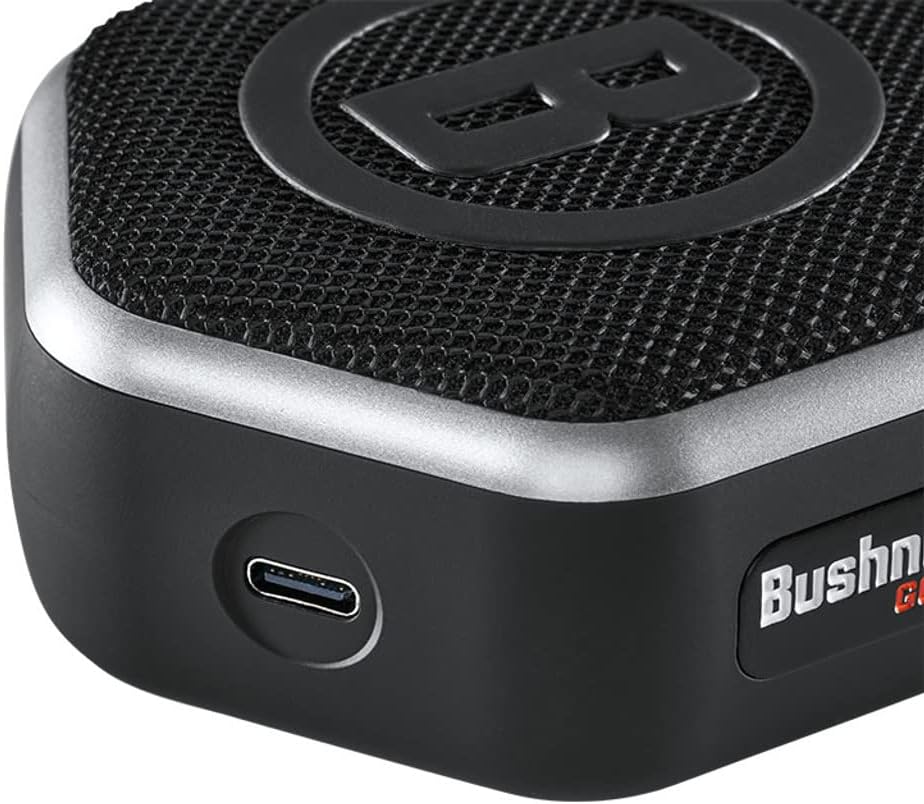
Image: The Wearable4U Ultimate Earbuds with their charging case, highlighting features like Bluetooth 5.0 and 1500 mAh power bank.
Aufstellen
1. Aufladen des Geräts
Before first use, fully charge the Wingman Mini using the provided USB-C cable and either the wall or car charger. The charging port is located on the side of the speaker. A full charge provides approximately 11 hours of battery life.
2. Bluetooth-Kopplung
- Power on the Wingman Mini by pressing and holding the power button.
- Stellen Sie sicher, dass Bluetooth auf Ihrem Smartphone aktiviert ist.
- Suchen nach available Bluetooth devices and select "Bushnell Wingman Mini" to pair.
- Nach erfolgreicher Kopplung bestätigt der Lautsprecher die Verbindung.
3. Bushnell Golf App Installation
For full GPS functionality and custom sound bites, download the Bushnell Golf app from your smartphone's app store (Google Play or Apple App Store). Follow the in-app instructions to set up your profile and access golf course data.
Bedienungsanleitung
1. Audible GPS Distances
With the Bushnell Golf app running and the Wingman Mini connected, press the 'B' button on the speaker to receive audible distances to the front, center, and back of the green. The speaker comes preloaded with over 38,000 golf courses worldwide.
2. Musikwiedergabe
Once paired via Bluetooth, you can stream music from your smartphone or other Bluetooth-enabled devices. Use the volume controls on the speaker or your connected device to adjust audio levels.
3. Freisprechen
The built-in microphone allows you to take and make calls directly through the Wingman Mini when connected to your smartphone. Press the play/pause button to answer or end a call.
4. TWS Speaker Pairing (True Wireless Stereo)
If you have two Wingman Mini speakers, you can pair them together for a True Wireless Stereo experience. Refer to the Bushnell Golf app or the full product manual for detailed instructions on TWS pairing.
5. Attaching to Golf Cart/Bag
Utilize the integrated BITE magnetic cart mount to securely attach the speaker to a golf cart bar. Alternatively, use the provided carabiner clip to attach it to your golf bag.
Wartung
- Reinigung: Wischen Sie den Lautsprecher mit einem weichen, damp Tuch. Vermeiden Sie die Verwendung aggressiver Chemikalien oder Scheuermittel.
- Lagerung: Bewahren Sie das Gerät bei Nichtgebrauch an einem kühlen, trockenen Ort auf.
- Wasserbeständigkeit: The Wingman Mini features IPX7 waterproof construction, meaning it can withstand immersion in up to 1 meter of water for 30 minutes. Ensure the charging port cover is securely closed before exposure to water.
- Batteriepflege: Um die Akkulaufzeit zu verlängern, vermeiden Sie häufiges vollständiges Entladen des Akkus. Laden Sie das Gerät regelmäßig auf.
Fehlerbehebung
| Problem | Lösung |
|---|---|
| Kein Strom/Gerät lässt sich nicht einschalten | Ensure the device is fully charged. Connect to a power source using the provided USB-C cable and charger. |
| Bluetooth-Kopplung nicht möglich |
|
| No audible GPS distances |
|
| Schlechte Audioqualität |
|
Technische Daten
- Modellname: Wingman Mini Black/Silver
- Artikelmodellnummer: w1
- Artikelgewicht: 6 Unzen
- Produktabmessungen: 4 x 3.23 x 1.57 Zoll
- Akku-Typ: 1 Lithium-Ionen-Akku (im Lieferumfang enthalten)
- Akkulaufzeit: Ungefähr 11 Stunden
- Konnektivitätstechnologie: Bluetooth
- Besondere Merkmale: Audible GPS Distances, Built-in Microphone, Mini, TWS Speaker Pairing Technology, Waterproof (IPX7)
- Montageart: Aufbisshalterung
- Kartentyp: Golf Course (preloaded with over 38,000 courses)
- Sprachbefehl: Mikrofon
Garantie und Support
The Bushnell Wingman Mini comes with a 2 Jahr Herstellergarantie. For warranty claims, technical support, or further assistance, please contact Wearable4U customer service or refer to the official Bushnell Golf webSite für Supportressourcen.
Hersteller: Wearable4U