
Einführung
Thank you for choosing the Edillas Digital Watch for Kids, Model 2207L. This watch is designed for children, featuring a 7-color LED backlight, 50M (5ATM) water resistance, and multiple functions including time, date, alarm, and stopwatch. This manual provides detailed instructions to help you understand and operate your new watch.
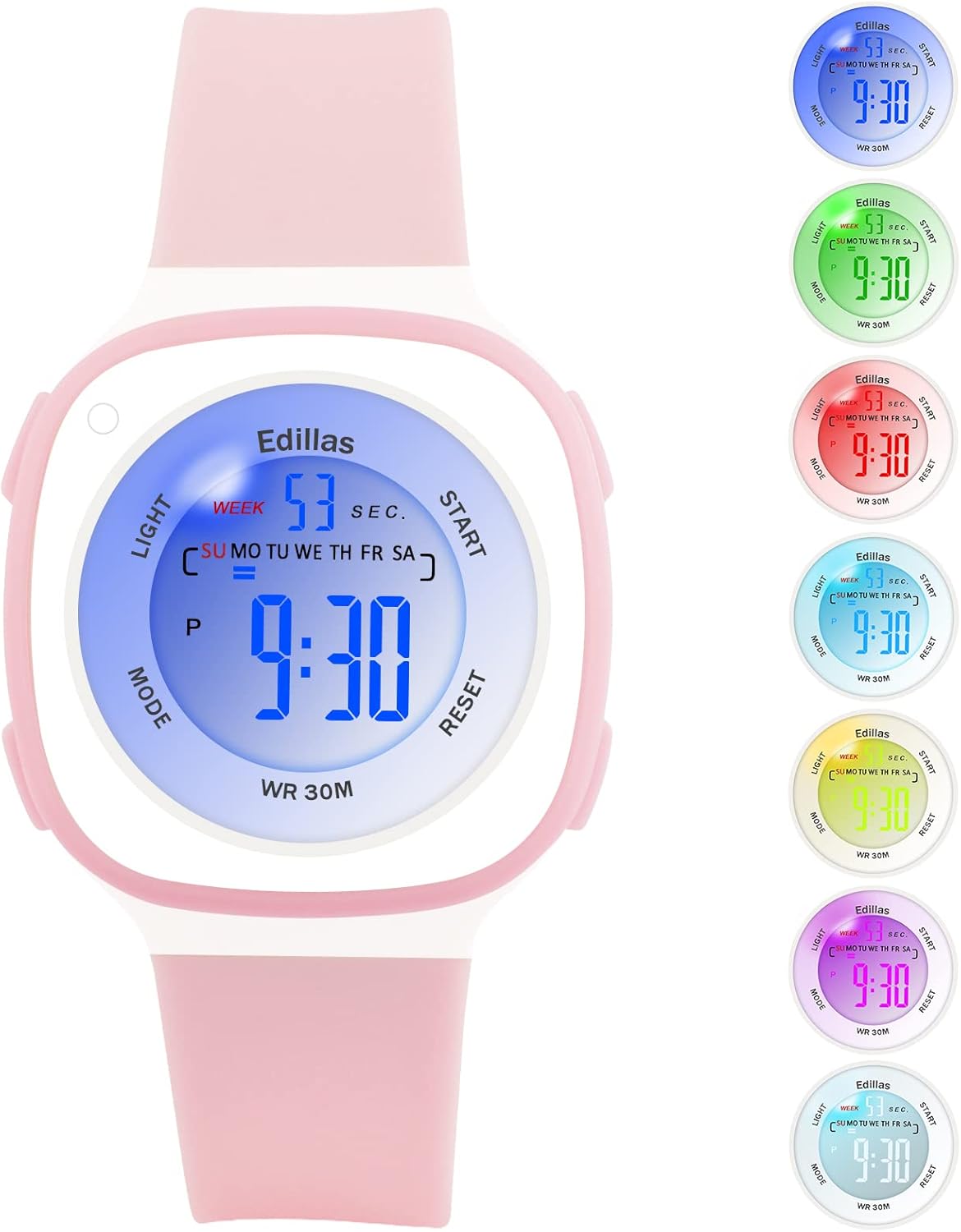
Figure 1: Edillas Digital Watch for Kids (Model 2207L)
Uhrenkomponenten und Knöpfe
Machen Sie sich mit den Knöpfen und Anzeigeelementen der Uhr vertraut:

Abbildung 2: Layout der Uhrentaste und des Displays
- LICHT-Taste (oben links): Aktiviert die Hintergrundbeleuchtung und ändert die Hintergrundbeleuchtungsfarbe.
- MODUS-Taste (unten links): Durchläuft verschiedene Modi (Zeit, Alarm, Stoppuhr).
- START-Taste (oben rechts): Used to start/stop functions in Stopwatch mode and adjust settings.
- RESET-Taste (unten rechts): Used to reset functions in Stopwatch mode and adjust settings.
Einrichtung und Zeiteinstellung
- Erstes Einschalten: The watch comes with a pre-installed battery. If the display is off, press any button to activate it.
- Zeiteinstellungsmodus aufrufen: Drücken Sie im normalen Zeitdisplay die Taste MODUS button three times. The seconds will start flashing, indicating you are in time setting mode.
- Sekunden einstellen: Drücken Sie die ZURÜCKSETZEN Taste, um die Sekunden auf Null zurückzusetzen.
- Einstellungsminuten: Drücken Sie die START button to move to the minutes setting. The minutes will flash. Use the ZURÜCKSETZEN Taste zum Einstellen der Minuten.
- Setting Hours: Drücken Sie die START button again to move to the hours setting. The hours will flash. Use the ZURÜCKSETZEN button to adjust the hours. Note the 'P' indicator for PM in 12-hour format.
- Setting Date (Day, Month, Year): Drücken Sie weiter die START button to cycle through setting the day, month, and year. Use the ZURÜCKSETZEN Schaltfläche zum Einstellen der einzelnen Werte.
- Setting Day of Week: Nach der Datumseinstellung drücken Sie START to move to the day of the week. Use ZURÜCKSETZEN um den richtigen Tag auszuwählen.
- Einstellungsmodus verlassen: Sobald alle Einstellungen abgeschlossen sind, drücken Sie die Taste MODUS Taste zum Zurückkehren zur normalen Zeitanzeige.
Betriebsfunktionen
1. LED-Hintergrundbeleuchtung
The watch features a 7-color LED backlight. To activate the backlight, press the LICHT Taste. Um die Hintergrundbeleuchtungsfarbe zu ändern, halten Sie die Taste gedrückt. LICHT Halten Sie die Taste etwa 3 Sekunden lang gedrückt. Die Farbe durchläuft die verfügbaren Optionen. Lassen Sie die Taste los, sobald die gewünschte Farbe angezeigt wird.

Figure 3: LED Backlight Functionality
2. Alarmfunktion
- Entering Alarm Mode: Drücken Sie im normalen Zeitdisplay die Taste MODUS button once. The alarm time will be displayed.
- Weckzeit einstellen: Drücken Sie im Alarmmodus die Taste ZURÜCKSETZEN Drücken Sie die Taste. Die Stundenziffern blinken. Verwenden Sie die START Taste, um die Stunde einzustellen.
- Drücken Sie die ZURÜCKSETZEN button again to move to the minute digits. Use the START Taste zum Einstellen der Minuten.
- Alarm aktivieren/deaktivieren: Drücken Sie die START Taste zum Ein- und Ausschalten des Alarms. Bei Aktivierung erscheint ein Alarmsymbol auf dem Display.
- Exiting Alarm Mode: Drücken Sie die MODUS Taste zum Zurückkehren zur normalen Zeitanzeige.
3. Stoppuhrfunktion
- Entering Stopwatch Mode: Drücken Sie im normalen Zeitdisplay die Taste MODUS button twice. The display will show '00:00:00'.
- Starting/Stopping Stopwatch: Drücken Sie die START Zum Starten der Zeitmessung drücken. START Drücken Sie erneut, um die Pause zu pausieren. START Um es noch einmal zu versuchen, geht es weiter.
- Resetting Stopwatch: While the stopwatch is paused, press the ZURÜCKSETZEN button to clear the time to '00:00:00'.
- Exiting Stopwatch Mode: Drücken Sie die MODUS Taste zum Zurückkehren zur normalen Zeitanzeige.
4. 12-/24-Stunden-Anzeige
To switch between 12-hour and 24-hour time formats, enter the time setting mode (press MODUS three times). When the hour digits are flashing, press the START button until you reach the hour setting. Press the ZURÜCKSETZEN button to cycle between 12H (with 'P' for PM) and 24H formats. Exit setting mode by pressing MODUS.
Wartung
1. Wasserdichtigkeit (50 m / 5 ATM)
This watch is water-resistant up to 50 meters (5 ATM), making it suitable for daily use, such as hand washing, rain, and showering. It is also suitable for swimming in shallow water. Drücken Sie keine Knöpfe, solange sich die Uhr unter Wasser befindet. Avoid using the watch in extremely hot or cold water, as this can shorten its lifespan and compromise water resistance.

Figure 4: Water Resistance Applications
2. Reinigung und Pflege
- Reinigen Sie die Uhr regelmäßig mit einem weichen, fusselfreien Tuch.amp Tuch.
- Avoid using chemical cleaners, as they may damage the watch's materials.
- Bewahren Sie die Uhr bei Nichtgebrauch an einem trockenen Ort auf.
- Protect the watch from extreme temperatures and direct sunlight for prolonged periods.
3. Batteriewechsel
The watch uses one C-type battery. Battery replacement should ideally be performed by a qualified technician to ensure proper sealing and maintain water resistance. Incorrect battery replacement may void the warranty.
Fehlerbehebung
| Problem | Mögliche Ursache | Lösung |
|---|---|---|
| Das Display ist leer oder dunkel. | Niedriger Batteriestand oder Batterie muss ausgetauscht werden. | Replace the battery. If issue persists, contact support. |
| Die Zeit ist ungenau. | Die Uhrzeit ist nicht richtig eingestellt. | Refer to the "Setup and Time Setting" section to reset the time. |
| Der Alarm ertönt nicht. | Der Alarm ist nicht aktiviert oder falsch eingestellt. | Ensure the alarm is set and activated (alarm icon visible). Check alarm volume if applicable (this model may not have adjustable volume). |
| Tasten reagieren nicht. | Vorübergehender Softwarefehler oder die Uhr ist nass. | Allow the watch to dry completely if wet. Try a soft reset by pressing all four buttons simultaneously for a few seconds (if applicable, consult support if unsure). |
| Screen scratches easily. | Normal wear and tear for acrylic crystal. | Consider applying a screen protector. Handle with care. |
| Strap discolors. | Exposure to dirt, sweat, or chemicals. | Clean the strap regularly with mild soap and water. Avoid prolonged exposure to harsh chemicals. |
Technische Daten

Abbildung 5: Abmessungen der Uhr
| Besonderheit | Detail |
|---|---|
| Modellnummer | 2207 Liter |
| Marke | Edillas |
| Anzeigetyp | Digitales |
| Bewegungstyp | Japanese Quartz (Digital Module) |
| Wasserbeständigkeit | 50M (5ATM) - Suitable for swimming, not for diving. |
| Besondere Merkmale | 7-color LED backlight, Alarm, Stopwatch, Date, 12/24H display |
| Stromquelle | 1 x C Battery (included) |
| Armbandmaterial | Silikon |
| Gehäusematerial | Gummi |
| Kristallart | Acryl |
| Gehäusedurchmesser | 37.4 mm (1.41 Zoll) |
| Gehäusedicke | 15 mm (0.39 Zoll) |
| Gurtbreite | 20 mm (0.63 Zoll) |
| Bandlänge | 19 cm (7.48 Zoll) |
| Produktgewicht | 20 g |
| Altersspanne | Kinder |
Garantie und Support
Garantieinformationen
The Edillas Digital Watch for Kids, Model 2207L, comes with a Lebenslange Garantie. This warranty covers manufacturing defects and ensures the product's quality under normal use. Please retain your proof of purchase for warranty claims.
Kundenservice
For any questions, concerns, or technical assistance regarding your Edillas watch, please refer to the retailer where you purchased the product or visit the official Edillas brand store online. You can also consult the product listing page for additional support options.
We are committed to providing satisfactory service and ensuring the durability of our products.