
Einführung
Thank you for choosing the OQIMAX White Noise Machine. This device is designed to create a peaceful and relaxing environment, aiding sleep for babies, children, and adults. It features a variety of soothing sounds, a night light, timer functions, and a portable design. Please read this manual carefully before use to ensure proper operation and maintenance.
Sicherheitshinweise
- Halten Sie das Gerät von Wasser und Feuchtigkeit fern.
- Zerlegen Sie das Gerät nicht und versuchen Sie nicht, es selbst zu reparieren. Wenden Sie sich bei Problemen an den Kundendienst.
- Verwenden Sie zum Aufladen ausschließlich das mitgelieferte USB-Kabel.
- Um Erstickungsgefahr durch Kleinteile zu vermeiden, bewahren Sie das Produkt außerhalb der Reichweite von Kleinkindern auf.
- Vermeiden Sie extreme Temperaturen und direkte Sonneneinstrahlung.
Packungsinhalt
- OQIMAX White Noise Machine (Model BH34-EU)
- USB-Kabel Typ C.
- Bedienungsanleitung
Produkteigenschaften
- 10 beruhigende Klänge: Includes white noise, nature sounds (stream, bird chirp, cicada chirp, sea wave), and lullabies.
- Wireless Speaker Function: Connect your phone via Bluetooth to play your preferred audio.
- 7-Farben-Nachtlicht: Adjustable brightness with 7 color options and a breathing light function.
- Timer-Funktion: Stellen Sie die automatischen Abschalttimer auf 15, 30 oder 60 Minuten ein.
- Speicherfunktion: Automatically restores previous volume, sound, timer, and night light settings.
- Automatik-Modus: Detects continuous noise for 10 seconds, then plays sound and turns off after 15 minutes of silence.
- USB wiederaufladbar und tragbar: Built-in 1200mAh battery provides up to 20 hours of use. Compact and lightweight for travel.
Gerätelayout und Bedienelemente
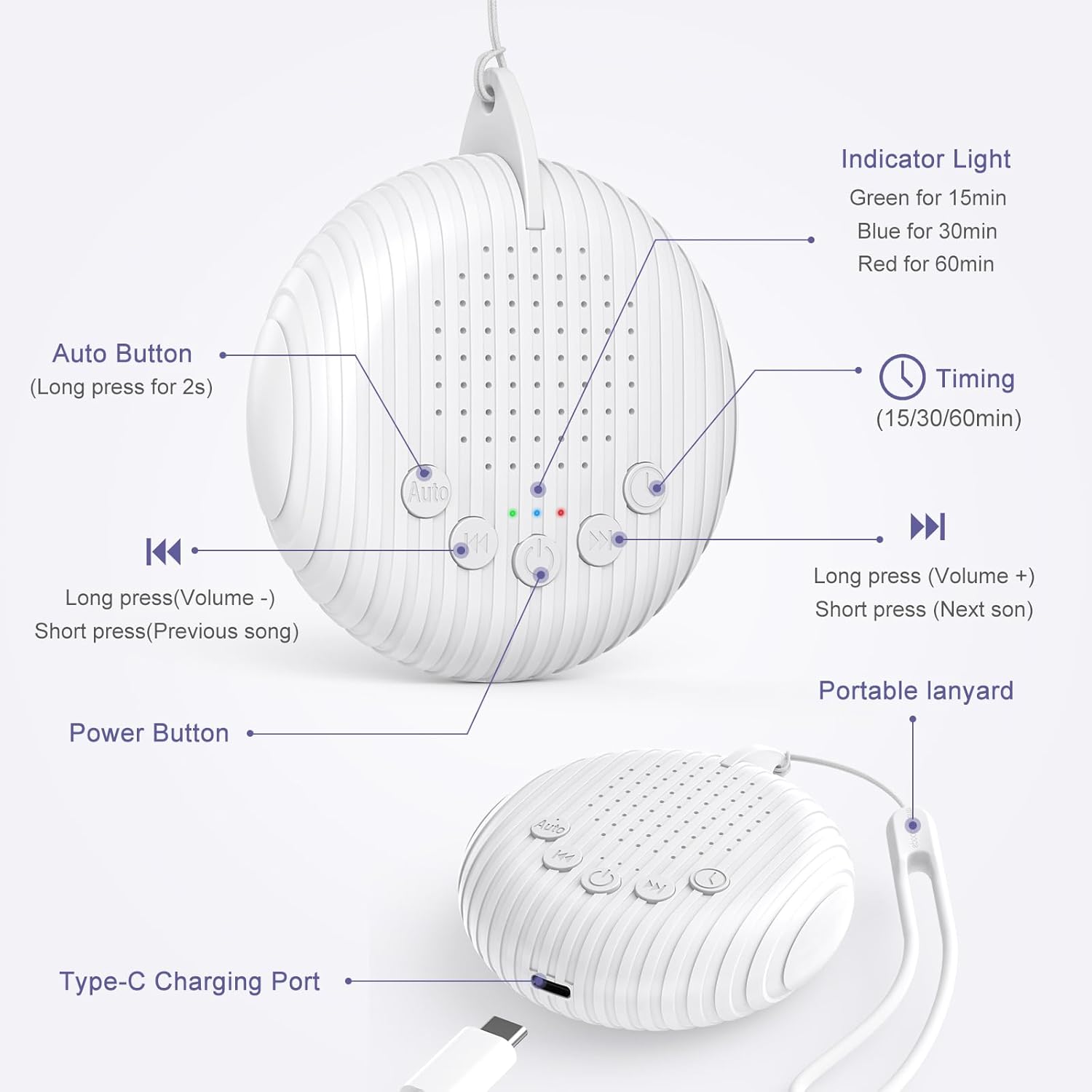
Bild: Vorne und seitlich view of the OQIMAX White Noise Machine, highlighting the Auto button, volume/track buttons, power button, indicator light, timing button, portable lanyard, and Type-C charging port.
- Netzschalter: Zum Ein-/Ausschalten drücken.
- Auto-Taste: Long press for 2 seconds to activate Automatic Noise Detection Mode.
- Volume Down / Previous Track (K<): Long press to decrease volume. Short press to go to the previous sound track.
- Volume Up / Next Track (>K): Long press to increase volume. Short press to go to the next sound track.
- Timing-Taste: Press to cycle through timer options (15 min, 30 min, 60 min).
- Kontrollleuchte: Green for 15 min timer, Blue for 30 min timer, Red for 60 min timer.
- Typ-C-Ladeanschluss: Zum Aufladen des Gerätes.
- Tragbares Schlüsselband: For easy carrying or hanging.
Aufstellen
- Aufladen des Geräts: Before first use, fully charge the device using the provided USB Type-C cable. Connect the cable to the charging port on the device and to a USB power adapter (not included) or computer. A full charge takes approximately 2 hours and provides up to 20 hours of use.
- Platzierung: Place the white noise machine on a stable surface or use the portable lanyard to hang it securely near the user, ensuring the sound is clear and unobstructed.
Bedienungsanleitung
1. Ein-/Ausschalten
Drücken Sie die Netzschalter once to turn the device on. Press it again to turn the device off.
2. Selecting Sounds

Bild: A person sleeping peacefully with the white noise machine nearby, illustrating the 10 available soothing sounds: Stream, Bird Chirp, Clock, Heartbeat, Cicada Chirp, Sea Wave, White Noise, and Lullaby, categorized as 6 Nature Sounds, 3 Lullabies, and 1 White Noise.
After powering on, the device will play the last used sound (due to the memory function). Short press the Lautstärke verringern / Vorheriger Titel button (K<) to go to the previous sound. Short press the Lauter / Nächster Titel button (>K) to go to the next sound. The device offers 10 distinct soothing sounds, including white noise, various nature sounds, and lullabies.
3. Lautstärke anpassen

Bild: A person exercising with the white noise machine, demonstrating the long press action on the volume buttons to increase or decrease the sound level.
To adjust the volume, long press the Lautstärke verringern / Vorheriger Titel button (K<) to decrease the volume, or long press the Lauter / Nächster Titel button (>K) to increase the volume.
4. Einstellen des Timers
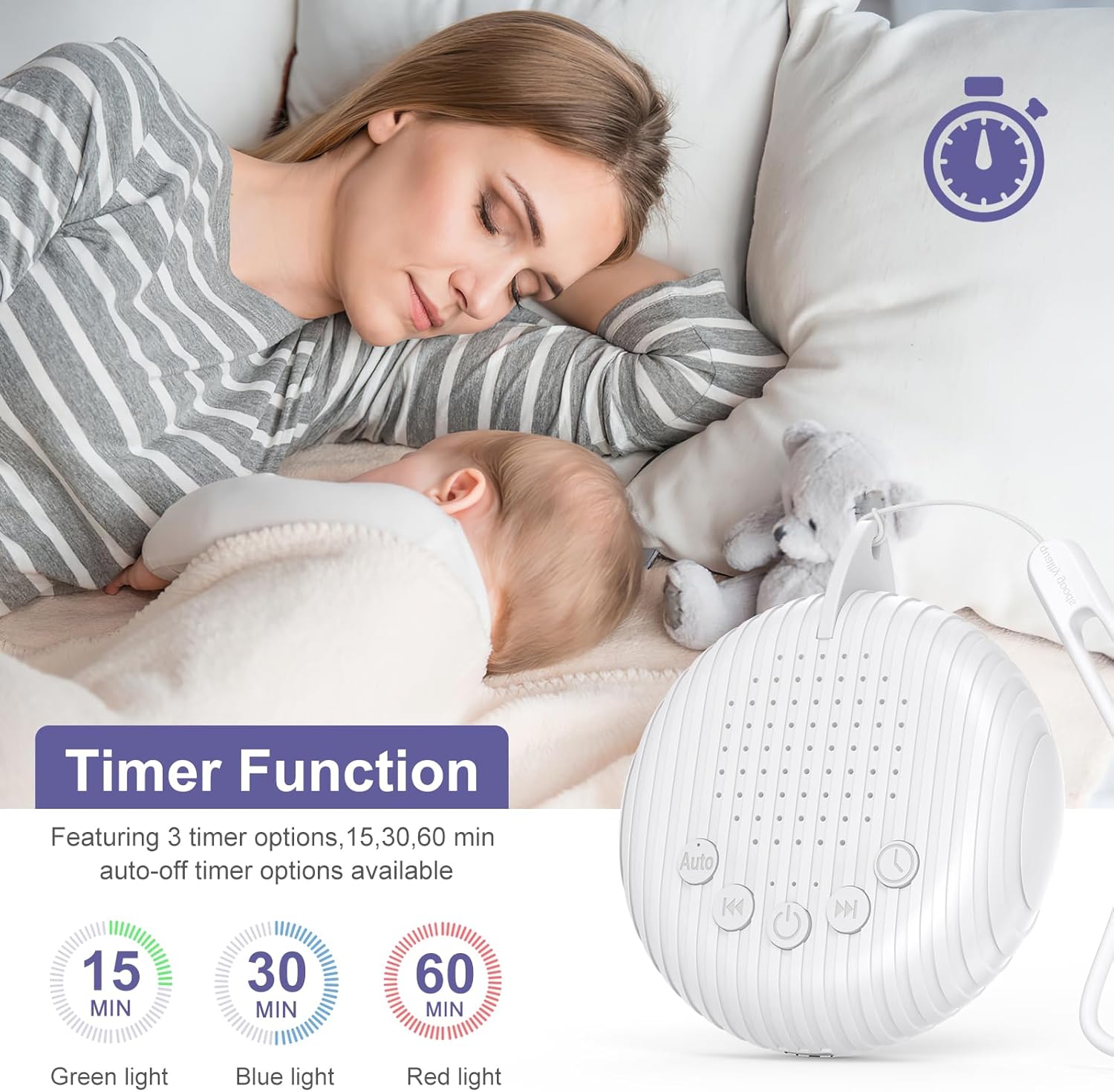
Bild: A mother and baby sleeping, with an overlay showing the timer function and its 15, 30, and 60-minute auto-off options, indicated by green, blue, and red lights respectively.
Drücken Sie die Timing-Taste to set an auto-off timer. Each press cycles through the available options: 15 minutes, 30 minutes, 60 minutes, or continuous play. The indicator light will change color to show the selected timer setting:
- Green light: 15-minute timer
- Blue light: 30-minute timer
- Red light: 60-minute timer
If no light is on, the device is set for continuous play.
5. Automatic Noise Detection Mode

Bild: A crying baby and a smiling baby, demonstrating how the automatic mode detects noise, starts playing sound, and then turns off after 15 minutes of silence.
Drücken Sie lange die Auto-Taste for 2 seconds to activate this mode. In Automatic Mode, if the device detects 10 seconds of continuous noise (e.g., a baby crying), it will automatically start playing the selected sound. The device will then turn off automatically after 15 minutes if no further continuous noise is detected.
6. Wireless Speaker Function (Bluetooth)
The device can also function as a wireless speaker. To activate Bluetooth mode, ensure the device is powered on.
- Turn on the OQIMAX White Noise Machine.
- Suchen Sie auf Ihrem Smartphone oder einem anderen Bluetooth-fähigen Gerät nach verfügbaren Bluetooth-Geräten.
- Select "OQIMAX" (or similar name) from the list to pair.
- Once paired, you can play your preferred music or audio through the machine's speaker.
Wartung
- Reinigung: Wischen Sie das Gerät mit einem weichen, trockenen Tuch ab. Verwenden Sie keine flüssigen Reinigungsmittel oder Scheuermittel.
- Lagerung: Bewahren Sie das Gerät an einem kühlen, trockenen Ort auf, wenn es längere Zeit nicht benutzt wird.
- Batteriepflege: Um die Lebensdauer des Akkus zu verlängern, vermeiden Sie häufiges vollständiges Entladen. Laden Sie den Akku regelmäßig auf.
Fehlerbehebung
| Problem | Mögliche Lösung |
|---|---|
| Gerät lässt sich nicht einschalten. | Ensure the device is charged. Connect to a power source using the USB-C cable and allow it to charge for at least 30 minutes before attempting to power on again. |
| Kein Ton oder geringe Lautstärke. | Check the volume level by long pressing the Volume Up button. Ensure the device is not muted. If using Bluetooth, check the volume on your connected device. |
| Die Bluetooth-Kopplung schlägt fehl. | Ensure the device is in pairing mode (usually indicated by a flashing light, though not specified). Turn off and on both the white noise machine and your Bluetooth device. Make sure the device is not already connected to another phone. |
| Automatic Mode not working. | Ensure the Auto Button has been long-pressed for 2 seconds to activate the mode. The device requires 10 seconds of continuous noise to trigger. |
| Timer function not setting correctly. | Press the Timing Button repeatedly to cycle through the 15, 30, and 60-minute options. Observe the indicator light color to confirm your selection. |
Technische Daten
- Modell: BH34-EU
- Marke: OQIMAX
- Energiequelle: Batteriebetrieben (1 Lithium-Ionen-Batterie erforderlich)
- Batteriekapazität: 1200 mAh
- Nutzungsdauer: Bis zu 20 Stunden
- Ladezeit: Ungefähr 2 Stunden
- Material: Acrylnitril-Butadien-Styrol (ABS)
- Maße (ca.): 8 cm (Breite) x 9.3 cm (Höhe) x 2 cm (Tiefe)
- Gewicht: 72.0 Gramm
- Steckertyp: USB Typ C
- Tonspuren: 10 (White Noise, Nature Sounds, Lullabies)
- Timer-Optionen: 15, 30, 60 Minuten
- Nachtlicht: 7 colors, 6 adjustable brightness levels, breathing light function
Garantie und Support
OQIMAX products come with a standard manufacturer's warranty. For specific warranty details, technical support, or any questions regarding your device, please contact OQIMAX customer service through the retailer where you purchased the product or visit the official OQIMAX webWebsite (falls vorhanden).