
Einführung
The TAXNELE THC30A is a digital programmable timer switch designed for automatic control of various electrical equipment. It features daily and weekly programming capabilities with up to 20 ON/OFF settings, a manual override function, and a built-in lithium battery for power-off memory. This manual provides detailed instructions for installation, operation, and maintenance to ensure safe and efficient use of your timer switch.
Sicherheitshinweise
- Stellen Sie vor der Installation oder Wartung sicher, dass die Stromversorgung unterbrochen ist.
- Die Installation sollte von einem qualifizierten Elektriker oder einer sachkundigen Person durchgeführt werden.
- Die maximale Belastbarkeit von 30A / 5000W darf nicht überschritten werden.
- Halten Sie das Gerät von Wasser und extremen Temperaturen fern.
- Verify correct wiring connections to prevent damage to the device or connected appliances.
Produkteigenschaften
- Programmierbare Steuerung: Up to 20 ON/OFF settings per day or week.
- Ausschaltspeicher: Built-in 3V lithium battery maintains timing, display, and data storage for up to 3 years during power interruptions.
- Hohe Präzision: Industrial-grade chip for accurate timing.
- Manuelle Übersteuerung: Allows temporary or permanent manual control.
- LCD Anzeige: Clear digital display for easy programming and monitoring.
- Din Rail Mount: Konzipiert für die einfache Montage auf einer Standard-DIN-Schiene.
- Breite Anwendung: Suitable for street lights, neon lamps, advertising signs, production equipment, and home appliances.

Figure 1: The THC30A timer switch highlighting its power-off memory function, which retains data for up to 3 years using a built-in CR2032 lithium battery.

Figure 2: The THC30A timer switch featuring a 30A big load relay for stable and safe operation with various electrical loads.
Product Components and Display
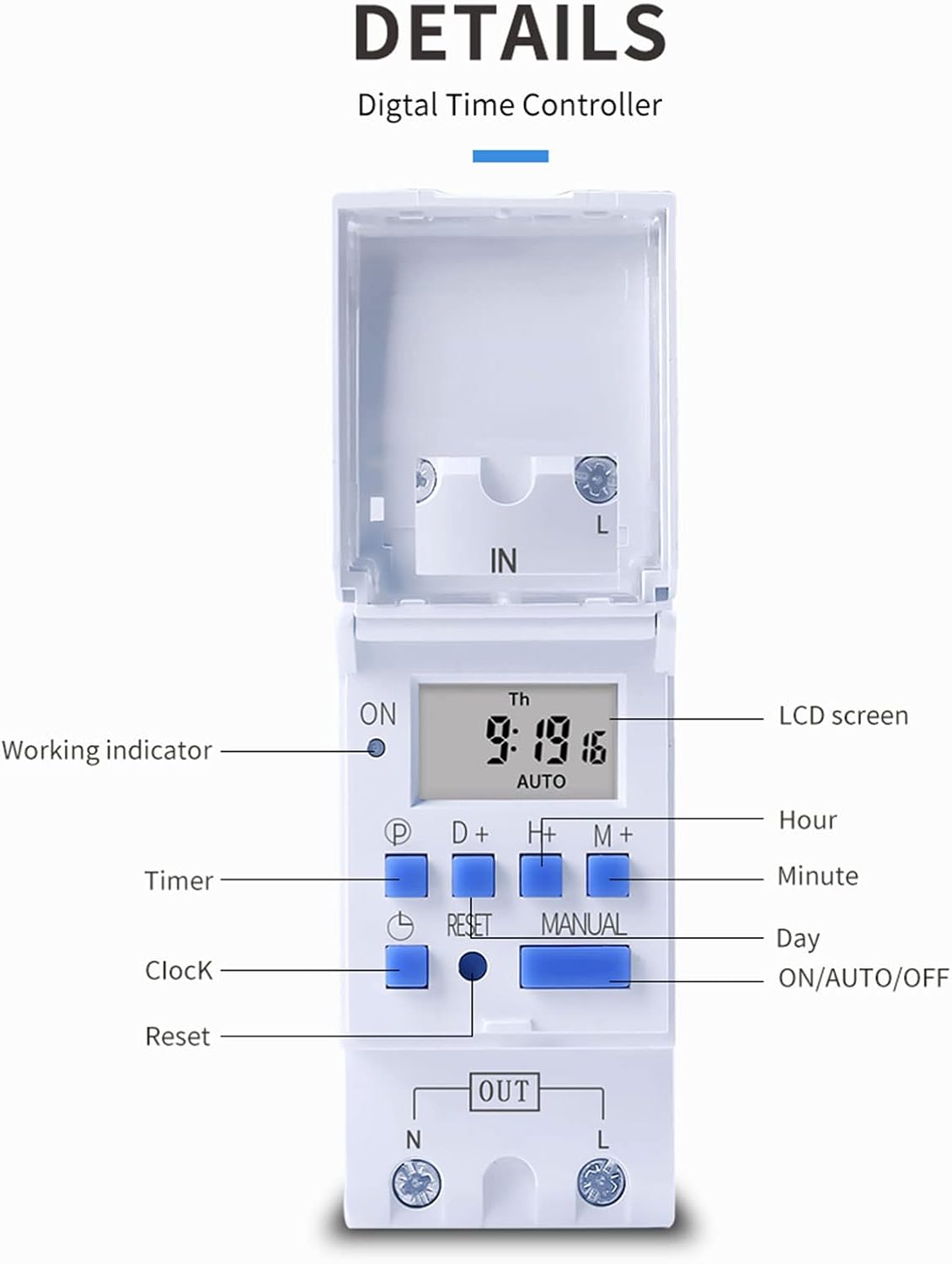
Abbildung 3: Ausführlich view of the THC30A timer switch's LCD screen and control buttons. Labels include Working indicator, Timer, Clock, Reset, P (Program), D+ (Day), H+ (Hour), M+ (Minute), Manual, and ON/AUTO/OFF status.
- LCD Bildschirm: Displays current time, day, and ON/OFF status.
- Arbeitsindikator: LED light indicating operation status.
- P-Taste: Wechselt in den Programmiermodus.
- D+ Button: Adjusts day in clock setting or program.
- H+ Button: Adjusts hour in clock setting or program.
- M+-Taste: Adjusts minute in clock setting or program.
- Uhr-Taste: Returns to clock display or exits programming mode.
- Reset-Taste: Löscht alle Einstellungen und setzt den Timer zurück.
- Manuelle Taste: Schaltet zwischen den Modi EIN, AUTO und AUS um.
Technische Daten
| Parameter | Wert |
|---|---|
| Modell | THC30A |
| Aktuelle Bewertung | 30 A |
| Nennleistung | 5000 W |
| Bandtage Optionen | 12V DC AC, 24V DC AC, 48V DC AC, 110V AC, 220V AC |
| Zeitfehler | ≤2 seconds/day |
| Anzeige | LCD |
| Zeitbereich | 1 Minute bis 168 Stunden (7 Tage) |
| EIN/AUS-Einstellungen | 20 Gruppen |
| Betriebstemperatur | -20℃ bis 50℃ |
| Maße | 86 x 36 x 65M (3.38 x 1.41 x 2.56 Zoll) |
| Gangreserve | 3V Lithium battery (CR2032 type) for 3 years data retention |

Figure 4: Dimensions of the THC30A timer switch, showing measurements for height, width, and depth for proper installation planning.
Setup und Installation
1. Montage
The THC30A timer switch is designed for DIN rail mounting. Securely attach the device to a standard 35mm DIN rail in an appropriate electrical enclosure.
2. Verkabelung
WARNUNG: Vor Beginn jeglicher Verkabelungsarbeiten muss unbedingt die Stromversorgung unterbrochen sein.
Connect the input power supply to the "IN" terminals (N for Neutral, L for Live). Connect the load (e.g., light, appliance) to the "OUT" terminals (N for Neutral, L for Live). The timer acts as a switch for the live wire. Refer to the wiring diagram below for correct connections.

Figure 5: Simplified wiring diagram for the THC30A timer switch. The new version offers direct power output, simplifying connections compared to older models.
- Eingabe (IN): Connect your main power supply (e.g., AC 12V, 24V, 48V, 110V, 220V) to these terminals.
- Ausgang (OUT): Connect your electrical load (e.g., light, motor) to these terminals. The timer controls the power flow to this output.
Bedienungsanleitung
1. Ersteinrichtung / Zurücksetzen
Bei der ersten Benutzung oder nach einem längeren Stromausfalltage, the display may be blank. Press the Zurücksetzen button (located in a small hole, use a pointed object) to clear all settings and initialize the timer. The LCD will display "0:00" and "AUTO".
2. Einstellen der aktuellen Uhrzeit und des Tages
- Halten Sie die Uhr Taste.
- Halten Sie Uhrdrücken D+ to set the current day (Monday to Sunday).
- Halten Sie Uhrdrücken H+ um die aktuelle Stunde (0-23) einzustellen.
- Halten Sie Uhrdrücken M+ um die aktuelle Minute (0-59) einzustellen.
- Lassen Sie den Uhr Knopf. Die Zeit ist nun eingestellt.
3. Programmierung von Ein-/Ausschaltzyklen
Der Timer unterstützt bis zu 20 EIN/AUS-Programme. Jedes Programm besteht aus einer EIN-Zeit und einer AUS-Zeit.
- Drücken Sie die P button once. The display will show "1 ON". This is for the first ON setting.
- Drücken D+ to select the day(s) for this ON event. You can choose a single day, specific days, or blocks of days (e.g., Mon-Fri, Sat-Sun, Mon-Sun).
- Drücken H+ die Uhrzeit für das erste ON-Ereignis festlegen.
- Drücken M+ die Minute für das erste EIN-Ereignis festlegen.
- Drücken Sie die P button again. The display will show "1 OFF". This is for the first OFF setting.
- Wiederholen Sie die Schritte 2-4, um den/die Tag(e), die Stunde und die Minute für das erste OFF-Ereignis festzulegen.
- Drücken Sie weiter P to cycle through "2 ON", "2 OFF", up to "20 ON", "20 OFF" and set additional programs as needed.
- Nachdem Sie alle gewünschten Programme eingestellt haben, drücken Sie die Taste Uhr Taste zum Verlassen des Programmiermodus und zur Rückkehr zur aktuellen Zeitanzeige.
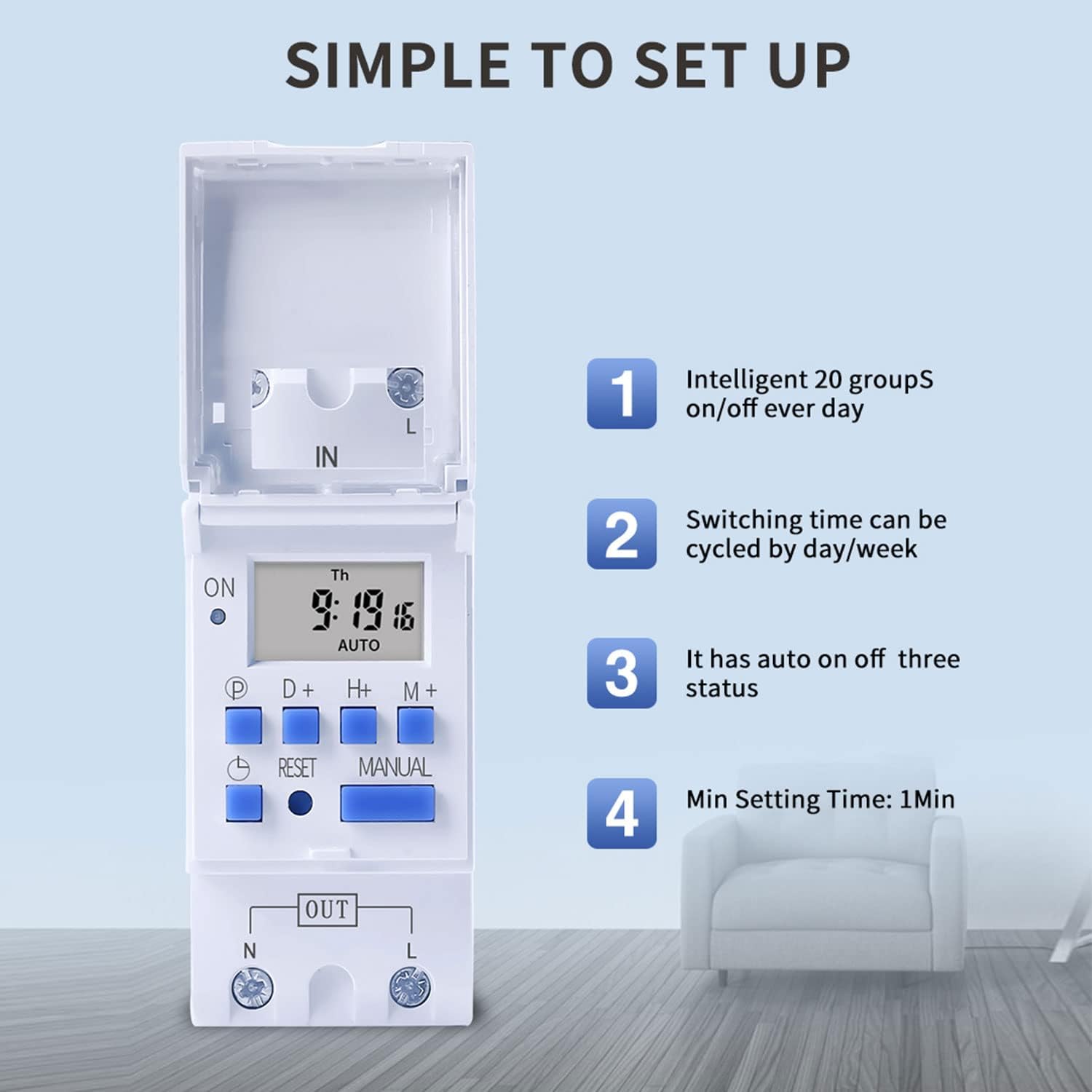
Figure 6: Visual guide to the simple setup of the THC30A timer, highlighting its 20 ON/OFF groups, daily/weekly cycling, auto ON/OFF status, and minimum 1-minute setting time.
4. Manuelle Übersteuerung
Drücken Sie die Handbuch Taste zum Durchschalten der Ausgabemodi:
- AUF: The output is continuously ON, overriding all programs.
- WAGEN: The output operates according to the programmed ON/OFF cycles. This is the standard operating mode.
- AUS: The output is continuously OFF, overriding all programs.
Stellen Sie sicher, dass der Timer eingeschaltet ist. AUTO Modus, in dem programmierte Operationen funktionieren.
Wartung
- Keep the timer clean and free from dust. Use a dry, soft cloth for cleaning.
- Keine Scheuer- oder Lösungsmittel verwenden.
- The internal lithium battery (CR2032) has a long lifespan (up to 3 years). If the display consistently goes blank after power outages, the battery may need replacement. This should be done by a qualified technician.
Fehlerbehebung
| Problem | Mögliche Ursache | Lösung |
|---|---|---|
| Anzeige ist leer. | Keine Stromversorgung; interne Batterie leer. | Check power connections. Press the Reset button. If problem persists, internal battery may need replacement. |
| Der Timer schaltet nicht wie programmiert ein/aus. | Timer is not in AUTO mode; incorrect program settings; current time/day is wrong. | Drücken Handbuch until "AUTO" is displayed. Verify program settings (ON/OFF times, days). Check and correct current time and day. |
| Der Ausgang ist entweder immer EIN oder immer AUS. | Der Timer befindet sich im manuellen EIN- oder AUS-Modus. | Drücken Handbuch bis "AUTO" angezeigt wird. |
| Programme gehen nach einem Stromausfall verloren.tage. | Internal backup battery is depleted. | The internal CR2032 battery may need replacement. Contact support if necessary. |
Anwendungen
The TAXNELE THC30A timer switch is versatile and can be used in various applications to automate electrical devices:

Abbildung 7: Bspamples of common applications for the THC30A timer switch, including street light control, home appliance control, battery charging control, and advertising light control.
- Street Light Control: Automate the turning ON/OFF of street lights based on time.
- Home Appliance Control: Schedule operation of water heaters, fans, or other household devices.
- Battery Charging Control: Manage charging cycles for batteries to prevent overcharging.
- Advertising Light Control: Program display times for neon signs and advertising boards.
- Produktionsausrüstung: Control machinery operation in industrial settings.
Garantie und Support
For warranty information or technical support, please refer to the contact details provided with your purchase or visit the official TAXNELE webBewahren Sie Ihren Kaufbeleg als Kaufnachweis auf.