
1. Einleitung
Thank you for choosing the SPLITSKY NZFS Kids Alarm Clock. This device combines an alarm clock, white noise sleep aid, and an 8-mode RGB night light, designed to assist with sleep and wake-up routines for children and adults. Please read this manual thoroughly to understand its features and ensure proper operation.
Sicherheitshinweise:
- Halten Sie das Gerät von Wasser und Umgebungen mit hoher Luftfeuchtigkeit fern.
- Versuchen Sie nicht, das Gerät selbst zu zerlegen oder zu reparieren.
- Use only the provided USB-C power cable or a certified equivalent.
- Sorgen Sie für eine ausreichende Belüftung rund um das Gerät.
2. Packungsinhalt
Überprüfen Sie, ob alle Artikel in Ihrem Paket vorhanden sind:
- SPLITSKY NZFS Kids Alarm Clock
- 1.2M (4.7 inch) USB-C Power Cable
- Benutzerhandbuch (dieses Dokument)
- 1 x CR2032 Lithium Ion Battery (pre-installed for memory backup)
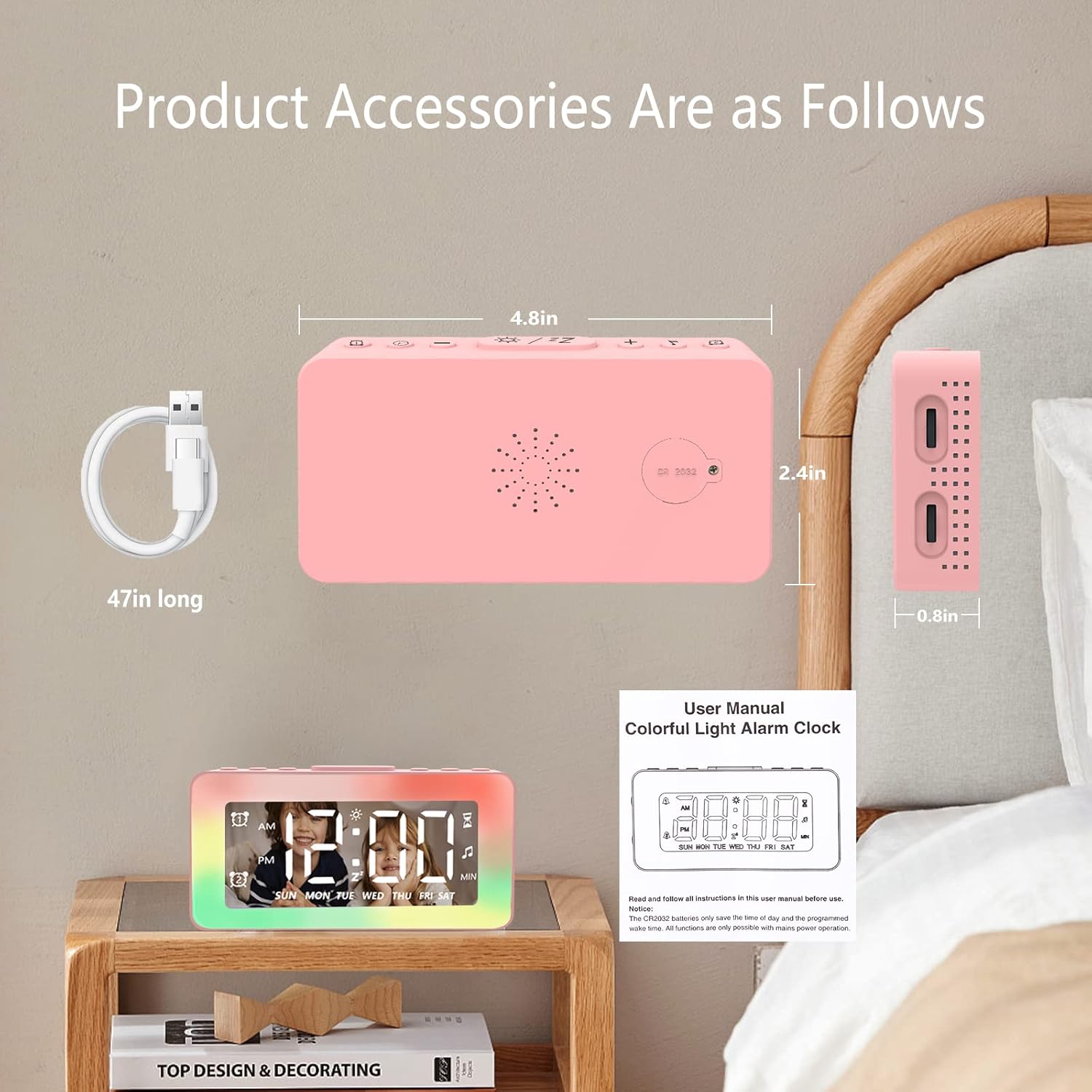
Image: The SPLITSKY NZFS Kids Alarm Clock, a USB-C power cable, and the user manual are included in the package.
3. Produktüberschreitungview
Machen Sie sich mit den Tasten und Anschlüssen Ihres Weckers vertraut:

Bild: Detailliert view of the alarm clock's top buttons and side ports, including Alarm 1, Time Setting, Light Minus/Settings, Snooze/Light Mode Switch, Light Plus/Setup, Music Switch, Alarm 2, Volume Setting, Time Brightness Setting, USB Output Charging Port, and Type-C Input Interface.
- Alarm-1-Taste: Set and activate Alarm 1.
- Zeiteinstellungstaste: Passen Sie die aktuelle Uhrzeit an.
- Light Minus / Settings Button: Decrease light brightness or navigate settings.
- Snooze / Light Mode Switch Button: Activate snooze, or cycle through light modes.
- Light Plus / Setup Button: Increase light brightness or confirm settings.
- Music Switch Button: Cycle through white noise sounds.
- Alarm-2-Taste: Set and activate Alarm 2.
- Volume Setting Wheel (Side): Adjust alarm and white noise volume.
- Time Brightness Setting Wheel (Side): Passen Sie die Displayhelligkeit an.
- USB Output Charging Port (Side): Charge external devices.
- Type-C Input Interface (Side): Connect power cable to the alarm clock.
4. Einrichtung
4.1 Stromanschluss
- Connect the provided USB-C power cable to the Type-C Input Interface on the side of the alarm clock.
- Stecken Sie das andere Ende des USB-C-Kabels in ein kompatibles USB-Netzteil (nicht im Lieferumfang enthalten) oder einen USB-Anschluss.
- Das Display leuchtet auf und zeigt damit an, dass die Uhr eingeschaltet ist.

Image: The SPLITSKY NZFS Kids Alarm Clock is shown powered on and connected via its USB-C port, also demonstrating its capability to charge a smartphone.
4.2 Batterieinstallation (Speicher-Backup)
The alarm clock includes a pre-installed CR2032 battery. This battery serves as a memory backup to retain time and alarm settings during a power outage or when the main power is disconnected. It does not power the clock for regular operation.
- If the battery needs replacement, locate the battery compartment on the back of the unit.
- Öffnen Sie das Fach mit einem kleinen Schraubenzieher.
- Ersetzen Sie die Batterie durch eine neue CR2032-Batterie und achten Sie dabei auf die richtige Polarität.
- Schließen Sie das Fach sicher.
5. Bedienungsanleitung
5.1 Setting the Time (12H/24H Format)
- Halten Sie die Zeiteinstellungstaste bis die Stundenziffern zu blinken beginnen.
- Verwenden Sie die Light Minus / Settings Button (runter) oder Light Plus / Setup Button (up) to adjust the hour.
- Drücken Sie die Zeiteinstellungstaste again to move to minute adjustment. Adjust minutes using the Light Minus/Plus buttons.
- Drücken Sie die Zeiteinstellungstaste a third time to select 12-hour or 24-hour format. Adjust using the Light Minus/Plus buttons.
- Drücken Sie die Zeiteinstellungstaste Zur Bestätigung und zum Verlassen des Zeiteinstellungsmodus noch einmal erneut vorgehen.
5.2 Setting Alarms (Dual Alarm, Daily/Weekday/Weekend Mode)
Die Uhr unterstützt zwei unabhängige Alarme (Alarm 1 und Alarm 2).
- Halten Sie die Alarm 1-Taste (für Alarm 1) oder Alarm 2-Taste (für Alarm 2) bis die Ziffern der Alarmstunde blinken.
- Verwenden Sie die Light Minus / Settings Button or Light Plus / Setup Button um die Stunde einzustellen.
- Press the respective Alarm Button again to move to minute adjustment. Adjust minutes using the Light Minus/Plus buttons.
- Press the respective Alarm Button again to select the alarm mode:
- Täglicher Modus: Der Wecker ertönt jeden Tag.
- Weekday Mode: Der Alarm ertönt von Montag bis Freitag.
- Wochenendmodus: Der Alarm ertönt am Samstag und Sonntag.
- Press the respective Alarm Button once more to confirm and exit alarm setting mode.
- Zum Aktivieren/Deaktivieren eines Alarms kurz die Taste drücken Alarm 1-Taste or Alarm 2-TasteAuf dem Display erscheint/verschwindet ein Alarmsymbol.
5.3 Schlummerfunktion
Wenn ein Alarm ertönt, tippen Sie auf die Snooze / Light Mode Switch Button on top to activate snooze. The alarm will pause for 9 minutes and then sound again. This can be repeated multiple times.
5.4 Night Light (8 Modes RGB, 10-level dimming)
The alarm clock features 6 solid color lights and 2 ambient colorful lights.
- Drücken Sie kurz die Snooze / Light Mode Switch Button to turn on the night light and cycle through the 8 color modes.
- To adjust the brightness (10 levels), use the Light Minus / Settings Button or Light Plus / Setup Button while the night light is active.
- To turn off the night light, continue pressing the Snooze / Light Mode Switch Button bis das Licht ausgeht.

Image: Multiple SPLITSKY NZFS Kids Alarm Clocks are shown, each displaying a different color from the 8 available RGB night light modes.
5.5 White Noise Sleep Aid (8 Sounds)
Die Uhr bietet 8 beruhigende Klänge zur Unterstützung des Einschlafens.
- Drücken Sie kurz die Musikschalter-Taste to turn on the white noise and cycle through the available sounds.
- To adjust the volume (16 levels), use the Volume Setting Wheel on the side of the clock.
- To turn off the white noise, continue pressing the Musikschalter-Taste until the sound stops.

Image: The SPLITSKY NZFS Kids Alarm Clock is displayed on a bedside table, with icons illustrating the various white noise options such as rain, cicadas, piano, bonfire, waves, birdsong, and church bells.
5.6 Sleep Timer (10-120 minutes)
The sleep timer allows you to set a duration for the white noise and/or night light to play before automatically turning off.
- While white noise or night light is active, press and hold the Musikschalter-Taste (for white noise timer) or Snooze / Light Mode Switch Button (for light timer).
- Verwenden Sie die Light Minus / Settings Button or Light Plus / Setup Button to select the desired timer duration (10, 20, 30, 60, 90, 120 minutes).
- Press the respective button again to confirm the timer setting. The timer icon will appear on the display.
5.7 Anpassung der Anzeigehelligkeit
Passen Sie die Helligkeit der LED-Zeitanzeige mit dem/der/dem ... an. Time Brightness Setting Wheel on the side of the clock.
5.8 USB-Ladeanschluss
The USB output charging port on the side of the alarm clock can be used to charge other small electronic devices, such as smartphones. Connect your device's charging cable to this port.
6. Wartung
6.1 Reinigung
- Stellen Sie sicher, dass das Gerät vor der Reinigung vom Stromnetz getrennt ist.
- Wischen Sie die Oberfläche mit einem weichen, trockenen Tuch ab.
- Verwenden Sie keine Scheuermittel, Lösungsmittel oder chemische Sprays.
6.2 Speicherung
Wenn der Wecker längere Zeit nicht benutzt wird, bewahren Sie ihn an einem kühlen, trockenen Ort, fern von direkter Sonneneinstrahlung und extremen Temperaturen auf.
7. Fehlerbehebung
If you encounter issues with your SPLITSKY NZFS Kids Alarm Clock, refer to the table below for common problems and solutions.
| Problem | Mögliche Ursache | Lösung |
|---|---|---|
| Die Uhranzeige ist ausgeschaltet oder schwach. | Not connected to power; Time brightness set too low. | Ensure USB-C cable is securely connected to a power source. Adjust the Time Brightness Setting Wheel. |
| Der Alarm ertönt nicht. | Alarm nicht aktiviert; Alarmlautstärke zu niedrig. | Check if the alarm icon is displayed. If not, short press the respective Alarm Button to activate. Adjust the Volume Setting Wheel. |
| Zeit/Einstellungen werden nach Stromunterbrechung zurückgesetzt. | Die CR2032-Notstrombatterie ist leer oder fehlt. | Tauschen Sie die CR2032-Batterie im Batteriefach aus. |
| Night light or white noise not working. | Function not activated; Sleep timer active. | Drücken Sie kurz die Snooze / Light Mode Switch Button or Musikschalter-Taste to activate. Check if a sleep timer is set. |
8. Spezifikationen
| Besonderheit | Detail |
|---|---|
| Marke | SPLITSKY |
| Modellnummer | NZFS |
| Anzeigetyp | Digitale LED |
| Technische Daten | 3.17"W x 3.17"H (approximately 8.05 cm W x 8.05 cm H) |
| Artikelgewicht | 8.1 Unzen (ca. 230 Gramm) |
| Stromquelle | Corded Electric (USB-C), Battery Powered (CR2032 for memory) |
| Nachtlichtmodi | 8 (6 solid colors, 2 ambient colorful) with 10-level dimming |
| Geräusche mit weißem Rauschen | 8 beruhigende Klänge |
| Alarmtöne | 7 wake-up alarm tones with 16-level volume control |
| Alarmfunktionen | Dual Alarm, Daily/Weekday/Weekend modes, 9-minute Snooze |
| Timerfunktion | 10-120 minute sleep timer for sounds and lights |
| Konnektivität | USB-C Input, USB-A Output (for charging external devices) |
| Material | Acrylnitril-Butadien-Styrol |
9. Garantie und Support
9.1 Garantieinformationen
Please refer to the warranty information provided at the time of purchase or contact your retailer for details regarding the product warranty. Keep your proof of purchase for any warranty claims.
9.2 Kundendienst
For technical assistance, troubleshooting beyond this manual, or general inquiries, please contact the seller through the platform where you purchased the product. Provide your order number and a detailed description of the issue for prompt support.