
VAIO VJPF11C11N
VAIO Pro PF (VJPF11C11N) Notebook PC User Manual
1. Einleitung
This manual provides essential information for setting up, operating, maintaining, and troubleshooting your VAIO Pro PF (Model: VJPF11C11N) notebook PC. Please read this manual thoroughly before using your device to ensure proper and safe operation.
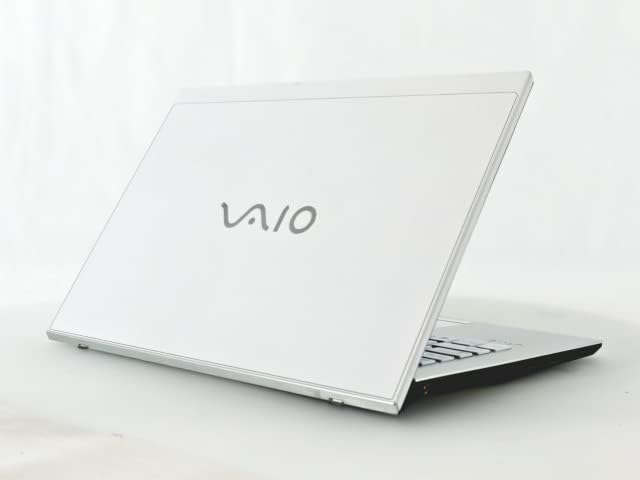
Figure 1: VAIO Pro PF Notebook PC
The VAIO Pro PF is a lightweight and compact mobile notebook designed for productivity. It features an 11.6-inch Full HD display, an Intel 8th Generation Core i5-8250U processor, 8GB of RAM, and a 256GB SSD, running on Windows 11 Pro. The device also includes a backlit keyboard for comfortable typing in various lighting conditions.
2. Einrichtung
2.1 Auspacken
Nehmen Sie alle Komponenten vorsichtig aus der Verpackung. Stellen Sie sicher, dass folgende Teile vorhanden sind:
- VAIO Pro PF Notebook PC
- Netzteil und Netzkabel
- Dokumentation (dieses Handbuch, Garantieinformationen)
2.2 An die Stromversorgung anschließen
Before initial use, connect the AC adapter to the laptop's power input port and then plug the power cord into a wall outlet. Allow the battery to charge fully.
2.3 Erstes Einschalten und Windows-Einrichtung
Drücken Sie den Netzschalter, um den Laptop einzuschalten. Folgen Sie den Anweisungen auf dem Bildschirm, um die Ersteinrichtung von Windows 11 Pro abzuschließen, einschließlich Sprachauswahl, Netzwerkverbindung und Benutzerkontoerstellung.
3. Operating Your VAIO Pro PF
3.1 Tastatur und Touchpad
The VAIO Pro PF features a full-sized keyboard with a backlight for improved visibility. The touchpad located below the keyboard supports multi-touch gestures for navigation.

Abbildung 2: Tastatur- und Touchpad-Layout
3.2 Externe Geräte anschließen
Ihr Laptop ist mit verschiedenen Anschlüssen zum Verbinden externer Geräte ausgestattet:
- USB 3.0-Anschlüsse (x3): For connecting USB devices such as external hard drives, mice, or keyboards.
- HDMI-Anschluss: For connecting to external displays or projectors with HDMI input.
- D-SUB15 (VGA) Port: For connecting to older external displays or projectors with VGA input.
- Wired LAN Port: For connecting to a wired network using an Ethernet cable.
- Kopfhöreranschluss: Zum Anschluss von Kopfhörern oder externen Lautsprechern.
3.3 Drahtlose Konnektivität
The VAIO Pro PF supports both Wi-Fi and Bluetooth connectivity:
- Wi-Fi (802.11n): To connect to a wireless network, go to Windows Settings > Network & Internet > Wi-Fi, turn Wi-Fi on, and select your desired network.
- Bluetooth: To connect Bluetooth devices, go to Windows Settings > Bluetooth & devices, turn Bluetooth on, and pair your device.
3.4 Verwenden des Web Kamera
Die integrierte web camera can be used for video calls and conferences. Access it through applications like Camera, Microsoft Teams, or Zoom.
4. Wartung
4.1 Reinigung des Laptops
To clean the exterior of your laptop, use a soft, lint-free cloth slightly dampened with water or a mild, non-abrasive cleaning solution. Avoid spraying liquids directly onto the device. For the screen, use a specialized screen cleaner.
4.2 Softwareaktualisierungen
Regularly check for and install Windows updates to ensure your system has the latest security patches and performance improvements. Go to Windows Settings > Windows Update.
4.3 Batteriepflege
To prolong battery life, avoid extreme temperatures and fully discharging the battery frequently. For long-term storage, charge the battery to about 50-70%.
5. Fehlerbehebung
This section addresses common issues you might encounter with your VAIO Pro PF.
| Problem | Lösung |
|---|---|
| Der Laptop lässt sich nicht einschalten. | Vergewissern Sie sich, dass das Netzteil fest angeschlossen und die Steckdose funktionsfähig ist. Versuchen Sie, den Netzschalter 10–15 Sekunden lang gedrückt zu halten. |
| Probleme mit der WLAN-Verbindung. | Check if Wi-Fi is enabled in Windows Settings. Restart your router and the laptop. Ensure you are within range of the Wi-Fi network. |
| Die Tastaturbeleuchtung funktioniert nicht. | Check if the backlight function key (often Fn + F key) is enabled. Adjust brightness settings if available. |
| Externes Display nicht erkannt. | Ensure the cable is securely connected to both the laptop and the display. Use Windows display settings to detect or extend displays. Try a different cable or port if available. |
6. Spezifikationen
| Besonderheit | Detail |
|---|---|
| Modellname | VAIO Pro PF (VJPF11C11N) |
| Marke | VAIO (Manufacturer: SONY) |
| Anzeigegröße | 11.6 Zoll |
| Auflösung | 1920x1080 Pixel (Full HD) |
| CPU | Intel Core i5-8250U (8th Gen, 4 Cores, 8 Threads, 1.6 GHz base, up to 3.4 GHz) |
| RAM | 8 GB DDR4 SDRAM |
| Lagerung | 256 GB SSD (Solid-State-Laufwerk) |
| Betriebssystem | Windows 11 Pro (64-Bit) |
| Grafik | Intel Integrated Graphics |
| Kabellose Konnektivität | WLAN (802.11n), Bluetooth |
| Häfen | 3x USB 3.0, 1x HDMI, 1x D-SUB15 (VGA), 1x Wired LAN, 1x Headphone Jack |
| Web Kamera | Integriert |
| Tastatur | Tastatur mit Hintergrundbeleuchtung |
| Gewicht | Approx. 0.87 kg (870 g) |
| Erstes verfügbares Datum | 10. Mai 2023 |
7. Garantie und Support
For information regarding your product's warranty, please refer to the warranty card included with your purchase or visit the official VAIO support website. For technical assistance, driver downloads, or further inquiries, please contact VAIO customer support through their official channels.
Ask a question about this manual
Ask about setup, troubleshooting, compatibility, parts, safety, or missing instructions. Manuals+ will review the question and use this page’s manual context to help answer it.