
Einführung
Vielen Dank für Ihren Einkauf.asing the SONRU Bluetooth 5.3 FM Transmitter Car Charger, Model FT1016. This device allows you to stream audio from your Bluetooth-enabled devices to your car's FM radio, make hands-free calls, and charge multiple devices simultaneously. Please read this manual carefully before use to ensure proper operation and to maximize the product's performance.
Sicherheitshinweise
- Zerlegen, reparieren oder modifizieren Sie das Produkt nicht.
- Halten Sie das Produkt von Wasser, Feuchtigkeit und extremen Temperaturen fern.
- Vermeiden Sie es, das Produkt über einen längeren Zeitraum direktem Sonnenlicht auszusetzen.
- Ensure the car's cigarette lighter socket is clean and free of debris before inserting the transmitter.
- Sicheres Fahren hat stets oberste Priorität. Bedienen Sie das Gerät nicht so, dass Sie vom Straßenverkehr abgelenkt werden.
- Unplug the device from the cigarette lighter socket when the car is turned off for extended periods to prevent battery drain.
Packungsinhalt
- SONRU Bluetooth 5.3 FM Transmitter Car Charger (Model FT1016)
- Bedienungsanleitung
Produkt überview
The image below illustrates the main components of the SONRU FM Transmitter.
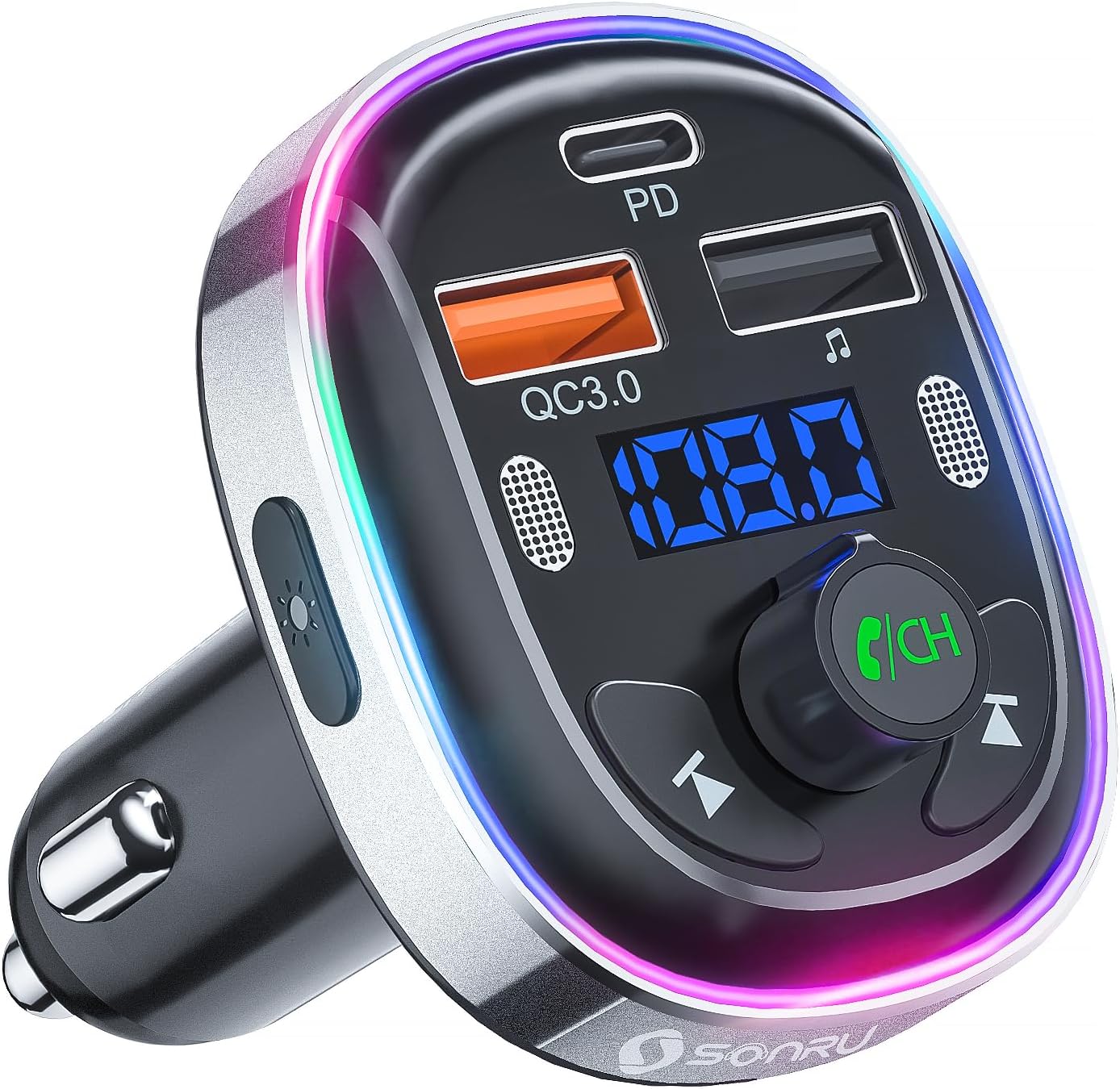
Bild: Vorderseite view of the SONRU Bluetooth 5.3 FM Transmitter Car Charger, showing the display, control buttons, and charging ports.
Kontrollen und Häfen

Image: Detailed diagram labeling the various ports and buttons on the FM transmitter.
- Type-C Charging Port (PD 30W): Für Geräte, die mit Schnellladen kompatibel sind.
- QC3.0 Charging Port (18W): Für Geräte, die mit Schnellladen kompatibel sind.
- Duale Mikrofone: For clear hands-free calls and voice assistant commands.
- LED-Schalter: Button to change LED light modes.
- Anzeigetafel: Shows FM frequency and battery voltage.
- Schaltfläche "Vorheriger Titel": Short press for previous track, long press for frequency adjustment.
- USB Memory Music Playback Port (5V/1A): For playing music from a USB flash drive and standard charging.
- Nächster Track-Button: Short press for next track, long press for frequency adjustment.
- LED-Lichtring: Multi-color ambient lighting.
- Multi-Function Button (MFB) / CH Button: Rotate to adjust volume/frequency, press to answer/end calls, play/pause music, activate voice assistant.
Technische Daten
| Besonderheit | Spezifikation |
|---|---|
| Modellnummer | FT1016 |
| Bluetooth-Version | 5.3 |
| Eingangslautstärketage | Gleichstrom 12 V bis 24 V |
| FM-Frequenzbereich | 87.5–108.0 MHz |
| USB-C-Ausgang | PD 30 W |
| USB-A-Ausgang (Orange) | QC3.0 18W |
| USB-A-Ausgang (Schwarz) | 5V/1A (U-Disk/Charging) |
| Mikrofone | Dual Microphones with CVC Noise Reduction |
| Unterstützung für Sprachassistenten | Siri, Google-Assistent |
| LED-Leuchten | 7-Color Convertible LED with 3 Modes |
| Material | ABS, Aluminiumlegierung |
| Maße | 10 x 5.9 x 12.2 cm |
| Gewicht | 32 g |
| Kompatibles Betriebssystem | Android, iOS |
Installationshandbuch
Follow these steps to set up your FM transmitter:
- Eine freie FM-Frequenz finden: Tune your car's FM radio to an empty frequency (one with no active radio station). Frequencies at the lower or upper end of the spectrum (e.g., around 87.5 MHz or 108.0 MHz) often work best.
- Schließen Sie den Sender an: Insert the SONRU FM transmitter into your car's 12V/24V cigarette lighter socket. The LED display will light up, showing the car battery voltage briefly, then the default FM frequency.
- FM-Frequenzen anpassen: Adjust the FM frequency on the transmitter to match the empty frequency you found on your car radio. To do this, press and hold the 'CH' (Multi-Function) button until the frequency on the display flashes. Then, rotate the 'CH' button left or right to adjust the frequency. Once matched, press the 'CH' button again to confirm.
- Kopplung über Bluetooth: On your smartphone or Bluetooth device, enable Bluetooth and search for available devices. Select 'T81' from the list to pair. Once connected, the display on the transmitter will stop flashing.
After the initial pairing, the transmitter will automatically connect to your device when Bluetooth is enabled on your phone and the transmitter is powered on.
Video: A visual guide demonstrating the steps to connect the FM transmitter to your car radio and pair it with a Bluetooth device.
Bedienungsanleitung
Musikwiedergabe
- Bluetooth-Streaming: Once paired with your smartphone, open your music app and start playing audio. The sound will be transmitted to your car's speakers via the selected FM frequency.
- Wiedergabe von USB-Datenträgern: Insert a USB flash drive (U-disk) containing MP3/WMA/WAV/FLAC audio files into the 5V/1A USB port. The transmitter will automatically detect and play music from the USB disk. Use the Previous/Next track buttons to navigate.
- Lautstärkeregelung: Rotate the 'CH' (Multi-Function) button to adjust the volume.
- Abspielen/Pause: Short press the 'CH' (Multi-Function) button to play or pause music.
Freisprechen
The dual microphones and CVC noise reduction technology ensure clear communication during calls.

Image: A driver safely making a hands-free call using the SONRU FM transmitter.
- Anruf annehmen: Short press the 'CH' (Multi-Function) button when an incoming call rings.
- Anruf beenden: Short press the 'CH' (Multi-Function) button during a call to hang up.
- Anruf ablehnen: Long press the 'CH' (Multi-Function) button when an incoming call rings.
- Wahlwiederholung letzte Nummer: Double-press the 'CH' (Multi-Function) button.
Sprachassistent (Siri/Google Assistant)
Activate your smartphone's voice assistant for navigation, making calls, or other commands.
- Sprachassistenten aktivieren: Long press the 'CH' (Multi-Function) button to activate Siri or Google Assistant on your paired smartphone.
LED-Lichtmodi
The transmitter features a 7-color LED light ring with three modes.

Image: The FM transmitter displaying its various 7-color LED light modes.
- Änderungsmodus: Short press the LED switch button on the side of the transmitter to cycle through the 7 static colors, a breathing light mode, or turn the lights off (dark mode).
Ladegeräte
The transmitter is equipped with multiple charging ports for your convenience.
Image: The FM transmitter simultaneously charging two smartphones using its fast-charging ports.
- PD 30W Typ-C-Anschluss: Use this port for ultra-fast charging of compatible devices.
- QC3.0 18W USB-A-Anschluss: Use this port for quick charging of compatible devices.
- 5V/1A USB-A-Anschluss: This port can be used for standard charging of devices or for USB disk music playback.
Wartung
- Clean the product with a soft, dry cloth. Do not use abrasive cleaners or solvents.
- Keep the charging ports free of dust and debris to ensure optimal charging performance.
- Bewahren Sie das Gerät bei Nichtgebrauch an einem kühlen, trockenen Ort auf.
Fehlerbehebung
| Problem | Lösung |
|---|---|
| Kein Strom/Display aus | Ensure the transmitter is securely plugged into the cigarette lighter socket. Check the car's fuse for the cigarette lighter. |
| Statisches Rauschen oder schlechte Audioqualität | Adjust the FM frequency on both the transmitter and car radio to a different, clear frequency. Avoid frequencies used by strong local radio stations. Ensure the volume on your phone and car radio is set appropriately. |
| Bluetooth-Kopplung nicht möglich | Ensure Bluetooth is enabled on your device. Restart both the transmitter and your device. Make sure 'T81' is selected from the Bluetooth device list. |
| Die Gesprächsqualität im Freisprechmodus ist schlecht. | Ensure the dual microphones are not obstructed. Reduce background noise in the car. Adjust the call volume using the 'CH' button. |
| Geräte werden nicht aufgeladen | Ensure the charging cable is properly connected to both the device and the transmitter. Verify that your device supports the fast charging protocols (PD/QC3.0) for the respective ports. |
Garantie und Support
SONRU provides a 12-month warranty for this product. If you encounter any issues or have questions regarding the product, please do not hesitate to contact our customer support. We are committed to providing assistance and ensuring your satisfaction.
For support, please refer to the contact information provided with your purchase or visit the official SONRU webWebsite.