
1. Einführung und Endeview
The DIHOOL Adjustable Voltage Protector DHOV3-110V is an advanced electrical protection device designed to safeguard your valuable appliances and electrical systems from various power anomalies. It provides comprehensive protection against overvoltage, Untervoltage, and overcurrent conditions, ensuring the stability and longevity of your connected equipment. This device features customizable settings and an intelligent automatic recovery function for seamless operation.

Bild: Überview of the DIHOOL Voltage Protector's capabilities.
2. Sicherheitshinweise
Your safety is paramount. The DIHOOL Voltage Protector is constructed with a high-quality, fire-resistant polycarbonate material to minimize fire risks. Always adhere to local electrical codes and safety standards during installation and operation. It is recommended that installation be performed by a qualified electrician to ensure proper wiring and functionality. Do not attempt to open or modify the device.

Image: Device casing made from flame-retardant material for enhanced safety.
3. Produktmerkmale
- 12 Customizable Presets: Precisely adjust overvoltage (140-300V), undervoltage (70-200V), and overcurrent (1-63A) settings, along with other parameters, using the intuitive interface.
- Maximale Sicherheit: The device's casing is made from high-quality, fire-resistant polycarbonate material, rigorously tested to prevent fire hazards.
- All-in-One Protection: Provides comprehensive protection against overcurrent, overvoltage, und Untervoltage, automatically disconnecting power to prevent damage.
- Smart Automatic Recovery: Automatically restores electricity supply once power conditions stabilize and return to safe, normal levels, requiring no manual intervention.
- Universal DIN Rail Mounting: Features a quick-fix design for easy installation on standard 35mm DIN rails, ideal for electrical panels and industrial control cabinets.
- Breite Anwendung: Protects a broad range of equipment, including industrial motors, home lighting systems, gaming PCs, and kitchen appliances from sudden power surges and fluctuations.

Image: Key features of the DIHOOL Smart Circuit Breaker.

Image: Comparison of Smart Circuit Breaker features versus a standard Circuit Breaker.
4. Packungsinhalt
Bitte überprüfen Sie nach dem Öffnen der Verpackung, ob alle Komponenten vorhanden und unbeschädigt sind:
- DIHOOL Adjustable Voltage Protector Unit
- 4 Terminal Connectors
- DIN-Schiene (80 mm)
- Befestigungsschrauben
- Benutzerhandbuch (dieses Dokument)

Abbildung: Im Produktpaket enthaltener Inhalt.
5. Spezifikationen
Refer to the table below for detailed technical parameters and default settings of the DIHOOL Adjustable Voltage Beschützer.
| Parameter | Wert |
|---|---|
| Nennversorgungsvoltage | Wechselstrom 110-240 V |
| Bandtage Setting Range (U) | Wechselstrom 70-300 V |
| Current Setting Range (A) | 1-63A |
| Nennfrequenz | 50/60 Hz |
| Bandtage Error Range | ±5 V |
| U And <U Trip Delay | 0.1-60.0 Sekunden |
| Delay Setting Range | 1s - 600s |
| Bewertetes Isolationsvolumentage | 400 V |
| Ausgangskontakt | 1 NO |
| Elektrische Lebensdauer | 10000 |
| Schutzgrad | IP20 |
| Verschmutzungsgrad | 3 |
| Höhe | ≤2000 m |
| Betriebstemperatur | -50°C ~ +55°C at 40°C ≤ 50% |
| Luftfeuchtigkeit | ≤ 50 % |
| Lagertemperatur | -30°C ~ +70°C |
| Energieaufnahme | ≤ 2 W |
| Verbindungsmethode | Up Input - Down Output |
Hinweis: Das Volumentage protector is an electronic product with a built-in capacitor. It needs to be powered on within 1 year; otherwise, it is easy to be damaged.
| Technische Parameter | Einstellbereich | Schritt | Standard |
|---|---|---|---|
| Einschaltverzögerungszeit | 1-600 Sekunden | A01 | 5s |
| Übervolumentage Trip Value | 140 bis 300 V | A02 | 260 V |
| Übervolumentage Wiederfindungswert | 135 bis 295 V | A03 | 255 V |
| Übervolumentage Erholungszeit | 1-600 Sekunden | A04 | 30er Jahre |
| Übervolumentage Tripping Time | 0.1-60.0 Sekunden | A05 | 1.0er Jahre |
| Untervoltage Trip Value | 70 bis 200 V | A06 | 90 V |
| Untervoltage Wiederfindungswert | 75 bis 215 V | A07 | 95 V |
| Untervoltage Erholungszeit | 1-600 Sekunden | A08 | 30er Jahre |
| Untervoltage Tripping Time | 0.1-60.0 Sekunden | A09 | 1.0er Jahre |
| Overcurrent Trip Value | 1-63A | A10 | 63.0 A |
| Overcurrent Recovery Time | 1-600 Sekunden | A11 | 30er Jahre |
| Overcurrent Tripping Time | 0.1-60.0 Sekunden | A12 | 1.0er Jahre |
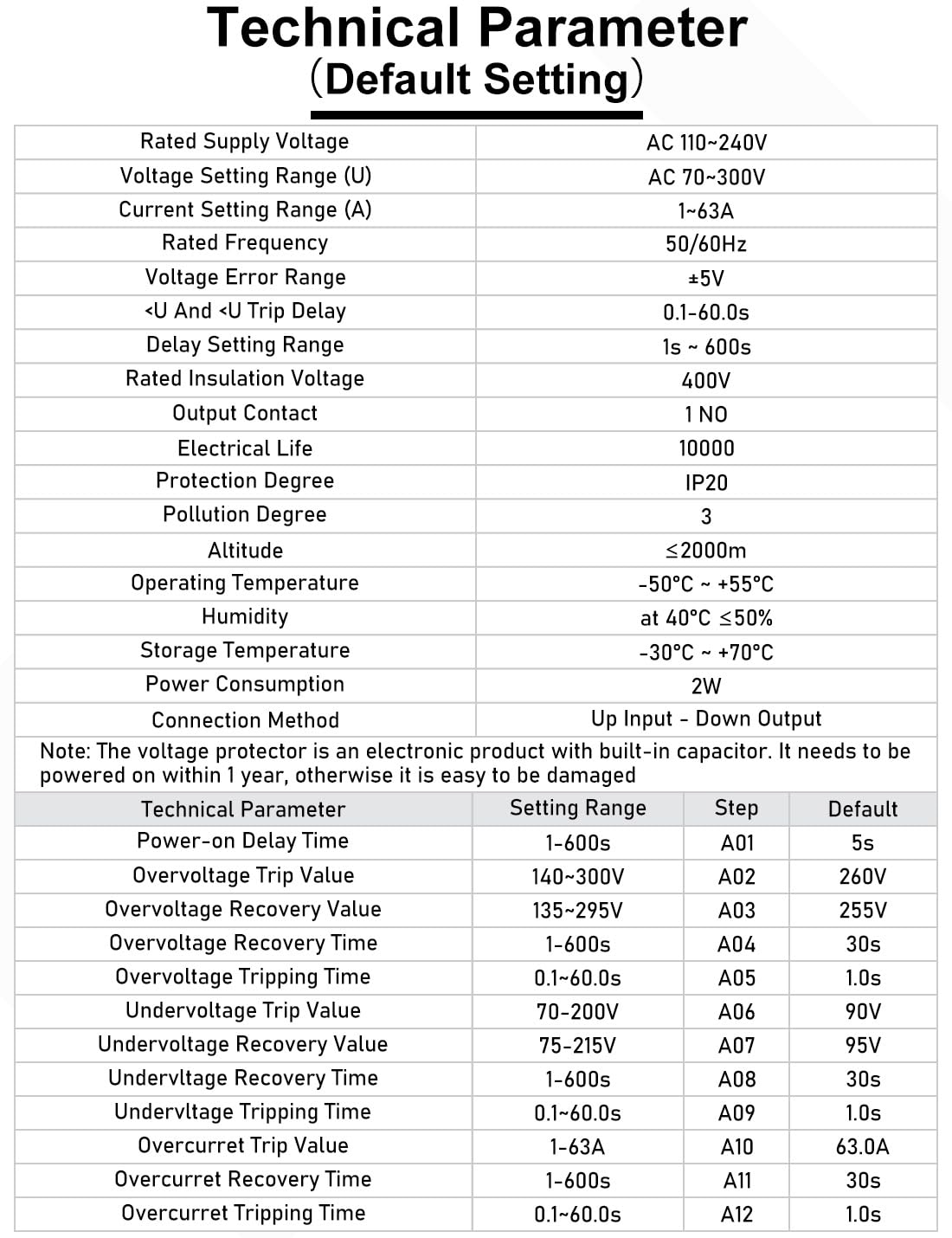
Image: Technical parameters and default settings table.

Image: Device dimensions and key default settings.
6. Einrichtung und Installation
The DIHOOL Voltage Protector is designed for easy installation on standard 35mm DIN rails. Ensure the main power supply is disconnected before beginning installation.
6.1 Montage
- Locate a suitable position on a standard 35mm DIN rail within your electrical panel or control cabinet.
- Richten Sie das Gerät an der DIN-Schiene aus.
- Press the device firmly onto the rail until it clicks into place, ensuring it is securely fastened. The quick-fix design allows for easy attachment and removal.

Image: DIN rail mounting procedure.
6.2 Verkabelung
- Stellen Sie sicher, dass die Hauptstromversorgung ausgeschaltet ist.
- Connect the incoming power lines (Line and Neutral) to the 'IN' terminals at the top of the device.
- Connect the outgoing load lines (Line and Neutral) to the 'OUT' terminals at the bottom of the device.
- Achten Sie darauf, dass alle Verbindungen fest und sicher sind, um Wackelkontakte und Überhitzung zu vermeiden.
The connection method is 'Up Input - Down Output'.

Image: Quick wiring connections for the device.
7. Bedienungsanleitung
The device features an intuitive interface with 'SET', 'Up', and 'Down' buttons for parameter adjustment and an LED display for real-time monitoring.

Image: LED display screen showing real-time voltage und aktuell.
7.1 Erstes Einschalten
Upon initial power-on, the smart circuit breaker supports 120V/240V. The default overvoltage setting is 260V and undervoltage beträgt 90V.
7.2 Function Setting Instructions
To adjust parameters, follow these steps:
- Halten Sie die SATZ button for 3 seconds to enter the setting mode. The display will show the current parameter (e.g., Power-on Delay Time).
- Verwenden Sie die Up (▲) und Runter (▼) buttons to adjust the value of the displayed parameter.
- Drücken Sie die SATZ button briefly to cycle through the different adjustable parameters (A01 to A12).
- Nachdem Sie alle gewünschten Parameter eingestellt haben, drücken und halten Sie die Taste gedrückt. SATZ button again for 3 seconds to save the settings and exit the setting mode. The display will show 'SAVE' or similar confirmation.

Image: Step-by-step guide for function settings.
Wichtiger Hinweis:
- For 110V/120V circuits: Adjust overvoltage parameters A02 and A03 to 140V and 135V respectively.
- For 230V/240V circuits: Adjust undervoltage parameters A06 and A07 to 220V and 225V respectively.
- Parameters are user-adjustable as needed to suit specific requirements.
8. Wartung
The DIHOOL Adjustable Voltage Protector is designed for minimal maintenance. To ensure optimal performance and longevity:
- Halten Sie das Gerät sauber und frei von Staub und Schmutz. Verwenden Sie zum Reinigen ein trockenes, weiches Tuch.
- Überprüfen Sie regelmäßig die Kabelverbindungen, um sicherzustellen, dass sie fest und sicher sitzen.
- Benutzen Sie keine Scheuer- oder Lösungsmittel am Gerät.
- Versuchen Sie nicht, das Gehäuse zu öffnen.asing or repair the device yourself. This may void the warranty and pose a safety risk.
9. Fehlerbehebung
Dieser Abschnitt bietet Hilfestellung bei häufig auftretenden Problemen.
9.1 Gerät lässt sich nicht einschalten
- Check the incoming power supply to ensure it is active.
- Prüfen Sie, ob alle Kabelverbindungen korrekt und fest sind.
- Ensure the device has been powered on within one year of purchase, as prolonged unpowered storage can affect internal components.
9.2 Frequent Tripping
- Review Ihre eingestellte Lautstärke ist zu hochtage, Untervoltage, and overcurrent parameters. They might be set too sensitively for your electrical environment.
- Check the connected load for any faults or excessive current draw.
- Überwachen Sie die eingehende Lautstärketage and current for frequent fluctuations that might be triggering the protection.
9.3 Automatic Recovery Failure
- Ensure the power conditions (voltage and current) have returned to within the safe, set parameters. The device will only recover once stable conditions are detected.
- Check the recovery time setting (e.g., Overvoltage Recovery Time, Undervoltage Recovery Time, Overcurrent Recovery Time) to ensure it is not set to an excessively long duration.
If issues persist after performing these checks, please contact customer support or consult a qualified electrician.
10. Garantie und Support
For detailed warranty information, including coverage period and terms, please refer to the documentation provided with your purchase or contact the seller directly. DIHOOL is committed to providing reliable products and customer satisfaction.
For technical assistance, product inquiries, or support, please reach out to DIHOOL customer service through the contact information provided on the product packaging or the official DIHOOL webWebsite.