
1. Einleitung
This manual provides instructions for the proper use and care of your Docooler Portable USB Cassette Player. This device allows you to play audio cassettes and convert their content into digital MP3 files via a USB connection to a computer. Please read this manual thoroughly before operating the device to ensure optimal performance and longevity.
2. Produktüberschreitungview
The Docooler Portable USB Cassette Player is a compact, handheld device designed for playing and digitizing audio cassettes. It features a transparent casing, allowing visibility of the internal mechanism.
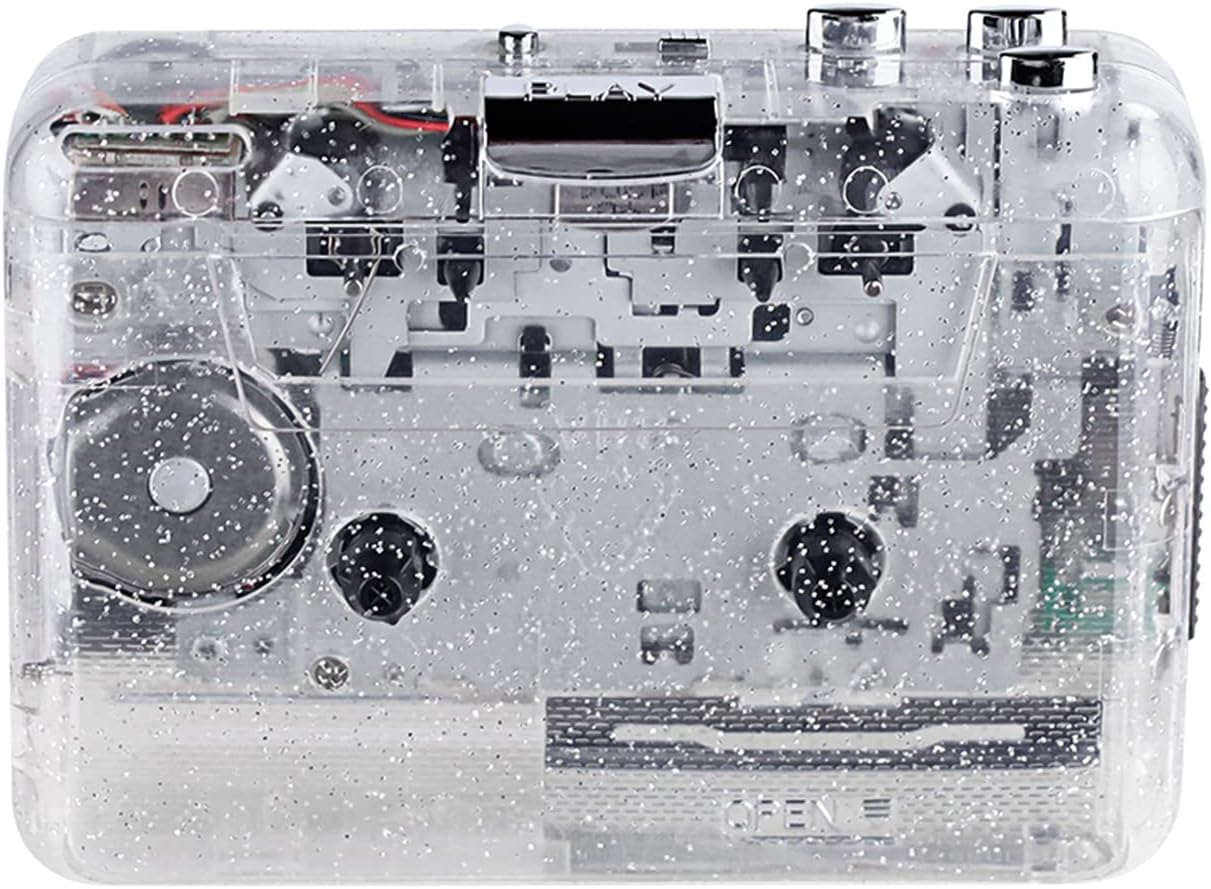
Abbildung 1: Vorderseite view of the Docooler Portable USB Cassette Player, showcasing sein transparentes Design.

Figure 2: Various angles of the cassette player, including top, side, and open views.
Packungsinhalt:
- Docooler Portable USB Cassette Player
- USB-Kabel
- Benutzerhandbuch (dieses Dokument)
- Headphones (may vary by package)
3. Einrichtung
3.1 Netzteil
The cassette player can be powered by either batteries or a USB connection.
Einlegen der Batterie:
- Suchen Sie das Batteriefach am Gerät.
- Öffnen Sie die Abdeckung des Batteriefachs.
- Legen Sie 2 x AA-Batterien (nicht im Lieferumfang enthalten) ein und achten Sie dabei auf die richtige Polarität (+/-).
- Schließen Sie den Batteriefachdeckel fest.
USB-Stromversorgung:
Connect the provided USB cable to the player's USB port and the other end to a powered USB port on your computer or a USB wall adapter. The device will draw power from the USB connection.
4. Bedienungsanleitung
4.1 Abspielen einer Musikkassette
- Öffnen Sie den Deckel des Kassettenfachs.
- Insert an audio cassette tape with the open edge facing upwards.
- Close the cassette compartment cover firmly.
- Connect headphones or external speakers to the 3.5mm audio output jack.
- Drücken Sie die SPIELEN , um die Wiedergabe zu starten.
- Verwenden Sie die STOPPEN Taste zum Anhalten der Wiedergabe.
- Verwenden Sie die FF (Schnellvorlauf) Und REW (Zurückspulen) Tasten zur Navigation durch das Band.
- Stellen Sie die Lautstärke mit dem Lautstärkeregler ein.
- The "DIR" button allows you to quickly flip the tape direction. The "play mode" button can be used to reverse playback once or an unlimited number of times.

Figure 3: The cassette player in use, demonstrating tape insertion and playback setup.

Figure 4: Users listening to audio through headphones connected to the cassette player.
4.2 Converting Tapes to MP3 Files
The Docooler Portable USB Cassette Player can convert your analog cassette audio into digital MP3 files. This process requires a computer and compatible audio recording software (not included).
- Ensure the cassette player is powered (via batteries or USB).
- Connect the cassette player to your computer using the provided USB cable.
- Install and open your preferred audio recording software on your computer. Software such as Audacity (free and open-source) is commonly used for this purpose.
- Configure your recording software to recognize the cassette player as an audio input device.
- Insert the cassette tape you wish to convert into the player.
- Start recording in your software, then press the SPIELEN Knopf am Kassettenrekorder.
- Monitor the recording process. Once the tape has finished playing, stop the recording in your software.
- Speichern Sie die Audioaufnahme als MP3-Datei. file auf Ihrem Computer.

Figure 5: Illustration of the process to convert cassette audio to MP3 files using the player and a computer.
5. Wartung
5.1 Gerät reinigen
- Wischen Sie die Außenseite des Players mit einem weichen, trockenen Tuch ab.
- Do not use liquid cleaners or abrasive materials, as they may damage the surface.
- Periodically clean the tape heads and pinch rollers using a cotton swab lightly dampwurde mit Isopropylalkohol behandelt, um eine optimale Klangqualität zu gewährleisten und Beschädigungen des Bandes zu vermeiden.
5.2 Speicherung
- Bei längerer Nichtbenutzung sollten die Batterien entfernt werden, um ein Auslaufen zu verhindern.
- Bewahren Sie den Player an einem kühlen, trockenen Ort fern von direkter Sonneneinstrahlung und extremen Temperaturen auf.
6. Fehlerbehebung
| Problem | Mögliche Ursache | Lösung |
|---|---|---|
| Kein Strom | Dead batteries; USB cable not connected properly. | Batterien austauschen; sicherstellen, dass das USB-Kabel fest angeschlossen ist. |
| Kein Ton | Headphones/speakers not connected; volume too low; dirty tape heads. | Connect audio output device; increase volume; clean tape heads. |
| Poor sound quality (hissing, muffled) | Dirty tape heads; worn-out tape; low battery. | Clean tape heads; try a different tape; replace batteries. |
| Tape not playing or moving | Tape jammed; mechanism issue; low battery. | Check tape for damage; replace batteries. |
| Cannot convert to MP3 | USB connection issue; software not configured correctly; no recording software. | Ensure USB is connected; check software settings; install compatible recording software. |
7. Spezifikationen
- Modell: B0C69FDZF6
- Stromversorgung: 2 x AA Batteries or USB 5V DC
- Schnittstelle: USB 2.0
- Audioausgang: 3.5 mm Stereobuchse
- Abmessungen: 7.2 x 5.91 x 1.54 Zoll (ca.)
- Gewicht: 9.6 Unzen (ca.)
- Hersteller: Docooler
8. Sicherheitshinweise
- Setzen Sie das Gerät nicht Wasser oder übermäßiger Feuchtigkeit aus.
- Lassen Sie das Gerät nicht fallen und setzen Sie es keinen starken Stößen aus.
- Versuchen Sie nicht, das Gerät selbst zu zerlegen oder zu reparieren. Wenden Sie sich an qualifiziertes Servicepersonal.
- Außerhalb der Reichweite von Kindern aufbewahren.
- Entsorgen Sie Batterien gemäß den örtlichen Vorschriften.
9. Garantie und Support
For warranty information or technical support, please refer to the documentation included with your purchase or contact Docooler customer service through their official website or the retailer where the product was purchased. Please have your model number (B0C69FDZF6) and purchase date available when contacting support.