
HIKMICRO FQ35
HIKMICRO Falcon FQ35 Wärmebildkamera – Benutzerhandbuch
Modell: FQ35
1. Einleitung
The HIKMICRO Falcon FQ35 Thermal Imaging Camera is a portable night vision device designed for various outdoor activities, including surveillance, security, and recreation. It features a high-resolution infrared sensor and an advanced OLED display, making it a top-tier option for thermal observation.

Figure 1: HIKMICRO Falcon FQ35 Thermal Imaging Camera
2. Produktmerkmale
2.1. Precision and Image Clarity
- Equipped with a 640 x 512 pixel infrared detector for high image resolution.
- Features a 1024 x 768 pixel OLED screen for clear and precise images, even in low light or complete darkness.
- Capable of detecting temperatures ranging from -20°C to 550°C, suitable for diverse applications.
2.2. Portability and Ease of Use
- Compact and lightweight design ensures easy transport.
- Der wiederaufladbare Akku ermöglicht eine kontinuierliche Nutzung von bis zu 5 Stunden.
- Intuitive and user-friendly interface for immediate operation.
- Observation and hotspot functions are ready-to-use.
2.3. High Thermal Sensitivity
- Integrated highly sensitive thermal detector for precise temperature detection.
- Image enhancement function ensures clear images even in challenging conditions like high humidity or smoke.

Abbildung 2: Seite view showing HIKMICRO branding
3. Einrichtung
3.1. Auspacken und erste Inspektion
Carefully unpack all components from the box. Verify that all items listed in the packing list are present and undamaged. This typically includes the thermal camera, USB cable, power adapter, and user manual.
3.2. Laden des Akkus
Before first use, fully charge the device. Connect the USB cable to the camera's charging port and the other end to the power adapter. Plug the adapter into a power outlet. The charging indicator light will show the charging status (e.g., red for charging, green for fully charged). A full charge can take several hours.
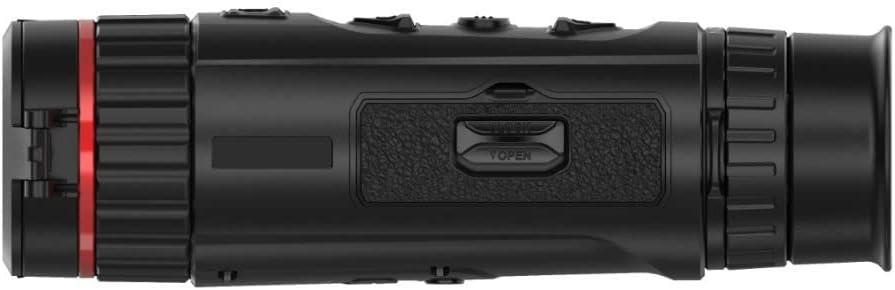
Abbildung 3: Seite view showing the battery compartment/port area
3.3. Ein-/Ausschalten
To power on the device, press and hold the power button (usually marked with a power symbol) for a few seconds until the screen illuminates. To power off, press and hold the power button again until the device shuts down.
3.4. Erstkonfiguration
Upon first power-on, you may be prompted to set up basic parameters such as language, date, and time. Follow the on-screen instructions to complete these settings.
4. Bedienungsanleitung
4.1. Grundlegend Viewing und Fokussierung
Hold the camera to your eye and adjust the eyepiece for comfortable viewing. Rotate the focus ring on the objective lens until the image appears sharp and clear. This manual focus ensures optimal image quality for different distances.
4.2. Menünavigation und Einstellungen
The device features several buttons on the top panel for navigation and control. Typically, there is a menu button to access settings, arrow buttons for navigation, and an OK/confirm button. Explore the menu to adjust settings such as brightness, contrast, color palettes (e.g., White Hot, Black Hot, Red Hot, Fusion), and digital zoom levels.
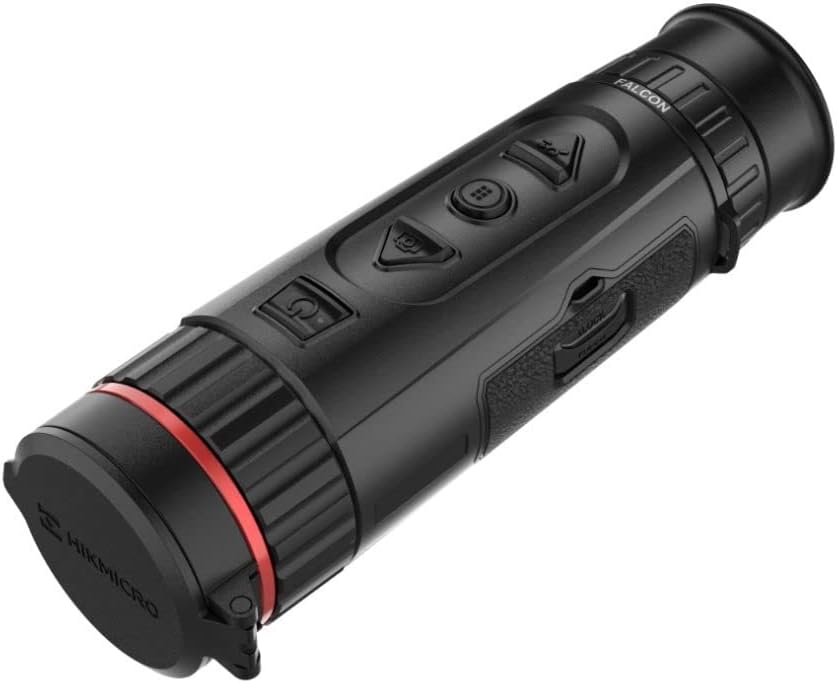
Abbildung 4: Oben view showing the control buttons
4.3. Bild- und Videoaufzeichnung
Most thermal cameras have dedicated buttons for capturing still images and recording videos. Press the photo button to take a snapshot. Press the video button once to start recording and again to stop. Recorded media is typically stored on internal memory or a removable SD card (if applicable).
4.4. Hotspot-Tracking
The FQ35 features an automatic hotspot tracking function that identifies and highlights the hottest point in the field of view. This is particularly useful for quickly locating objects with higher temperatures.
4.5. Connectivity (Smartphone)
The camera can connect to a smartphone via Wi-Fi for live view, remote control, and media transfer. Download the official HIKMICRO app from your device's app store and follow the in-app instructions to establish a connection.
5. Wartung
5.1. Reinigen des Geräts
- Linse: Verwenden Sie ein weiches, fusselfreies Tuch, das speziell für optische Linsen entwickelt wurde. Wischen Sie die Linsenoberfläche vorsichtig ab. Vermeiden Sie die Verwendung von Scheuermitteln oder aggressiven Chemikalien.
- Körper: Wischen Sie das Kameragehäuse mit einem weichen, fusselfreien Tuch ab.amp cloth. Do not use solvents, alcohol, or corrosive cleaners.
5.2. Batteriepflege
- Um die Batterieleistung zu erhalten, laden Sie den Akku regelmäßig auf, auch wenn das Gerät nicht häufig benutzt wird.
- Vermeiden Sie häufiges vollständiges Entladen des Akkus.
- Do not expose the battery to extreme temperatures (hot or cold) for prolonged periods.
5.3. Speicherung
When not in use, store the thermal camera in its protective case in a cool, dry place, away from direct sunlight and excessive humidity. Ensure the lens cap is on to protect the objective lens.

Abbildung 5: Vorderseite view with lens cap open
6. Fehlerbehebung
This section addresses common issues you might encounter with your HIKMICRO Falcon FQ35.
| Problem | Mögliche Ursache | Lösung |
|---|---|---|
| Gerät lässt sich nicht einschalten. | Niedriger oder leerer Akku. | Laden Sie den Akku vollständig auf. |
| Das Bild ist unscharf oder unpräzise. | Incorrect focus adjustment. Dirty lens. | Adjust the focus ring. Clean the objective lens. |
| Kurze Akkulaufzeit. | Battery not fully charged. High screen brightness. | Ensure battery is fully charged. Reduce screen brightness in settings. |
| Es können keine Bilder/Videos aufgenommen werden. | Unzureichender Stauraum. | Altes löschen files or transfer them to another device. |
| Probleme mit der WLAN-Verbindung. | Falsche WLAN-Einstellungen. App-Probleme. | Ensure Wi-Fi is enabled on both devices. Restart the camera and app. Refer to app instructions. |
7. Spezifikationen
Below are the key technical specifications for the HIKMICRO Falcon FQ35 Thermal Imaging Camera.
| Besonderheit | Spezifikation |
|---|---|
| Marke | HIKMICRO |
| Modellname | FQ35 |
| Herstellerteilenummer | HK022 |
| Infrared Detector Resolution | 640 x 512 Pixel |
| OLED Screen Resolution | 1024 x 768 Pixel |
| Temperaturerfassungsbereich | -20°C bis 550°C |
| Okularlinsenbeschreibung | High-performance germanium aspherical lens |
| Beschreibung der Teleskopmontierung | Montieren |
| Fokustyp | Manueller Fokus |
| Fachgebiet View | 20 Grad |
| Kompatible Geräte | Kamera, Smartphone |
| Akkulaufzeit | Bis zu 5 Stunden (Dauerbetrieb) |
| Ursprungsland | China |
8. Garantie und Support
For warranty information, technical support, or service inquiries, please refer to the warranty card included with your product or visit the official HIKMICRO webBewahren Sie Ihren Kaufbeleg als Kaufnachweis für Garantieansprüche auf.
Offizieller HIKMICRO WebWebsite: www.hikmicrotech.com
Ask a question about this manual
Ask about setup, troubleshooting, compatibility, parts, safety, or missing instructions. Manuals+ will review the question and use this page’s manual context to help answer it.