
1. Einführung und Endeview
The UGREEN Uno 65W GaN USB-C Charger is a compact and efficient multi-port charging device. Utilizing advanced GaN (Gallium Nitride) technology, it offers high power output in a smaller form factor, reducing energy loss and heat generation during operation. This charger features an interactive LED display that indicates the charging status, providing a clear visual cue.
Equipped with two USB-C ports and one USB-A port, it supports various fast charging protocols, making it compatible with a wide range of devices including laptops, tablets, and smartphones. Integrated multiple safety features protect against short circuits, overcharging, overheating, and overvoltage, ensuring safe and reliable charging.

Image 1.1: UGREEN Uno 65W GaN USB-C Charger, showcasing dank seines kompakten Designs.
2. Sicherheitshinweise
- Das Ladegerät darf weder Flüssigkeiten noch Feuchtigkeit oder extremen Temperaturen ausgesetzt werden.
- Vermeiden Sie es, das Ladegerät fallen zu lassen oder starken Stößen auszusetzen.
- Do not disassemble, modify, or attempt to repair the charger. This may void the warranty and pose safety risks.
- Ensure proper ventilation when using the charger. Do not cover it with clothing or other materials.
- Use only compatible cables and devices with the charger.
- Außerhalb der Reichweite von Kindern aufbewahren.
- Ziehen Sie den Stecker des Ladegeräts aus der Steckdose, wenn es nicht benutzt wird oder bei Gewittern.
3. Packungsinhalt
Bitte prüfen Sie das Paket auf folgende Artikel:
- UGREEN Uno 65W GaN USB-C Charger (Model CD361)
- Bedienungsanleitung
4. Produktmerkmale
- Maximale Ausgangsleistung: 65 W Liefert bis zu 65 W Leistung zum schnellen Aufladen kompatibler Geräte.
- GaNFast Technology: High-efficiency power conversion (95%) for reduced heat and compact size.
- 3-in-1-Mehrfachanschluss-Design: Features 2 USB-C ports and 1 USB-A port for simultaneous charging of multiple devices.
- LED-Anzeige: An interactive LED screen indicates the current charging status.
- Erweitertes Sicherheitssystem: Built-in protections against short circuits, overcharging, overheating, and overvoltage.
- Removable Magnetic Feet: Provides stability and a unique aesthetic.
- Breite Kompatibilität: Supports a wide range of devices including laptops, tablets, and smartphones from various brands.

Abbildung 4.1: Detailansicht view of the charger's ports, magnetic feet, and LED display.
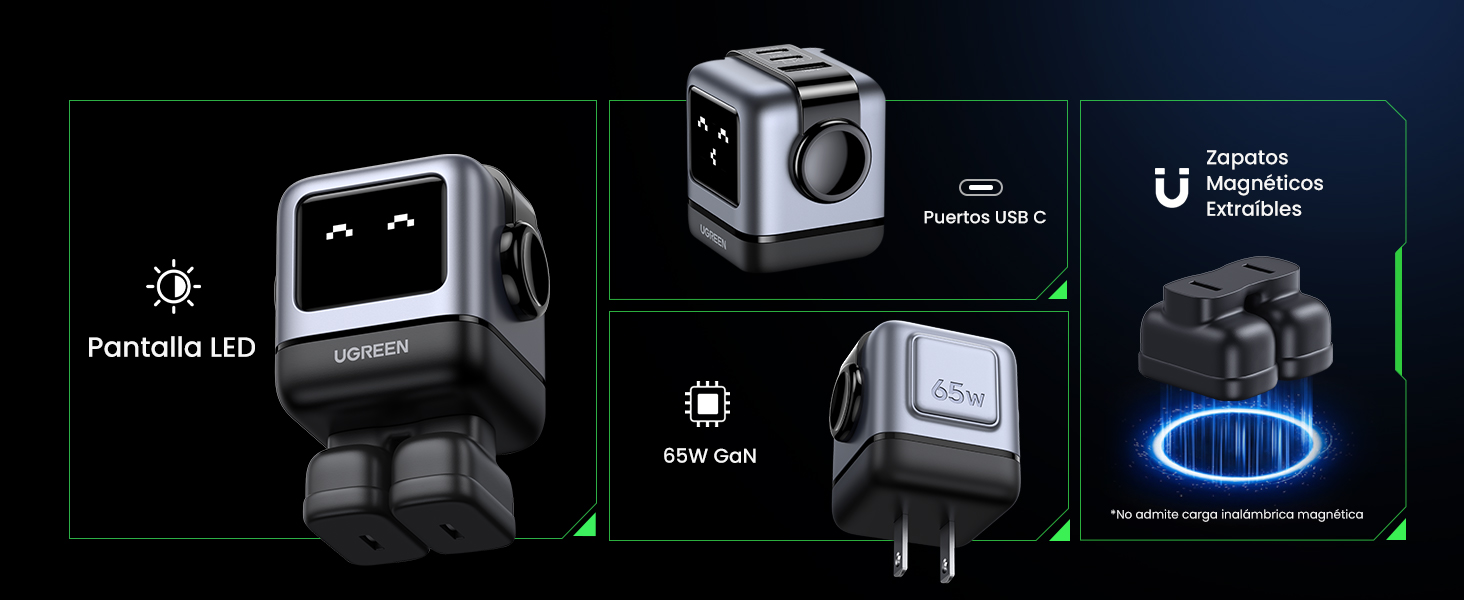
Image 4.2: The charger's LED display showing charging status.
5. Einrichtung
- Auspacken des Ladegeräts: Carefully remove the UGREEN Uno 65W GaN USB-C Charger from its packaging.
- Attach Magnetic Feet (Optional): If desired, attach the removable magnetic feet to the bottom of the charger for added stability.
- An die Steckdose anschließen: Plug the charger into a standard wall power outlet (AC 100-240V, 50/60Hz).
- Bereit zum Benutzen: Das Ladegerät ist nun bereit, Ihre Geräte anzuschließen.
6. Bedienungsanleitung
6.1 Geräte anschließen
- Use a compatible USB-C to USB-C cable for devices that support USB-C charging.
- Use a compatible USB-A to [device connector] cable for devices that charge via USB-A.
- Connect the appropriate cable to one of the charger's ports (2x USB-C, 1x USB-A).
- Verbinden Sie das andere Ende des Kabels mit Ihrem Gerät.
6.2 Stromverteilung
The charger intelligently distributes power based on the connected devices and their charging requirements:
- Einzelport-Nutzung: When only one USB-C port is used, it can deliver up to 65W (e.g., charging a MacBook Air M2 from 0% to 51% in approximately 30 minutes).
- Verwendung mehrerer Ports: When multiple ports are in use, the 65W total power is dynamically distributed. For example, if both USB-C ports are used, one might provide 45W for a laptop and the other 20W for a mobile device.
- USB-A-Anschluss: The USB-A port provides standard charging output, typically up to 18W, depending on the device.
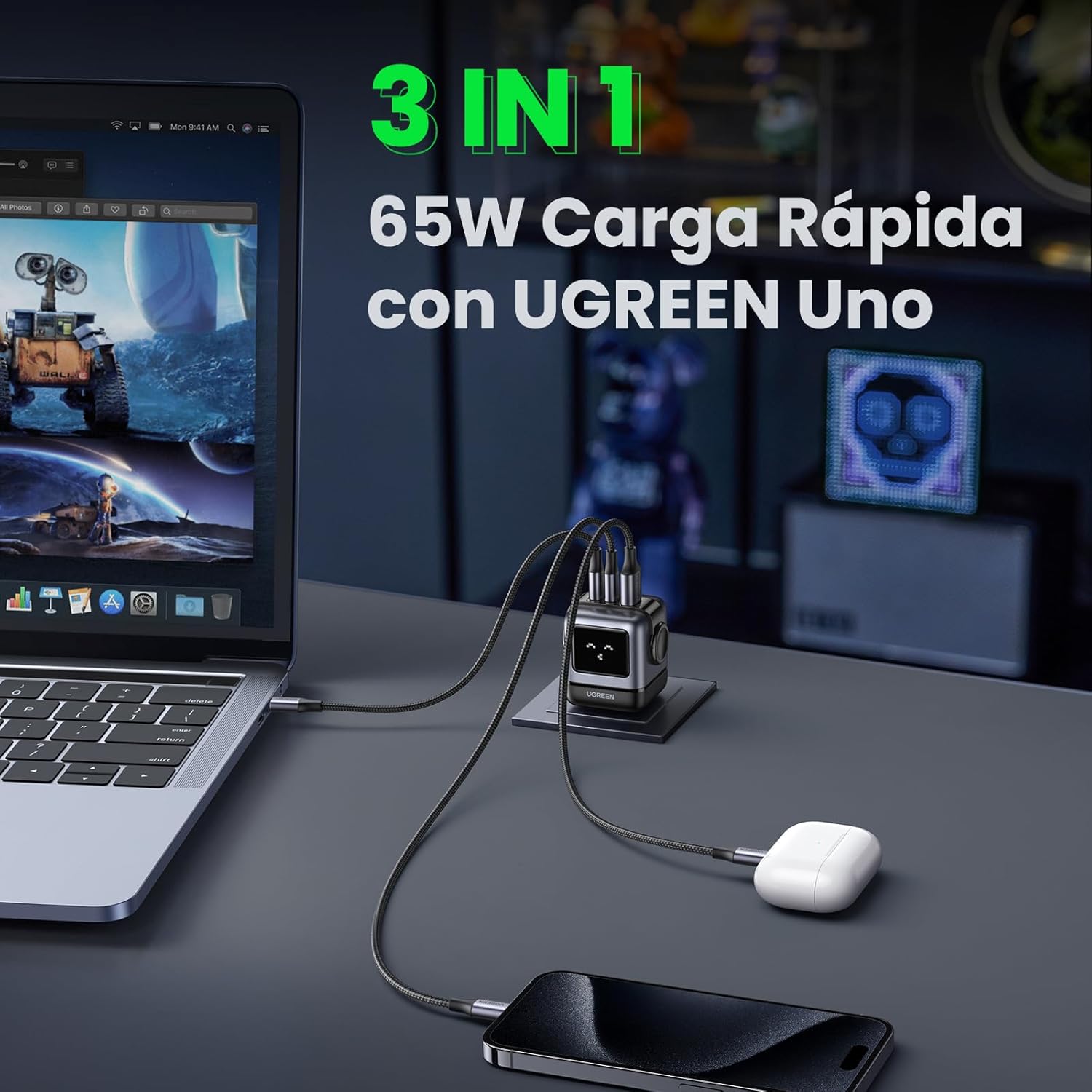
Image 6.1: The charger simultaneously charging a laptop, smartphone, and earbuds.
6.3 LED Display Indications
The LED display on the charger provides visual feedback on its operational status:
- Laden: The LED display will show an animation or specific icon indicating that a device is actively charging.
- Vollständig aufgeladen: Once a connected device reaches full charge, the LED display will change to indicate completion.
- Leerlauf: When no devices are connected or charging, the display may show a standby indicator.

Image 6.2: Comparison of the LED display during charging and when fully charged.
Notiz: The charger is not compatible with 60W fast charging for the Samsung S26 Ultra; it will charge at a maximum of 45W PPS for this device.
7. Wartung
- Reinigung: Ziehen Sie vor der Reinigung den Netzstecker. Wischen Sie die Oberfläche mit einem weichen, trockenen Tuch ab. Verwenden Sie keine flüssigen Reiniger oder Sprays.
- Lagerung: Bewahren Sie das Ladegerät an einem kühlen, trockenen Ort ohne direkte Sonneneinstrahlung und extreme Temperaturen auf.
- Kabelpflege: Avoid bending or twisting charging cables excessively, as this can damage them.
8. Fehlerbehebung
| Problem | Mögliche Ursache | Lösung |
|---|---|---|
| Gerät wird nicht geladen. | 1. Charger not plugged in. 2. Cable is faulty. 3. Device is incompatible or port is damaged. | 1. Ensure the charger is securely plugged into a live power outlet. 2. Try a different charging cable. 3. Test with another device or try a different port on the charger. |
| Langsamer Ladevorgang. | 1. Using a non-fast charging cable. 2. Multiple devices connected, distributing power. 3. Device does not support fast charging. 4. Device requires higher PPS than provided (e.g., S26 Ultra). | 1. Use a high-quality, fast-charging compatible cable. 2. Disconnect other devices to allow maximum power to a single device. 3. Verify your device supports fast charging. 4. Note that some devices may not achieve their absolute maximum charging speed if they require specific PPS profiles not fully supported by the charger. |
| Das Ladegerät fühlt sich warm an. | Normaler Betrieb, insbesondere während des Schnellladens. | The charger is designed with thermal protection. If it becomes excessively hot, disconnect it and allow it to cool. Ensure adequate ventilation. |
| LED display not working or showing incorrect status. | Vorübergehender Softwarefehler oder Stromproblem. | Unplug the charger from the wall outlet, wait a few seconds, and plug it back in. If the issue persists, contact customer support. |
9. Spezifikationen
| Besonderheit | Detail |
|---|---|
| Marke | UGREEN |
| Modellnummer | CD361 |
| Steckertyp | USB Typ C |
| Kompatible Geräte | Game consoles, Laptops, Smartphones, Tablets (e.g., iPhone 8-17 Series, Galaxy S10-S24 Series, Pixel 8/7/6, MacBook Air/Pro, iPad Pro/Air/mini, Watch 8/7, HomePod, AirPods Pro) |
| Eingangslautstärketage | 240 Volt (AC 100-240V) |
| AmpAlter | 3.25 Amperes |
| Anzahl USB-Anschlüsse | 3 (2x USB-C, 1x USB-A) |
| Maximale Leistungsabgabe | 65 Watt |
| Ausgangsstrom | 5 Amperes |
| Ausgangsvolumentage | 5 Volt |
| Stromquelle | Kabelgebundene Elektrik |
| Frequenzbereich | 50-60 Hz |
| Hauptstromanschlusstyp | 2-pin (North America Type A) |
| Tragbar | Ja |
| Artikelgewicht | 146 Gramm |
| Außenmaterial | GaN |
| Formfaktor | Robot-shaped |
10. Garantie und Support
10.1 Garantieinformationen
This UGREEN product is covered by an 18 Monate Garantie Diese Garantie gilt ab Kaufdatum. Sie deckt Herstellungsfehler und Mängel ab, die bei normalem Gebrauch auftreten. Schäden durch Missbrauch, Unfälle, unbefugte Änderungen oder Naturkatastrophen sind nicht abgedeckt.
Bitte bewahren Sie Ihren Kaufbeleg für Garantieansprüche auf.
10.2 Kundendienst
For technical support, warranty claims, or any questions regarding your UGREEN Uno 65W GaN USB-C Charger, please contact UGREEN customer service through the following channels:
- UGREEN Offizieller WebWebsite: Besuchen www.ugreen.com Für häufig gestellte Fragen, Support-Ressourcen und Kontaktinformationen.
- E-Mail-Support: Siehe den Kontaktbereich auf der offiziellen Website. webWebsite für die entsprechende E-Mail-Adresse.
- Unterstützung für Online-Händler: If purchased from an online retailer, you may also contact their customer service for assistance.