
The Voice VHOL-6/2069
Benutzerhandbuch für die kabellosen Kopfhörer „The Voice Hollywood“
Model: VHOL-6/2069 | Brand: The Voice
Einführung
Thank you for choosing The Voice Hollywood Wireless Headphones. These headphones are designed to provide a superior audio experience with the convenience of wireless connectivity. Featuring HD Ultra Max Sound, a comfortable adjustable headband, and a tri-fold design for portability, they are optimized for seamless integration with Siri and Google Assistant. This manual provides detailed instructions for setup, operation, maintenance, and troubleshooting to ensure optimal performance and longevity of your device.
Sicherheitshinweise
- Die Kopfhörer dürfen keinen extremen Temperaturen, hoher Luftfeuchtigkeit oder ätzenden Substanzen ausgesetzt werden.
- Vermeiden Sie es, längere Zeit bei hoher Lautstärke zu hören, um Gehörschäden vorzubeugen.
- Do not use the headphones while driving, cycling, or in situations where inability to hear ambient sounds could be dangerous.
- Halten Sie die Kopfhörer von Kindern und Haustieren fern.
- Verwenden Sie ausschließlich das mitgelieferte Ladekabel und Zubehör.
- Versuchen Sie nicht, die Kopfhörer zu zerlegen oder zu verändern. Dadurch erlischt die Garantie.
Packungsinhalt
Bitte überprüfen Sie, ob alle Artikel in Ihrem Paket vorhanden sind:
- The Voice Hollywood Wireless Headphones
- USB-Kabel Typ C.
- 3.5-mm-Audiokabel (AUX)

Figure 1: Included components and key features of the headphones.
Produkt überview
The Hollywood Wireless Headphones feature an ergonomic design for extended comfort and intuitive controls for ease of use. The over-ear cups provide a comfortable fit, and the adjustable headband ensures a secure fit for various head sizes. The tri-fold design allows for compact storage and portability.

Abbildung 2: Vorderseite view der Kopfhörer.

Figure 3: Headphones in folded position for portability.
Kontrollen und Häfen
Refer to Figure 1 for a visual guide to the controls and ports. The main controls are located on the ear cups and include:
- Netzschalter: Dient zum Ein-/Ausschalten und zum Initiieren der Bluetooth-Kopplung.
- Lautstärke erhöhen/Nächster Titel-Taste: Kurz drücken für Lautstärke erhöhen, lang drücken für nächsten Titel.
- Lautstärke verringern/Vorheriger Titel-Taste: Kurzes Drücken verringert die Lautstärke, langes Drücken springt zum vorherigen Titel.
- Multifunktionstaste (MFB): Wiedergabe/Pause, Anrufe annehmen/beenden, Sprachassistent aktivieren.
- USB-Typ-C-Anschluss: Zum Aufladen der Kopfhörer.
- 3.5-mm-Audiobuchse: Für kabelgebundene Verbindungen über das AUX-Kabel.
- Eingebautes Mikrofon: For hands-free calling and voice assistant commands.
Aufstellen
Aufladen der Kopfhörer
Before first use, fully charge your headphones. A full charge typically takes approximately 2-3 hours.
- Connect the small end of the USB Type-C charging cable to the charging port on the headphone ear cup.
- Verbinden Sie das größere Ende des USB-Kabels mit einem USB-Netzteil (nicht im Lieferumfang enthalten) oder einem USB-Anschluss Ihres Computers.
- The LED indicator light will illuminate during charging and turn off or change color once fully charged.
Bluetooth-Kopplung
Koppeln Sie Ihre Kopfhörer mit Ihrem Bluetooth-fähigen Gerät (z. B. Smartphone, Tablet, Computer).
- Stellen Sie sicher, dass die Kopfhörer ausgeschaltet sind.
- Halten Sie den Ein-/Ausschalter etwa 5-7 Sekunden lang gedrückt, bis die LED-Anzeigeleuchte abwechselnd blau und rot blinkt und damit den Kopplungsmodus anzeigt.
- Aktivieren Sie Bluetooth auf Ihrem Gerät und suchen Sie nach neuen Geräten.
- Select "Hollywood" from the list of available devices.
- Once successfully paired, the LED indicator will flash blue slowly or turn solid blue.
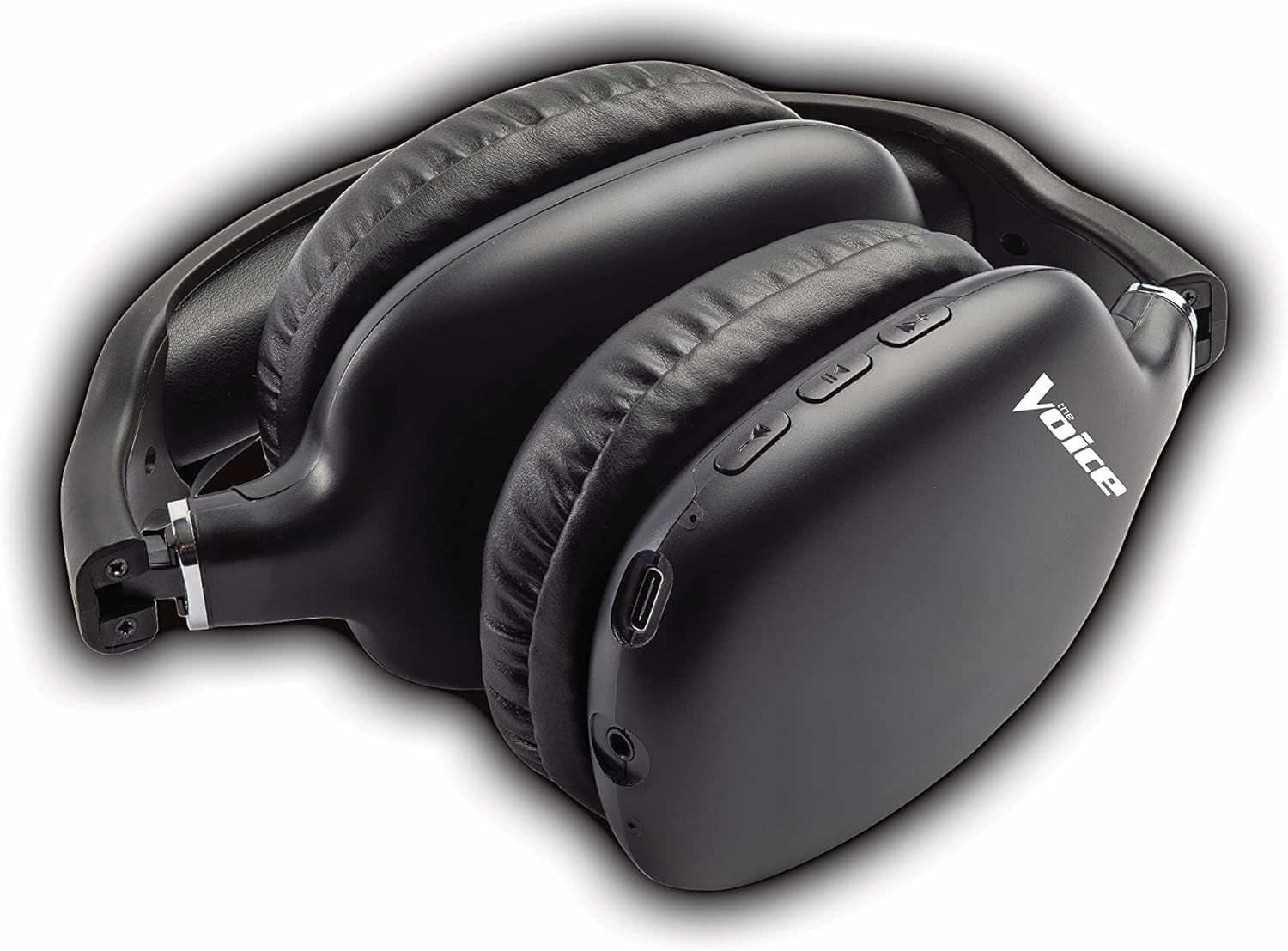
Figure 4: Headphones paired with a smartphone.
Kabelverbindung (AUX-Modus)
Sie können die Kopfhörer auch mit Geräten ohne Bluetooth-Funktion oder bei leerem Akku mit dem mitgelieferten 3.5-mm-Audiokabel verwenden.
- Plug one end of the 3.5mm audio cable into the audio jack on the headphone ear cup.
- Stecken Sie das andere Ende in die 3.5-mm-Audioausgangsbuchse Ihres Geräts.
- Die Kopfhörer schalten automatisch in den kabelgebundenen Modus.
Bedienungsanleitung
Ein-/Ausschalten
- Einschalten: Halten Sie den Ein-/Ausschalter etwa 3 Sekunden lang gedrückt, bis die LED-Anzeige blau blinkt.
- Ausschalten: Halten Sie den Netzschalter etwa 3 Sekunden lang gedrückt, bis die LED-Anzeige erlischt.
Musikwiedergabe
- Abspielen/Pause: Drücken Sie kurz die Multifunktionstaste (MFB).
- Nächster Titel: Die Lauter-Taste lange drücken.
- Vorheriges Lied: Die Leiser-Taste lange gedrückt halten.
- Lautstärke erhöhen: Drücken Sie kurz die Lauter-Taste.
- Lautstärke runter: Drücken Sie kurz die Leiser-Taste.
Anruf-Management
- Anruf annehmen/beenden: Drücken Sie kurz die Multifunktionstaste (MFB).
- Anruf ablehnen: Die Multifunktionstaste (MFB) lange drücken.
- Wahlwiederholung letzte Nummer: Drücken Sie die Multifunktionstaste (MFB) zweimal.
Aktivierung des Sprachassistenten
- Siri/Google Assistant aktivieren: Drücken Sie dreimal die Multifunktionstaste (MFB).
Video 1: Demonstrates the adjustable and padded comfort, built-in mic, and connectivity to Google or Siri for The Voice Hollywood Wireless Headphones.

Figure 5: User enjoying audio with the headphones, highlighting comfort and usability.
Wartung
Reinigung
Regular cleaning helps maintain the headphones' appearance and functionality.
- Wipe the ear cups and headband with a soft, dry, lint-free cloth.
- Bei hartnäckigen Verschmutzungen leicht dampDas Tuch mit Wasser und milder Seife befeuchten und anschließend sofort trocken wischen.
- Verwenden Sie keine Scheuermittel, Alkohol oder chemische Lösungsmittel.
Lagerung
When not in use, store your headphones in a cool, dry place, away from direct sunlight and extreme temperatures. Utilize the tri-fold feature for compact storage.
Fehlerbehebung
Sollten Sie Probleme mit Ihren Kopfhörern haben, finden Sie in der folgenden Tabelle häufige Probleme und Lösungen.
| Problem | Mögliche Ursache | Lösung |
|---|---|---|
| Kopfhörer lassen sich nicht einschalten | Schwache Batterie | Laden Sie die Kopfhörer vollständig auf. |
| Kopplung mit dem Gerät nicht möglich | Kopfhörer nicht im Kopplungsmodus; Bluetooth am Gerät deaktiviert; zu weit vom Gerät entfernt | Stellen Sie sicher, dass sich die Kopfhörer im Kopplungsmodus befinden (rot/blau blinkend). Schalten Sie Bluetooth am Gerät ein und aus. Bringen Sie die Kopfhörer näher an das Gerät heran (innerhalb von 10 Metern). |
| Kein Ton | Volume too low; Not connected; Incorrect audio source | Erhöhen Sie die Lautstärke an Kopfhörern und Gerät. Stellen Sie sicher, dass die Kopfhörer korrekt gekoppelt/verbunden sind. Überprüfen Sie die Audioausgabeeinstellungen Ihres Geräts. |
| Klangverzerrung | Interference; Device volume too high | Move away from other wireless devices. Lower the volume on your device. |
| Mikrofon funktioniert nicht | Not connected; Device settings | Ensure headphones are properly paired. Check microphone input settings on your device. |
Technische Daten
| Besonderheit | Detail |
|---|---|
| Modellname | Hollywood |
| Konnektivitätstechnologie | Wireless, Wired (Bluetooth) |
| Platzierung des Ohrs | Über dem Ohr |
| Formfaktor | Über dem Ohr |
| Steuerungstyp | Voice Control, Built-in buttons and microphone |
| Frequenzbereich | 20 Hz – 20 kHz |
| Artikelgewicht | 13.4 Unzen |
| Abmessungen (Paket) | 9.65 x 8.35 x 3.58 Zoll |
| Modellnummer | VHOL-6/2069 |
| UPC | 841133120698 |
Garantie und Support
The Voice Hollywood Wireless Headphones come with a standard manufacturer's warranty. For detailed warranty information, technical support, or service inquiries, please refer to the warranty card included in your product packaging or visit the official The Voice Electronics webBitte versuchen Sie nicht, das Produkt selbst zu reparieren.
Ask a question about this manual
Ask about setup, troubleshooting, compatibility, parts, safety, or missing instructions. Manuals+ will review the question and use this page’s manual context to help answer it.