
1. Einleitung
This manual provides detailed instructions for the installation, operation, and maintenance of your Rebluum Solar Outdoor Security Camera. Please read this manual thoroughly before using the product to ensure proper function and safety. Keep this manual for future reference.
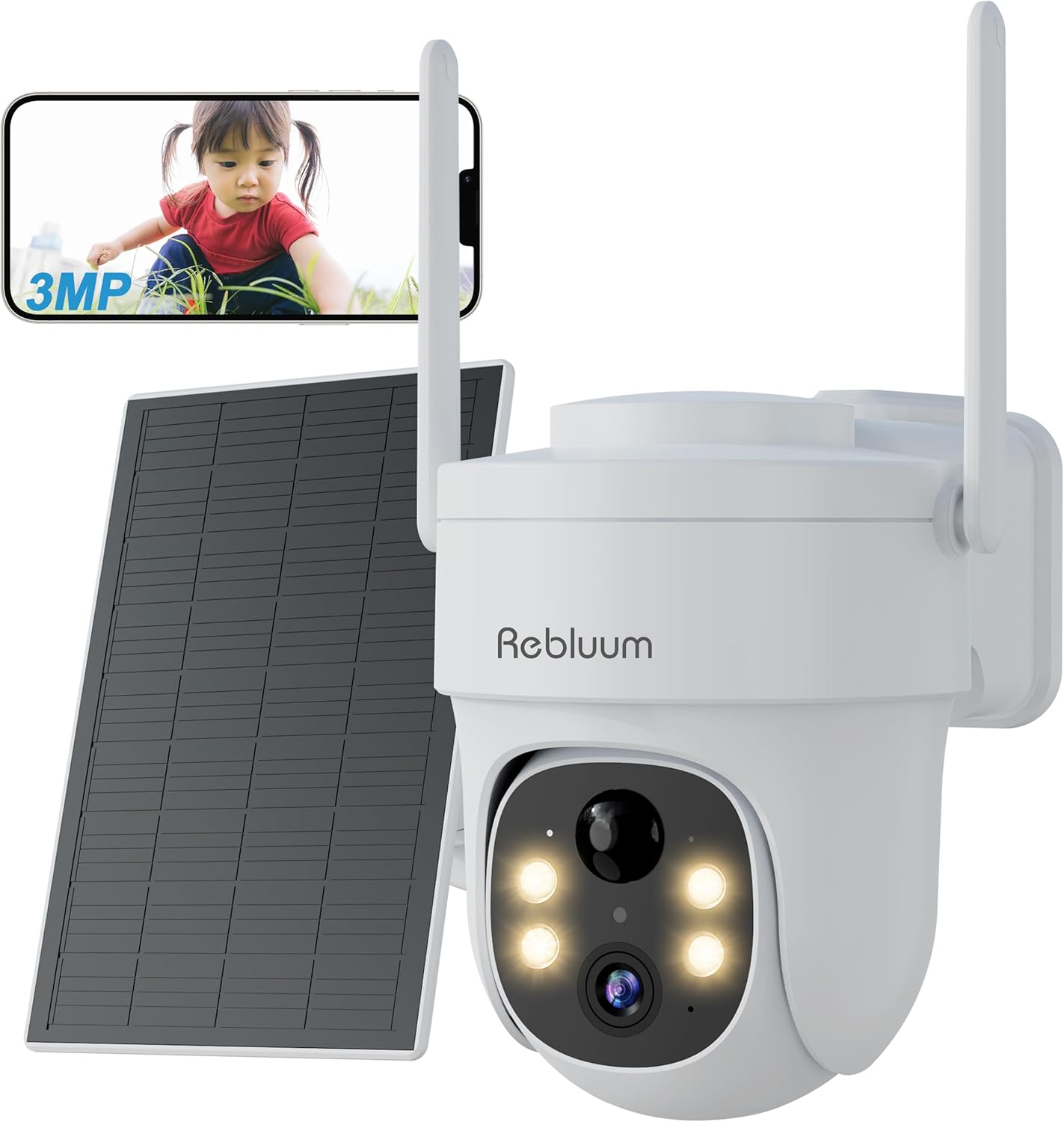
Figure 1: Rebluum Solar Outdoor Security Camera
2. Produktmerkmale
- Hochauflösendes Video: Capture clear images with 3MP (2304x1296) resolution. Features WDR (Wide Dynamic Range) for optimal image quality in varying light conditions, such as strong backlight at building entrances.
- Erweiterte Nachtsicht: Equipped with LED and infrared functions, offering three night vision modes:
- Infrarot Nachtsicht: Black and white video in low light.
- Farbnachtsicht: Full-color video at night when motion is detected and white lights activate.
- Intelligente Nachtsicht: Infrared mode by default, switches to color when motion is detected.

Abbildung 2: Nachtsichtmodi
- Wetterbeständigkeit: IP65 rated for dust and water resistance, suitable for outdoor installation in various weather conditions.
- 360° Schwenken/Neigen/Zoomen (PTZ): Remotely control the camera's horizontal (360°) and vertical (90°) movement, and zoom in/out via the smartphone app for comprehensive area monitoring.
- Kabellose Verbindung: Supports 2.4GHz Wi-Fi for stable communication. Solar panel power eliminates the need for power cables, simplifying installation.
- Intelligente Erkennung: Features PIR thermal detection and AI recognition (human, pet, vehicle, package detection). Customizable detection sensitivity (1-10 levels) and activity zones to minimize false alarms.
- Zweiwege-Audio: Das eingebaute Mikrofon und der Lautsprecher ermöglichen die Echtzeitkommunikation mit Besuchern oder die Abschreckung von Eindringlingen.
- Speicheroptionen: Supports local storage via MicroSD card (8GB-128GB, sold separately) and cloud storage services. Older data is automatically overwritten when storage is full.
- Smart Home Integration: Kompatibel mit Amazon Alexa für Sprachsteuerung und Live-Übertragung viewing on compatible Echo devices.
- App-Steuerung: Manage and monitor your camera from anywhere using the dedicated CloudEdge app (compatible with Android 4.2+ and iOS 8.0+).
Video 1: Produktübergabeview - This video demonstrates the key features of the Rebluum Solar Outdoor Security Camera, including its high-resolution video, night vision capabilities, and smart detection functions.
3. Packungsinhalt
Bitte überprüfen Sie beim Öffnen des Pakets, ob alle Artikel vorhanden und in einwandfreiem Zustand sind.
- Rebluum Solar Outdoor Security Camera
- Solarpanel
- Montagehalterung
- USB-Kabel Typ C.
- Befestigungsschrauben und Wandanker
- Montage-Schablonenaufkleber
- Benutzerhandbuch (dieses Dokument)
- Solar Charger Manual
- Security Camera Warning Sticker
Video 2: Unboxing and Package Contents - This video shows the unboxing process and all items included in the Rebluum Solar Outdoor Security Camera package.
4. Installationsanleitung
4.1 Erstaufladung
- Connect the solar panel to the camera using the USB Type-C cable.
- Ensure the solar panel is placed in an area with direct sunlight for 6-8 hours for initial charging.
Notiz: Always perform initial charging before first use.
4.2 Einlegen der microSD-Karte
If you plan to record video locally, insert a MicroSD card (8GB-128GB, not included) into the designated slot on the camera.
4.3 App-Download und Registrierung
- Download the "CloudEdge" app from your smartphone's app store (Android 4.2+ or iOS 8.0+).
- Register a new user account following the in-app instructions.
4.4 Kamerakonfiguration
- Follow the in-app instructions to add your camera and connect it to your 2.4GHz Wi-Fi network.
- Ensure your smartphone and camera are close to your Wi-Fi router during the initial setup.
4.5 Montage der Kamera
Choose a suitable location for your camera and solar panel, ensuring the solar panel receives adequate sunlight.
- Wandmontage: Use the provided mounting bracket and screws. The bracket has specific holes for wall installation. Use the template sticker to mark drill points.
- Deckenmontage: The bracket also has holes suitable for ceiling installation.
Wichtig: Drill holes as needed for the chosen mounting method. Secure the bracket firmly, then slide the camera onto the bracket until it clicks into place.

Abbildung 3: Montageoptionen
5. Bedienungsanleitung
5.1 ViewLive-Feed
Open the CloudEdge app on your smartphone to view the live video feed from your camera. You can remotely control the camera's pan, tilt, and zoom functions from the app interface.
5.2 Nachtsichtmodi
You can select from three night vision modes within the app settings:
- Infrarotmodus: Liefert klare Schwarzweißvideos in völliger Dunkelheit.
- Farbmodus: Keeps white lights on for full-color night vision.
- Smart-Modus: Schaltet bei Bewegungserkennung automatisch von Infrarot- auf Farbnachtsicht um.
5.3 Einstellungen zur Bewegungserkennung
Customize detection to suit your needs:
- Erkennungsempfindlichkeit: Adjust the motion detection sensitivity from level 1 to 10. Higher sensitivity detects smaller movements.
- Humanoiderkennung: Enable this feature to detect only human shapes, reducing false alarms from animals or moving objects. Set to level 1 for human-only detection.
- Benutzerdefinierte Erkennungszonen: Definieren Sie spezifische Bereiche innerhalb der Kamera view where you want motion detection to be active, avoiding unnecessary alerts from public areas.
Notiz: If both motion detection and humanoid detection are enabled, humanoid detection takes precedence. To detect all moving objects (people, animals, packages, vehicles), set motion detection to level 10 and turn off humanoid detection.

Figure 4: Customizable Detection Settings
5.4 Zwei-Wege-Kommunikation
Use the two-way audio feature in the app to speak through the camera's speaker and listen through its microphone. This is useful for interacting with visitors or deterring unwanted guests.
5.5 Aufnahme und Wiedergabe
The camera supports both MicroSD card and cloud storage. When motion is detected, the camera will automatically record. You can view aufgenommenes footage via the CloudEdge app.
- SD-Kartenaufzeichnung: Records in 10, 20, or 30-second clips.
- Cloud-Aufzeichnung: Records in 6-second clips.
5.6 Familiennutzung
Share camera access with family members through the CloudEdge app. You can set specific permissions for each shared user, allowing multiple people to view gleichzeitig das Kamerabild.
5.7 Alexa-Integration
Connect your Rebluum camera to Amazon Alexa. Once linked, you can use voice commands like "Alexa, show me the garden" to view the live feed on compatible Echo devices with a display.

Figure 5: Smart Features Overview
6. Wartung
- Reinigung: Reinigen Sie das Kameraobjektiv und das Solarpanel regelmäßig mit einem weichen Tuch.amp Für optimale Ergebnisse mit einem Tuch abwischen. Scheuermittel vermeiden.
- Platzierung des Solarmoduls: Ensure the solar panel remains free from obstructions (e.g., leaves, dirt) and is positioned to receive maximum direct sunlight for efficient charging.
- Firmware-Updates: Check the CloudEdge app periodically for firmware updates to ensure your camera has the latest features and security enhancements.
7. Fehlerbehebung
- Kamera stellt keine Verbindung zum WLAN her: Stellen Sie sicher, dass Ihr WLAN mit 2.4 GHz arbeitet. Überprüfen Sie die WLAN-Signalstärke am Standort der Kamera. Starten Sie Router und Kamera neu.
- Schlechte Nachtsicht: Verify the camera lens is clean. Ensure there are no obstructions blocking the infrared or white lights. Check if the selected night vision mode is appropriate for the environment.
- Häufige Fehlalarme: Adjust motion detection sensitivity in the app. Enable humanoid detection or set custom detection zones to exclude irrelevant areas.
- Batterie entlädt sich schnell: Ensure the solar panel is receiving sufficient direct sunlight. Reduce the frequency of motion detection events or live viewing if possible.
- Kein Aufnehmen: Check if a MicroSD card is properly inserted and formatted, or if your cloud storage subscription is active. Ensure motion detection is enabled.
8. Spezifikationen
| Besonderheit | Spezifikation |
|---|---|
| Marke | Rebluum |
| Auflösung | 3 MP (2304 x 1296) |
| Linse | 4 mm |
| Nachtsichtentfernung | Bis zu 15 m |
| Wasserdichtigkeit | IP65 |
| Schwenk- / Neigungswinkel | Horizontal 360°, Vertikal 90° |
| Kabellose Konnektivität | Nur 2.4-GHz-WLAN |
| Lagerung | MicroSD Card (8GB-128GB), Cloud Storage |
| Stromquelle | Solar Panel, Built-in Battery |
| Kompatibilität | Android 4.2+, iOS 8.0+, Amazon Alexa |
| Maße | 20.7 x 19 x 16 cm |
| Gewicht | 1.11 kg |
9. Garantie und Support
Rebluum is committed to providing quality products and services. If you encounter any issues, malfunctions, or have questions regarding your product, please do not hesitate to contact our customer support team. We will provide solutions to the best of our ability.
During the warranty period, repair or exchange requests may be possible.
E-Mail: Support@szrebluum.com
YouTube: Rebluum Security