
M5Stack Tough
M5Stack Tough ESP32 IoT Development Board Kit User Manual
Model: Tough
1. Produktüberschreitungview
The M5Stack Tough is an industrial-grade ESP32-based IoT development board kit designed for robust and reliable performance in harsh environments. It features a durable, dustproof, and water-resistant enclosure, a powerful dual-core processor, an integrated touch display, and versatile connectivity options.

Figure 1: M5Stack Tough Development Board Kit, showcasing its robust design with water resistance.
Hauptmerkmale:
- Industrielle Langlebigkeit: Designed to withstand harsh environments with full dustproof and water-resistant capabilities.
- Powerful Dual-Core Performance: Powered by the Espressif ESP32 dual-core processor, ensuring swift and efficient performance for demanding applications.
- Integriertes Display: Features a 2.0-inch HD IPS capacitive multi-touch screen for intuitive interaction and data visualization.
- Robuste Konnektivität: Built-in Wi-Fi and versatile interfaces (RS485/I2C/GPIO/UART) provide seamless connectivity and expandability for various sensors and devices.
- Low Power Management: Incorporates advanced power management solutions, including RTC wake-up capabilities, for energy-efficient operation.
2. Packungsinhalt
Bitte überprüfen Sie, ob alle unten aufgeführten Artikel in Ihrem Paket enthalten sind:
- 1x M5Stack TOUGH unit
- 1x Type-C USB cable (1m)
- 1x 2.5mm hexagon wrench
- 1x 1.25-2P single head terminal line
- 1x 1.25-4P single head terminal line
- 1x Waterproof O-ring
- 1x HY2.0-4P connector

Figure 2: Contents of the M5Stack Tough kit, including the main unit, cables, and tools.
3. Einrichtung und erste Verwendung
3.1 Physische Verbindung
- Stromanschluss: Connect the provided Type-C USB cable to the USB port on the M5Stack Tough unit and the other end to a 5V power source (e.g., computer USB port or USB power adapter). The device can also be powered via the RS485 interface (24V @ 1A).
- Erster Start: Upon connecting power, the device's 2.0-inch IPS display should light up, indicating successful power-on.
- Externe Verbindungen: Utilize the M12 RS485 interface, I2C, GPIO, and UART interfaces for connecting external sensors, actuators, or other development modules as required by your application.
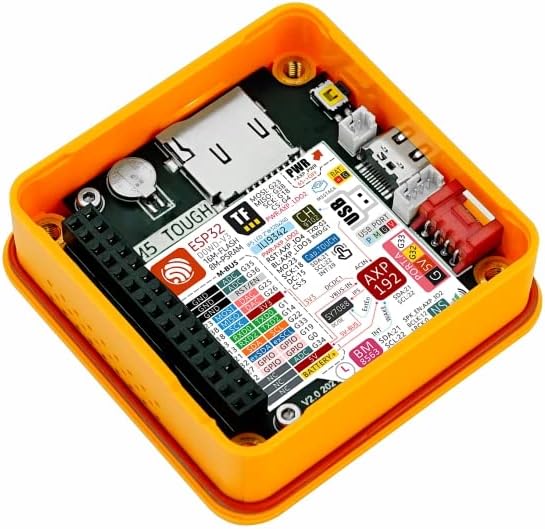
Figure 3: Internal components of the M5Stack Tough, highlighting the ESP32 module and various connection points.
3.2 Software-Setup
The M5Stack Tough supports multiple development platforms, including UIFlow, Arduino, and ESP-IDF. For detailed programming guides and examples, refer to the official M5Stack documentation.

Figure 4: Steps to access online tutorials and documentation for M5Stack products.
To access tutorials and documentation:
- Visit the official M5Stack webWebsite: m5stack.com
- Klicken Sie im Navigationsmenü auf „DOKUMENT“.
- Suchen nach "Tough" or browse for your product.
- Scroll down to find the "Tutorial" section for specific guides and examples.
4. Bedienung des Geräts
The M5Stack Tough is designed for various industrial and IoT applications. Its 2.0-inch HD IPS capacitive multi-touch screen allows for direct interaction and data display. Programming the device determines its specific operational behavior.
4.1 Grundlegende Interaktion
- Touch-Screen: Interact with on-screen elements by tapping or swiping, depending on the programmed interface.
- Datenvisualisierung: The display can be used to show real-time sensor data, system status, or control interfaces.
4.2 Anwendungsbeispielamples
The M5Stack Tough can be deployed in various scenarios, including:
- Datenerfassung: Collecting and displaying data from various sensors in industrial or environmental monitoring.
- Timer Controller: Functioning as a programmable timer for industrial processes or fitness applications.
- IoT-Controller: Acting as a central control unit for smart home or industrial IoT systems.

Figure 5: Illustrative applications of the M5Stack Tough in different environments.
5. Wartung
The M5Stack Tough is designed for durability and requires minimal maintenance. Follow these guidelines to ensure its longevity:
- Reinigung: Verwenden Sie ein weiches,amp cloth to clean the exterior. Avoid abrasive cleaners or solvents that could damage the enclosure or screen.
- Umweltschutz: While the device is dustproof and water-resistant, avoid prolonged immersion in water or exposure to extreme temperatures beyond its operating range. Ensure the M12 connector is properly sealed with the waterproof O-ring if used in wet environments.
- Firmware-Updates: Überprüfen Sie regelmäßig die offizielle M5Stack-Website. website for firmware updates to ensure optimal performance and access to new features. Follow the provided instructions carefully for any update procedures.
- Kabelmanagement: Ensure all connected cables are securely fastened and not under undue strain to prevent damage to the ports.
6. Fehlerbehebung
This section addresses common issues you might encounter with your M5Stack Tough unit.
6.1 Gerät lässt sich nicht einschalten
- Überprüfen Sie die Stromquelle: Ensure the USB Type-C cable is securely connected to a functional 5V power source or that the RS485 interface is receiving 24V power.
- Kabelintegrität: Inspect the USB cable for any visible damage. Try a different USB cable if available.
- Netzschalter: Ensure the power button (if applicable, though not explicitly mentioned for Tough, common for M5Stack devices) is pressed.
6.2 Bildschirm reagiert nicht
- Gerät neustarten: Disconnect and reconnect the power to perform a hard reset.
- Firmware-Problem: If the display remains unresponsive after a reboot, it might indicate a software issue. Refer to the M5Stack documentation for instructions on reflashing the firmware.
- Physischer Schaden: Inspect the screen for any cracks or physical damage.
6.3 Connectivity Issues (Wi-Fi/RS485)
- Softwarekonfiguration: Verify that your code correctly initializes and configures the Wi-Fi or RS485 modules.
- Netzwerkumgebung: For Wi-Fi, ensure the network is active and the credentials are correct. For RS485, check wiring and termination.
- Interferenz: Minimize potential electromagnetic interference from other devices.
For more advanced troubleshooting or specific programming issues, consult the comprehensive documentation and community forums available on the official M5Stack webWebsite.
7. Spezifikationen
Detailed technical specifications for the M5Stack Tough ESP32 IoT Development Board Kit:
| Besonderheit | Parameter |
|---|---|
| Prozessor | Espressif ESP32-D0WDQ6-V3, 240MHz dual-core |
| Flash-Speicher | 16 MB |
| PSRAM | 8 MB |
| Eingangslautstärketage | USB (5V @ 500mA) / RS485 interface power input (24V @ 1A) |
| Schnittstellen | Type-C x 1, Grove x 4 (RS485 / I2C / GPIO / UART interfaces) |
| Anzeige | 2.0" 320 x 240 ILI9342C full-color IPS LCD, max brightness 853 nits |
| touch Controller | CHSC6540 |
| Lautsprecher-Setup | NS4168 16-bit I2S amplifier + 1W speaker |
| Kabelloser Typ | Bluetooth, Wi-Fi |
| Betriebssystem | Linux (supported development environments) |
| Artikelgewicht | 4.1 Unzen (ca. 116 g) |
| Produktabmessungen (L x B x H) | 2.99 x 2.28 x 1.64 Zoll (76 x 58 x 41 mm) |
| Farbe | Gelb |
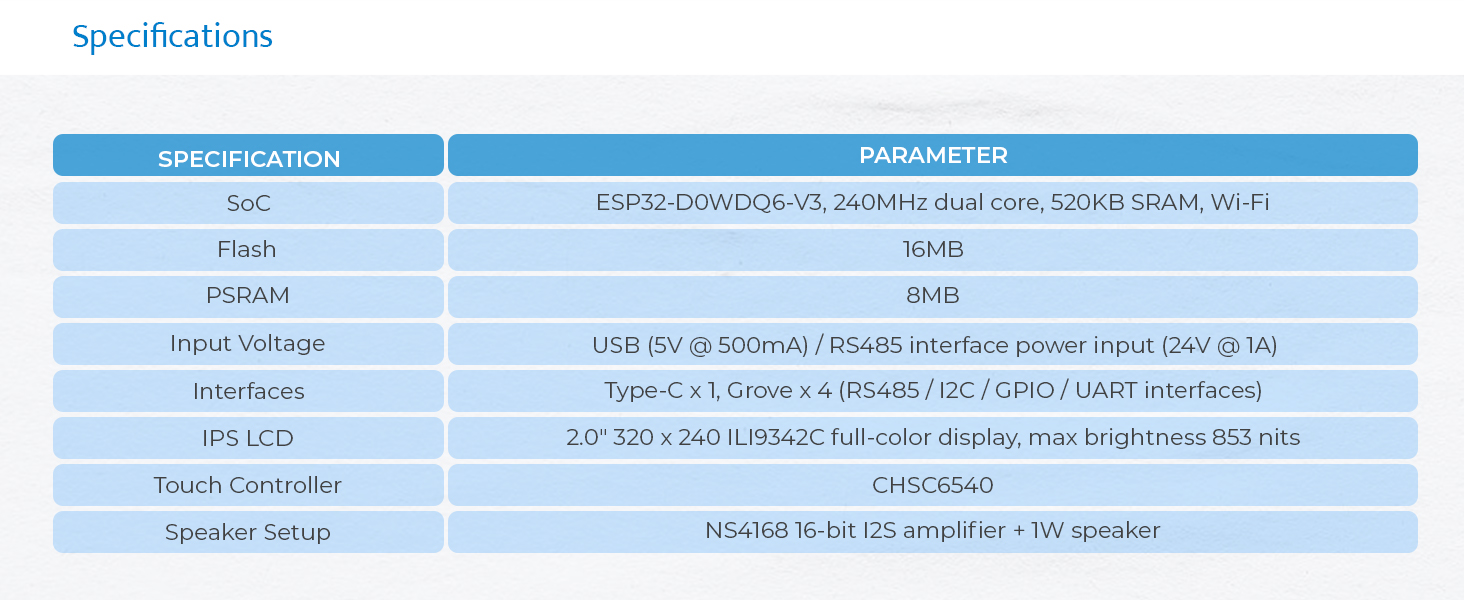
Figure 6: Visual representation of the M5Stack Tough's technical specifications.

Figure 7: Physical dimensions of the M5Stack Tough unit.

Figure 8: Weight of the M5Stack Tough unit.
8. Garantie und Support
8.1 Garantieinformationen
M5Stack products typically come with a standard manufacturer's warranty covering defects in materials and workmanship. For specific warranty terms and duration, please refer to the warranty card included with your product or visit the official M5Stack webDie Hilfeseite der Website. Bewahren Sie Ihren Kaufbeleg für Garantieansprüche auf.
8.2 Technischer Support
For technical assistance, programming inquiries, or advanced support, please utilize the following resources:
- Offizieller M5Stack WebWebsite: m5stack.com - Provides extensive documentation, tutorials, and community forums.
- Community-Foren: Engage with other developers and M5Stack experts for solutions and project ideas.
- Kontaktieren Sie den Support: If you cannot find a solution through documentation or forums, contact M5Stack customer support directly via their webWebsite.
Zugehörige Dokumente - Hart
 |
M5 STACK STAMPS3 Datenblatt und technische Spezifikationen Entdecken Sie den M5STACK STAMPS3-Entwicklungsboard mit dem ESP32-S3-Chip mit WLAN und Bluetooth 5 (LE). Dieses Datenblatt beschreibt die Hardwarezusammensetzung, Pin-Beschreibungen, Funktionsumfang und elektrischen Eigenschaften für IoT-Projekte. |
 |
M5Stack AtomS3-Lite ESP32-S3 Entwicklungsboard Entdecken Sie das M5Stack AtomS3-Lite, ein kompaktes ESP32-S3-Entwicklungsboard mit WLAN, integrierter Antenne und vielseitigen Schnittstellen für IoT- und Mikrocontroller-Projekte. Erfahren Sie mehr über seine Spezifikationen, Funktionen und Entwicklungsmöglichkeiten mit Arduino IDE und UiFlow2. |
 |
M5StickC-Plus SE: Development Board Technical Specification and User Guide Detailed technical specifications, pin descriptions, functional overview, electrical characteristics, and FCC compliance information for the M5StickC-Plus SE development board by M5STACK. |
 |
M5StickC Plus2 Bedienungsanleitung Ausführliche Bedienungsanleitung für das M5StickC Plus2 IoT-Entwicklungsboard. Diese Anleitung behandelt häufige Fehlersuche-Szenarien, einschließlich Startproblemen und Akkuproblemen, und bietet detaillierte Schritt-für-Schritt-Anweisungen zum Flashen der offiziellen Firmware mit dem M5Burner-Tool, einschließlich der Installation der erforderlichen USB-Treiber und der Auswahl des Ports. |
 |
M5Stack NanoC6 IoT-Entwicklungsboard: Kurzanleitung und Spezifikationen Ein umfassender Leitfaden zum M5Stack NanoC6, einem miniaturisierten, stromsparenden IoT-Entwicklungsboard mit ESP32-C6-Mikrocontroller. Er beschreibt detailliert die Funktionen des Boards, darunter Wi-Fi 6, ZigBee und Bluetooth 5.0, liefert technische Spezifikationen und bietet eine Kurzanleitung mit Anweisungen zur Einrichtung der Arduino IDE, zur seriellen Bluetooth-Kommunikation, zum Wi-Fi-Scanning und zur ZigBee-Funktionalität. |
 |
M5STAMP C3 ESP32 IoT Entwicklungsboard – Benutzerhandbuch Erkunden Sie den M5STAMP Das C3 ist das kleinste ESP32-Systemboard von M5Stack. Dieses Handbuch beschreibt seine Funktionen und Spezifikationen und bietet Schnellstartanleitungen für die Arduino IDE sowie die Bluetooth- und WLAN-Entwicklung. Damit eignet es sich ideal für IoT-Anwendungen. |
Ask a question about this manual
Ask about setup, troubleshooting, compatibility, parts, safety, or missing instructions. Manuals+ will review the question and use this page’s manual context to help answer it.